FiveTech Support Forums

FiveWin / Harbour / xBase community
Board index FiveWin for Harbour/xHarbour setting font on Group Box
Posts: 44158
Joined: Thu Oct 06, 2005 05:47 PM
setting font on Group Box
Posted: Sat Nov 29, 2008 08:28 AM
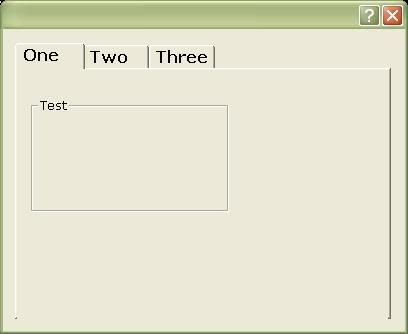
This is working fine:
#include "FiveWin.ch" 

function Main() 

   local oFnt, oFnt2, oDlg, oFld, oGrp 
    
   DEFINE FONT oFnt NAME "Verdana" SIZE 0, -16 BOLD 

   DEFINE FONT oFnt2 NAME "Arial" SIZE 0, -10 
    
   DEFINE DIALOG oDlg SIZE 400, 300 FONT oFnt

   @ 0.5, 1 FOLDER oFld OF oDlg SIZE 188, 138 ; 
      PROMPTS "One", "Two", "Three" 
      
   @ 1, 1 GROUP oGrp TO 5, 15 PROMPT "Test" OF oFld:aDialogs[ 1 ]
      
   ACTIVATE DIALOG oDlg CENTERED ;
      ON INIT oGrp:SetFont( oFnt2 )

return nil

Should I add themes manifest to it ?
regards, saludos

Antonio Linares
www.fivetechsoft.com
Posts: 811
Joined: Tue May 06, 2008 04:28 AM
setting font on Group Box
Posted: Sat Nov 29, 2008 08:29 AM

OK! Lets try and solve this..

I will build this example and post results..

ASAP.

The dialog should be redefined from .RC and themed.

Kind Regards,

Frances


Fivewin for xHarbour v18.07

xHarbour v1.2.3.x

BCC 7.3 + PellesC8 ( Resource Compiler only)

ADS 10.1 / MariaDB

Crystal Reports 8.5/9.23 DE

xMate v1.15
Posts: 44158
Joined: Thu Oct 06, 2005 05:47 PM
setting font on Group Box
Posted: Sat Nov 29, 2008 08:35 AM
Ok, using themes we can reproduce the problem.

First change required is this line in Class TControl:
METHOD Colors( hDC ) CLASS TControl
   ...
   else
      if IsAppThemed() .and. Upper( ::ClassName() ) $ "TCHECKBOX;TRADIO;TGROUP" // changed!
         DrawPBack( ::hWnd,  hDC )
      endif
   endif
   ...
regards, saludos

Antonio Linares
www.fivetechsoft.com
Posts: 811
Joined: Tue May 06, 2008 04:28 AM
setting font on Group Box
Posted: Sat Nov 29, 2008 08:37 AM
#include "FiveWin.ch"

function Main()

   local oFnt, oDlg, oFld, oGrp
   local oFnt2
   
   DEFINE FONT oFnt NAME "Verdana" SIZE 0, -16 BOLD

   DEFINE FONT oFnt2 NAME "Verdana" SIZE 0, -12 

   DEFINE DIALOG oDlg SIZE 400, 300 FONT oFnt

   @ 0.5, 1 FOLDER oFld OF oDlg SIZE 188, 138 ;
      PROMPTS "One", "Two", "Three"
     
   @ 1, 1 GROUP oGrp TO 5, 15 PROMPT "Test" OF oFld:aDialogs[ 1 ]
     
   ACTIVATE DIALOG oDlg CENTERED;
            ON INIT oGrp:SetFont( oFnt2 )

return nil


This is true and correct:

Kind Regards,

Frances


Fivewin for xHarbour v18.07

xHarbour v1.2.3.x

BCC 7.3 + PellesC8 ( Resource Compiler only)

ADS 10.1 / MariaDB

Crystal Reports 8.5/9.23 DE

xMate v1.15
Posts: 44158
Joined: Thu Oct 06, 2005 05:47 PM
setting font on Group Box
Posted: Sat Nov 29, 2008 08:47 AM

Frances,

Are you using themes there ?

It does not work fine in Vista when using themes :-(

It looks like a Windows bug with groups and themes. We need to find a workaround for this...

regards, saludos

Antonio Linares
www.fivetechsoft.com
Posts: 811
Joined: Tue May 06, 2008 04:28 AM
setting font on Group Box
Posted: Sat Nov 29, 2008 09:17 AM
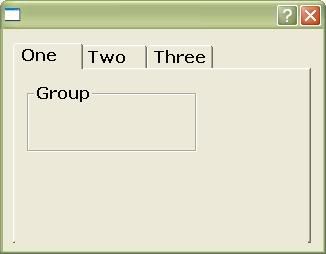
Yes.

Here's the sample codes (EXPANDED)

.PRG
#include "FiveWin.ch"

function Main()

   local oFnt, oDlg, oFld, oGrp
   local oFnt2
   
   DEFINE FONT oFnt NAME "Verdana" SIZE 0, -16 BOLD
   DEFINE FONT oFnt2 NAME "Verdana" SIZE 0, -12 

   
   DEFINE DIALOG oDlg FONT oFnt RESOURCE 'TRY_DLG'

          REDEFINE FOLDER oFld ID 903 OF oDlg;
                   PROMPTS "One", "Two", "Three";
		   DIALOGS 'GRP_DLG','BLANK_DLG','BLANK_DLG';
		   FONT oFnt


   ACTIVATE DIALOG oDlg CENTERED;
            ON INIT oFld:aDialogs[1]:SetFont( oFnt2 )

return nil


.RC
1 MANIFEST "xpman.xml"


TRY_DLG DIALOG 1, 1, 160, 111
STYLE WS_POPUP | WS_CAPTION | WS_SYSMENU
{
 CONTROL "", 903, "SysTabControl32", 0 | WS_CHILD | WS_VISIBLE, 5, 7, 149, 100
}

GRP_DLG DIALOG 1, 1, 99, 51
STYLE WS_CHILD | WS_CLIPCHILDREN
{
 GROUPBOX "Group", 101, 6, 7, 85, 34, BS_GROUPBOX
}
BLANK_DLG DIALOG 1, 1, 95, 61
STYLE WS_CHILD | WS_SYSMENU
{
}


RESULTS


That's the problem there. The groupbox should be of different font against the font of TFolder.


I hope we can make some workaround.. Vista is not my concern.. Only XP.


Best regards,

:-)
Kind Regards,

Frances


Fivewin for xHarbour v18.07

xHarbour v1.2.3.x

BCC 7.3 + PellesC8 ( Resource Compiler only)

ADS 10.1 / MariaDB

Crystal Reports 8.5/9.23 DE

xMate v1.15
Posts: 44158
Joined: Thu Oct 06, 2005 05:47 PM
setting font on Group Box
Posted: Sat Nov 29, 2008 09:21 AM

Frances,

I have tried to set the hroupbox font from Class TControl Method Colors() but without success...

Colors() is called just before painting the control, and even there a WM_SETFONT msg is not properly processed. Strange...

regards, saludos

Antonio Linares
www.fivetechsoft.com
Posts: 44158
Joined: Thu Oct 06, 2005 05:47 PM
setting font on Group Box
Posted: Sat Nov 29, 2008 09:24 AM
This fails too:
#include "FiveWin.ch" 

function Main() 

   local oFnt, oFnt2, oDlg, oFld, oGrp 
    
   DEFINE FONT oFnt NAME "Verdana" SIZE 0, -16 BOLD 

   DEFINE FONT oFnt2 NAME "Arial" SIZE 0, -10 
    
   DEFINE DIALOG oDlg SIZE 400, 300 FONT oFnt

   @ 0.5, 1 FOLDER oFld OF oDlg SIZE 188, 138 ; 
      PROMPTS "One", "Two", "Three" 
      
   @ 1, 1 GROUP oGrp TO 5, 15 PROMPT "Test" OF oFld:aDialogs[ 1 ] FONT oFnt2

   @ 5, 1 BUTTON "font" OF oFld:aDialogs[ 1 ] ACTION oGrp:SelFont()
      
   ACTIVATE DIALOG oDlg CENTERED

return nil
regards, saludos

Antonio Linares
www.fivetechsoft.com
Posts: 811
Joined: Tue May 06, 2008 04:28 AM
setting font on Group Box
Posted: Sat Nov 29, 2008 09:28 AM
Antonio Linares wrote:This fails too:
#include "FiveWin.ch" 

function Main() 

   local oFnt, oFnt2, oDlg, oFld, oGrp 
    
   DEFINE FONT oFnt NAME "Verdana" SIZE 0, -16 BOLD 

   DEFINE FONT oFnt2 NAME "Arial" SIZE 0, -10 
    
   DEFINE DIALOG oDlg SIZE 400, 300 FONT oFnt

   @ 0.5, 1 FOLDER oFld OF oDlg SIZE 188, 138 ; 
      PROMPTS "One", "Two", "Three" 
      
   @ 1, 1 GROUP oGrp TO 5, 15 PROMPT "Test" OF oFld:aDialogs[ 1 ] FONT oFnt2

   @ 5, 1 BUTTON "font" OF oFld:aDialogs[ 1 ] ACTION oGrp:SelFont()
      
   ACTIVATE DIALOG oDlg CENTERED

return nil


This works good.. same as the first example. Please try the (EXPANDED) sample.
Kind Regards,

Frances


Fivewin for xHarbour v18.07

xHarbour v1.2.3.x

BCC 7.3 + PellesC8 ( Resource Compiler only)

ADS 10.1 / MariaDB

Crystal Reports 8.5/9.23 DE

xMate v1.15
Posts: 811
Joined: Tue May 06, 2008 04:28 AM
setting font on Group Box
Posted: Tue Dec 02, 2008 02:18 AM

Mr. Antonio,

Any development?

Regards

Kind Regards,

Frances


Fivewin for xHarbour v18.07

xHarbour v1.2.3.x

BCC 7.3 + PellesC8 ( Resource Compiler only)

ADS 10.1 / MariaDB

Crystal Reports 8.5/9.23 DE

xMate v1.15
Posts: 44158
Joined: Thu Oct 06, 2005 05:47 PM
setting font on Group Box
Posted: Tue Dec 02, 2008 08:41 AM

Frances,

No, sorry, nothing yet. It seems as a Windows theme bug and we need to find a workaround.

Setting the right font from Method Colors() should be enough, but it does not work.

regards, saludos

Antonio Linares
www.fivetechsoft.com
Posts: 811
Joined: Tue May 06, 2008 04:28 AM
setting font on Group Box
Posted: Thu Dec 04, 2008 02:18 AM
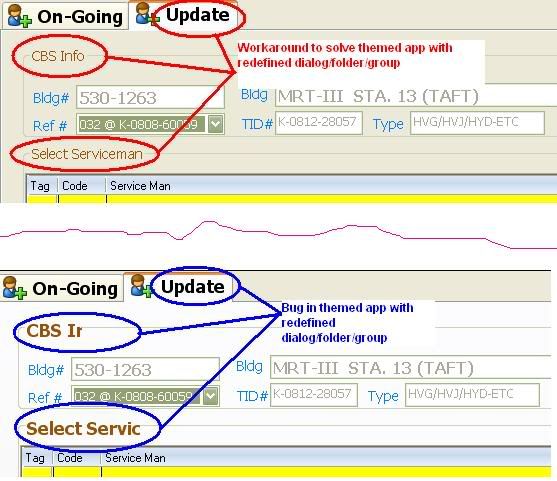
SOLVED!!!! - workaround


Mr. Antonio,

I put this:

...
ON INIT oFld:aDialogs[2]:bEraseBkGnd := { | hDC | DrawPBack( oFld:hWnd, hDC ), 1 }
...


OR

...
ON INIT oFld:aDialogs[2]:bEraseBkGnd :=  Nil
...


oFld:aDialogs[2] is the container of redefined dialog with redefined groupbox

oFld:hWnd is the handle of redefined folder

Please look at the image


This bug must be solved in the future

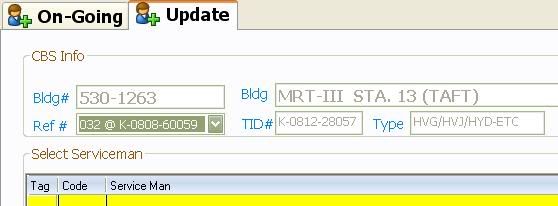
Observation: Noticed the folder color!? it turns to plain and not themed.... :-)


I added this:

...
REDEFINE FOLDER oFld ...
               COLOR CLR_BLACK, RGB(252,252,254)
...


Result:

Kind Regards,

Frances


Fivewin for xHarbour v18.07

xHarbour v1.2.3.x

BCC 7.3 + PellesC8 ( Resource Compiler only)

ADS 10.1 / MariaDB

Crystal Reports 8.5/9.23 DE

xMate v1.15

Continue the discussion