

.
Board index FiveWin para Harbour/xHarbour Nuevo FWH 25.09
Page: 1 2 (26 posts)

Estimado Antonio
Puede agregar ésta línea en la Clase Btnbmp
Gracias
Puede agregar ésta línea en la Clase Btnbmp
METHOD MouseLeave( nRow, nCol, nFlags ) CLASS TBtnBmp

   ::lMOver = .F.
   XEval( ::bMMoved, ::lMOver )
   ::Setcolor( CLR_BLACK )  //Ésta
   ::Refresh()

return nil
Gracias
Saludos,
Adhemar Cuéllar
Adhemar,
Se cambia el color del texto del botón en caso de no hacerlo ?
Por qué cambia el color ?
Debería seguir usándose el valor contenido en ::nClrText
Estimado Antonio
Hago lo siguiente:
Modifiqué la clase así
https://ibb.co/nMjQTS
https://ibb.co/g2txa7
https://ibb.co/gcCR2n
Cómo podría hacer para no modificar la clase
Muchas gracias por la ayuda.
Hago lo siguiente:
 If lPuede  //Botón activo
       REDEFINE BTNBMP oBtn ID xI+100 OF oDlgMnu RESOURCE "Boton1",Nil,Nil,"Boton2" PROMPT oMenu:Item ACTION (&aAct,oDlgMnu:SetFocus()) FONT oFontMenu TRANSPARENT ADJUST 2007
       oBtn:bMMoved:= {|| lColor:=.t.,cMsg:=vMsg,BusFoto(vTab,xI), oMsg:Refresh(),oBtn:Setcolor( CLR_HBLUE )}
    Else ////Botón Desactivado
       REDEFINE BTNBMP oBtn ID xI+100 OF oDlgMnu RESOURCE "Boton1",Nil,Nil,"Boton1" PROMPT oMenu:Item FONT oFontMenu TRANSPARENT ADJUST 2007
       oBtn:SetColor( CLR_GRAY )
       oBtn:bMMoved:= {|| lColor:=.F.,cMsg:=vMsg,BusFoto(vTab,xI), oMsg:Refresh(),oBtn:Setcolor( CLR_GRAY )}
    ENDif
Modifiqué la clase así
METHOD MouseLeave( nRow, nCol, nFlags ) CLASS TBtnBmp

   ::lMOver = .F.
   XEval( ::bMMoved, ::lMOver )
   If lColor   //Para controlar cuando el botón está desactivado y no se ponga  CLR_BLACK
     ::Setcolor( CLR_BLACK )
   Endif
   ::Refresh()
return nil
https://ibb.co/nMjQTS
https://ibb.co/g2txa7
https://ibb.co/gcCR2n
Cómo podría hacer para no modificar la clase
Muchas gracias por la ayuda.
Saludos,
Adhemar Cuéllar

Possible that you can simplify the code with something similar to this:
If the button is disabled the text color is always GRAY.
If the button is active when the mouse is over the text color is BLUE and when the mouse is away the text color is black.
You may not need to use bMMoved block
REDEFINE BTNBMP oBtn ID xI+100 OF oDlgMnu RESOURCE "Boton1",Nil,Nil,"Boton2" ;
PROMPT oMenu:Item ACTION (&aAct,oDlgMnu:SetFocus())
COLOR { |lMOver| If( lMover, CLR_BLUE, CLR_BLACK ) }, CLR_WHITE ;
FONT oFontMenu TRANSPARENT ADJUST 2007

if !lPuede
   oBtn:Disable()
endif
If the button is disabled the text color is always GRAY.
If the button is active when the mouse is over the text color is BLUE and when the mouse is away the text color is black.
You may not need to use bMMoved block
Regards
G. N. Rao.
Hyderabad, India
G. N. Rao.
Hyderabad, India
This example can be used to test
#include "fivewin.ch"

function Main()

   local oDlg, oFont, oBtn1, oBtn2

   DEFINE FONT oFont NAME "TAHOMA" SIZE 0,-14 BOLD

   DEFINE DIALOG oDlg SIZE 400,300 PIXEL TRUEPIXEL FONT oFont

   @ 020,20 BTNBMP oBtn1 SIZE 200,70 PIXEL OF oDlg ;
      FILE "\fwh\bitmaps\32x32\cascade.bmp", nil, nil, ;
           "\fwh\bitmaps\32x32\tiled.bmp" ;
      PROMPT "Prompt" 2007 ;
      COLOR { |lMOver| If( lMover, CLR_HRED, CLR_BLACK ) }, CLR_WHITE ;
      ACTION MsgInfo( "Some Action" ) ;
      MESSAGE "MouseOver"

   @ 120,20 BTNBMP oBtn2 SIZE 200,70 PIXEL OF oDlg ;
      FILE "\fwh\bitmaps\32x32\cascade.bmp", nil, nil, ;
           "\fwh\bitmaps\32x32\tiled.bmp" ;
      PROMPT "Prompt" 2007 ;
      COLOR { |lMOver| If( lMover, CLR_HRED, CLR_BLACK ) }, CLR_WHITE ;
      ACTION MsgInfo( "Some Action" ) ;
      MESSAGE "MouseOver"

   oBtn2:Disable()

   oDlg:bInit  := <||
         DEFINE MSGBAR OF oDlg PROMPT "" 2007
         return nil
         >

   ACTIVATE DIALOG oDlg CENTERED

   RELEASE FONT oFont

return nil
Regards
G. N. Rao.
Hyderabad, India
G. N. Rao.
Hyderabad, India
Thanks Mr. Rao
Compiling this gives this error: D:\Sistemas\RRHH\DATA\PRG\RRHH.PRG(230) Error E0030 Syntax error "syntax error at 'BTNBMP'"
Without the COLOR line, compile OK
The example compiles ok maybe it's because of the resource
Compiling this gives this error: D:\Sistemas\RRHH\DATA\PRG\RRHH.PRG(230) Error E0030 Syntax error "syntax error at 'BTNBMP'"
REDEFINE BTNBMP oBtn ID xI+100 OF oDlgMnu RESOURCE "Boton1",Nil,Nil,"Boton2" ;
PROMPT oMenu:Item ACTION (&aAct,oDlgMnu:SetFocus()) ;
COLOR { |lMOver| If( lMover, CLR_BLUE, CLR_BLACK ) }, CLR_WHITE ;
FONT oFontMenu TRANSPARENT ADJUST 2007
Without the COLOR line, compile OK
The example compiles ok maybe it's because of the resource
Saludos,
Adhemar Cuéllar
REDEFINE BTNBMP oBtn ID xI+100 OF oDlgMnu RESOURCE "Boton1",Nil,Nil,"Boton2" ;
PROMPT oMenu:Item ACTION (&aAct,oDlgMnu:SetFocus())
FONT oFontMenu TRANSPARENT ADJUST 2007

oBtn:nClrText := { |lMOver| If( lMover, CLR_BLUE, CLR_BLACK ) }

if !lPuede
   oBtn:Disable()
endif
Regards
G. N. Rao.
Hyderabad, India
G. N. Rao.
Hyderabad, India
Perfect!!
Thank you very much
Saludos,
Adhemar Cuéllar
FWH 18.05 revised build 1

Hola buenos dias Antonio,
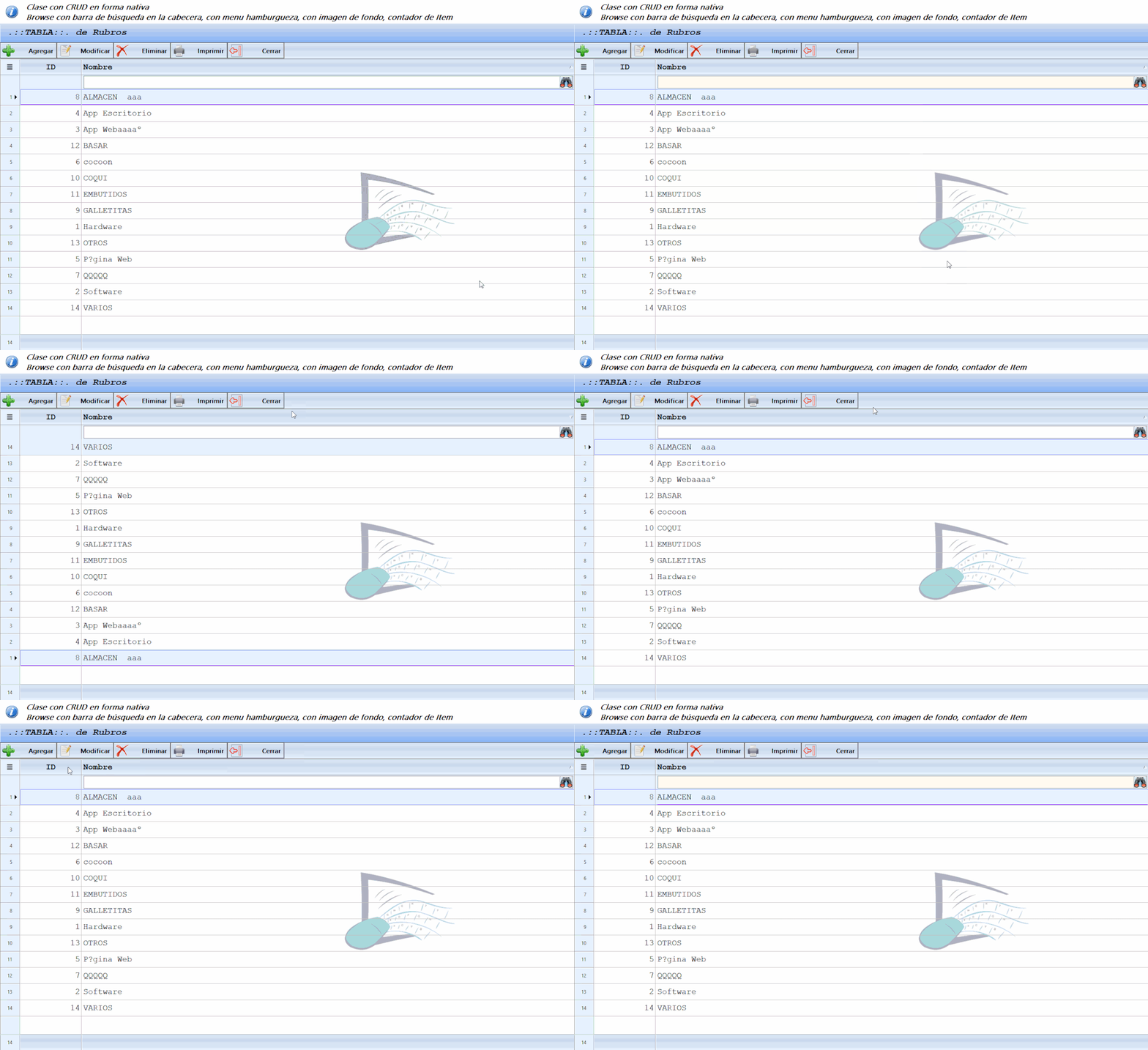
He probado xbrbar.prg: shows inbuilt buttonbar in xbrowse. en un ejemplo mio, y me hace el siguiente efecto al pulsar sobre la cabecera o sobre la buttonbar.
Adjunto un archivo gif para que aprecie el efecto que hace al poner
Saludos
Marcelo
He probado xbrbar.prg: shows inbuilt buttonbar in xbrowse. en un ejemplo mio, y me hace el siguiente efecto al pulsar sobre la cabecera o sobre la buttonbar.
Adjunto un archivo gif para que aprecie el efecto que hace al poner
Saludos
Marcelo
FWH - Harbour - BCC7 - PellesC
Yes.
This was a bug in FWH2006, fixed in FWH2007.
Whatsnew.txt
Please let us know if you are having this problem with FWH2007 also?
This was a bug in FWH2006, fixed in FWH2007.
Whatsnew.txt
- When a column header is clicked, the header is painted in the topbar area
fixed.
viewtopic.php?f=3&t=39178&p=233785#p233785
Please let us know if you are having this problem with FWH2007 also?
Regards
G. N. Rao.
Hyderabad, India
G. N. Rao.
Hyderabad, India
Buenos días Mr. Rao, si efectivamente esto ocurrió en la FWH2007 es por eso que lo reporte en este hilo.
Saludos cordiales desde Argentina.
FWH - Harbour - BCC7 - PellesC
Page: 1 2 (26 posts)