FiveTech Support Forums

FiveWin / Harbour / xBase community
Board index FiveWin for Harbour/xHarbour How to open wmf files?
Posts: 6983
Joined: Fri Oct 07, 2005 07:07 PM
How to open wmf files?
Posted: Tue Nov 18, 2008 02:01 AM

WORD2007 makes for every docx also a
thumbnail.wmf .
How can I open a wmf-file?
I tried with testimg.prg but the file does not open.

Thanks in advance
Otto

Posts: 4043
Joined: Wed Dec 19, 2007 06:40 PM
WMF-File
Posted: Tue Nov 18, 2008 01:45 PM
Hello Otto,

after you message, I tested WMF with FREEIMAGE.dll
( needed for testimg.prg ).
The Image is not shown in the preview-window.
I had a look at the FREEIMAGE new doc.

The table with supported formats ( WMF is not included ) :


Regards
Uwe :-)
Since 1995 ( the first release of FW 1.9 )

i work with FW.

If you have any questions about special functions, maybe i can help.
Posts: 44158
Joined: Thu Oct 06, 2005 05:47 PM
How to open wmf files?
Posted: Tue Nov 18, 2008 07:09 PM

Otto,

You can use FWH Class TMetaFile to visualize a WMF file. EMF files are also supported.

Please review FWH\samples\evans.prg

regards, saludos

Antonio Linares
www.fivetechsoft.com
Posts: 989
Joined: Thu Nov 24, 2005 03:01 PM
Re: How to open wmf files?
Posted: Tue Mar 31, 2015 08:16 AM
Hi Otto,

Otto wrote:WORD2007 makes for every docx also a
thumbnail.wmf .
How can I open a wmf-file?

Can you tell me how do I get the thumbnail.wmf for a given docx? Will it work with other Office files like Excel or Powerpoint files?

Best regards,

Carlos
Saludos
Carlos Mora
http://harbouradvisor.blogspot.com/
StackOverflow http://stackoverflow.com/users/549761/carlos-mora
“If you think education is expensive, try ignorance"
Posts: 10733
Joined: Sun Nov 19, 2006 05:22 AM
Re: How to open wmf files?
Posted: Tue Mar 31, 2015 11:12 AM
Code (fw): Select all Collapse
#include "fivewin.ch"

function main()

   local aPalBmp, oWnd

   DEFINE WINDOW oWnd TITLE "WMF-VIEWER"

   aPalBmp  := oWnd:ReadPalBmpEx( "sample.wmf" )

   ACTIVATE WINDOW oWnd ;
      ON PAINT oWnd:SayPalBmp( aPalBmp )

   PalBmpFree( aPalBmp[ 1 ], aPalBmp[ 2 ] )

return nil
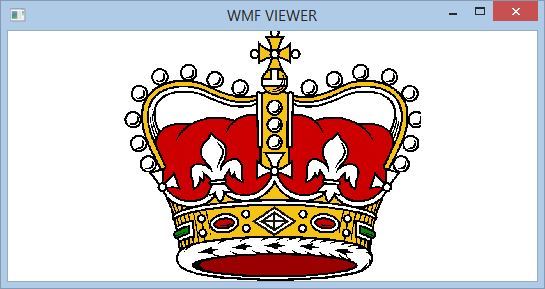

Regards


G. N. Rao.

Hyderabad, India
Posts: 989
Joined: Thu Nov 24, 2005 03:01 PM
Re: How to open wmf files?
Posted: Tue Mar 31, 2015 03:31 PM
Hi Nages,

quoting myself, "Can you tell me how do I get the thumbnail.wmf for a given docx?"

The point is to obtain the wmf FROM THE DOCX
Saludos
Carlos Mora
http://harbouradvisor.blogspot.com/
StackOverflow http://stackoverflow.com/users/549761/carlos-mora
“If you think education is expensive, try ignorance"
Posts: 44158
Joined: Thu Oct 06, 2005 05:47 PM
Re: How to open wmf files?
Posted: Tue Mar 31, 2015 04:56 PM

Carlos,

I remember that I saw a very clever implementation from Otto to generate a thumbnail from any image (running app, etc) on the screen.

Basically once the image was shown, he captured the portion of the screen with the image and generated a bitmap from it.

Otto could you explain the way you did it ? many thanks

regards, saludos

Antonio Linares
www.fivetechsoft.com
Posts: 989
Joined: Thu Nov 24, 2005 03:01 PM
Re: How to open wmf files?
Posted: Wed Apr 01, 2015 08:27 AM
Hi Antonio,

It would be interesting to have the Otto procedure, having sth as automatic as posible. I'm not particulary worried about image files, making a thumbnail for an image is something more or less easy to do, imagemagic can do it's 'magic' i think.
But what i need to do is to know how to extract the thumbnails from non-image files, like MS-Word's docx or Excel's xlsx.

For docx, manually (not by program, as I want) the trick is to save it with the 'Generate thumbnail' checkbox in the "Save" dialog. Then, opening the xlsx as a zip file, you can get a wmf file.
My problem is that you have to do all this procedure by hand, i thought Otto got it by program, that is what i'm looking for.

Best regards
Saludos
Carlos Mora
http://harbouradvisor.blogspot.com/
StackOverflow http://stackoverflow.com/users/549761/carlos-mora
“If you think education is expensive, try ignorance"
Posts: 1515
Joined: Thu Oct 30, 2008 02:37 PM
Re: How to open wmf files?
Posted: Wed Apr 01, 2015 08:54 AM
Carlos,

He buscado por ahi algo. Alguna pista se puede encontrar con las palabras shellFile.Thumbnail.

Quiza ya lo conozcas.

Saludos
Posts: 1335
Joined: Fri Jun 13, 2008 11:04 AM
Re: How to open wmf files?
Posted: Wed Apr 01, 2015 09:04 AM
The MS Office's documents are saved in OOXML format which basically is a zipped archive of "different files". To extract the thumb, just look in the ZIP (docx) archive for a file named "thumbnail" with whatever extension. (Currently is either thumbnail.emf (for docx), wmf (for xlsx) and jpeg (for pptx)). Also, be advised that the thumb (the file) can be missing if the user chose when he save the file from Word/Excel/PowerPoint to NOT include the thumbnail.

The Word Documents in Hard drive


The contents shown, if you try to open the Word docx file via a Zip manager application


The folder where the thumbnail file is stored


Regards

Anser
Posts: 989
Joined: Thu Nov 24, 2005 03:01 PM
Re: How to open wmf files?
Posted: Wed Apr 01, 2015 10:59 AM

Hola HMpaquito,

Lo que encontré con esas palabras es todo para C# o .NET, sigo dándole vueltas a ver si pillo algo para C o, si no queda otra, C++.

Anserkk,

i've already got that, but, as you said, user should check the 'Generate Thumbnail" in the Save dialog. What i want seems that can be done with C#, but no path to write it in just C. I thought Otto already solved the issue, let's cross fingers

Saludos
Carlos Mora
http://harbouradvisor.blogspot.com/
StackOverflow http://stackoverflow.com/users/549761/carlos-mora
“If you think education is expensive, try ignorance"
Posts: 1335
Joined: Fri Jun 13, 2008 11:04 AM
Re: How to open wmf files?
Posted: Wed Apr 01, 2015 11:33 AM
For me, the following code used while saving the word document is working as expected ie it is showing the thumbnail

Use this to save the Word file with Thumbnail enabled
Code (fw): Select all Collapse
   oWord:ActiveDocument:SaveAs2( "D:\anser.docx", 16, .F., "",  .T., "", .F., .F., .F., .F., .F., 0 )


You may extract the thumbnails from the word file using the zip trick :-)

Regards

Anser
Posts: 6755
Joined: Wed Feb 15, 2012 08:25 PM
Re: How to open wmf files?
Posted: Wed Apr 01, 2015 12:49 PM

Anser as Word is configured so that documents created by users the Thumbnail be included?

Anser, como se configura Word para que en los documentos creados por los usuarios se incluyan los Thumbnail?

Cristobal Navarro

Hay dos tipos de personas: las que te hacen perder el tiempo y las que te hacen perder la noción del tiempo

El secreto de la felicidad no está en hacer lo que te gusta, sino en que te guste lo que haces
Posts: 1335
Joined: Fri Jun 13, 2008 11:04 AM
Re: How to open wmf files?
Posted: Wed Apr 01, 2015 01:04 PM
cnavarro wrote:Anser as Word is configured so that documents created by users the Thumbnail be included?


I understand that you need to enable this "Save Thumbnail" option only once in your PC. After that word is remembering the option and is remaining as checked.
Posts: 6755
Joined: Wed Feb 15, 2012 08:25 PM
Re: How to open wmf files?
Posted: Wed Apr 01, 2015 01:26 PM

Thanks, had looked at all options
He had not looked in the dialogue "Save" and "Save As" :oops: :( :shock:

Gracias, habia mirado en todas las opciones
No habia mirado en el dialogo "Guardar" y "Guardar como"

Cristobal Navarro

Hay dos tipos de personas: las que te hacen perder el tiempo y las que te hacen perder la noción del tiempo

El secreto de la felicidad no está en hacer lo que te gusta, sino en que te guste lo que haces

Continue the discussion