FiveTech Support Forums

FiveWin / Harbour / xBase community
Board index FiveWin for Harbour/xHarbour Folder Transparency in gradient dialog brush - SOLVED
Posts: 811
Joined: Tue May 06, 2008 04:28 AM
Folder Transparency in gradient dialog brush - SOLVED
Posted: Tue Feb 23, 2010 05:26 AM
Hello All,

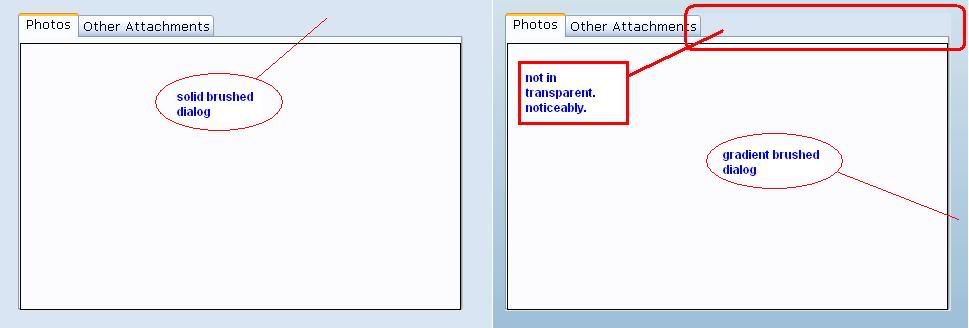
How to make this transparent?


On the right side is a solid brush and on the left side is a gradient background of FW dialog.

Noticeably, I cant make the folder transparent. Any help please.


Regards,
FAP
Kind Regards,

Frances


Fivewin for xHarbour v18.07

xHarbour v1.2.3.x

BCC 7.3 + PellesC8 ( Resource Compiler only)

ADS 10.1 / MariaDB

Crystal Reports 8.5/9.23 DE

xMate v1.15
Posts: 811
Joined: Tue May 06, 2008 04:28 AM
Re: Folder Transparency in gradient dialog brush
Posted: Wed Feb 24, 2010 11:44 PM

Anybody using Folder class on Gradient Brushed Dialog?

:wink:

Kind Regards,

Frances


Fivewin for xHarbour v18.07

xHarbour v1.2.3.x

BCC 7.3 + PellesC8 ( Resource Compiler only)

ADS 10.1 / MariaDB

Crystal Reports 8.5/9.23 DE

xMate v1.15
Posts: 4043
Joined: Wed Dec 19, 2007 06:40 PM
Re: Folder Transparency in gradient dialog brush
Posted: Thu Feb 25, 2010 11:21 PM

Have a look at my tests.

viewtopic.php?f=3t=16021p=83047hilit=ttrans1.jpg#p83047

Best regards
Uwe :lol:

&&&

Since 1995 ( the first release of FW 1.9 )

i work with FW.

If you have any questions about special functions, maybe i can help.
Posts: 811
Joined: Tue May 06, 2008 04:28 AM
Re: Folder Transparency in gradient dialog brush - SOLVED
Posted: Fri Feb 26, 2010 12:28 AM
Thanks Uwe!

It was a great example..

The most simple trick by Mr. Ramesh works for me. Defining blank Brush to dialog with gradient.


My best regards with you both. :-)

FAP
Kind Regards,

Frances


Fivewin for xHarbour v18.07

xHarbour v1.2.3.x

BCC 7.3 + PellesC8 ( Resource Compiler only)

ADS 10.1 / MariaDB

Crystal Reports 8.5/9.23 DE

xMate v1.15
Posts: 883
Joined: Thu Dec 24, 2009 12:46 AM
Re: Folder Transparency in gradient dialog brush - SOLVED
Posted: Wed Feb 23, 2011 06:14 AM
How can I do to make my folders look like this:


Mine looks plain...Even when I set:

set 3dlook on
SET _3DLOOK ON

Code (fw): Select all Collapse
FOLDERS1 DIALOGEX DISCARDABLE 6, 18, 504, 239
STYLE WS_POPUP|DS_MODALFRAME|DS_CONTEXTHELP|DS_3DLOOK|DS_CONTROL|WS_CAPTION|WS_SYSMENU|WS_VISIBLE
CAPTION "Dialog"
FONT 8, "MS Sans Serif"
{
  CONTROL "", 4001, "SysTabControl32", 0 | WS_CHILD | WS_VISIBLE | WS_TABSTOP, 4, 4, 495, 230
}

=====>

Bayron Landaverry
xBasePHP.com
(215)2226600 Philadelphia,PA, USA
MayaBuilders@gMail.com
Guatemala

FWH25.06--Harbour 3.0.0--BCC7.7--UEstudio 10.10
Windows 10

FiveWin, One line of code and it's done...

Posts: 4043
Joined: Wed Dec 19, 2007 06:40 PM
Re: Folder Transparency in gradient dialog brush - SOLVED
Posted: Wed Feb 23, 2011 10:10 AM
Hello Bayron,

it seems, the sample uses class TFOLDEX not TFolder
The transparent-setting ( Ramesh-solution Zero-brush ) is only needed for TFolder !!
You can see it on the brown Line of the 1. Folder-tab.
Class TFOLDEX will be included in Release 3.0
I can generate a complete sample with the PRG-Creator.
Just let me know the Style-Combination You need, in case You want to use this class :

1.Windows-background
2. Dialog-background
3. Folder-background
4. selected Tab-brush ( Bmp )
--or Color / Gradient ( Yes / No )
5. Tab-Gradients for : aGradSel, aGradUnSel, aGradOverUnSel, aGradOver, aGradDis
6. Tab-separator ( Yes / No )


A sample, created with the PRG-Generator using Gradient-tabs.
There is still another Gradient, to show disabled Tabs.


Best Regards
Uwe :-)
Since 1995 ( the first release of FW 1.9 )

i work with FW.

If you have any questions about special functions, maybe i can help.
Posts: 883
Joined: Thu Dec 24, 2009 12:46 AM
Re: Folder Transparency in gradient dialog brush - REVISITED
Posted: Wed Feb 23, 2011 05:20 PM
ukoenig wrote:
it seems, the sample uses class TFOLDEX not TFolder

That is what I suspected... but....
I think the class tFoldex was published on 08/2010, and if you see the date of the post is on 02/2010, that is why I am Asking....(unless fraxzi has changed the pictures or there was an error on PhBB logging date...)

=====>

Bayron Landaverry
xBasePHP.com
(215)2226600 Philadelphia,PA, USA
MayaBuilders@gMail.com
Guatemala

FWH25.06--Harbour 3.0.0--BCC7.7--UEstudio 10.10
Windows 10

FiveWin, One line of code and it's done...

Posts: 811
Joined: Tue May 06, 2008 04:28 AM
Re: Folder Transparency in gradient dialog brush - SOLVED
Posted: Thu Feb 24, 2011 06:16 PM

Dear Bayron,

I used "SysTabControl32" in my resource and redefine it as REDEFINE FOLDER. The app is themed.

Kind regards,

Kind Regards,

Frances


Fivewin for xHarbour v18.07

xHarbour v1.2.3.x

BCC 7.3 + PellesC8 ( Resource Compiler only)

ADS 10.1 / MariaDB

Crystal Reports 8.5/9.23 DE

xMate v1.15
Posts: 883
Joined: Thu Dec 24, 2009 12:46 AM
Re: Folder Transparency in gradient dialog brush - SOLVED
Posted: Thu Feb 24, 2011 07:43 PM
Fraxzi,

Thank's for answering, but it should be something else, because I get it like this:


Unless there is a way to change the color of the Folder Tabs????

=====>

Bayron Landaverry
xBasePHP.com
(215)2226600 Philadelphia,PA, USA
MayaBuilders@gMail.com
Guatemala

FWH25.06--Harbour 3.0.0--BCC7.7--UEstudio 10.10
Windows 10

FiveWin, One line of code and it's done...

Posts: 4043
Joined: Wed Dec 19, 2007 06:40 PM
Re: Folder Transparency in gradient dialog brush - SOLVED
Posted: Thu Feb 24, 2011 10:13 PM
Hello Bayron,

I think Gradient-Tabs works only with Class TFOLDEX :

From my Screenshot above :

// aGradSel, aGradUnSel, aGradOverUnSel, aGradOver, aGradDis
You can change the Gradients at Runtime :

aS := { { 1, 128, 16777215 } } // Selected
aUS := { { 1, 8388608, 16777215 } } // Unselected
aOU := { { 1, 32768, 16777215 } } // Mouse-Caption unselected
aO := { { 1, 0, 16777215 } } // Mouscaption
aD := { { 1, 12566463, 16777215 } } // Disabled


oFld:SetDefColors( aS, aUS, aOU, aO, aD )

Best Regards
Uwe :-)
Since 1995 ( the first release of FW 1.9 )

i work with FW.

If you have any questions about special functions, maybe i can help.
Posts: 883
Joined: Thu Dec 24, 2009 12:46 AM
Re: Folder Transparency in gradient dialog brush - SOLVED
Posted: Thu Feb 24, 2011 11:11 PM

Thanks Uwe, for being kind enough to answer my post.

I think that the effect should be the quality of the picture....

=====>

Bayron Landaverry
xBasePHP.com
(215)2226600 Philadelphia,PA, USA
MayaBuilders@gMail.com
Guatemala

FWH25.06--Harbour 3.0.0--BCC7.7--UEstudio 10.10
Windows 10

FiveWin, One line of code and it's done...

Posts: 4043
Joined: Wed Dec 19, 2007 06:40 PM
Re: Folder Transparency in gradient dialog brush - SOLVED
Posted: Thu Feb 24, 2011 11:37 PM
Here is a complete created PRG.
This Part is finished, tested and works fine.
I use 5 defined Gradient-colors for the Tabs, otherwise it would blow up the Application to select them.

Also with Buttonbar


The new Parts Buttonbar and Buttons are also nearly finished ( still some tests must be done )

Save the File as PROJECT.prg and You can compile it from inside the Tool with GO1.bat.
I hope it works for You.
Just let me know, if there is still something missing.

Code (fw): Select all Collapse
#include "fivewin.ch"

STATIC hDC, oWndMain, oFont1
STATIC c_path

FUNCTION MAIN()
LOCAL oBar, aColors1,aColors2,aColors3
LOCAL oBtn1, oBtn2, oBtn3, oBtn4
LOCAL oTmp, oBrush1, oBrush2, oBrush3, oBrush4
LOCAL aRect3 := GetSysmetrics( 1 ) // Screen-Height
LOCAL aRect4 := GetSysmetrics( 0 ) // Screen-Width

c_path := CURDRIVE() + ":\" + GETCURDIR()
oFont1 := TFont():New( "Arial",0,-14,.F.,.T.,0,0,0,.T.,.F.)

// ---- MDI - FRAME -----------
// ----------------------------------

DEFINE IMAGE oTmp FILENAME c_Path + "\bitmaps\Back3.jpg"
oBrush1 := TBrush():new( ,,,, ResizeBmp( oTmp:hBitmap, aRect4, aRect3, .T. ) )
DEFINE WINDOW oWndMain FROM 0, 0 TO aRect3, aRect4 ;
TITLE "Window- and Dialog-test"  BRUSH oBrush1 PIXEL
oTmp:End()


DEFINE BITMAP oAlpha FILENAME c_Path + "\bitmaps\Logo.bmp"

ACTIVATE WINDOW oWndMain MAXIMIZED ;
ON INIT MDI_DIALOG() ;
ON PAINT ABPaint( hDC, 30, 380, oAlpha:hBitmap, 255 )  // Horiz / Vertical

SET MESSAGE OF oWndMain TO FWVERSION + "  TechData Software " ;
CENTERED 2007

oFont1:End()
oBrush1:End()
oBrush2:End()

RETURN NIL

// --------- DIALOG ----------

FUNCTION MDI_DIALOG()
LOCAL oWndDlg, oFld, hDC, oBtn1
LOCAL oSay1, oSay2, oRadio1, oRadio2, oCheck1, oCheck2
LOCAL nRadio1 := 1, nRadio2 := 1, lCheck1 := .T., lCheck2 := .T.

DEFINE IMAGE oTmp FILENAME c_Path + "\bitmaps\Back1.jpg"
DEFINE DIALOG oWndDlg FROM 100, 180 TO 580, 880 OF oWndMain  PIXEL TRANSPARENT ;
TITLE "Dialog-Test"
oBrush3 := TBrush():new( ,,,, ResizeBmp( oTmp:hBitmap, 700, 480, .T. ) ) 
oWndDlg:Setbrush( oBrush3 )
oTmp:End()

@ 65, 20 SAY oSay1 PROMPT "Transparent Say" OF oWndDlg SIZE 80, 20 FONT oFont1 PIXEL
oSay1:SetColor( 65535, )
oSay1:lTransparent := .T.

@ 85, 15 RADIO oRadio1 VAR nRadio1 OF oWndDlg PIXEL ;
ITEMS "Option &1", "Option &2" _3D SIZE 70, 16 COLOR 65535 ;
HELPID 100, 101 ;
ON CHANGE MsgBeep()
oRadio1:SetFont( oFont1 )
AEval( oRadio1:aItems, { | oRad | oRad:lTransparent := .T. } )

@ 130, 20 CHECKBOX oCheck1 VAR lCheck1  COLOR 65535 PIXEL ;
PROMPT "&Checkbox" OF oWndDlg SIZE 70, 15 ;
ON CHANGE oCheck3:SetText( "New Text" )
oCheck1:lTransparent := .T.
oCheck1:SetFont( oFont1 )

@ 68, 130 FOLDEREX oFld OF oWndDlg PIXEL SIZE 200, 120 ;
PROMPT "T&est","&Tabs", "&Bmp", "Br&ush" ;
BITMAPS c_Path + "\bitmaps\16edit.bmp", ;
        c_Path + "\bitmaps\16edit.bmp", ;
        c_Path + "\bitmaps\16edit.bmp", ;
        c_Path + "\bitmaps\16edit.bmp" ;
ROUND 5 ;
ON CHANGE ( nTabPos := 1 )

oFld:lTransparent := .T.
oFld:nFolderHeight := 25
oFld:nSeparator := 5
oFld:bClrText := {| o, n | 65535 }
oFld:oFont := oFont1

// aGradSel, aGradUnSel, aGradOverUnSel, aGradOver, aGradDis
aS := { { 1, 128, 16777215 } }
aUS := { { 1, 8388608, 16777215 } }
aOU := { { 1, 32768, 16777215 } }
aO := { { 1, 0, 16777215 } }
aD := { { 1, 12566463, 16777215 } }
oFld:SetDefColors( aS, aUS, aOU, aO, aD )
oFld:bClrTabs := {| o, n | oFld:SetFldColors( o, n ) }
@ 15, 20 SAY oSay2 PROMPT "Transparent Say" OF oFld:aDialogs[1] SIZE 80, 20 FONT oFont1 PIXEL
oSay2:SetColor( 65535, )
oSay2:lTransparent := .T.

@ 35, 15 RADIO oRadio2 VAR nRadio2 OF oFld:aDialogs[1] PIXEL ;
ITEMS "Option &1", "Option &2" _3D SIZE 70, 16 COLOR 65535 ;
HELPID 100, 101 ;
ON CHANGE MsgBeep()
oRadio1:SetFont( oFont1 )
AEval( oRadio1:aItems, { | oRad | oRad:lTransparent := .T. } )

@ 80, 20 CHECKBOX oCheck1 VAR lCheck1  COLOR 65535 PIXEL ;
PROMPT "&Checkbox" OF oFld:aDialogs[1] SIZE 70, 15 ;
ON CHANGE oCheck3:SetText( "New Text" )
oCheck1:lTransparent := .T.
oCheck1:SetFont( oFont1 )

@ 200, 250 BTNBMP oBtn1 OF oWndDlg ;
SIZE 75 , 35  PROMPT "Exit" 2007 ;
FONT oFont1 ;
TOP ;
NOBORDER ;
FILENAME c_Path + "\bitmaps\Exit.bmp" ;
ACTION  oWndMain:End()

oBtn1:SetColor( 128, )
oBtn1:cTooltip :=  { "Close" + CRLF + ;
                  "MDI-test","Exit", 1, CLR_BLACK, 14089979 }

ACTIVATE DIALOG oWndDlg NOWAIT ;
ON  INIT ( SHOW_BAR( oWndDlg ), oFld:SetOption( 2 ) ) ;
ON PAINT F_BACKGRD( 3, oFld, hDC,0.50,14853684,16312263,.T.,"Marble.bmp","Back1.jpg")

RETURN NIL

// -----------------------

FUNCTION SHOW_BAR( oWndDlg )
LOCAL oBar, oBarButt1, oBarButt2, oBarButt3

DEFINE BUTTONBAR oBar SIZE 100, 50 _3D OF oWndDlg 2007

DEFINE BUTTON oBarButt1 OF oBar FILE c_Path + "\bitmaps\Exit.bmp" LEFT NOBORDER ;   
PROMPT " &Exit " TOOLTIP "Preview" FONT oFont1 ;
ACTION  MsgAlert( "Bartest","Attention" )

oBarButt1:SetSize( 100, 50, .T. )
oBarButt1:Refresh()

DEFINE BUTTON oBarButt2 OF oBar FILE c_Path + "\bitmaps\Preview.bmp" LEFT NOBORDER ;   
PROMPT " &Preview " TOOLTIP "Exit BarPainter" FONT oFont1 ;
ACTION  MsgAlert( "Bartest","Attention" )

oBarButt2:SetSize( 120, 50, .T. )
oBarButt2:Refresh()


RETURN NIL

//------------------------

FUNCTION NEW_BRUSH(oWndDlg)
LOCAL hDC1, aColors

aColors := { { 0.50, 14853684, 16312263 }, { 0.50, 16312263, 14853684 } }
hDC1 = CreateCompatibleDC( oWndDlg:GetDC() )
hBmp = CreateCompatibleBitMap( oWndDlg:hDC, oWndDlg:nWidth(), oWndDlg:nHeight() - 25 )
hBmpOld = SelectObject( hDC1, hBmp )
GradientFill( hDC1, 0, 0, oWndDlg:nHeight(), oWndDlg:nWidth(), aColors, .T. )
DeleteObject( oWndDlg:hBrush )
oWndDlg:hBitmap = hBmp
oWndDlg:hBrush = CreatePatternBrush( hBmp )
SelectObject( hDC1, hBmpOld )
oWndDlg:ReleaseDC()

oWndDlg:Refresh()

RETURN NIL

// ----------------------------

FUNCTION PaintTab( o, nOption )
LOCAL hBrush, hBmp, nLastRow

IF nOption == o:nOver .OR. nOption == o:nOption
    o:SetAlphaLevel( nOption, 255 )
ELSE
    o:SetAlphaLevel( nOption, 50 )
ENDIF

IF nOption == o:nOption .and. nOption == 3
    hBmp = ReadBitmap( 0, c_Path + "\bitmaps\Marble.bmp" )
    hBrush = CreatePatternBrush( hBmp )
    DeleteObject( hBmp )
    IF o:nLayOut == 2
        nLastRow = o:aPos[ o:aLines[ o:aOrder[ 1 ] ][ 1 ] ][ 1 ] + o:nFolderHeight
        SetBrushOrgEx( o:hDC, nLastRow + 2, 1 )
    ELSE
        SetBrushOrgEx( o:hDC, 2, 2 )
    ENDIF
    RETURN hBrush
ENDIF

RETURN o:SetFldColors( o, nOption ) 

// --------  Folder - Background ---------------

FUNCTION F_BACKGRD( nStyle, oFld, hDC, nMove, nColor1, nColor2, lDirect, cBrush, cImage )
LOCAL n, oDlg, oBrush2, oBrush3, oImage2, hDC1
LOCAL aColors := { { nMOVE, nCOLOR1, nCOLOR2 }, ;
                 { nMOVE, nCOLOR2, nCOLOR1 } }
LOCAL aRect := GetClientRect( oFld:hWnd )

FOR n := 1 to Len( oFld:aDialogs )
    oDlg := oFld:aDialogs[ n ]
    hDC1 = CreateCompatibleDC( oDlg:GetDC() )
    hBmp = CreateCompatibleBitMap( oDlg:hDC, oDlg:nWidth, oDlg:nHeight )
    hBmpOld = SelectObject( hDC1, hBmp )
        DEFINE BRUSH oBrush2 FILENAME c_Path + "\bitmaps\" + cBrush
        FillRect( hDC1, aRect, oBrush2:hBrush )
    DeleteObject( oDlg:hBrush )
    oDlg:hBitmap = hBmp
    oDlg:hBrush = CreatePatternBrush( hBmp )
    SelectObject( hDC1, hBmpOld )
    oDlg:ReleaseDC()
NEXT

RETURN( NIL )


Best Regards
Uwe :-)
Since 1995 ( the first release of FW 1.9 )

i work with FW.

If you have any questions about special functions, maybe i can help.
Posts: 883
Joined: Thu Dec 24, 2009 12:46 AM
Re: Folder Transparency in gradient dialog brush - SOLVED
Posted: Fri Feb 25, 2011 03:03 AM

Thanks Uwe, It's going to be usefull to me when I upgrade FiveWin....

=====>

Bayron Landaverry
xBasePHP.com
(215)2226600 Philadelphia,PA, USA
MayaBuilders@gMail.com
Guatemala

FWH25.06--Harbour 3.0.0--BCC7.7--UEstudio 10.10
Windows 10

FiveWin, One line of code and it's done...

Posts: 4043
Joined: Wed Dec 19, 2007 06:40 PM
Re: Folder Transparency in gradient dialog brush - SOLVED
Posted: Fri Feb 25, 2011 09:13 AM
Hello Byron,

Today, I will add a link to the new Update.
It is not 100 % finished jet ( new Button- and Bar-parts) , but You can test the new TFOLDEREX.
The Buttonbar-Section uses Buttons, created with the Button-Section.
( create a Button, switch to Bar-section and the created Button is displayed inside the Buttonbar )

Update :
1. Exe- and Link-Files ( 1.1 MB ) Release 3.0 :
http://www.pflegeplus.com/fw_downloads/Backpart1_2.zip
some new BMP's included ( to be copied to Subdirectory => \Bitmaps )

These Files are only needed for a complete new install !!!!
2. Editor and Freeimage ( 2.1 MB ) :
http://www.pflegeplus.com/fw_downloads/Backpart2.zip
3. Images ( 0.8 MB ) :
http://www.pflegeplus.com/fw_downloads/Backpart3.zip

1. Select Your Window-background
2. select Your Dialog-background
3. Choose Fld-Ex and select the Folder-background

4. From inside the Folder, You can :
a ) change Tab-height
b ) Tab separator
c ) switch normal / gradient Tab-background
d ) change Tab-bmp
e ) change Tab-brush

To show a selected brushed Tab in combination with normal Tabs,
You have to select < Plain >, Gradient shows the Tabs from Screenshot.

You can create a PRG. To create a EXE, maybe You need a FWH-update ?


Bar and Button-painter


Best Regards
Uwe :-)
Since 1995 ( the first release of FW 1.9 )

i work with FW.

If you have any questions about special functions, maybe i can help.

Continue the discussion