FiveTech Support Forums

FiveWin / Harbour / xBase community
Board index FiveWin para Harbour/xHarbour Como cambio los colores en rbbtn ? SOLUCIONADO
Posts: 366
Joined: Wed Aug 30, 2006 05:25 PM
Como cambio los colores en rbbtn ? SOLUCIONADO
Posted: Sat Jun 26, 2010 12:48 PM

Estimados:

Alguien tendria un ejemplo de como cambiar los colores de un rbbtn usado como boton no en las ribbon

Gracias

Gracias y Saludos

Ruben Fernandez - Uruguay

FWH 11.06, Harbour, Borland 5.82
Posts: 2365
Joined: Wed Nov 02, 2005 11:46 PM
Re: Como cambio los colores en rbbtn ?
Posted: Sat Jun 26, 2010 04:20 PM
Ruben


Code (fw): Select all Collapse
#include "fivewin.ch"
#include "ribbon.ch" 

function main()
   local oWnd
   local oBtn1, oBtn2, oBtn3, oBtn4
   
   DEFINE WINDOW oWnd 
   @ 30, 30 RBBTN oBtn1 PROMPT "&Ok" OF oWnd BORDER SIZE 100, 30 ROUND ROUNDSIZE 2 CENTER ;
            LINECOLORS RGB( 255,255,255 ), RGB( 255, 0, 0);
            GRADIANT { { 0.3, RGB( 254, 154, 128 ), RGB( 254, 154, 128 ) }, ;
                       { 0.7, RGB( 252, 85, 40 ), RGB( 181, 61, 29 ) } }
                       
   oBtn1:bClrGradNormal = { | lPressed | if ( lPressed,; 
     { { 1, RGB( 181, 61, 29 ), RGB( 254, 154, 128 ) } },;
     { { 1, RGB( 254, 154, 128 ), RGB( 181, 61, 29 ) } } ) }


   ACTIVATE WINDOW oWnd
   
return nil
Posts: 366
Joined: Wed Aug 30, 2006 05:25 PM
Re: Como cambio los colores en rbbtn ?
Posted: Sat Jun 26, 2010 06:49 PM

Daniel: Toman el color del fondo del Dialogo, solo cuando paso el raton por encima toman el color, que luego
desaparece cuando vuelvo a sacar el raton.

Alguna otra sugerencia...

Gracias y Saludos

Ruben Fernandez - Uruguay

FWH 11.06, Harbour, Borland 5.82
Posts: 2365
Joined: Wed Nov 02, 2005 11:46 PM
Re: Como cambio los colores en rbbtn ?
Posted: Sat Jun 26, 2010 08:06 PM
Ruben

a mi me trabaja perfectamente el ejemplo que te puse, podrias colocar el codigo que estas usando de forma que podamos reproducir el mismo error

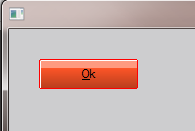
Normal


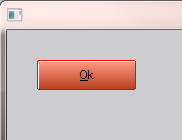
Mouse Over


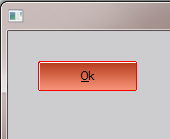
Left Button Down (presionado)
Posts: 366
Joined: Wed Aug 30, 2006 05:25 PM
Re: Como cambio los colores en rbbtn ?
Posted: Sun Jun 27, 2010 01:41 AM

Daniel: Te dejo el código

 REDEFINE RBBTN oBoton2  ID 250 OF oDlg   ;
           ACTION( lSaleAdd:=.t., oDlg:End()) BITMAP "SALIR2"  ;
           PROMPT "&Cancelar"  LEFT  BORDER ROUND ROUNDSIZE 2 ;
           LINECOLORS RGB( 255,255,255 ), RGB( 255, 0, 0);
           GRADIANT { { 0.3, RGB( 254, 154, 128 ), RGB( 254, 154, 128 ) }, ;
                   { 0.7, RGB( 252, 85, 40 ), RGB( 181, 61, 29 ) } }

oBoton2:bClrGradNormal = { | lPressed | if ( lPressed,;
{ { 1, RGB( 181, 61, 29 ), RGB( 254, 154, 128 ) } },;
{ { 1, RGB( 254, 154, 128 ), RGB( 181, 61, 29 ) } } ) }

      Gracias...
Gracias y Saludos

Ruben Fernandez - Uruguay

FWH 11.06, Harbour, Borland 5.82
Posts: 2365
Joined: Wed Nov 02, 2005 11:46 PM
Re: Como cambio los colores en rbbtn ?
Posted: Sun Jun 27, 2010 10:47 AM

Ruben...

dentro del recurso debes definir el botton como TRBBTN (tipo custom)

Posts: 366
Joined: Wed Aug 30, 2006 05:25 PM
Re: Como cambio los colores en rbbtn ?
Posted: Sun Jun 27, 2010 12:22 PM
Daniel: Lo tengo como tu dices, lo que ocurre es que el Dialogo
tiene un brush y esta así: Define Dialog oDlg......Brush oBrush Transparent <<<--- Este Transparent me
evita declarar los SAY que tengo en el dialogo, o sea que me evita hacer un Redefine Say ....Transparent por cada say.

Si saco el Transparent del dialogo funciona bien.

Como puedo hacer para que el boton no sea transparente, si hago oBtn:lTransparent:=.f. el boton sigue transparente.

Gracias
Gracias y Saludos

Ruben Fernandez - Uruguay

FWH 11.06, Harbour, Borland 5.82
Posts: 2365
Joined: Wed Nov 02, 2005 11:46 PM
Re: Como cambio los colores en rbbtn ?
Posted: Sun Jun 27, 2010 01:03 PM
Ruben.

Cuando usas transparent en el dialogo ese asigna la transparebcia a sus controles hijos a execpcion de algunos, como es el caso de TGET, TXBROWSE, TBTNBMP, etc
te planteo 2 formas de resolverlo
1. sin tocar la clase TDIALOG:
en el ON INT del comando ACTIVATE asignas los controles que no seran transparentes, antes no puedes hacerlo pq el dialogo en si aun no se ha "creado"

Code (fw): Select all Collapse
ACTIVATE DIALOG oDlg ON INIT oBtn:lTransparent := .F.


2. Modificar la clase TDIALOG
y asignale la execpcion en em METHOD INITIATE
cambia estas lineas
Code (fw): Select all Collapse
#ifdef __HARBOUR__
      AEval( ::aControls,;
             { | o | If( ! Upper( o:ClassName() ) $ ;
             "TGET;TMULTIGET;TBTNBMP;TCOMBOBOX;TWBROWSE;TCBROWSE;TXBROWSE;TLISTBOX;TRBTN" .and. ;
               ! o:IsKindOf( 'TXBROWSE' ),;
                         o:lTransparent := .t.,) } )
#else
      AEval( ::aControls,;
             { | o | If( ! Upper( o:ClassName() ) $ ;
             "TGET;TMULTIGET;TBTNBMP;TCOMBOBOX;TWBROWSE;TCBROWSE;TXBROWSE;TLISTBOX;TRBTN",;
                         o:lTransparent := .t.,) } )
#endif
Posts: 366
Joined: Wed Aug 30, 2006 05:25 PM
Re: Como cambio los colores en rbbtn ? SOLUCIONADO
Posted: Sun Jun 27, 2010 01:53 PM

Daniel: GRACIAS, funcionando.
Por el momento le asignare la clausola en el on init, luego vere si se puede asignarle los colores con SkinButtons()...

Gracias de nuevo.

Gracias y Saludos

Ruben Fernandez - Uruguay

FWH 11.06, Harbour, Borland 5.82
Posts: 592
Joined: Tue Mar 14, 2006 11:34 PM
Re: Como cambio los colores en rbbtn ? SOLUCIONADO
Posted: Mon Jun 28, 2010 06:04 PM

Ruben,

Perdona que pregunte algo ya que cerraste tu tema.

Daniel : Si cambio los colores directamente a la clase, para que todos los botones manejen el mismo color (degradado) afectaria a los botones que tengo en la ribbon ?? o es otra clase aparte ?

Saludos

FWH 10.6 + xHarbour + Borland 582
Posts: 366
Joined: Wed Aug 30, 2006 05:25 PM
Re: Como cambio los colores en rbbtn ? SOLUCIONADO
Posted: Mon Jun 28, 2010 07:17 PM

Raymundo: No hay problema, peguntando se aprende.

Creo que si cambias los colores desde la clase, cambiaran los colores de los botones de la ribbon.

Para asegurarte podrías hacer una prueba, aunque creo que hay que esperar que se puedan usar con SkinButtons()

Saludos

Gracias y Saludos

Ruben Fernandez - Uruguay

FWH 11.06, Harbour, Borland 5.82
Posts: 2365
Joined: Wed Nov 02, 2005 11:46 PM
Re: Como cambio los colores en rbbtn ? SOLUCIONADO
Posted: Mon Jun 28, 2010 08:17 PM
Raymundo Islas M. wrote:Daniel : Si cambio los colores directamente a la clase, para que todos los botones manejen el mismo color (degradado) afectaria a los botones que tengo en la ribbon ?? o es otra clase aparte ?


Si efectivamente se cambian todos los colores...

Ruben Fernandez wrote:Para asegurarte podrías hacer una prueba, aunque creo que hay que esperar que se puedan usar con SkinButtons()

Ruben, SkinButtons es una funcion que trabaja sobre los botones propios de window (los qu eno sproporciona el api), la clase TRBtn, TBtnBmp son propias de fivewin, por lo tanto, dicha funcion no trabaja sobre estas clases
Posts: 2365
Joined: Wed Nov 02, 2005 11:46 PM
Re: Como cambio los colores en rbbtn ? SOLUCIONADO
Posted: Mon Jun 28, 2010 09:06 PM
Ruben...

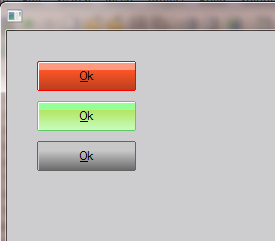
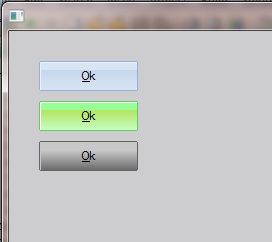
Te dejo un ejemplo de como implementar tu propia clase SkinButton

http://www.sitasoft.net/fivewin/samples/rbskin.zip

Code (fw): Select all Collapse
#include "fivewin.ch"
#include "ribbon.ch" 

#define SKIN_DEFAULT  1
#define SKIN_RED      2
#define SKIN_GREEN    3
#define SKIN_GRAY     4


function main()
   local oWnd
   local oBtn1, oBtn2, oBtn3
   local aSkin := Array( 4 )
   
   
   BuildSkin( aSkin )
   DEFINE WINDOW oWnd 

   @ 30, 30 RBBTN oBtn1 PROMPT "&Ok" OF oWnd BORDER SIZE 100, 30 ROUND ROUNDSIZE 2 CENTER 
   
   @ 70, 30 RBBTN oBtn2 PROMPT "&Ok" OF oWnd BORDER SIZE 100, 30 ROUND ROUNDSIZE 2 CENTER 
   
   @ 110, 30 RBBTN oBtn3 PROMPT "&Ok" OF oWnd BORDER SIZE 100, 30 ROUND ROUNDSIZE 2 CENTER ;
             ACTION ( aSkin[ SKIN_DEFAULT ]:SetSkin( oBtn1 ), oBtn1:Refresh() )
       

   aSkin[ SKIN_RED ]:SetSkin( oBtn1 )
   aSkin[ SKIN_GREEN ]:SetSkin( oBtn2 )
   aSkin[ SKIN_GRAY ]:SetSkin( oBtn3 )

   ACTIVATE WINDOW oWnd
   
return nil


FUNCTION BuildSkin( aSkin )
   
   
   //default skin
   aSkin[ SKIN_DEFAULT ] = TSkinRBtn():New()
   
   //skin red 
   aSkin[ SKIN_RED ] = TSkinRBtn():New()
   aSkin[ SKIN_RED ]:nClrBoxIn  = RGB( 255,255,255 )
   aSkin[ SKIN_RED ]:nClrBoxOut = RGB( 255, 0, 0)
   aSkin[ SKIN_RED ]:aGradiant  = { { 0.3, RGB( 254, 154, 128 ), RGB( 254, 154, 128 ) }, ;
                                    { 0.7, RGB( 252, 85, 40 ), RGB( 181, 61, 29 ) } }   
   aSkin[ SKIN_RED ]:bClrGradNormal = { | lPressed | if ( lPressed,; 
                                        { { 1, RGB( 181, 61, 29 ), RGB( 254, 154, 128 ) } },;
                                        { { 1, RGB( 254, 154, 128 ), RGB( 181, 61, 29 ) } } ) }                                    

   //skin green
   aSkin[ SKIN_GREEN ] = TSkinRBtn():New()
   aSkin[ SKIN_GREEN ]:nClrBoxIn  = RGB( 255,255,255 )
   aSkin[ SKIN_GREEN ]:nClrBoxOut = RGB( 100, 200, 100 )
   aSkin[ SKIN_GREEN ]:aGradiant  = { { 0.3, RGB( 150, 255, 150 ), RGB( 150, 255, 150 ) }, ;
                                    { 0.7, RGB( 180, 230, 100  ), RGB( 200, 255, 200 ) } }   
   aSkin[ SKIN_GREEN ]:bClrGradNormal = { | lPressed | if ( lPressed,; 
                                        { { 1, RGB( 200, 255, 200 ), RGB( 110, 255, 110 ) } },;
                                        { { 1, RGB( 110, 255, 110 ), RGB( 200, 255, 200 ) } } ) }   

   //skin green
   aSkin[ SKIN_GRAY ] = TSkinRBtn():New()
   aSkin[ SKIN_GRAY ]:nClrBoxIn  = RGB( 200,200,200 )
   aSkin[ SKIN_GRAY ]:nClrBoxOut = RGB( 100, 100, 100 )
   aSkin[ SKIN_GRAY ]:aGradiant  = { { 0.3, RGB( 200, 200, 200 ), RGB( 200, 200, 200 ) }, ;
                                    { 0.7, RGB( 200, 200, 200  ), RGB( 100, 100, 100 ) } }   
   aSkin[ SKIN_GRAY ]:bClrGradNormal = { | lPressed | if ( lPressed,; 
                                        { { 1, RGB( 200, 200, 200 ), RGB( 100, 100, 100 ) } },;
                                        { { 1, RGB( 100, 100, 100 ), RGB( 200, 200, 200 ) } } ) }     
   
RETURN NIL

//-----------------------------------------------------//

#define BLUE0               RGB( 218, 229, 243 )      
#define BLUE1               RGB( 199, 216, 237 ) 
#define BLUEBOX0            RGB( 141, 178, 227 )      
#define BLUEBOX2            RGB( 237, 242, 248 )

CLASS TSkinRBtn

   DATA   bClrGradNormal
   DATA   aClrGradOver
   DATA   bClrGradSubOver
   DATA   aClrGradUnder
   DATA   aClrGradBack
   DATA   aGradiant
   DATA   bClrText
   DATA   bClrGradSelectPress
   DATA   bClrGradSelect
   DATA   aClrGradBtnGr 
   DATA   nClrBoxIn, nClrBoxOut
   
   METHOD New( bClrGradNormal, aClrGradOver, bClrGradSubOver, aClrGradUnder,;
               aClrGradBack, aGradiant, bClrText, bClrGradSelectPress, bClrGradSelect,;
               aClrGradBtnGr )
               
   METHOD SetSkin( oRBtn )               
               
ENDCLASS

//-----------------------------------------------------//

METHOD New( bClrGradNormal, aClrGradOver, bClrGradSubOver, aClrGradUnder,;
               aClrGradBack, aGradiant, bClrText, bClrGradSelectPress, bClrGradSelect,;
               aClrGradBtnGr, nClrBoxIn, nClrBoxOut, nRound ) CLASS TSkinRBtn
   
   DEFAULT aGradiant := { {0.3, BLUE0, BLUE0 }, { 0.7, BLUE1, BLUE0 } }
   
   DEFAULT nClrBoxOut := BLUEBOX0, nClrBoxIn := BLUEBOX2
            
   DEFAULT bClrGradNormal := { | lPressed | if ( lPressed,; 
     { ;
      { 1/3, nRGB( 254, 215, 169 ), nRGB( 251, 179, 99 ) } , ;
      { 2/3, nRGB( 250, 155,  50 ), nRGB( 253, 239,  173 ) } ;
     },;
     {;
      { 1/3, nRGB( 255, 253, 222 ), nRGB( 255, 231, 147 ) } , ;
      { 2/3, nRGB( 255, 215,  86 ), nRGB( 255, 231,  153 ) } ;
     } ) }

   DEFAULT bClrGradSubOver := { | lPressed | if ( lPressed,; 
     { ;
      { 2/3, nRGB( 248, 187, 107 ), nRGB( 253, 171, 98 ) } , ;
      { 1/3, nRGB( 253, 154,  63 ), nRGB( 255, 164,  64 ) };
     },;
     {;
       { 2/3, nRGB( 255, 253, 222 ), nRGB( 255, 231, 147 ) } , ;
       { 1/3, nRGB( 255, 215,  86 ), nRGB( 255, 231,  153 ) };
      } ) }
         
   DEFAULT aClrGradUnder := {|| { {1 , nRGB( 248,186,107), nRGB( 255, 253, 222 ) } } }
   
   DEFAULT aClrGradOver := {|| { {1 , nRGB( 255,215,84), nRGB( 255, 253, 222 ) } } }
     
   DEFAULT aClrGradBack := { { 1 , nRGB( 255, 253, 222 ), nRGB( 255, 253, 222 ) } }
         
   DEFAULT bClrGradSelect := {| lSelected | if( lSelected ,;
    { ;
        {1/3, nRGB( 253,212,168 ), nRGB( 251,178,99 ) },;
      {2/3, nRGB( 250,157,52 ), nRGB( 252,234,163 ) };
    },;
    { ;
        {1/3, nRGB( 245,177,110 ), nRGB( 243,165,89 ) },;
      {2/3, nRGB( 216,136,52 ), nRGB( 249,202,98 ) } ;
    } ) }       

   DEFAULT bClrGradSelectPress := {| lPressed | if( lPressed ,;
    { ;
      { 1/3, nRGB( 248, 187, 107 ), nRGB( 253, 171, 98 ) } , ;
      { 2/3, nRGB( 253, 154,  63 ), nRGB( 255, 164,  64 ) };
    },;
    { ;
        {1/3, nRGB( 245,177,110 ), nRGB( 243,165,89 ) },;
      {2/3, nRGB( 216,136,52 ), nRGB( 249,202,98 ) } ;
    } ) }       
    
    DEFAULT aClrGradBtnGr := {|| ;
    { ;
      { 1/3, nRGB( 200, 219, 238 ), nRGB( 201, 221, 246 ) } , ;
      { 2/3, nRGB( 192, 212, 237 ), nRGB( 208, 225, 247 ) };
    } }

    
   ::bClrGradNormal = bClrGradNormal
   ::aClrGradOver   = aClrGradOver
   ::bClrGradSubOver= bClrGradSubOver
   ::aClrGradUnder  = aClrGradUnder
   ::aClrGradBack   = aClrGradBack
   ::bClrGradSelect = bClrGradSelect
   ::bClrGradSelectPress = bClrGradSelectPress
   ::aClrGradBtnGr  = aClrGradBtnGr
   ::aGradiant      = aGradiant
   ::nClrBoxIn      = nClrBoxIn
   ::nClrBoxOut     = nClrBoxOut
   
   
RETURN Self               

//-----------------------------------------------------//

METHOD SetSkin( oRBtn ) CLASS TSkinRBtn

   IF oRBtn:hBack != NIL 
     DeleteObject( oRBtn:hBack )
     oRBtn:hBack = NIL 
   ENDIF 

   oRBtn:bClrGradNormal       = ::bClrGradNormal     
   oRBtn:aClrGradOver         = ::aClrGradOver       
   oRBtn:bClrGradSubOver      = ::bClrGradSubOver    
   oRBtn:aClrGradUnder        = ::aClrGradUnder      
   oRBtn:aClrGradBack         = ::aClrGradBack       
   oRBtn:bClrGradSelect       = ::bClrGradSelect     
   oRBtn:bClrGradSelectPress  = ::bClrGradSelectPress
   oRBtn:aClrGradBtnGr        = ::aClrGradBtnGr      
   oRBtn:aGradiant            = ::aGradiant          
   oRBtn:nClrBoxIn            = ::nClrBoxIn
   oRBtn:nClrBoxOut           = ::nClrBoxOut   
   
RETURN NIL


Cambiandolo dinamicamente (en tiempo de ejecucion)
Posts: 366
Joined: Wed Aug 30, 2006 05:25 PM
Re: Como cambio los colores en rbbtn ? SOLUCIONADO
Posted: Tue Jun 29, 2010 12:23 AM

Daniel: simplemente ESPECTACULAR.

Muchas gracias por tu tiempo.

Gracias y Saludos

Ruben Fernandez - Uruguay

FWH 11.06, Harbour, Borland 5.82

Continue the discussion