

CAN I SET THE QUANTITY OF TRASPARENT OF A BITMAP I WANT SHOW ON A A DIALOG ?
FWH .. BC582.. xharbour
CAN I SET THE QUANTITY OF TRASPARENT OF A BITMAP I WANT SHOW ON A A DIALOG ?
See \Fwh\Samples\BmpAlpha.Prg
Regards
Anser
run only with alpha bitmap ?
The Alpha Channel
RGB colours are also called RGB channels. The reason for this is that there is an optional fourth channel a pixel can have, namely its alpha channel.
The alpha channel ('A') is used to represent transparency. Not all digital images have transparency information. In cases where they don't, (a plain RGB image), the images are 100% "solid". If you were to layer such an image over another image, it would obscure the one underneath as it is completely opaque.
Sorry,
I want show a bitmap normal no Alpha bitmap !!!!!
Can I show this bitmap on a dialog in mode WATERMARK set the trans quantity ( layer) ?
Mda...
Sorry but is not possible, the transparence level is possible with alpha channel
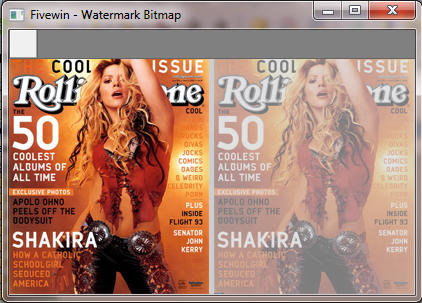
i will try to build a function to make watermark (without alpha channel)
#include "fivewin.ch"

FUNCTION Main()

   LOCAL oWnd
   LOCAL oBar
   LOCAL aBitmap := Array( 2 )

   DEFINE WINDOW oWnd TITLE "Fivewin - Watermark Bitmap"
   DEFINE BUTTONBAR oBar OF oWnd

   DEFINE BUTTON OF oBar ACTION ( LoadFile( aBitmap ), oWnd:Refresh() )

   ACTIVATE WINDOW oWnd ;
            ON PAINT ( DrawBitmap( hDC, aBitmap[ 1 ], 25, 0 ),;
                       ABPaint( hDC, nBmpWidth( aBitmap[ 1 ] ) + 5, 25, aBitmap[ 2 ], 30 ) )

RETURN NIL


FUNCTION LoadFile( aBitmap )

   LOCAL cFile

   cFile = cGetFile( "*.bmp", "Select BMP File" )

   IF aBitmap[ 1 ] != NIL
      DeleteObject( aBitmap[ 1 ] )
      DeleteObject( aBitmap[ 2 ] )
   ENDIF

   IF ! Empty( cFile )
      aBitmap[ 1 ] = ReadBitmap( 0, cFile )
      aBitmap[ 2 ] = FWWaterMark( aBitmap[ 1 ] )
   ENDIF

RETURN NIL


#pragma BEGINDUMP

#include <windows.h>
#include <hbapi.h>

BITMAPINFOHEADER PrepareInfoHeader( WORD, WORD );


HBITMAP FWWaterMark( HBITMAP hbm )
{
   BITMAPINFOHEADER bmiS, bmiD;
   LPBITMAPINFOHEADER lpSrcBits, lpDesBits;
   DWORD dwSizeScr;
   HANDLE hDibSrc;
   HDC dc, dcDes;
   BITMAP bm;
   HBITMAP hbmDes, hbmOldDes;
   INT j,i;

   GetObject( hbm, sizeof( BITMAP ), &bm );

   // source
   bmiS = PrepareInfoHeader( ( WORD ) bm.bmWidth, ( WORD ) bm.bmHeight );

   dwSizeScr = ( ( bm.bmWidth * bmiS.biBitCount + 31 ) / 32 ) * 4 * bm.bmHeight;

   hDibSrc = GlobalAlloc( GHND, dwSizeScr + sizeof( BITMAPINFOHEADER ) );
   lpSrcBits = ( LPBITMAPINFOHEADER )GlobalLock( hDibSrc );
   *lpSrcBits = bmiS;


   dc = GetDC ((HWND) NULL);

   GetDIBits( dc, hbm, 0,
            ( UINT ) bm.bmHeight,
             lpSrcBits,
            ( LPBITMAPINFO )lpSrcBits, DIB_RGB_COLORS);

   dcDes = CreateCompatibleDC( NULL );
   bmiD = PrepareInfoHeader( ( WORD ) bm.bmWidth, ( WORD ) bm.bmHeight );

   hbmDes = CreateDIBSection ( dc, ( LPBITMAPINFO )&bmiD,
       DIB_RGB_COLORS, ( void ** )&lpDesBits, 0, 0 );

   hbmOldDes  = SelectObject( dcDes, hbmDes );

    for( j = 0; j < bm.bmHeight; ++j )
    {
       LPBYTE pbDestRGB = ( LPBYTE )&( ( DWORD * ) lpDesBits )[ j * bm.bmWidth ];
       LPBYTE pbSrcRGB  = ( LPBYTE )&( ( DWORD * ) lpSrcBits  )[ j * bm.bmWidth ];

       for( i = 0; i < bm.bmWidth; ++i )
       {
          pbDestRGB[ 0 ] =  pbSrcRGB[ 0 ];
          pbDestRGB[ 1 ] =  pbSrcRGB[ 1 ];
          pbDestRGB[ 2 ] =  pbSrcRGB[ 2 ];
          pbDestRGB[ 3 ] =  255;
          pbDestRGB += 4;
          pbSrcRGB  += 4;

       }
    }

    SelectObject( dcDes, hbmOldDes );

    GlobalUnlock( hDibSrc );
    GlobalFree( hDibSrc );

    DeleteDC( dcDes );
    DeleteObject( hDibSrc );
    ReleaseDC ((HWND) NULL, dc);

   return hbmDes;
}

HB_FUNC( FWWATERMARK )
{
   hb_retnl( ( LONG ) FWWaterMark( ( HBITMAP ) hb_parnl( 1 ) ) ) ;
}
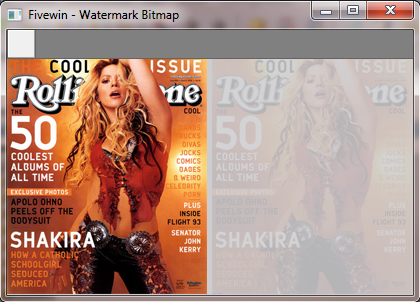
MdaSolution wrote:I want show a bitmap normal no Alpha bitmap !!!!!
Can I show this bitmap on a dialog in mode WATERMARK set the trans quantity ( layer) ?
#include "Fivewin.ch"

#define LWA_ALPHA                  2
#define GWL_EXSTYLE -20
#define WS_EX_LAYERED 524288

Function Main()

    Local oDlg, oBrush

    Define Font oFont Name "Arial" Size 0, 18 Bold
    Define Brush oBrush File "..\bitmaps\FiveWin.bmp"

    Define Dialog oDlg Size 460, 240 Pixel ;
           Style WS_POPUP Brush oBrush

    oDlg:bLClicked := {||oDlg:End()}

    @ 110, 55 Say oSay Prompt "This must be transparent" Transparent Pixel Font oFont Color CLR_HRED

    Activate Dialog oDlg Centered On Init SetTransparent( oDlg )

    oFont:End()
    oBrush:End()

Return Nil


Static Function SetTransparent( oDlg )

    SetWindowLong( oDlg:hWnd, GWL_EXSTYLE, nOr( GetWindowLong( oDlg:hWnd, GWL_EXSTYLE ), WS_EX_LAYERED ) )
    SetLayeredWindowAttributes( oDlg:hWnd, 0, 128, LWA_ALPHA )

Return NilbBlend.BlendOp = AC_SRC_OVR
bBlend.BlendFlags = 0
bBlend.AlphaFormat = 0
bBlend.SourceConstantAlpha = nTransparencyDaniel,
can yoiu help me
here viewtopic.php?f=3&t=19196&p=101073#p101073


