

Hello Daniel,
If I use nType 1 action is not fired.
oBackStage:AddOption( "Exit",,, 2,,,,, ,,, ,{|Self, oOpt, nLastSelect |Msginfo( oOpt:cPrompt )} )
Best regrads,
Otto
Hello Daniel,
If I use nType 1 action is not fired.
oBackStage:AddOption( "Exit",,, 2,,,,, ,,, ,{|Self, oOpt, nLastSelect |Msginfo( oOpt:cPrompt )} )
Best regrads,
Otto
Hello Daniel,
Maybe I am missing something but for me it seems as the only nType
in METHOD LButtonDown of CLASS TBackStage is: BCKTYPE_SELECT
Best regards,
Otto
   DEFINE BACKSTAGE oBackStage

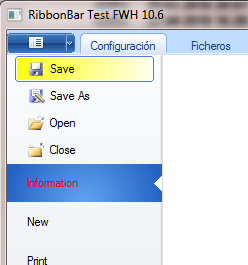
   DEFINE BSBUTTON OF oBackStage PROMPT "Save" ;
          BITMAP "..\bitmaps\alphabmp\bs_save.bmp" ACTION Msginfo( oOpt:cPrompt );
          GRADIENT { { 1, nRGB(  255, 255, 0 ), nRGB( 255, 255, 255 ) } }

   DEFINE BSBUTTON OF oBackStage PROMPT "Save As" ;
          BITMAP "..\bitmaps\alphabmp\bs_saveas.bmp" ACTION Msginfo( oOpt:cPrompt );
          GRADIENT { { 1,  nRGB( 242, 96, 96 ), nRGB( 195, 37, 37 ) } };
          COLORTEXT CLR_BLACK, CLR_WHITE

   DEFINE BSBUTTON OF oBackStage PROMPT "Open" ;
          BITMAP "..\bitmaps\alphabmp\bs_open.bmp" ACTION Msginfo( oOpt:cPrompt )

   DEFINE BSBUTTON OF oBackStage PROMPT "Close";
          BITMAP "..\bitmaps\alphabmp\bs_close.bmp" ACTION Msginfo( oOpt:cPrompt )


   DEFINE BSSELECT OF oBackStage PROMPT "Information";
          COLORTEXT NIL, CLR_HRED ACTION Msginfo( oOpt:cPrompt )

   DEFINE BSSELECT OF oBackStage PROMPT "New" ACTION Msginfo( oOpt:cPrompt )

   DEFINE BSSELECT OF oBackStage PROMPT "Print" ACTION Msginfo( oOpt:cPrompt )

   DEFINE BSSELECT OF oBackStage PROMPT "Save / Send" ACTION Msginfo( oOpt:cPrompt );
      GRADIENT { { 1, nRGB(  255, 255, 0 ), nRGB( 255, 255, 255 ) } }

   DEFINE BSSELECT OF oBackStage PROMPT "Help" ACTION Msginfo( oOpt:cPrompt );
          COLORS nRGB( 242, 96, 96 ), nRGB( 195, 37, 37 )

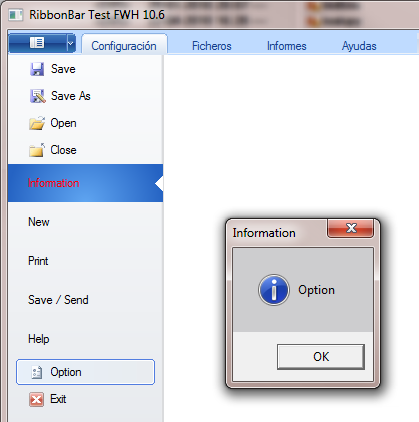
   DEFINE BSBUTTON OF oBackStage PROMPT "Option" ;
          BITMAP "..\bitmaps\alphabmp\bs_options.bmp" ACTION Msginfo( oOpt:cPrompt )

   DEFINE BSBUTTON OF oBackStage PROMPT "Exit" ;
          BITMAP "..\bitmaps\alphabmp\bs_exit.bmp" ACTION Msginfo( oRBar:oWnd:End() )


   SET BACKSTAGE oBackStage TO oRBar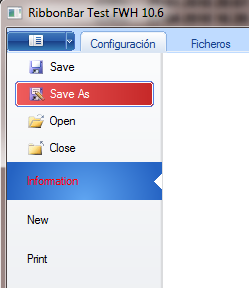
Hello Daniel,
thank you.
But I don't have BSBUTTON in ribbon.ch.
Do I need to download a new FWH-version?
My libs are from 26.6.2010.
Best regards,
Otto

