FiveTech Support Forums

FiveWin / Harbour / xBase community
Board index FiveWin for Harbour/xHarbour How to get Active Object in MDI app
Posts: 811
Joined: Tue May 06, 2008 04:28 AM
How to get Active Object in MDI app
Posted: Thu Jul 08, 2010 07:53 AM

Dear All,

How can I get/know active object (focused object) without going through an active dialog/window..
Is this possible?

Regards,
Frances

Kind Regards,

Frances


Fivewin for xHarbour v18.07

xHarbour v1.2.3.x

BCC 7.3 + PellesC8 ( Resource Compiler only)

ADS 10.1 / MariaDB

Crystal Reports 8.5/9.23 DE

xMate v1.15
Posts: 392
Joined: Tue Mar 10, 2009 11:54 AM
Re: How to get Active Object in MDI app
Posted: Thu Jul 08, 2010 12:58 PM
Frances,

Code (fw): Select all Collapse
oWndActiveChild := WndMain():oWndClient:getActive()

HTH
Windows 11 Pro 22H2 22621.1848

Microsoft (R) Windows (R) Resource Compiler Version 10.0.10011.16384

Harbour 3.2.0dev (r2008190002)

FWH 23.10 x86
Posts: 811
Joined: Tue May 06, 2008 04:28 AM
Re: How to get Active Object in MDI app
Posted: Fri Jul 09, 2010 12:08 AM

Dear Mr. Frank,

Thank you for the reply.

I already tried that approach but it returns only the active window..

I'm looking for the active object with the current focus of the active window or dialog.

I tried WndMain():oWndActive:oCtlFocus.. If I have TFolder active, it returns the object but not the active object (e.g. xbrowse) of the TFolder..
It's a work around for now..

Regards,
Frances

Kind Regards,

Frances


Fivewin for xHarbour v18.07

xHarbour v1.2.3.x

BCC 7.3 + PellesC8 ( Resource Compiler only)

ADS 10.1 / MariaDB

Crystal Reports 8.5/9.23 DE

xMate v1.15
Posts: 44158
Joined: Thu Oct 06, 2005 05:47 PM
Re: How to get Active Object in MDI app
Posted: Fri Jul 09, 2010 05:37 AM

Frances,

Try with:

oWndFromHwnd( GetFocus() )

regards, saludos

Antonio Linares
www.fivetechsoft.com
Posts: 811
Joined: Tue May 06, 2008 04:28 AM
Re: How to get Active Object in MDI app
Posted: Fri Jul 09, 2010 01:04 PM
Antonio Linares wrote:Frances,

Try with:

oWndFromHwnd( GetFocus() )


Dear Mr. Antonio,

Thanks for the reply..

It returns NIL on active dialog..

Maybe an active child window can be determine.. how about an active dialog? and an active object of that dialog?..


Regards,
Frances
Kind Regards,

Frances


Fivewin for xHarbour v18.07

xHarbour v1.2.3.x

BCC 7.3 + PellesC8 ( Resource Compiler only)

ADS 10.1 / MariaDB

Crystal Reports 8.5/9.23 DE

xMate v1.15
Posts: 44158
Joined: Thu Oct 06, 2005 05:47 PM
Re: How to get Active Object in MDI app
Posted: Fri Jul 09, 2010 04:56 PM

Frances,

Please run this:

MsgInfo( GetClassName( GetFocus() ) )

and let me know what you get

regards, saludos

Antonio Linares
www.fivetechsoft.com
Posts: 44158
Joined: Thu Oct 06, 2005 05:47 PM
Re: How to get Active Object in MDI app
Posted: Fri Jul 09, 2010 05:04 PM

Frances,

For a dialog you have to use:

oDlgFromHwnd( GetFocus() )

regards, saludos

Antonio Linares
www.fivetechsoft.com
Posts: 10733
Joined: Sun Nov 19, 2006 05:22 AM
Re: How to get Active Object in MDI app
Posted: Fri Jul 09, 2010 09:15 PM
Mr. Antonio

Can this modification be done in control.prg?
Code (fw): Select all Collapse
static oCtrlFocus
...
...
...
method GotFocus() CLASS TControl
...
..
// after ::oCtrlFocus := Self
// Insert this line
oCtrlFocus := Self
...
...
// at the end of the module
function CtrlFocus()
return oCtrlFocus


Mr. Frances,
Can you test by making this change and see if you get the right result?
Regards


G. N. Rao.

Hyderabad, India
Posts: 811
Joined: Tue May 06, 2008 04:28 AM
Re: How to get Active Object in MDI app
Posted: Mon Jul 12, 2010 12:35 AM
Dear Mr. RAO, Mr. Antonio,

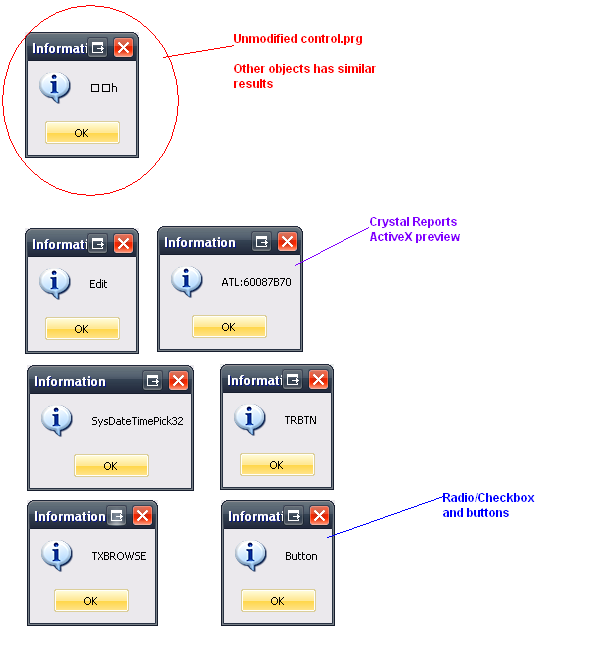
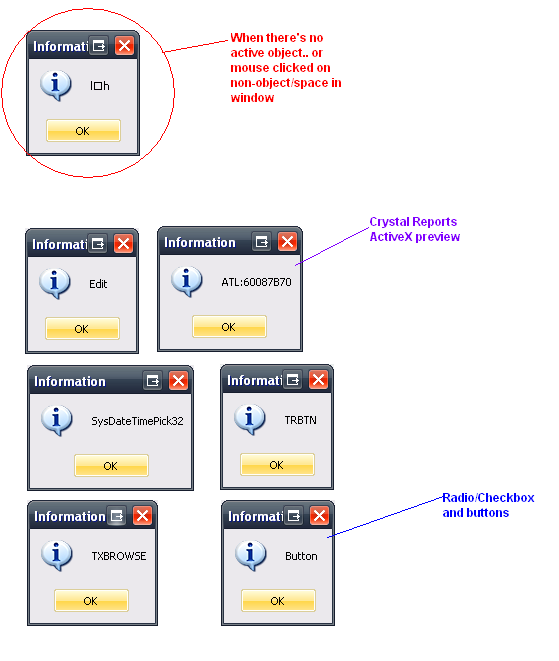
Here are the test results.. looks promising :-) :-)


With the revised control.prg instructed by Mr. RAO

A little concern on no active object or only container (window/dialog) is active..


Here is the result of unmodified control.prg


I used MsgInfo( GetClassName( GetFocus() ) ) for both window/dialog


Using:
Code (fw): Select all Collapse
       oObj := oWinMDI:oWndClient:GetActive()
       msginfo( oObj:CtrlFocus() )
Returns NIL.. error. Maybe I used it incorrectly..

Best regards for both of you,
Frances
Kind Regards,

Frances


Fivewin for xHarbour v18.07

xHarbour v1.2.3.x

BCC 7.3 + PellesC8 ( Resource Compiler only)

ADS 10.1 / MariaDB

Crystal Reports 8.5/9.23 DE

xMate v1.15
Posts: 10733
Joined: Sun Nov 19, 2006 05:22 AM
Re: How to get Active Object in MDI app
Posted: Mon Jul 12, 2010 03:35 AM

Mr Frances

In the revised control.prg, wherever you find "::oWnd:oCtlFocus = nil", also please add another line "oCtrlFocus := nil".

Now in our application, you can query for oCtrl := CtrlFocus(). If the result is not nil, then that is the control having focus.

Regards


G. N. Rao.

Hyderabad, India
Posts: 811
Joined: Tue May 06, 2008 04:28 AM
Re: How to get Active Object in MDI app
Posted: Mon Jul 12, 2010 05:13 AM
nageswaragunupudi wrote:Mr Frances

In the revised control.prg, wherever you find "::oCtlFocus = nil", also please add another line "oCtrlFocus := nil".

Now in our application, you can query for oCtrl := CtrlFocus(). If the result is not nil, then that is the control having focus.


Dear Mr. RAO,

I works like a charm...


I hope this mod be included in the next build..

Regards,
Frances
Kind Regards,

Frances


Fivewin for xHarbour v18.07

xHarbour v1.2.3.x

BCC 7.3 + PellesC8 ( Resource Compiler only)

ADS 10.1 / MariaDB

Crystal Reports 8.5/9.23 DE

xMate v1.15
Posts: 10733
Joined: Sun Nov 19, 2006 05:22 AM
Re: How to get Active Object in MDI app
Posted: Mon Jul 12, 2010 06:58 AM
I hope this mod be included in the next build..

We don't know if Mr. Antonio has a better solution.

We can have a function to return control in focus ( or nil if none ) even without modifying the fwh libraries.

Here is the pseudo logic:
find active window.
find control in focus of that window
if that control is tfolder
find the active dialog
find the control in focus of that dialog

You may try this approach too and make a genral function and test it.
Regards


G. N. Rao.

Hyderabad, India
Posts: 811
Joined: Tue May 06, 2008 04:28 AM
Re: How to get Active Object in MDI app
Posted: Mon Jul 12, 2010 07:03 AM
nageswaragunupudi wrote:
I hope this mod be included in the next build..

We don't know if Mr. Antonio has a better solution.

We can have a function to return control in focus ( or nil if none ) even without modifying the fwh libraries.

Here is the pseudo logic:
find active window.
find control in focus of that window
if that control is tpanel
find the active dialog
find the control in focus of that dialog

You may try this approach too and make a genral function and test it.


Dear Mr. RAO,

I tried that approach but it too much code. Your solution works ok.


Best regards,
Frances
Kind Regards,

Frances


Fivewin for xHarbour v18.07

xHarbour v1.2.3.x

BCC 7.3 + PellesC8 ( Resource Compiler only)

ADS 10.1 / MariaDB

Crystal Reports 8.5/9.23 DE

xMate v1.15
Posts: 44158
Joined: Thu Oct 06, 2005 05:47 PM
Re: How to get Active Object in MDI app
Posted: Mon Jul 12, 2010 07:20 AM

It seems as Rao's solution is very simple and it works fine :-)

And we may enhance it in the future, as described for folders, in case that we need to extend its functionality

regards, saludos

Antonio Linares
www.fivetechsoft.com
Posts: 10733
Joined: Sun Nov 19, 2006 05:22 AM
Re: How to get Active Object in MDI app
Posted: Wed Jul 14, 2010 11:01 AM
Mr. Frances

This seems to be a much simpler solution. Can you please test and confirm if it works for you?
Code (fw): Select all Collapse
function ActiveControl()

   local oWnd := oWndFromHwnd( GetFocus() )

return If( oWnd:IsKindOf( 'TCONTROL' ), oWnd, nil )
Regards


G. N. Rao.

Hyderabad, India