FiveTech Support Forums

FiveWin / Harbour / xBase community
Board index FiveWin for Harbour/xHarbour XBrowse Win7 Bar New Sample
Posts: 10733
Joined: Sun Nov 19, 2006 05:22 AM
XBrowse Win7 Bar New Sample
Posted: Wed Dec 29, 2010 07:52 AM
Here is a new derived class for Win7 bars.
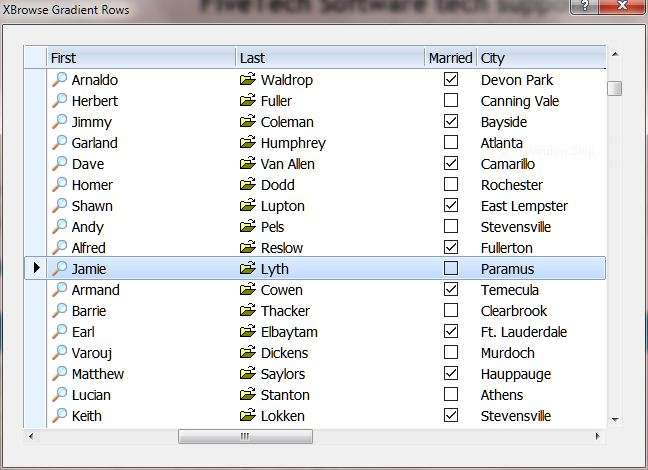


Sample program
Code (fw): Select all Collapse
// Using Windows 7 row selection colors in xbrowse

#include 'fivewin.ch'
#include 'xbrowse.ch'

#define MARQSTYLE_HIGHLWIN7  7

function Main()

   local oDlg, oBrw, oFont

   USE CUSTOMER ALIAS CUST

   DEFINE FONT oFont NAME 'Tahoma' SIZE 0, -14

   DEFINE DIALOG oDlg SIZE 640,440 PIXEL ;
      FONT oFont TITLE 'XBrowse Gradient Rows'

   @ 10, 10 XBROWSE oBrw OF oDlg ;
      SIZE 300, 200 PIXEL ;
      COLUMNS 'First', 'Last', 'Married', 'City' ;
      ALIAS 'CUST' NOBORDER CLASS TXbrWin7()

   WITH OBJECT oBrw
      //
      :nMarqueeStyle    = MARQSTYLE_HIGHLWIN7  // for Windows 7 style
      //
      :Married:SetCheck()
      WITH OBJECT :First
         :AddBitmap( "c:\fwh\bitmaps\16x16\zoom2.bmp" )
         :bBmpData         := { || 1 }
      END
      WITH OBJECT :Last
         :AddBitmap( "c:\fwh\bitmaps\16x16\open.bmp" )
         :bBmpData         := { || 1 }
      END
   END

   oBrw:CreateFromCode()

   ACTIVATE DIALOG oDlg CENTERED

   oFont:End()

return nil

//----------------------------------------------------------------------------//

CLASS TXbrWin7 FROM TXBrowse

   CLASSDATA lRegistered AS LOGICAL // This is compulsory for derived classes

   METHOD Adjust()
   METHOD FullPaint() INLINE ( ::lTransparent .or. ::lMergeVert .or. ::nMarqueeStyle == MARQSTYLE_HIGHLWIN7 )
   METHOD DrawLine( lSelected, nRowSel )

ENDCLASS

//----------------------------------------------------------------------------//

METHOD Adjust() CLASS TXBrWin7

   if ::nMarqueeStyle == MARQSTYLE_HIGHLWIN7
      ::nRowDividerStyle   := LINESTYLE_NOLINES
      ::nColDividerStyle   := LINESTYLE_NOLINES
      ::bClrSelFocus       := ;
      ::bClrSel            := { || { CLR_BLACK, ;
                                 { { 1, RGB( 220, 235, 252 ), ;
                                 RGB( 193, 219, 252 ) } } } }

   endif

return Super:Adjust()

//----------------------------------------------------------------------------//

METHOD DrawLine( lSelected, nRowSel ) CLASS TXBrWin7

   local hDC, nRow, nBrwWidth, nDataHeight

   Super:DrawLine( lSelected, nRowSel )

   DEFAULT lSelected := .f.

   if lSelected
      if ::nMarqueeStyle == MARQSTYLE_HIGHLWIN7

         hDC         := ::GetDC()
         nRow        := ( ( ::nRowSel - 1 ) * ::nRowHeight ) + ::HeaderHeight()
         nBrwWidth   := ::BrwWidth()
         nDataHeight := ::DataHeight()

         RoundBox( hDC, 2, nRow - 1, nBrwWidth - 1, nRow + nDataHeight,     2, 2,;
                   RGB( 235, 244, 253 ), 1 )
         RoundBox( hDC, 1, nRow - 2, nBrwWidth,     nRow + nDataHeight + 1, 2, 2,;
                   RGB( 125, 162, 206 ), 1 )
      endif
   endif

return Self

//------------------------------------------------------------------//


If you like, you can keep this class in your library.

What all required is :

1) Add the clause "CLASS TXBrWin7()" while creating XBrowse
and
2) set oBrw:nMarqueeStyle := 7

Nothing more is to be done in the application program.
Regards


G. N. Rao.

Hyderabad, India
Posts: 422
Joined: Mon Aug 17, 2009 12:18 PM
Re: XBrowse Win7 Bar New Sample
Posted: Wed Dec 29, 2010 05:08 PM

Master Rao,

Why this beatiful look is not the normal xBrowse behaviour?.

Thanks

Saludos,


Eduardo
Posts: 10733
Joined: Sun Nov 19, 2006 05:22 AM
Re: XBrowse Win7 Bar New Sample
Posted: Wed Dec 29, 2010 05:19 PM
mgsoft wrote:Master Rao,

Why this beatiful look is not the normal xBrowse behaviour?.

Thanks

If our friends test this code and are satisfied, this can become part of the main class and a feature of future versions.
The derived class I have provided can be used with all earlier versions of fwh.
Regards


G. N. Rao.

Hyderabad, India
Posts: 4840
Joined: Fri Nov 18, 2005 04:52 PM
Re: XBrowse Win7 Bar New Sample
Posted: Wed Dec 29, 2010 06:13 PM

Rao,

This looks great!

Is there a way to define a column that only contains a graphic (and the header has a graphic also). We can do this with TWBrowse.

Thanks,
James

FWH 18.05/xHarbour 1.2.3/BCC7/Windows 10
Posts: 408
Joined: Fri Jan 29, 2010 08:14 PM
Re: XBrowse Win7 Bar New Sample
Posted: Wed Dec 29, 2010 10:16 PM
Hola Nages:

Yo acabo de compilar tu ejemplo con la version 8.12 y da error de compilacion cuando detecta CLASS.


.\JMEDIA.PRG(328) Error E0030 Syntax error: "syntax error at '{'"


un saludo
JLL
Libreria: FWH/FWH1109 + Harbour 5.8.2 + Borland C++ 5.8.2
Editor de Recursos: PellecC
ADA, OURXDBU
S.O: XP / Win 7 /Win10
Blog: http://javierlloris.blogspot.com.es/
e-mail: javierllorisprogramador@gmail.com
Posts: 10733
Joined: Sun Nov 19, 2006 05:22 AM
Re: XBrowse Win7 Bar New Sample
Posted: Thu Dec 30, 2010 03:40 AM
James Bott wrote:Rao,

This looks great!

Is there a way to define a column that only contains a graphic (and the header has a graphic also). We can do this with TWBrowse.

Thanks,
James

To show bitmap in header, after adding bitmaps to the column, with oCol:AddBitmap( <file/resource> ),
oCol:nHeadBmp := <nBmp> // nBmp is the serial number of bitmaps added to the column.
if you want to show only bitmap and not text in header, you can set oCol:cHeader := ''

You have already seen how to show bitmaps in the cells. If you want to show bitmaps only the cells without any data, make oCol:bStrData := { || '' }

For example, in the above sample, add these two lines:
oBrw:nHeadBmp := 1
oBrw:cHeader := ''
Regards


G. N. Rao.

Hyderabad, India
Posts: 422
Joined: Mon Aug 17, 2009 12:18 PM
Re: XBrowse Win7 Bar New Sample
Posted: Thu Dec 30, 2010 05:47 PM

Mr. Rao,

I think it will be very interesting that native xBrowse class (without the modification as all xbrowses must be changed) can detect Windows 7 grid by putting MARQSTYLE_HIGHLWIN7.

Thanks a lot ;)

Saludos,


Eduardo
Posts: 883
Joined: Tue Oct 11, 2005 11:57 AM
Re: XBrowse Win7 Bar New Sample
Posted: Thu Dec 30, 2010 09:00 PM

Rao

How can I add the CLASS TXbrWin7() clause to my code...

I create all my xBrowse in this way

    oBrw:=TxBrowse():New(oWnSql)
    oBrw:nTop:=95
    oBrw:nLeft:=0
    oBrw:...

Thanks in advance

From Chile
Adolfo

;-) Ji,ji,ji... buena la cosa... "all you need is code"

http://www.xdata.cl - Desarrollo Inteligente
----------
Asus TUF F15, 32GB Ram, 2 * 1 TB NVME M.2, GTX 1650
Posts: 10733
Joined: Sun Nov 19, 2006 05:22 AM
Re: XBrowse Win7 Bar New Sample
Posted: Thu Dec 30, 2010 09:28 PM
Instead of
Code (fw): Select all Collapse
oBrw:=TxBrowse():New(oWnSql)

Code (fw): Select all Collapse
oBrw:=TxBrWin7():New(oWnSql)

While you are free to choose any method of creating XBrowse, you are not aware that by this way of creating XBrowse and the columns, you have firmly decided NOT to use any of the capabilities of xbrowse. Probably you will never know what you are missing till you change your style to the new command syntax. You are using xbrowse as a dumb browse.
But it is totally your choice.
Regards


G. N. Rao.

Hyderabad, India
Posts: 883
Joined: Tue Oct 11, 2005 11:57 AM
Re: XBrowse Win7 Bar New Sample
Posted: Thu Dec 30, 2010 09:34 PM
Rao

While you are free to choose any method of creating XBrowse, you are not aware that by this way of creating XBrowse and the columns, you have firmly decided NOT to use any of the capabilities of xbrowse. Probably you will never know what you are missing till you change your style to the new command syntax. You are using xbrowse as a dumb browse.
But it is totally your choice.


I totally agree with you... but.. this is part of a data driven module, which has worked for some time with no problemas at all, with a great control over the data and functions to control it, and... is the same for DBF and MYSQL.

So if it works... :-)


Thanks for your answer.. will try it rigth away..

From Chile
Adolfo
;-) Ji,ji,ji... buena la cosa... "all you need is code"

http://www.xdata.cl - Desarrollo Inteligente
----------
Asus TUF F15, 32GB Ram, 2 * 1 TB NVME M.2, GTX 1650
Posts: 10733
Joined: Sun Nov 19, 2006 05:22 AM
Re: XBrowse Win7 Bar New Sample
Posted: Thu Dec 30, 2010 10:38 PM

Please do what you are comfortable with.
I only said you never know what you are missing. :)

Regards


G. N. Rao.

Hyderabad, India
Posts: 422
Joined: Mon Aug 17, 2009 12:18 PM
Re: XBrowse Win7 Bar New Sample
Posted: Thu Dec 30, 2010 11:11 PM

Master Rao,

Why don´t you incorporate the changes to xbrowse.prg?

Thank you

Saludos,


Eduardo
Posts: 4840
Joined: Fri Nov 18, 2005 04:52 PM
Re: XBrowse Win7 Bar New Sample
Posted: Fri Dec 31, 2010 07:21 AM

Mgsoft,

Rao did answer that question in a previous message above.

James

FWH 18.05/xHarbour 1.2.3/BCC7/Windows 10
Posts: 3107
Joined: Fri Oct 07, 2005 06:28 PM
Re: XBrowse Win7 Bar New Sample
Posted: Fri Dec 31, 2010 02:10 PM

THANKS MR RAO...

two questions...
the bitmaps I use must have the background color on white or another color ?

AND IF I WISH TOINSERT a BACKGROUND ( a bitmap on a center of xbrowse) INTO XBROWSE .....are there problems ?
can insert here a sample pls ?

Best Regards, Saludos


Falconi Silvio
Posts: 10733
Joined: Sun Nov 19, 2006 05:22 AM
Re: XBrowse Win7 Bar New Sample
Posted: Fri Dec 31, 2010 03:46 PM

Mr. Silvio

You can use any bitmaps just like in a normal browse.

You can also use a background like any other browse.

But recently I found that bitmaps we define in columns are not being painted correctly, when we also define a background (on some backgrounds only). I found this problem with both normal xbrowse as well as win7style. We need to find a solution for this in general. For the time being, you may not use bitmaps in columns when you use backgrounds, till we solve this problem

Regards


G. N. Rao.

Hyderabad, India