FiveTech Support Forums

FiveWin / Harbour / xBase community
Board index FiveWin para Harbour/xHarbour Un problemita con TTreeView
Posts: 1279
Joined: Mon Feb 06, 2006 04:28 PM
Un problemita con TTreeView
Posted: Wed May 25, 2011 11:15 AM

Hola,

Tengo un problema con ttreeview, que no he podido solucionar.....

Gracias a un amigo he podido entender mejor como funcionan los tree, y estoy tratando de hacer un tree en el cual se puedan seleccionar itemes de un nivel y automaticamente se seleccionen los sub-itemes del branch.

El problema es que no he encontrado otro evento para disparar la acci贸n de tildado que el click y sucede que el click es un evento que no se dispara si estoy seleccionando o tildando.

Por ello si tildo un item, los sub-items no se tildar谩n a menos que de click en cualquier parte del tree que no seleccione ni tilde.

Alguien me podr铆a sugerir una soluci贸n?

Adjunto el c贸digo y un link al exe, la dll y el prg para quien quiera probar el c贸digo.

http://www.box.net/shared/hbidjadl2s

Gracias desde ya por vuestra ayuda

Saludos/Regards,

Jos茅 Murugosa

"Los errores en programaci贸n, siempre est谩n entre la silla, el teclado y la IA!!"
Posts: 2365
Joined: Wed Nov 02, 2005 11:46 PM
Re: Un problemita con TTreeView
Posted: Thu May 26, 2011 10:38 AM
Hola Jose

Code (fw): Select all Collapse
// Using a TreeView with checkboxes and checking their status

#include "FiveWin.ch"

function Main()

   local oDlg, oTree

   DEFINE DIALOG oDlg

      oTree = TTreeView():New( 0, 0, oDlg,,,,,200,200,,.t.)

      oTree:OnClick = { | nRow, nCol | CheckStatus( oTree, oTree:aItems, nRow, nCol ) }

   ACTIVATE DIALOG oDlg CENTERED ON INIT BuildTree( oTree )

return nil 

function BuildTree( oTree ) 

   local oMenu := Array( 2 ), oSubMenu := Array( 3 ) 

   oMenu[ 1 ]:= oTree:Add( "Principal" ) 
   oMenu[ 1 ]:Cargo = "01"
      oSubMenu[ 1 ]:= oMenu[ 1 ]:Add( "Imprimir..." )
      oSubMenu[ 1 ]:SetCheck( .T. ) 
      oSubMenu[ 1 ]:Cargo = "01:01" 

   oMenu[ 2 ]:= oTree:Add( "Proyectos" ) 
   oMenu[ 2 ]:Cargo = "02" 
      oSubMenu[ 2 ]:= oMenu[ 2 ]:Add( "Definir Proyectos" ) 
      oSubMenu[ 2 ]:Cargo = "02:01" 
      oSubmenu[ 3 ]:= oMenu[ 2 ]:Add( "Actualizaci贸n datos" ) 
      oSubMenu[ 3 ]:Cargo = "02:02" 

   oTree:Expand() 

return nil 

function CheckStatus( oTree, aItems, nRow, nCol )

   local n, lActivo, nn, x
   local cPrompt, cCargo
   local oItem
   local aiTmp
   
   oItem  := oTree:HitTest( nRow, nCol )

   nn     := LEN(oItem:cargo)
   lActivo:= oTree:GetCheck( oItem )

   for n = 1 to Len( aItems )
       if LEFT(aItems[ n ]:cargo,nn) == oItem:cargo

          aiTmp:= aItems[n]:aItems
          FOR x:= 1 TO LEN( aiTmp )
              oTree:SetCheck( aiTmp[ x ], lActivo )
          NEXT

       endif
   next
   
return nil
Posts: 1279
Joined: Mon Feb 06, 2006 04:28 PM
Re: Un problemita con TTreeView
Posted: Thu May 26, 2011 10:44 AM

Muchas Gracias Daniel!!!

Llevaba 4 d铆as quemandome la cabeza sin encontrar el como.....

Gracias por la ayuda que siempre nos das en el foro!! :)

Saludos/Regards,

Jos茅 Murugosa

"Los errores en programaci贸n, siempre est谩n entre la silla, el teclado y la IA!!"
Posts: 1710
Joined: Tue Oct 28, 2008 06:26 PM
Re: Un problemita con TTreeView
Posted: Thu May 26, 2011 01:26 PM

Daniel,
En el ejemplo posteado da error cuando se da click en menos (-)

El error es:

'NIL' has no exported method: CARGO

Saludos,

Adhemar

Saludos,


Adhemar C.
Posts: 1279
Joined: Mon Feb 06, 2006 04:28 PM
Re: Un problemita con TTreeView
Posted: Thu May 26, 2011 02:47 PM
acuellar wrote:Daniel,
En el ejemplo posteado da error cuando se da click en menos (-)

El error es:

'NIL' has no exported method: CARGO

Saludos,

Adhemar


En realidad, hay 2 problemas

En primer lugar, cuando se da click en cualquier parte del tree que no sea tildar o seleccionar produce el error que mencionas.
En segundo lugar, no funciona el tildado si el tree se coloca desde recursos.

Pero... nos vamos acercando!!!!! :-)

( aramos dijo el mosquito.... :-) )
Saludos/Regards,

Jos茅 Murugosa

"Los errores en programaci贸n, siempre est谩n entre la silla, el teclado y la IA!!"
Posts: 389
Joined: Wed Nov 29, 2006 01:51 PM
Re: Un problemita con TTreeView
Posted: Thu May 26, 2011 04:08 PM

Bueno,

yo encontre el siguiente tema y tambien la solucion, pero no s茅 como implementarla.

si tenemos una estructura

menu1
submenu1
submenu2
menu2
-.-
ahi anda ok

ahora si tenemos :
menu1
submenu1
submenu1.1
submenu1.2
submenu2
menu2

da error cuando pulso el +, el mismo q plantea jose, con la var CARGO, y entiendo q oItem va a NIL, x eso da error.
Lo q entiendo es q en el ejemplo q puso Daniel, y q habiamos empezado a probar con jose, es q faltaria como una recursividad para subopciones, pero no se como implementar eso...

bueno, a ver los experimentados si nos echan una manito.

Gracias., salu2.

Posts: 1279
Joined: Mon Feb 06, 2006 04:28 PM
Re: Un problemita con TTreeView
Posted: Thu May 26, 2011 06:00 PM

Efectivamente,

No he podido encontrar la vuelta al problema... verdaderamente me supera, ma帽ana seguir茅 sufriendo..... gracias a todos los que se han interesado en el tema :D

Saludos/Regards,

Jos茅 Murugosa

"Los errores en programaci贸n, siempre est谩n entre la silla, el teclado y la IA!!"
Posts: 2365
Joined: Wed Nov 02, 2005 11:46 PM
Re: Un problemita con TTreeView
Posted: Thu May 26, 2011 09:44 PM

Jose

Relamnete trabaja diferente el creado desde recurso que el creado desde codigo... no tengo una explicacion logica :-s

Posts: 2365
Joined: Wed Nov 02, 2005 11:46 PM
Re: Un problemita con TTreeView
Posted: Thu May 26, 2011 09:45 PM
Ariel wrote:Bueno,

yo encontre el siguiente tema y tambien la solucion, pero no s茅 como implementarla.

si tenemos una estructura

menu1
submenu1
submenu2
menu2
-.-
ahi anda ok

ahora si tenemos :
menu1
submenu1
submenu1.1
submenu1.2
submenu2
menu2

da error cuando pulso el +, el mismo q plantea jose, con la var CARGO, y entiendo q oItem va a NIL, x eso da error.
Lo q entiendo es q en el ejemplo q puso Daniel, y q habiamos empezado a probar con jose, es q faltaria como una recursividad para subopciones, pero no se como implementar eso...

bueno, a ver los experimentados si nos echan una manito.

Gracias., salu2.


Ariel solucionado tu punto
Code (fw): Select all Collapse
// Using a TreeView with checkboxes and checking their status

#include "FiveWin.ch"

function Main()

   local oDlg, oTree

   DEFINE DIALOG oDlg SIZE 400, 600

      oTree = TTreeView():New( 0, 0, oDlg,,,,,200,300,,.t.)

      oTree:OnClick = { | nRow, nCol | CheckStatus( oTree, oTree:aItems, nRow, nCol ) }

   ACTIVATE DIALOG oDlg CENTERED ON INIT BuildTree( oTree )

return nil 

function BuildTree( oTree ) 

   local oMenu 
   local oSub, oSub2, oSub3
   
   
   oMenu := oTree:Add( "menu 1" ) 
      oSub = oMenu:Add( "submenu 1" )
      oSub = oMenu:Add( "submenu 2" )
      oSub = oMenu:Add( "submenu 3" )
      oSub = oMenu:Add( "submenu 4" )
      oSub = oMenu:Add( "submenu 5" )
         oSub2 = oSub:Add( "submenu 5-1" )
         oSub2 = oSub:Add( "submenu 5-2" )
         oSub2 = oSub:Add( "submenu 5-3" )
         oSub2 = oSub:Add( "submenu 5-4" )
         oSub2 = oSub:Add( "submenu 5-5" )
            oSub = oSub2:Add( "submenu 5-5-1" )
            oSub = oSub2:Add( "submenu 5-5-2" )
            oSub = oSub2:Add( "submenu 5-5-3" )
            oSub = oSub2:Add( "submenu 5-5-4" )
               oSub2 = oSub:Add( "submenu 5-5-1-1" )
               oSub2 = oSub:Add( "submenu 5-5-1-2" )
               oSub2 = oSub:Add( "submenu 5-5-1-3" )

   oMenu := oTree:Add( "Principal" ) 
      oSub = oMenu:Add( "Imprimir..." )

   oTree:Expand() 

return nil 

function CheckStatus( oTree, aItems, nRow, nCol )

   local lActivo
   local oItem
   
   oItem  := oTree:HitTest( nRow, nCol )

   if oItem != NIL 
      lActivo:= oTree:GetCheck( oItem )
   
      RunItems( oItem:aItems, lActivo )
   endif
   
return nil      
   
   
//----------------------------------------------------------------------------//

function RunItems( aItems, lActivo ) 

   local n, oItem 

   for n = 1 to Len( aItems ) 
      aItems[ n ]:SetCheck( lActivo )

      if Len( aItems[ n ]:aItems ) > 0
         RunItems( aItems[ n ]:aItems, lActivo ) 
      endif
   next 

return nil
Posts: 389
Joined: Wed Nov 29, 2006 01:51 PM
Re: Un problemita con TTreeView
Posted: Fri May 27, 2011 02:33 AM
Daniel,
Gracias func铆on贸 perfecta la multiseleccion, ahora encontr茅 otro bugecito :-) , si le fuerzo a q este seleccionado el subitem, no lo tiene en cuenta.
siguiendo con tu ej. :

Code (fw): Select all Collapse
// Using a TreeView with checkboxes and checking their status

#include "FiveWin.ch"

function Main()

   local oDlg, oTree

   DEFINE DIALOG oDlg SIZE 400, 600

      oTree = TTreeView():New( 0, 0, oDlg,,,,,200,300,,.t.)

      oTree:OnClick = { | nRow, nCol | CheckStatus( oTree, oTree:aItems, nRow, nCol ) }

   ACTIVATE DIALOG oDlg CENTERED ON INIT BuildTree( oTree )

return nil 

function BuildTree( oTree ) 

   local oMenu 
   local oSub, oSub2, oSub3
   
   
   oMenu := oTree:Add( "menu 1" ) 
      oSub = oMenu:Add( "submenu 1" )
      oSub:SetCheck( .t. )
      oSub = oMenu:Add( "submenu 2" )
      oSub = oMenu:Add( "submenu 3" )
      oSub = oMenu:Add( "submenu 4" )
      oSub = oMenu:Add( "submenu 5" )
         oSub2 = oSub:Add( "submenu 5-1" )
         oSub2 = oSub:Add( "submenu 5-2" )
         oSub2:SetCheck( .t. )
         oSub2 = oSub:Add( "submenu 5-3" )
         oSub2 = oSub:Add( "submenu 5-4" )
         oSub2 = oSub:Add( "submenu 5-5" )
            oSub = oSub2:Add( "submenu 5-5-1" )
            oSub = oSub2:Add( "submenu 5-5-2" )
            oSub:SetCheck( .t. )
            oSub = oSub2:Add( "submenu 5-5-3" )
            oSub = oSub2:Add( "submenu 5-5-4" )
               oSub2 = oSub:Add( "submenu 5-5-1-1" )
               oSub2 = oSub:Add( "submenu 5-5-1-2" )
               oSub2:SetCheck( .t. )
               oSub2 = oSub:Add( "submenu 5-5-1-3" )

   oMenu := oTree:Add( "Principal" ) 
      oSub = oMenu:Add( "Imprimir..." )

   oTree:Expand() 

return nil 

function CheckStatus( oTree, aItems, nRow, nCol )

   local lActivo
   local oItem
   
   oItem  := oTree:HitTest( nRow, nCol )

   if oItem != NIL 
      lActivo:= oTree:GetCheck( oItem )
   
      RunItems( oItem:aItems, lActivo )
   endif
   
return nil      
   
   
//----------------------------------------------------------------------------//

function RunItems( aItems, lActivo ) 

   local n, oItem 

   for n = 1 to Len( aItems ) 
      aItems[ n ]:SetCheck( lActivo )

      if Len( aItems[ n ]:aItems ) > 0
         RunItems( aItems[ n ]:aItems, lActivo ) 
      endif
   next 

return nil


si te fijas los sub:Setcheck(.t.) NO funcionan.

Grax.
Salu2. Ariel.
Posts: 2365
Joined: Wed Nov 02, 2005 11:46 PM
Re: Un problemita con TTreeView
Posted: Fri May 27, 2011 11:15 AM
Ariel

Al parecer es otro de los incomodos casos de los DIALOGOS y la forma como procesan los mensajes...


en el siguiente ejemplo en la funcion TreeUno() uso la clausula NOWAIT despues proceso los mensajes pendientes con un sysrefresh y luego es que se hace efectiva la seleccion de item

en al funcion TreeDos() uso un dialogo modal, lo hago por medio del codeblock bPainted del dialogo para activar los item solo la primera vez...

Code (fw): Select all Collapse
// Using a TreeView with checkboxes and checking their status

#include "FiveWin.ch"

function Main()

   local oWnd
   local oMenu
   
   MENU oMenu 
      MENUITEM "Tree 1" ACTION treeuno()
      MENUITEM "Tree 2" ACTION treedos()
   ENDMENU
   
   define window oWnd menu oMenu
   
   activate window oWnd

return nil 

function treeuno()

   local oTree, oDlg

   DEFINE DIALOG oDlg SIZE 400, 600

      oTree = TTreeView():New( 0, 0, oDlg,,,,,200,300,,.t.)

      oTree:OnClick = { | nRow, nCol | CheckStatus( oTree, oTree:aItems, nRow, nCol ) }

   ACTIVATE DIALOG oDlg CENTERED ON INIT ( BuildTree( oTree ) ) NOWAIT
   
   SetInitItem( oTree )
   
return nil

function treedos()

   local oTree, oDlg

   DEFINE DIALOG oDlg SIZE 400, 600

      oTree = TTreeView():New( 0, 0, oDlg,,,,,200,300,,.t.)

      oTree:OnClick = { | nRow, nCol | CheckStatus( oTree, oTree:aItems, nRow, nCol ) }
      
      oDlg:bPainted = {|| SetInitItem( oTree ) }

   ACTIVATE DIALOG oDlg CENTERED ON INIT ( BuildTree( oTree ) ) 
   

return nil

function SetInitItem( oTree )

   if oTree:Cargo == NIL
      SysRefresh()
      oTree:aItems[ 1 ]:aItems[ 1 ]:SetCheck( .T. )
      oTree:aItems[ 1 ]:aItems[ 5 ]:aItems[ 2 ]:SetCheck( .T. )
      oTree:aItems[ 1 ]:aItems[ 5 ]:aItems[ 5 ]:aItems[ 2 ]:SetCheck( .T. )
      oTree:aItems[ 1 ]:aItems[ 5 ]:aItems[ 5 ]:aItems[ 4 ]:aItems[ 2 ]:SetCheck( .T. )
      oTree:Cargo = 1
   endif


return nil

function BuildTree( oTree ) 

   local oMenu 
   local oSub, oSub2, oSub3
   
   
   oMenu := oTree:Add( "menu 1" ) 
      oSub = oMenu:Add( "submenu 1" )
//      oSub:SetCheck( .t. )     
      oSub = oMenu:Add( "submenu 2" )
      oSub = oMenu:Add( "submenu 3" )
      oSub = oMenu:Add( "submenu 4" )
      oSub = oMenu:Add( "submenu 5" )
         oSub2 = oSub:Add( "submenu 5-1" )
         oSub2 = oSub:Add( "submenu 5-2" )
//         oSub2:SetCheck( .t. )
         oSub2 = oSub:Add( "submenu 5-3" )
         oSub2 = oSub:Add( "submenu 5-4" )
         oSub2 = oSub:Add( "submenu 5-5" )
            oSub = oSub2:Add( "submenu 5-5-1" )
            oSub = oSub2:Add( "submenu 5-5-2" )
//            oSub:SetCheck( .t. )
            oSub = oSub2:Add( "submenu 5-5-3" )
            oSub = oSub2:Add( "submenu 5-5-4" )
               oSub2 = oSub:Add( "submenu 5-5-1-1" )
               oSub2 = oSub:Add( "submenu 5-5-1-2" )
//               oSub2:SetCheck( .t. )
               oSub2 = oSub:Add( "submenu 5-5-1-3" )

   oMenu := oTree:Add( "Principal" ) 
      oSub = oMenu:Add( "Imprimir..." )

   oTree:ExpandAll() 

return nil 

function CheckStatus( oTree, aItems, nRow, nCol )

   local lActivo
   local oItem
   
   oItem  := oTree:HitTest( nRow, nCol )

   if oItem != NIL 
      lActivo:= oTree:GetCheck( oItem )
   
      RunItems( oItem:aItems, lActivo )
   endif
   
return nil      
   
   
//----------------------------------------------------------------------------//

function RunItems( aItems, lActivo ) 

   local n, oItem 

   for n = 1 to Len( aItems ) 
      aItems[ n ]:SetCheck( lActivo )

      if Len( aItems[ n ]:aItems ) > 0
         RunItems( aItems[ n ]:aItems, lActivo ) 
      endif
   next 

return nil
Posts: 1078
Joined: Thu Sep 27, 2007 03:47 PM
Re: Un problemita con TTreeView
Posted: Fri Jun 03, 2011 03:51 PM

Mi pregunta al inicial el Dialogo carga se BuildTree( oTree ) es lo que entiendo

ACTIVATE DIALOG oDlg CENTERED ON INIT BuildTree( oTree )

Como lo cargo sin usar ON INIT BuildTree( oTree )

Ruben Dario Gonzalez
Cali-Colombia
rubendariogd@hotmail.com - rubendariogd@gmail.com
Posts: 537
Joined: Mon Jan 16, 2006 03:42 PM
Re: Un problemita con TTreeView
Posted: Tue Feb 19, 2019 02:52 PM

Amigos, como puedo saber cual checkbox esta activo

saludos

Posts: 537
Joined: Mon Jan 16, 2006 03:42 PM
Re: Un problemita con TTreeView
Posted: Wed Feb 20, 2019 11:47 AM

Gracias al Cristobal Navarro. pongo el codigo completo. muchas gracuas

include "xbrowse.ch"

Static aSelected := {}
Static oTree

//----------------------------------------------------------------------------//

Function Main()

local oDlg, oImageList, n, ncargo
local oBtt2
local oFnt

DEFINE FONT oFnt NAME "Calibri" SIZE 0, -16

DEFINE DIALOG oDlg TITLE "Tipos de Servicios" SIZE 600, 650 FONT oFnt
oDlg:lHelpIcon := .F.
@ 10, 15 BTNBMP oBtt2 PROMPT "Selecccionados" FILENAME "..\bitmaps\link.bmp" OF oDlg ;
ACTION ( aSelected := {},NewSelected( oTree:aItems ), XBrowse( aSelected ) ) SIZE 80, 32 LEFT

@ 0.5, 20 TREEVIEW oTree OF oDlg SIZE 170, 300 COLOR Rgb( 128, 128, 128 ), GetSysColor( 5 ) CHECK
oTree:nStyle += WS_BORDER

oTree:bLClicked := { | nRow, nCol, nKeyFlags | NewClick( nRow, nCol ) }

ACTIVATE DIALOG oDlg CENTERED ON INIT ( AddItems( oImageList ), oTree:Expand() )

RELEASE FONT oFnt

Return NIL

//----------------------------------------------------------------------------//

Function AddItems( oImageList )

local oItem1, oItem2, oItem3, oItem4, oItem5, oItem6
local oItem11, oItem12, oItem13, oItem14, oItem15, oItem16
local oItem21, oItem22, oItem23
local oItem31, oItem32
local oItem41, oItem42, oItem43
local oItem51
local oItem61, oItem62

local Mydate, Mytime

Mydate := DATE()
Mytime := TIME()

if !Empty( oImageList )
oTree:SetImageList( oImageList )
endif

oItem1 := oTree:Add( "LAVADOS", 0 )
oItem11 := oItem1:Add( "INTERIOR", 2)
//oItem11:Cargo :={ "CHECKBOX", 2, oItem1 }
oItem12 := oItem1:Add( "EXTERIOR", 2)
//oItem12:Cargo :={ "CHECKBOX", 3, oItem1 }
oItem13 := oItem1:Add( "MOTOR", 2)
//oItem13:Cargo :={ "CHECKBOX", 2, oItem1 }
oItem14 := oItem1:Add( "CHASIS", 2)
//oItem14:Cargo :={ "CHECKBOX", 2, oItem1 }
oItem15 := oItem1:Add( "PULVERIZADO", 2)
//oItem15:Cargo :={ "CHECKBOX", 2, oItem1 }
oItem16 := oItem1:Add( "FITOSOI", 2)
//oItem16:Cargo :={ "CHECKBOX", 2, oItem1 }

oItem2 := oTree:Add( "NEUMATICOS", 0 )
oItem21 := oItem2:Add( "MONTAJE", 2 )
//oItem21:Cargo := { "CHECKBOX", 2, oItem2 }
oItem22 := oItem2:Add( "BALANCEO", 2 )
//oItem22:Cargo := { "CHECKBOX", 2, oItem2 }
oItem23 := oItem2:Add( "ARREGLO", 2 )
//oItem23:Cargo := { "CHECKBOX", 2, oItem2 }

oItem3 := oTree:Add( "ALINEACION", 0 )
oItem31 := oItem3:Add( "REVISION ALINEACION", 2 )//; oItem31:Cargo := { "CHECKBOX", 2, oItem3 }
oItem32 := oItem3:Add( "ALINEACION", 2 ) //; oItem32:Cargo := { "CHECKBOX", 2, oItem3 }

oItem4 := oTree:Add( "CAMBIO DE ACEITE", 0 )
oItem41 := oItem4:Add( "MOTOR", 2 ) //; oItem41:Cargo := { "CHECKBOX", 2, oItem4 }
oItem42 := oItem4:Add( "CAJA", 2 ) //; oItem42:Cargo := { "CHECKBOX", 2, oItem4 }
oItem43 := oItem4:Add( "DIFERENCIAL", 2 ) //; oItem43:Cargo := { "CHECKBOX", 2, oItem4 }

oItem5 = oTree:Add( "ENGRASE", 0 )
oItem51 = oItem5:Add( "ENGRASE", 2 ) //; oItem51:Cargo:={ "CHECKBOX", 2, oItem5 }

oItem6 = oTree:Add( "SERVICIOS VARIOS", 0 )
oItem61 = oItem6:Add( "MECANICA", 2 ) //; oItem61:Cargo:={ "CHECKBOX", 2, oItem6 }
oItem62 = oItem6:Add( "ELECTRICO", 2 ) //; oItem62:Cargo:={ "CHECKBOX", 2, oItem6 }

Return NIL

//----------------------------------------------------------------------------//

Function NewClick( nRow, nCol )

local oItem

oItem := oTree:HitTest( nRow, nCol )
if !Empty( oItem )
if Len( oItem:aItems ) > 0
AEVal( oItem:aItems, { | o | oTree:SetCheck( o, !oTree:GetCheck( o ) ) } )
endif
endif
Return nil

//----------------------------------------------------------------------------//

Function NewSelected( aItems )

local x ,oItem

For x = 1 to Len( aItems )
oItem := aItems[ x ]
if Len( oItem:aItems ) == 0
if oTree:GetCheck( oItem )
AAdd( aSelected, oItem:cPrompt )
endif
else
NewSelected( oItem:aItems )

endif
Next x
*/

Return nil

Saludos

Posts: 6755
Joined: Wed Feb 15, 2012 08:25 PM
Re: Un problemita con TTreeView
Posted: Mon Feb 25, 2019 08:59 PM
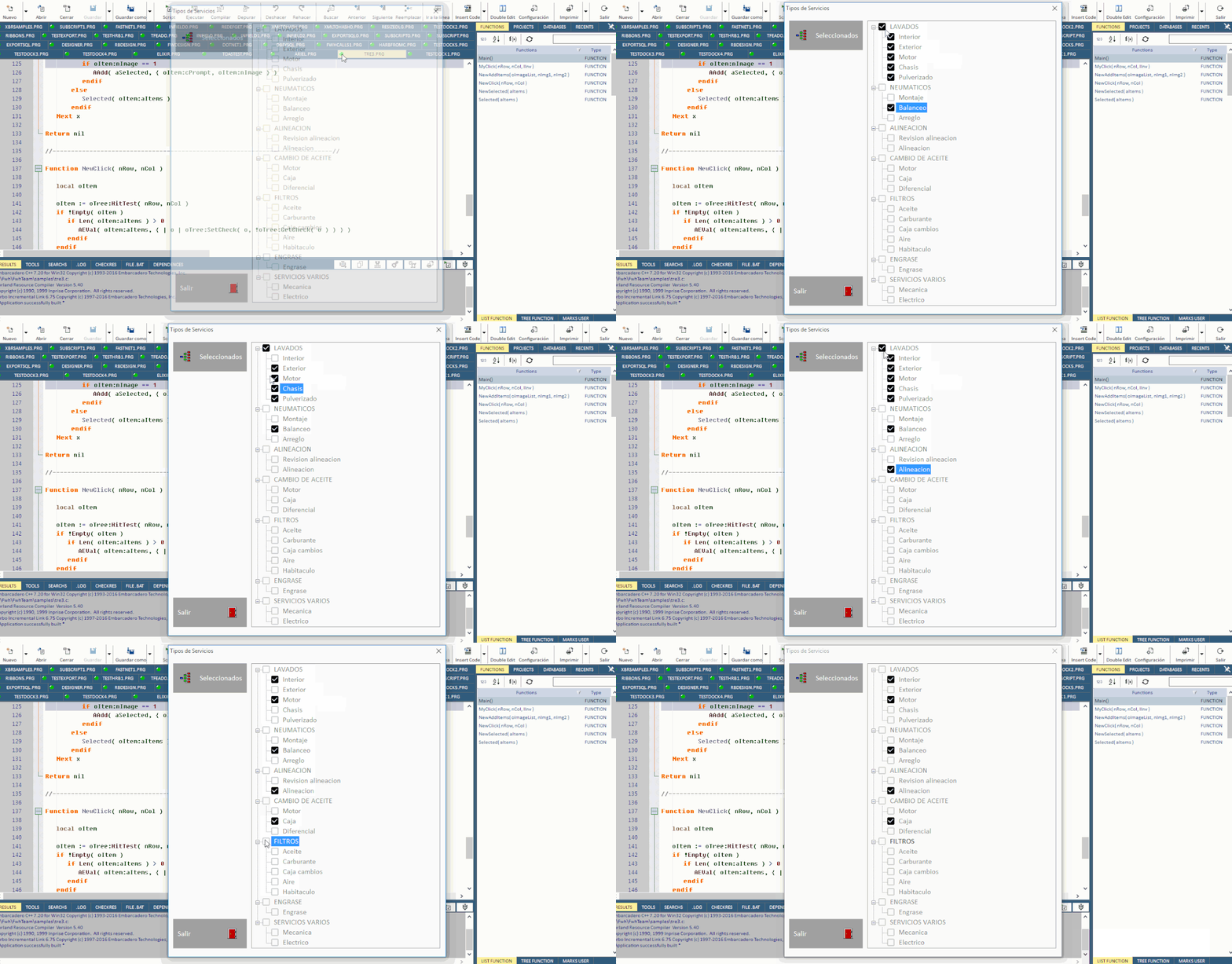
Con permiso de Jose, adjunto mi c贸digo

Code (fw): Select all Collapse
#Include "FiveWin.ch"

Static aSelected  := {}
Static oTree

//----------------------------------------------------------------------------//

Function Main()

   local oDlg, oImageList
   local oBtt1
   local oBtt2
   local oBtt3
   local oFnt
   
   DEFINE FONT oFnt NAME "Calibri" SIZE 0, -16

   DEFINE DIALOG oDlg TITLE "Tipos de Servicios" SIZE 600, 650 FONT oFnt
   oDlg:lHelpIcon := .F.

   @ 07, 05 BTNBMP oBtt1 PROMPT "Seleccionados" FILENAME "..\bitmaps\link.bmp" OF oDlg ;
      ACTION ( if( Empty( oImageList ), NewSelected( oTree:aItems ), Selected( oTree:aItems ) ), ;
               XBrowse( aSelected ) ) SIZE 80, 32 LEFT ;
      COLOR CLR_WHITE, Rgb( 160, 160, 160 ) ;
      FLAT PIXEL NOROUND NOBORDER // TRANSPARENT

   @ ( oDlg:nHeight / 2 ) - 40, 05 BTNBMP oBtt2 PROMPT "Salir" FILENAME "..\bitmaps\exit.bmp" OF oDlg ;
      ACTION ( oDlg:End() ) SIZE 80, 32 RIGHT ;
      COLOR CLR_WHITE, Rgb( 160, 160, 160 ) ;
      FLAT PIXEL NOROUND NOBORDER // TRANSPARENT

   oImageList := TImageList():New( 16, 16 )
   oImageList:Add( TBitmap():Define( "conex_off1",, oDlg ) , TBitmap():Define( "conex_off",, oDlg ) )
   oImageList:Add( TBitmap():Define( "conex_on1",, oDlg ) , TBitmap():Define( "conex_on",, oDlg ) )
   oImageList:Add( TBitmap():Define( "conex_work",, oDlg ), TBitmap():Define( "conex_fet",, oDlg ) )

   @ 0.5, 15 TREEVIEW oTree OF oDlg SIZE 205, 310 COLOR Rgb( 128, 128, 128 ), GetSysColor( 5 ) //CHECK
   oTree:nStyle += WS_BORDER

   oTree:bLClicked  := { | nRow, nCol, nKeyFlags | if( Empty( oImageList ), ;
                                                       NewClick( nRow, nCol ), ;
                                                       MyClick( nRow, nCol ) ) }

   ACTIVATE DIALOG oDlg CENTERED ON INIT ( NewAddItems( oImageList ), oTree:Expand() )

   RELEASE FONT oFnt

Return NIL

//----------------------------------------------------------------------------//

Function NewAddItems( oImageList, nImg1, nImg2 )

   local x
   local y
   local oItem
   local oItem1
   local aItems    := { "LAVADOS", "NEUMATICOS", "ALINEACION", "CAMBIO DE ACEITE", ;
                        "FILTROS", "ENGRASE", "SERVICIOS VARIOS" }
   local aSubItems := { { "INTERIOR", "EXTERIOR", "MOTOR", "CHASIS", "PULVERIZADO" }, ;
                        { "MONTAJE", "BALANCEO", "ARREGLO" }, ;
                        { "REVISION ALINEACION", "ALINEACION" }, ;
                        { "MOTOR", "CAJA", "DIFERENCIAL" }, ;
                        { "ACEITE", "CARBURANTE", "CAJA CAMBIOS", "AIRE", "HABITACULO" }, ;
                        { "ENGRASE" }, ;
                        { "MECANICA", "ELECTRICO" } }
                        
   if !Empty( oImageList )
      oTree:SetImageList( oImageList )
      DEFAULT nImg1 := 0
      DEFAULT nImg2 := 0
   else
      DEFAULT nImg1 := 0
      DEFAULT nImg2 := 0
   endif

   For x = 1 to Len( aItems )
       oItem := oTree:Add( " " + aItems[ x ], nImg1 )
       For y = 1 to Len( aSubItems[ x ] )
          oItem1 := oItem:Add( " " + StrCapFirst( aSubItems[ x ][ y ] ), nImg2 )
          oItem1:Cargo := aSubItems[ x ][ y ]
       Next y
   Next x

Return nil

//----------------------------------------------------------------------------//

Function MyClick( nRow, nCol, lInv )

   local oItem
   local nImg
   DEFAULT lInv   := .T.

   oItem := oTree:HitTest( nRow, nCol )

   if !hb_IsNil( oItem )
      nImg   := if( oItem:nImage = 0, 1, 0 )
      oItem:Set( , nImg )
      oItem:nImage := nImg
      if hb_IsNil( oItem:Cargo )
         if Len( oItem:aItems ) > 0
            if lInv
               AEVal( oItem:aItems, ;
                     { | o | if( o:nImage = 1, ( o:Set( , 0 ), o:nImage := 0 ), ;
                                ( o:Set( , 1 ), o:nImage := 1 ) ) } )
            else
               AEVal( oItem:aItems, ;
                      { | o | o:Set( , oItem:nImage ), o:nImage := oItem:nImage } )
            endif
         endif
      endif
   endif

return nil

//----------------------------------------------------------------------------//

Function Selected( aItems )

   local x
   For x = 1 to Len( aItems )
       oItem := aItems[ x ]
       if Len( oItem:aItems ) == 0
          if oItem:nImage == 1
             AAdd( aSelected, { oItem:cPrompt, oItem:nImage } )
          endif
       else
          Selected( oItem:aItems )
       endif
   Next x

Return nil

//----------------------------------------------------------------------------//

Function NewClick( nRow, nCol )

   local oItem
   
   oItem := oTree:HitTest( nRow, nCol )
   if !Empty( oItem )
      if Len( oItem:aItems ) > 0
         AEVal( oItem:aItems, { | o | oTree:SetCheck( o, !oTree:GetCheck( o ) ) } )
      endif
   endif

Return nil

//----------------------------------------------------------------------------//

Function NewSelected( aItems )

   local x

   For x = 1 to Len( aItems )
       oItem := aItems[ x ]
       if Len( oItem:aItems ) == 0
          if oTree:GetCheck( oItem )
             AAdd( aSelected, LTrim( oItem:cPrompt ) )
          endif
       else
          NewSelected( oItem:aItems )
       endif
   Next x

Return nil

//----------------------------------------------------------------------------//


Cristobal Navarro

Hay dos tipos de personas: las que te hacen perder el tiempo y las que te hacen perder la noci贸n del tiempo

El secreto de la felicidad no est谩 en hacer lo que te gusta, sino en que te guste lo que haces

Continue the discussion