


Antonio,
I have 3 problems :
1) with QUICKBUTTON , you cann try fwh\samples\testcqk.prg
Application
===========
Path and name: C:\FWH_05\samples\TESTQCK.exe (32 bits)
Size: 1,664,000 bytes
Time from start: 0 hours 0 mins 0 secs
Error occurred at: 05/30/11, 16:48:51
Error description: Warning BASE/1005 Message not found: TRIBBONBAR:_BLDBLCLICKQ
2) the BRUSH of RIBBONBAR ( I try with Windows XP )
This with FWH 11.04
[IMG=http://img143.imageshack.us/img143/4562/immagineokx.png][/IMG]
Uploaded with ImageShack.us
This with FWH 11.05
[IMG=http://img717.imageshack.us/img717/4475/immagineerr.png][/IMG]
Uploaded with ImageShack.us
3 ) And this is the same problem of Enrico , I move the Dialog , so you can see the problem .
[IMG=http://img688.imageshack.us/img688/1229/immagineenr.png][/IMG]
Uploaded with ImageShack.us
Regards MAurizio
Board index FiveWin for Harbour/xHarbour New FWH 11.05
Page: 1 2 (22 posts)
Maurizio
www.nipeservice.com
www.nipeservice.com
Maurizio,
For 1. please add this data to Class TRibbonBar:
DATA bLDblClickQ

Saludos;
Igual tengo el detalle con un QuickButton en un TRibbon
hago la modificación de incorporar la data bLDblClickQ, pero ahora me dice
al momento de compilar que no consigue el hbcompat.ch
Acabo de bajar de nuevo la 11.05, e igual.
Gracias.-
Mario Antonio González Osal
Venezuela
m a g 0 7 1 @ g m a i l. c o m
Venezuela
m a g 0 7 1 @ g m a i l. c o m

hbcompat.ch can be found in \harbour\include or \xharbour\include
Regards
G. N. Rao.
Hyderabad, India
G. N. Rao.
Hyderabad, India
Thank you nageswaragunupudi;
I not can be hbcompat.ch found in \harbour\include
I am used harbour FTDN
Excuse me my english 
Mario Antonio González Osal
Venezuela
m a g 0 7 1 @ g m a i l. c o m
Venezuela
m a g 0 7 1 @ g m a i l. c o m

![[IMG=http://img143.imageshack.us/img143/4562/immagineokx.png][/IMG]](http://imageshack.us/photo/my-images/143/immagineokx.png/)
![[IMG=http://img717.imageshack.us/img717/4475/immagineerr.png][/IMG]](http://imageshack.us/photo/my-images/717/immagineerr.png/)
![[IMG=http://img688.imageshack.us/img688/1229/immagineenr.png][/IMG]](http://imageshack.us/photo/my-images/688/immagineenr.png/)
Maurizio wrote:This with FWH 11.05
[IMG=http://img717.imageshack.us/img717/4475/immagineerr.png][/IMG]
Uploaded with ImageShack.us
already fixed, please be alert for a build revision
Thanks...
our best documentation is the source code
Isla de Margarita Venezuela.
danielgarciagil@gmail.com
http://tdolphin.blogspot.com/
https://www.dropbox.com/referrals/NTI5Njk4MDc1OQ?src=global9
Isla de Margarita Venezuela.
danielgarciagil@gmail.com
http://tdolphin.blogspot.com/
https://www.dropbox.com/referrals/NTI5Njk4MDc1OQ?src=global9
We have just published a revised FWH 11.05 with all these recent changes
Thanks Antonio and Daniel , now works perfect .
Daniel ,
is it possible have style 2010 in QUICKBUTTON and QUICKACCESS ,
and why my menu is not in 2010 style ? ( I use XP)
[IMG=http://img822.imageshack.us/img822/8241/immagine05.png][/IMG]
Uploaded with ImageShack.us
Regards MAurizio
Daniel ,
is it possible have style 2010 in QUICKBUTTON and QUICKACCESS ,
and why my menu is not in 2010 style ? ( I use XP)
[IMG=http://img822.imageshack.us/img822/8241/immagine05.png][/IMG]
![[IMG=http://img822.imageshack.us/img822/8241/immagine05.png][/IMG]](http://imageshack.us/photo/my-images/822/immagine05.png/)
Uploaded with ImageShack.us
Regards MAurizio
Maurizio
www.nipeservice.com
www.nipeservice.com
Hello Maurizio
the quickacces is not same in 2010 style,...you can use DATA aQuickRGrad
example:
oRibbon:aQuickRGrad = { { 1, RGB( 255, 255, 255 ), RGB( 231, 228, 226 ) } }
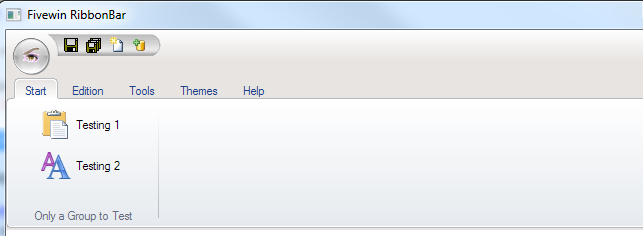
the quickacces is not same in 2010 style,...you can use DATA aQuickRGrad
example:
oRibbon:aQuickRGrad = { { 1, RGB( 255, 255, 255 ), RGB( 231, 228, 226 ) } }
our best documentation is the source code
Isla de Margarita Venezuela.
danielgarciagil@gmail.com
http://tdolphin.blogspot.com/
https://www.dropbox.com/referrals/NTI5Njk4MDc1OQ?src=global9
Isla de Margarita Venezuela.
danielgarciagil@gmail.com
http://tdolphin.blogspot.com/
https://www.dropbox.com/referrals/NTI5Njk4MDc1OQ?src=global9
Thanks DAniel ,
I have another anomaly with FWH 11.05
This is the PRG
a
And this is the RC
When you press on ChekBox Insoluti
You have this
[IMG=http://img684.imageshack.us/img684/2066/immagineget.png][/IMG]
Uploaded with ImageShack.us
Regards MAurizio
I have another anomaly with FWH 11.05
This is the PRG
#include "FiveWin.ch"

//======================================================================================================
Function  Main

Local n1 := 0
Local oGet := array(5)
LOcal oSay := array(4)
LOcal dDalla := date()
LOcal DAlla := date()
Local lInsoluti := .f.
Local lRitenuta := .f.
Local oDlg


 DEFINE DIALOG oDlg RESOURCE "COMBOS"  TRANSPARENT  // BRUSH oBrush TRANSPARENT
  REDEFINE get oGet[1] VAR   n1  ID  51 of oDlg
   oGet[1]:lBtnTransparent := .t.


    REDEFINE SAY oSay[1]       VAR  "1..."      ID 105 of oDlg  COLOR 'R+/W'
    REDEFINE SAY oSay[2]       VAR  "2..."         ID 106 of oDlg  COLOR 'R+/W'
    REDEFINE SAY oSay[3]       VAR  "3..."       ID 107 of oDlg  COLOR 'R+/W'
    REDEFINE SAY oSay[4]       VAR  "3..."       ID 108 of oDlg  COLOR 'R+/W'


    REDEFINE get oGet[2]       Var  dDalla  ID  52 of oDlg
    REDEFINE get oGet[3]       Var  dAlla   ID  53 of oDlg


    REDEFINE CHECKBOX oGet[4] VAR  lInsoluti  ID  54 OF oDlg

    REDEFINE CHECKBOX oGet[5] VAR  lRitenuta  ID  55 OF oDlg
   ACTIVATE DIALOG oDlg CENTERED  ON INIT ( GRADIENTBRUSH( oDlg, ACLRGRAD() ),;
                                              oGet[5]:Disable())


Return nil


Static FUNCTION GRADIENTBRUSH( oDlg, aColors )

    LOCAL hDC, hBmp, hBmpOld, oBrush

    hDC = CREATECOMPATIBLEDC( oDlg:GetDC() )

    hBmp = CREATECOMPATIBLEBITMAP( oDlg:hDC, oDlg:nWidth, oDlg:nHeight )

    hBmpOld = SELECTOBJECT( hDC, hBmp )

    GRADIENTFILL( hDC, 0, 0, oDlg:nHeight, oDlg:nWidth, aColors )

    oBrush = TBrush():New( ,,,, hBmp )

//     DEFINE BRUSH oBrush COLOR rgb(246,245,242)

    oDlg:SetBrush( oBrush )

    AEVAL( oDlg:aControls, { | oCtl | If( oCtl:lTransparent, oCtl:SetBrush( oDlg:oBrush ), ) } )

    RELEASE BRUSH oBrush

    SELECTOBJECT( hDC, hBmpOld )

    DELETEDC( hDC )

    oDlg:ReleaseDC()

    RETURN NIL

    STATIC FUNCTION ACLRGRAD()
RETURN { { 1, RGB( 239, 239, 239 ), RGB( 216, 230, 238 ) } }
a
And this is the RC
// RESOURCE SCRIPT generated by "Pelles C for Windows, version 6.50".

#include <windows.h>
#include <commctrl.h>
#include <richedit.h>
#include "Combos"

LANGUAGE LANG_ENGLISH,SUBLANG_ENGLISH_US

COMBOS DIALOG DISCARDABLE 22, 74, 394, 119
STYLE WS_POPUP|DS_MODALFRAME|DS_3DLOOK|WS_CAPTION|WS_SYSMENU
CAPTION "Testing all ComboBoxes styles"
FONT 8, "Arial"
{
  CONTROL "", 51, "Edit", WS_BORDER|WS_TABSTOP, 5, 24, 191, 14
  CONTROL "", 52, "Edit", ES_RIGHT|ES_READONLY|WS_BORDER|WS_DISABLED|WS_TABSTOP, 268, 54, 53, 12
  CONTROL "", 53, "Edit", ES_RIGHT|ES_READONLY|WS_BORDER|WS_DISABLED|WS_TABSTOP, 327, 54, 53, 12
  CONTROL "Insoluti ", 54, "Button", BS_AUTOCHECKBOX|WS_GROUP|WS_TABSTOP, 269, 17, 54, 10
  CONTROL "Ritenute", 55, "Button", BS_AUTOCHECKBOX|WS_GROUP|WS_TABSTOP, 269, 31, 46, 10
  CONTROL "Rag.Sociale :", -1, "Static", WS_GROUP, 6, 14, 51, 10
  CONTROL "Dal :", 4001, "Static", WS_GROUP, 268, 43, 21, 10
  CONTROL "Al :", 4002, "Static", WS_GROUP, 327, 43, 13, 10
  CONTROL "", 106, "Static", WS_BORDER|WS_GROUP, 5, 40, 191, 12
  CONTROL "n. Conto", 4003, "Static", WS_GROUP, 201, 14, 39, 10
  CONTROL "", 105, "Static", WS_BORDER|WS_GROUP, 201, 24, 52, 14
  CONTROL "", 107, "Static", WS_BORDER|WS_GROUP, 5, 54, 191, 12
  CONTROL "Saldo ", 4004, "Static", WS_GROUP, 201, 43, 39, 10
  CONTROL "", 108, "Static", WS_BORDER|WS_GROUP, 201, 53, 52, 12
  CONTROL "", 4005, "Button", BS_GROUPBOX, 0, 6, 258, 64
  CONTROL "", 4006, "Button", BS_GROUPBOX, 261, 6, 125, 64
}


 1 24 ".\WinXP\WindowsXP.Manifest"
When you press on ChekBox Insoluti
You have this
[IMG=http://img684.imageshack.us/img684/2066/immagineget.png][/IMG]
![[IMG=http://img684.imageshack.us/img684/2066/immagineget.png][/IMG]](http://imageshack.us/photo/my-images/684/immagineget.png/)
Uploaded with ImageShack.us
Regards MAurizio
Maurizio
www.nipeservice.com
www.nipeservice.com
Antonio ,
have you tried my example ?
Thanks Maurizio
Maurizio
www.nipeservice.com
www.nipeservice.com
Mr. Maurizio
In the new version, there is a problem painting Says with border when themes are enabled.
This is the fix for control.prg.
For these lines 433 and 434 in \fwh\source\classes\control.prg
the followings lines need to be substituted:
In the new version, there is a problem painting Says with border when themes are enabled.
This is the fix for control.prg.
For these lines 433 and 434 in \fwh\source\classes\control.prg
if ! Empty( ::oBrush:hBitmap ) .or. ! Empty( ::oBrush:aGrad )
   ParentImage( ::hWnd, hDC )
the followings lines need to be substituted:
if ! Empty( ::oBrush:hBitmap )
   SetBrushOrgEx( hDC, nBmpWidth( ::oBrush:hBitmap ) - ::nLeft, nBmpHeight( ::oBrush:hBitmap ) - ::nTop )
   FillRect( hDC, GetClientRect( ::hWnd ), ::oBrush:hBrush )
Regards
G. N. Rao.
Hyderabad, India
G. N. Rao.
Hyderabad, India
We have just published a revised FWH 11.05, thanks!
Antonio 
The problem persist
[IMG=http://img847.imageshack.us/img847/5742/immaginejii.png][/IMG]
Uploaded with ImageShack.us
if I use the precedent control.prg with the G. N. Rao modify all works .
Regards Maurizio
The problem persist
[IMG=http://img847.imageshack.us/img847/5742/immaginejii.png][/IMG]
![[IMG=http://img847.imageshack.us/img847/5742/immaginejii.png][/IMG]](http://imageshack.us/photo/my-images/847/immaginejii.png/)
Uploaded with ImageShack.us
if I use the precedent control.prg with the G. N. Rao modify all works .
Regards Maurizio
Maurizio
www.nipeservice.com
www.nipeservice.com
Page: 1 2 (22 posts)