

To next build a new feature to splitter control...
added clause STYLE to show gradient in splitter area
added GRAD clause to custom gradient values
download exe: http://www.siatasoft.net/fivewin/samples/listbar3.zip
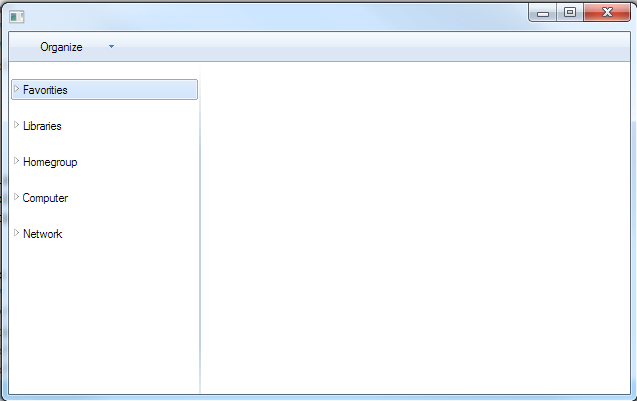
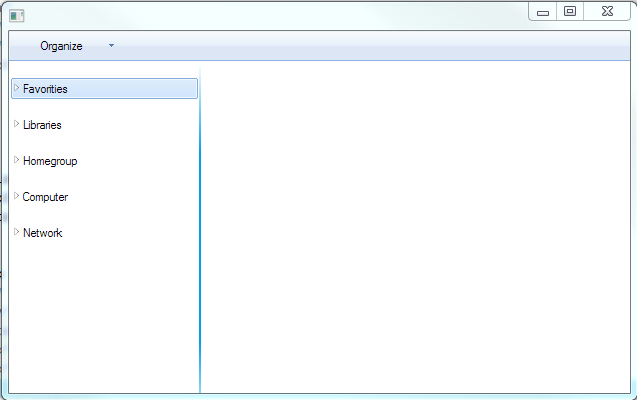
added clause STYLE to show gradient in splitter area
added GRAD clause to custom gradient values
#include "FiveWin.ch"
#include "ttitle.ch"
#include "ribbon.ch"
#include "splitter.ch"


FUNCTION Main()

   LOCAL oWnd
   LOCAL oExplorerList
   LOCAL oItem, oSubItem
   LOCAL oTitle, oBtn
   LOCAL oSplit

   menu oPopup popup 2010
      menuitem "Cut"
      menuitem "Copy"
      menuitem "Paste"
      menuitem "Undo"
      menuitem "Redo"
      separator
      menuitem "Select All"
      separator
      menuitem "Layout"
      menuitem "Folder and search option"
      separator
      menuitem "Delete"
      menuitem "Rename"
      menuitem "Remove properties"
      menuitem "Properties"
      separator
      menuitem "Close"
   endmenu

   DEFINE WINDOW oWnd

   @ 015,150 TITLE oTitle size 100, 30 of oWnd SHADOW NOSHADOW;
             GRADIENT { { 0.5, RGB(0xfa,0xfc,0xfd), RGB(0xe6,0xf0,0xfa) },;
                        { 0.5, RGB(0xdc,0xe6,0xf4), RGB(0xdd,0xe9,0xf7) } }


   @ 5, 10 rbbtn oBtn prompt "Organize" of oTitle transparent ;
           size 100, 22 round rsize 3 popup;
           linecolors RGB(0xf9,0xfb,0xfe), RGB(0xbb,0xca,0xdb);
           menu oPopup center

   oBtn:bClrGradNormal = {| l |;
              if( l, ( { { 0.5, RGB(0xfa,0xfc,0xfd), RGB(0xe6,0xf0,0xfa) },;
                           { 0.5, RGB(0xdc,0xe6,0xf4), RGB(0xdd,0xe9,0xf7) } } ),;
                       ( { { 0.5, RGB(0xfd,0xfe,0xff), RGB(0xed,0xf2,0xfa) },;
                         { 0.5, RGB(0xd7,0xe4,0xf4), RGB(0xc1,0xd2,0xe8) } } ) ) }

   oExplorerList = TExplorerList():New( 0, 0, oWnd, .T., .F., 200, 300 )

   oItem = oExplorerList:AddItem( "Favorities" )
   oSubItem = oItem:AddItem( "Recent Places" )
   oSubItem:lNoMini = .T.
   oSubItem = oItem:AddItem( "Download" )
   oSubItem:lNoMini = .T.
   oSubItem = oItem:AddItem( "Desktop" )
   oSubItem:lNoMini = .T.

   oItem = oExplorerList:AddItem( "Libraries" )
   oSubItem = oItem:AddItem( "Video" )
   oSubItem:lNoMini = .T.
   oSubItem = oItem:AddItem( "Pictures" )
   oSubItem:lNoMini = .T.
   oSubItem = oItem:AddItem( "Music" )
   oSubItem:lNoMini = .T.
   oSubItem = oItem:AddItem( "Documents" )
   oSubItem:lNoMini = .T.

   oItem = oExplorerList:AddItem( "Homegroup" )

   oItem = oExplorerList:AddItem( "Computer" )

   oItem = oExplorerList:AddItem( "Network" )

   oWnd:oTop := oTitle

   @ 31, 201  SPLITTER oSplit ;
              VERTICAL ;
              PREVIOUS CONTROLS oExplorerList ;
              LEFT MARGIN 100 ;
              RIGHT MARGIN 140 ;
              SIZE 2, 300  PIXEL ;
              OF oWnd ;
              UPDATE STYLE

   ACTIVATE WINDOW oWnd ;
            ON INIT ( oSplit:SetSize( 2, oWnd:nHeight - 30 ), ;
                      oSplit:nLong := oWnd:nHeight - 30 ,;
                      oSplit:AdjLeft() );
            ON RESIZE( oSplit:SetSize( 2, oWnd:nHeight - 30 ),;
                       oSplit:nLong := oWnd:nHeight - 30 )


RETURN NIL
download exe: http://www.siatasoft.net/fivewin/samples/listbar3.zip
our best documentation is the source code
Isla de Margarita Venezuela.
danielgarciagil@gmail.com
http://tdolphin.blogspot.com/
https://www.dropbox.com/referrals/NTI5Njk4MDc1OQ?src=global9
Isla de Margarita Venezuela.
danielgarciagil@gmail.com
http://tdolphin.blogspot.com/
https://www.dropbox.com/referrals/NTI5Njk4MDc1OQ?src=global9