

I am testing some toolbar options to implement in my program.
I have some .BMP files, some of them from \FWH\BITMAPS\32x32 are BMP files with transparency which is shown on image below correctly.
Then I decided to add more different BMP files (rightmost two) which are not transparent.
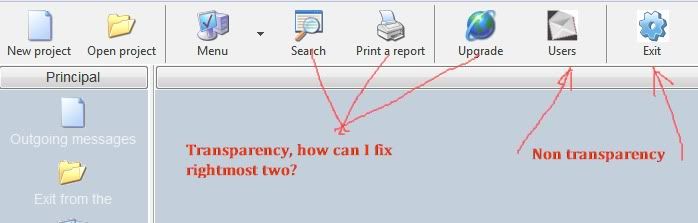
I cannot figure out, what is the difference between the rightmost two BMP files and the rest of them I marked as shown with correct transparency. How can I design my own BMP to have transparencu on Toolbar. Tried PixelForm, doesn't work, the last BMP on right is created by PixelFormer PNG with transparency imported
I also used some PNG files with transparency and import them into PixelFormer and export as BMP with "premultiplied alpha" checked. I got the BMP with a black (alpha?) background. But, when I use them on Toolbar (see two righmost images above), they are not transparent.
I am missing something and I know I read something about grey pixel top-left of the image, but I think this was used when we started with FW, back to the 1.9.2 version, many years ago. And besides - what gray? There are houndreds of gray at least
Can somebody advice me what to do?
Before I solve this I cannot continue with what I try to do.
Thanks
I have some .BMP files, some of them from \FWH\BITMAPS\32x32 are BMP files with transparency which is shown on image below correctly.
Then I decided to add more different BMP files (rightmost two) which are not transparent.
I cannot figure out, what is the difference between the rightmost two BMP files and the rest of them I marked as shown with correct transparency. How can I design my own BMP to have transparencu on Toolbar. Tried PixelForm, doesn't work, the last BMP on right is created by PixelFormer PNG with transparency imported
I also used some PNG files with transparency and import them into PixelFormer and export as BMP with "premultiplied alpha" checked. I got the BMP with a black (alpha?) background. But, when I use them on Toolbar (see two righmost images above), they are not transparent.
I am missing something and I know I read something about grey pixel top-left of the image, but I think this was used when we started with FW, back to the 1.9.2 version, many years ago. And besides - what gray? There are houndreds of gray at least
Can somebody advice me what to do?
Before I solve this I cannot continue with what I try to do.
Thanks