FiveTech Support Forums

FiveWin / Harbour / xBase community
Board index FiveWin for Harbour/xHarbour xBrowse Image
Posts: 811
Joined: Tue May 06, 2008 04:28 AM
xBrowse Image
Posted: Mon Mar 05, 2012 07:00 AM
Dear All

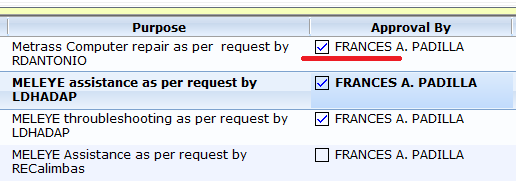
I have this xBrowse with 2 datalines.. two columns are setcheck()
it shows like this:


How can I put the image to upper right instead of what it shown..
like this:

Kind Regards,

Frances


Fivewin for xHarbour v18.07

xHarbour v1.2.3.x

BCC 7.3 + PellesC8 ( Resource Compiler only)

ADS 10.1 / MariaDB

Crystal Reports 8.5/9.23 DE

xMate v1.15
Posts: 4043
Joined: Wed Dec 19, 2007 06:40 PM
Re: xBrowse Image
Posted: Mon Mar 05, 2012 11:41 AM
Fraxzi,

A Image-solution without changing xBrowse-class ( not for Checkbox ),
moving the Picture inside the Frame to the Top.
The xBrowse-row is adjusted to the Image,
or the Image is centered to the Row with a defined Row-height.


copy with right-mouseclick on the Images ( 24 x 24 alpablended )

Center.bmp

Top.bmp


Best Regards
Uwe :-)
Since 1995 ( the first release of FW 1.9 )

i work with FW.

If you have any questions about special functions, maybe i can help.
Posts: 10733
Joined: Sun Nov 19, 2006 05:22 AM
Re: xBrowse Image
Posted: Thu Mar 08, 2012 08:04 PM

oCol:nDataBmpAlign := AL_RIGHT.
Does this not do wha you want?

Regards


G. N. Rao.

Hyderabad, India
Posts: 4043
Joined: Wed Dec 19, 2007 06:40 PM
Re: xBrowse Image
Posted: Thu Mar 08, 2012 11:07 PM
Mr. Rao,

is that what he wants, moving the Bmp to Top ?


( maybe possible, to include a Option Row-centered or Top ) ?
I changed in xBrowse.prg the Line :

Bitmap Row-centered :
nBmpRow := nRow + ( nHeight - aBitmap[ BITMAP_HEIGHT ] ) / 2 + 2

in :
nBmpRow := nRow + 10

Best Regards
Uwe :-)
Since 1995 ( the first release of FW 1.9 )

i work with FW.

If you have any questions about special functions, maybe i can help.
Posts: 811
Joined: Tue May 06, 2008 04:28 AM
Re: xBrowse Image
Posted: Fri Mar 09, 2012 12:09 AM
nageswaragunupudi wrote:oCol:nDataBmpAlign := AL_RIGHT.
Does this not do wha you want?


Dear Mr. RAO,

Because the 2 dataline centers the bitmap on AL_RIGHT and the prompt (single line) to the first line not vertically centered.
Kind Regards,

Frances


Fivewin for xHarbour v18.07

xHarbour v1.2.3.x

BCC 7.3 + PellesC8 ( Resource Compiler only)

ADS 10.1 / MariaDB

Crystal Reports 8.5/9.23 DE

xMate v1.15
Posts: 811
Joined: Tue May 06, 2008 04:28 AM
Re: xBrowse Image
Posted: Fri Mar 09, 2012 12:11 AM
Dear Uwe,

I tried.


the image still vertically centered and prompt not align with the image..
Kind Regards,

Frances


Fivewin for xHarbour v18.07

xHarbour v1.2.3.x

BCC 7.3 + PellesC8 ( Resource Compiler only)

ADS 10.1 / MariaDB

Crystal Reports 8.5/9.23 DE

xMate v1.15
Posts: 811
Joined: Tue May 06, 2008 04:28 AM
Re: xBrowse Image
Posted: Fri Mar 09, 2012 01:07 AM
Dear Uwe and Mr. RAO,

I did this to Method PaintData()

...
      nWidth  -= BMP_EXTRAWIDTH
      nBmpRow := nRow + IF( ::nDataLines == 1, ( ( nHeight - aBitmap[ BITMAP_HEIGHT ] ) / 2 ), 0)
...

Results..

Good!
Kind Regards,

Frances


Fivewin for xHarbour v18.07

xHarbour v1.2.3.x

BCC 7.3 + PellesC8 ( Resource Compiler only)

ADS 10.1 / MariaDB

Crystal Reports 8.5/9.23 DE

xMate v1.15

Continue the discussion