FiveTech Support Forums

FiveWin / Harbour / xBase community
Board index FiveWin for Harbour/xHarbour TGRAPH
Posts: 1091
Joined: Thu Nov 17, 2005 11:08 AM
TGRAPH
Posted: Mon Jan 28, 2013 04:35 PM
Hi,
I have to scale a linear TGRAPH

For example
Code (fw): Select all Collapse
#Include "FiveWin.Ch"

Function Main()
   LOCAL aMisura := {}
   LOCAL aOra    := {}
   LOCAL oWnd , oGraph

   aMisura := { 136.08, 136.08, 136.05, 136.10, 136.10, 137.10, 136.70, 136.70, 137.11, 137.90, 137.60 }

   DEFINE WINDOW oWnd FROM 1, 1 TO 20, 80 TITLE "Misure"

   oGraph:=TGraph():New( 0 , 0 , oWnd ,oWnd:nWidth()-8 , oWnd:nHeight()-40 )
   oGraph:SetYVals( aOra )
   oGraph:cTitX   := "Misura"
   oGraph:cTitY   := "Ora"
   oGraph:lYVal   :=.T.
   oGraph:lLegends:=.T.
   oGraph:nType   := 2

   oGraph:AddSerie( aMisura , "MISURE" , RGB( 128 , 128 ,255 ) )

   ACTIVATE WINDOW oWnd ;
      ON PAINT ( oGraph:nWidth :=  oWnd:nWidth  - 8 , ;
                 oGraph:nHeight := oWnd:nHeight -40 , ;
                 oGraph:Refresh(.f.))


RETURN (NIL)


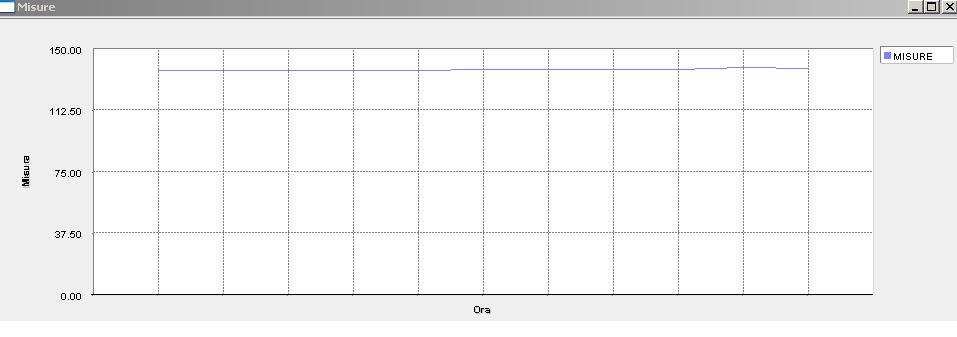
This is graph.

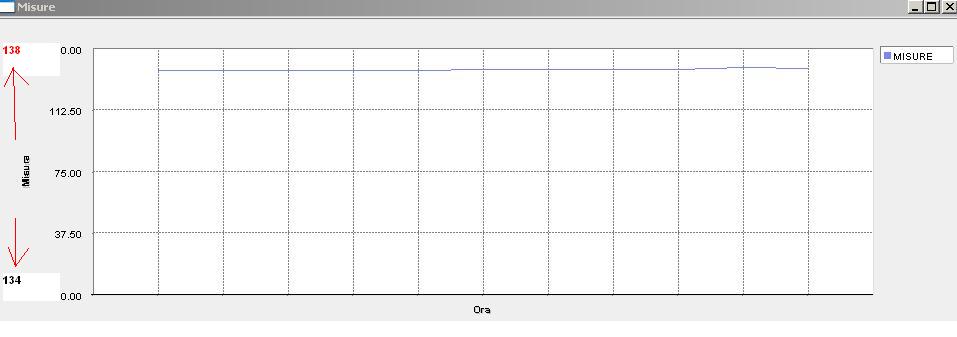
I want this
I want set min and max in Y Axes


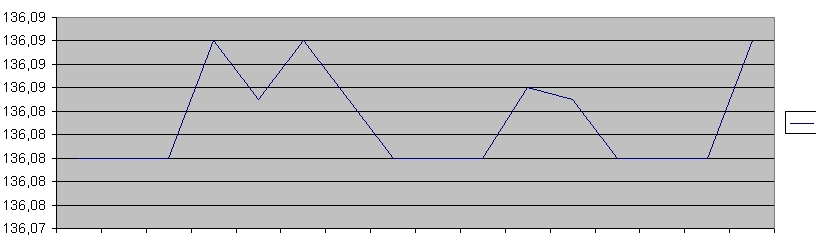
This is created by excel


many thanks
marco
Marco Boschi
info@marcoboschi.it
Posts: 1088
Joined: Fri Oct 07, 2005 03:33 PM
Re: TGRAPH
Posted: Tue Jan 29, 2013 01:51 AM
Posts: 1091
Joined: Thu Nov 17, 2005 11:08 AM
Re: TGRAPH
Posted: Tue Jan 29, 2013 09:48 AM

Hi Marcelo,
sorry but I can not get it to work!

:oops:

Marco Boschi
info@marcoboschi.it
Posts: 1088
Joined: Fri Oct 07, 2005 03:33 PM
Re: TGRAPH
Posted: Tue Jan 29, 2013 02:07 PM

Marco,

sorry, you are right, this modification worked with old version of tGraph, let me time to see if I found an old modified version of tGraph

regards

Marcelo

Posts: 1091
Joined: Thu Nov 17, 2005 11:08 AM
Re: TGRAPH
Posted: Tue Jan 29, 2013 02:13 PM

Marcelo,
I have FWH dated 26 october 2009

Many thanks
Marco

Marco Boschi
info@marcoboschi.it
Posts: 4840
Joined: Fri Nov 18, 2005 04:52 PM
Re: TGRAPH
Posted: Wed Jan 30, 2013 05:22 PM

Marco,

I don't know if this will work, but try setting oGraph:nMinVal to whatever you want. Let us know if that works.

Regards,
James

FWH 18.05/xHarbour 1.2.3/BCC7/Windows 10
Posts: 4840
Joined: Fri Nov 18, 2005 04:52 PM
Re: TGRAPH
Posted: Wed Jan 30, 2013 05:28 PM

OK, I tested it an setting nMinVal doesn't work. Sorry.

Regards,
James

FWH 18.05/xHarbour 1.2.3/BCC7/Windows 10
Posts: 4840
Joined: Fri Nov 18, 2005 04:52 PM
Re: TGRAPH
Posted: Wed Jan 30, 2013 06:07 PM

Well I did find that you can adjust the number of increments for the labels on the Y axis.

oGraph:nXRanges:= 5

nXRanges defaults to 4. Note that it is actually named incorrectly since these are the Y axis ranges so it should be nYRanges. I would be nice if there was also a similar setting for the X-axis.

I still have not been able to find class vars for the Y axis minimum and maximum values. I don't think they exist.

Regards,
James

FWH 18.05/xHarbour 1.2.3/BCC7/Windows 10
Posts: 4840
Joined: Fri Nov 18, 2005 04:52 PM
Re: TGRAPH
Posted: Wed Jan 30, 2013 07:02 PM

OK, I have spent about an hour looking for a var for the Y-axis minimum and I don't see one. I fear that zero is being used so it may be impossible to set the min y-axis value without some major modifications to TGraph.

James

FWH 18.05/xHarbour 1.2.3/BCC7/Windows 10
Posts: 7317
Joined: Thu Oct 18, 2012 07:17 PM
Re: TGRAPH
Posted: Wed Jan 30, 2013 07:52 PM

I spend this afternoon.. and then I asked help to Alfredo...but he not sent any messages until now

Since from 1991/1992 ( fw for clipper Rel. 14.4 - Momos)

I use : FiveWin for Harbour March-April 2024 - Harbour 3.2.0dev (harbour_bcc770_32_20240309) - Bcc7.70 - xMate ver. 1.15.3 - PellesC - mail: silvio[dot]falconi[at]gmail[dot]com

Continue the discussion