FiveTech Support Forums

FiveWin / Harbour / xBase community
Board index FiveWin for Harbour/xHarbour TreeView Problem (SOLVED)
Posts: 1387
Joined: Fri May 23, 2008 01:33 PM
TreeView Problem (SOLVED)
Posted: Sun Apr 14, 2013 06:18 PM
Hi

I have a problem with TreeView. First of all, this is not new. it was the same in fwh 1204.

This problem occurs treeview in folderx. The sample is below. this sample expands all items. if you change vertical scrollbar, treeview items mixed.

Any comments?

Thanks.
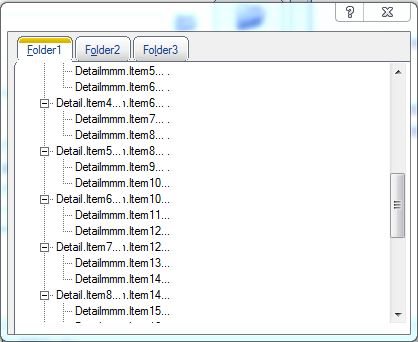


Code (fw): Select all Collapse
// Using a TreeView with checkboxes and checking their status

#include "FiveWin.ch"

function Main()

   local oDlg, oTree

   DEFINE DIALOG oDlg SIZE 400, 300

  @ 2, 3 FOLDERex oFld OF oDlg PIXEL ; 
      PROMPTS "&Folder1", "F&older2","Fo&lder3";
      ROUND 10 

    @ 0,0 TREEVIEW oTree OF oFld:aDialogs[1] SIZE 195, 130 PIXEL 

   ACTIVATE DIALOG oDlg CENTERED ON INIT BuildTree( oTree )

return nil 

function BuildTree( oTree ) 

   local oItem

   oItem := oTree:Add( "Main.Item1" ) 
      oItem:Add( "Detail.Item1..." )
      oItem:Add( "Detail.Item2..." )
      oItem:Add( "Detail.Item3..." )
      oItem:Add( "Detail.Item4..." )
      oItem:Add( "Detail.Item5..." )
      oItem:Add( "Detail.Item6..." )

   oItem:= oTree:Add( "Main.Item2" ) 
      oItem:Add( "Detail.Item1..." )
      oItem:Add( "Detail.Item2..." )
      oItem:Add( "Detail.Item3..." )
      oItem:Add( "Detail.Item4..." )
      oItem:Add( "Detail.Item5..." )
      oItem:Add( "Detail.Item6..." )

   oItem := oTree:Add( "Main.Item3" ) 
      oItem1 := oItem:Add( "Detail.Item1..." )
        oItem1:Add( "Detailmmm.Item1..." )
        oItem1:Add( "Detailmmm.Item2..." )
      oItem1 := oItem:Add( "Detail.Item2..." )
        oItem1:Add( "Detailmmm.Item3..." )
        oItem1:Add( "Detailmmm.Item4..." )
      oItem1 := oItem:Add( "Detail.Item3..." )
        oItem1:Add( "Detailmmm.Item5..." )
        oItem1:Add( "Detailmmm.Item6..." )
      oItem1 := oItem:Add( "Detail.Item4..." )
        oItem1:Add( "Detailmmm.Item7..." )
        oItem1:Add( "Detailmmm.Item8..." )
      oItem1 := oItem:Add( "Detail.Item5..." )
        oItem1:Add( "Detailmmm.Item9..." )
        oItem1:Add( "Detailmmm.Item10..." )
      oItem1 := oItem:Add( "Detail.Item6..." )
        oItem1:Add( "Detailmmm.Item11..." )
        oItem1:Add( "Detailmmm.Item12..." )
      oItem1 := oItem:Add( "Detail.Item7..." )
        oItem1:Add( "Detailmmm.Item13..." )
        oItem1:Add( "Detailmmm.Item14..." )
      oItem1 := oItem:Add( "Detail.Item8..." )
        oItem1:Add( "Detailmmm.Item15..." )
        oItem1:Add( "Detailmmm.Item16..." )
      oItem1 := oItem:Add( "Detail.Item9..." )
        oItem1:Add( "Detailmmm.Item17..." )
        oItem1:Add( "Detailmmm.Item18..." )
      oItem1 := oItem:Add( "Detail.Item10..." )
        oItem1:Add( "Detailmmm.Item19..." )
        oItem1:Add( "Detailmmm.Item20..." )
      oItem1 := oItem:Add( "Detail.Item11..." )
        oItem1:Add( "Detailmmm.Item21..." )
        oItem1:Add( "Detailmmm.Item1..." )
      oItem1 := oItem:Add( "Detail.Item12..." )
        oItem1:Add( "Detailmmm.Item22..." )
        oItem1:Add( "Detailmmm.Item23..." )
      oItem1 := oItem:Add( "Detail.Item13..." )
        oItem1:Add( "Detailmmm.Item24..." )
        oItem1:Add( "Detailmmm.Item25..." )

   oTree:ExpandAll() 


return nil
Regards,


Hakan ONEMLI


Harbour & MSVC 2022 & FWH 23.06
Posts: 1387
Joined: Fri May 23, 2008 01:33 PM
Re: TreeView Problem.
Posted: Mon Apr 15, 2013 07:37 AM

Antonio?

Regards,


Hakan ONEMLI


Harbour & MSVC 2022 & FWH 23.06
Posts: 44162
Joined: Thu Oct 06, 2005 05:47 PM
Re: TreeView Problem.
Posted: Mon Apr 15, 2013 08:53 AM

Hakan,

Have yoy tried to refresh the treeview ? If that solves the problem. Then we should try to fire it automatically

regards, saludos

Antonio Linares
www.fivetechsoft.com
Posts: 1387
Joined: Fri May 23, 2008 01:33 PM
Re: TreeView Problem.
Posted: Mon Apr 15, 2013 09:37 AM

Hi Antonio,

Where should i put refresh. Which method should use?

Thanks

Regards,


Hakan ONEMLI


Harbour & MSVC 2022 & FWH 23.06
Posts: 44162
Joined: Thu Oct 06, 2005 05:47 PM
Re: TreeView Problem.
Posted: Mon Apr 15, 2013 10:03 AM
Hakan,

These changes are required in Class TTreeView Method New(): (fwh\source\classes\ttreevie.prg)

line 168: (added the styles CS_VREDRAW and CS_HREDRAW)
Code (fw): Select all Collapse
   ::nStyle    = nOR( WS_CHILD, WS_VISIBLE, CS_VREDRAW, CS_HREDRAW,;
                      If( lDesign, WS_CLIPSIBLINGS, 0 ), WS_TABSTOP,;
                      TVS_HASBUTTONS, TVS_HASLINES, TVS_LINESATROOT, TVS_SHOWSELALWAYS, TVS_DISABLEDRAGDROP,;
                      If( lCheckBoxes, TVS_CHECKBOXES, 0 ) )
regards, saludos

Antonio Linares
www.fivetechsoft.com
Posts: 1387
Joined: Fri May 23, 2008 01:33 PM
Re: TreeView Problem.
Posted: Mon Apr 15, 2013 11:07 AM

Hi Antonio,

I have changed the ttreevie.prg and put this prg to my make file and compile, but there is no change.

Regards,


Hakan ONEMLI


Harbour & MSVC 2022 & FWH 23.06
Posts: 44162
Joined: Thu Oct 06, 2005 05:47 PM
Re: TreeView Problem.
Posted: Mon Apr 15, 2013 02:25 PM
Hakan,

Here it seems to be working fine. Please test my EXE on your computer, thanks:

https://code.google.com/p/fivewin-contributions/downloads/detail?name=hakan.zip
regards, saludos

Antonio Linares
www.fivetechsoft.com
Posts: 1387
Joined: Fri May 23, 2008 01:33 PM
Re: TreeView Problem.
Posted: Mon Apr 15, 2013 03:04 PM
Antonio Linares wrote:Hakan,

Here it seems to be working fine. Please test my EXE on your computer, thanks:

https://code.google.com/p/fivewin-contributions/downloads/detail?name=hakan.zip


Antonio,

There is also problem in your exe. I have tested my win 7 64x and XP.

Please slide the vertical bar bottom side and top side.

Thanks
Regards,


Hakan ONEMLI


Harbour & MSVC 2022 & FWH 23.06
Posts: 44162
Joined: Thu Oct 06, 2005 05:47 PM
Re: TreeView Problem.
Posted: Mon Apr 15, 2013 06:33 PM

Hakan,

This is not a perfect solution but it helps:

METHOD VScroll( nWParam, nLParam ) INLINE ::oWnd:Refresh(), nil

in Class TTreeView

regards, saludos

Antonio Linares
www.fivetechsoft.com
Posts: 1387
Joined: Fri May 23, 2008 01:33 PM
Re: TreeView Problem.
Posted: Mon Apr 15, 2013 07:12 PM
Antonio Linares wrote:Hakan,

This is not a perfect solution but it helps:

METHOD VScroll( nWParam, nLParam ) INLINE ::Refresh(), nil

in Class TTreeView


Antonio,

Unfortuanely, it does not work.

Thanks.
Regards,


Hakan ONEMLI


Harbour & MSVC 2022 & FWH 23.06
Posts: 44162
Joined: Thu Oct 06, 2005 05:47 PM
Re: TreeView Problem.
Posted: Mon Apr 15, 2013 07:46 PM

Hakan,

When you release the mouse on the vertical scrollbar, it should repaint it properly. Here it works

regards, saludos

Antonio Linares
www.fivetechsoft.com
Posts: 1387
Joined: Fri May 23, 2008 01:33 PM
Re: TreeView Problem.
Posted: Mon Apr 15, 2013 08:15 PM

Antonio,

You are right. When i released the button, it refresh. but it is not suitable for customers.

Why does not refresh the ttreeview in folder/x class? I could not understand it.

Thanks again.

Regards,


Hakan ONEMLI


Harbour & MSVC 2022 & FWH 23.06
Posts: 44162
Joined: Thu Oct 06, 2005 05:47 PM
Re: TreeView Problem.
Posted: Mon Apr 15, 2013 09:34 PM

Hakan,

In tfoldex.prg line 347 comment this line:

  // oDlg:lTransparent := .T.
regards, saludos

Antonio Linares
www.fivetechsoft.com
Posts: 1387
Joined: Fri May 23, 2008 01:33 PM
Re: TreeView Problem.
Posted: Tue Apr 16, 2013 10:50 AM

Hi Antonio,

It is ok now without changing anything in ttreevie.prg.
Will you change it next month fwh in tfolderx.prg?

Thanks.

Regards,


Hakan ONEMLI


Harbour & MSVC 2022 & FWH 23.06
Posts: 44162
Joined: Thu Oct 06, 2005 05:47 PM
Re: TreeView Problem (SOLVED)
Posted: Tue Apr 16, 2013 10:52 AM

Hakan,

Yes, it will be included in next FWH build, thanks :-)

regards, saludos

Antonio Linares
www.fivetechsoft.com

Continue the discussion