FiveTech Support Forums

FiveWin / Harbour / xBase community
Board index FiveWin for Harbour/xHarbour Logo background screen blurring on Windows SEVEN 64 or 32bit
Posts: 100
Joined: Fri Dec 12, 2008 04:39 PM
Logo background screen blurring on Windows SEVEN 64 or 32bit
Posted: Mon May 20, 2013 02:45 PM
Good day.

I have a problem related to standard operating WINDOWS SEVEN 64 BITS - PROFESSIONAL, see:

Windows set to: Let Windows choose the best option for the computer or

Adjust for best appearance

Follow the screen that appears, and that this right:
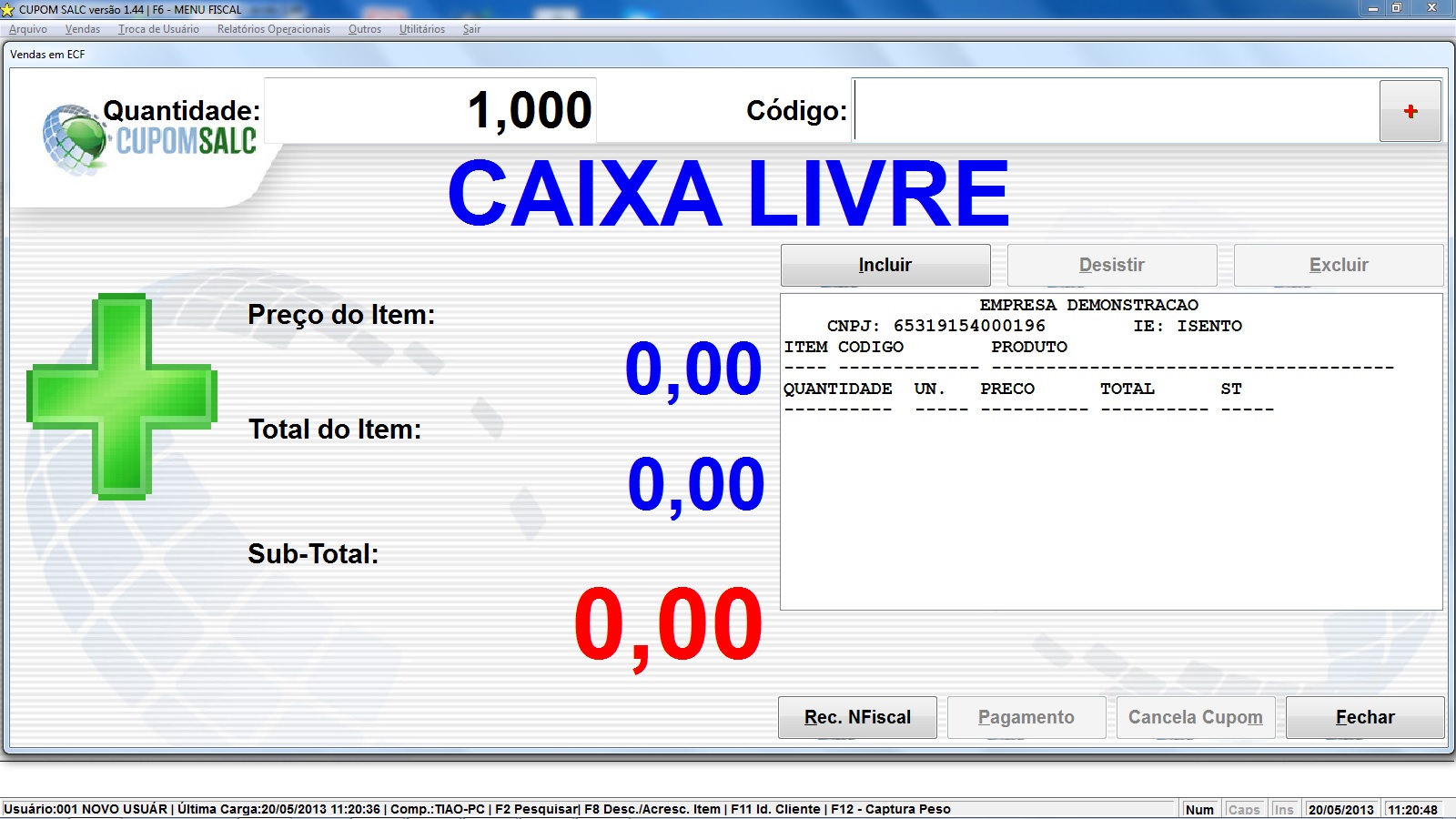


However if I change the configuration for Windows:

Adjust for best performance

The same screen is displayed as follows:
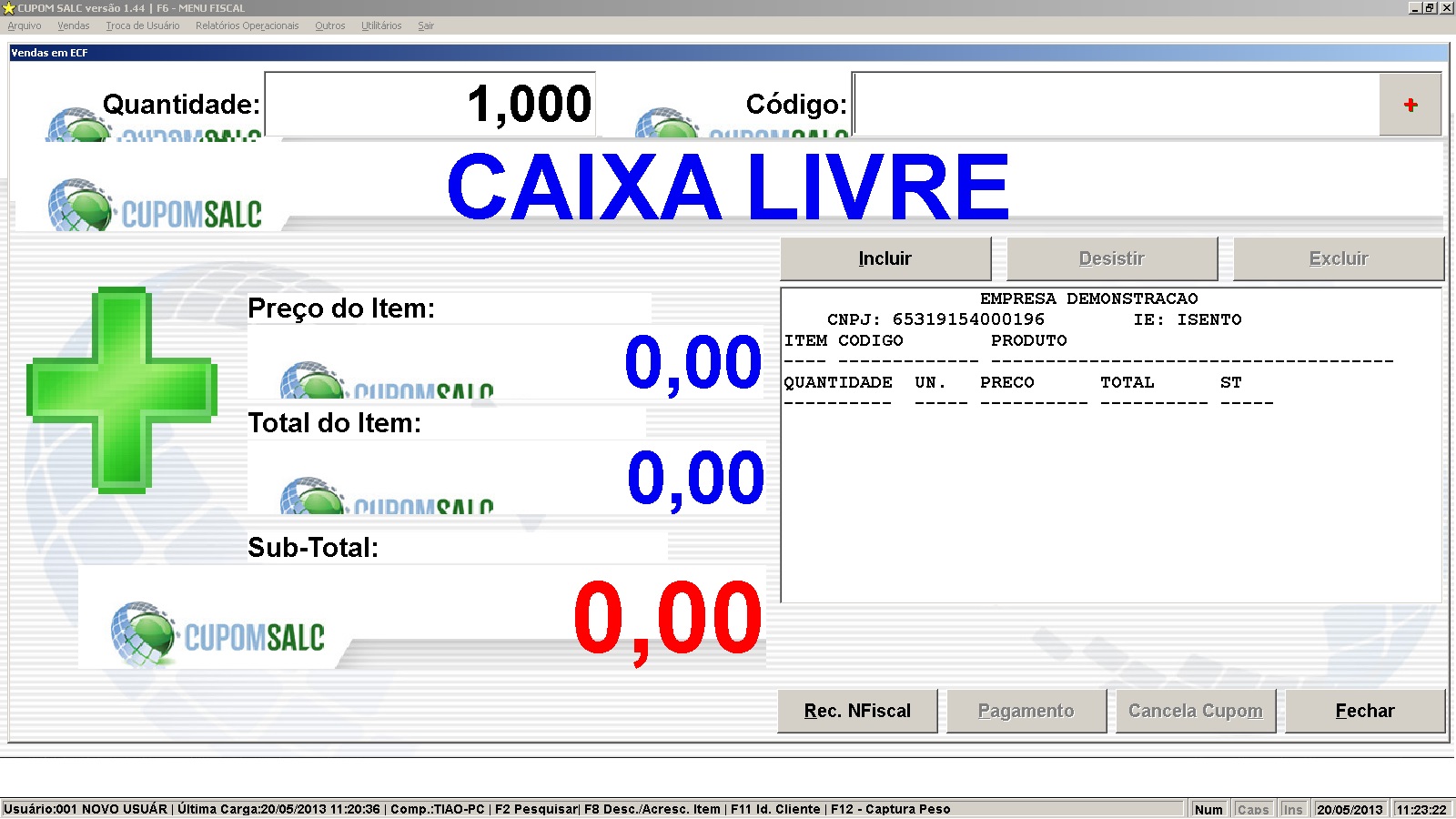


I quote the following code snippet to see what I'm doing:

Code (fw): Select all Collapse
if file("TelaVenda.jpg") .and. !v_logovenda

   nWidth := GetSysMetrics(0) - 20
   nHeight := GetSysMetrics(1) - 108

   DEFINE BRUSH oTmp FILE "TelaVenda.jpg"
   oBRU   := oTmp:Resized( nWidth, nHeight , 1 )  // 1 = stretch, 2 : fitoutside, 3:fitinside
   RELEASE BRUSH oTmp

   DEFINE DIALOG ODLG_PROA RESOURCE WtipoTela TITLE "Vendas em ECF" FONT oFont1 BRUSH oBRU TRANSPARENT

else

   DEFINE DIALOG ODLG_PROA RESOURCE WtipoTela TITLE "Vendas em ECF" FONT oFont1 COLOR _CORPADRAO, _CORPADRAO

endif

   redefine SAY osay_qt_Val ID 14 COLOR _CORTXTVEN, _CORPADRAO of odlg_PROa UPDATE FONT oFont_SAY //oFont_grande
   redefine SAY osay_cod ID 15 COLOR _CORTXTVEN, _CORPADRAO of odlg_PROa UPDATE FONT oFont_SAY //oFont_grande
osay_qt_Val:ltransparent := .t.
osay_cod:ltransparent := .t.

redefine SAY o_tot ID 8     COLOR _CORTXTVEN, _CORPADRAO FONT oFont_grande of odlg_proa UPDATE
redefine SAY o_tot2 ID 10   COLOR _CORTXTVEN, _CORPADRAO FONT oFont_grande of odlg_proa UPDATE
redefine SAY o_totdoc ID 12 COLOR _CORTXTVEN, _CORPADRAO FONT oFont_grande of odlg_proa UPDATE

o_tot:ltransparent := .t.
o_tot2:ltransparent := .t.
o_totdoc:ltransparent := .t.

redefine SAY osay_unitario VAR vunitario picture '@E 999,999.99'  ID 303 of odlg_PROa UPDATE FONT oFont_Enorme COLOR _CORPADVEN1, _CORPADRAO
redefine SAY osay_tot      VAR vtotal    picture '@E 999,999.99'  ID 304 of odlg_PROa UPDATE FONT oFont_Enorme COLOR _CORPADVEN1, _CORPADRAO
redefine SAY osay_totdoc   VAR vtot_ven  picture '@E 999,999.99'  ID 305 of odlg_PROa UPDATE COLOR _CORPADVEN2, _CORPADRAO FONT oFont_Giga

osay_unitario:ltransparent := .t.
osay_tot:ltransparent := .t.
osay_totdoc:ltransparent := .t.

   redefine SAY osay_totitens VAR 'Total de Itens: ' + ;
            alltrim(transform(vtot_itens, '@E 999,999')) ID 306 ;
            COLOR _CORPADVEN1, _CORPADRAO FONT ;
            oFont_Item of odlg_proa UPDATE
osay_totitens:ltransparent := .t.

      ACTIVATE DIALOG odlg_PROA VALID SAI_PROA


Someone has gone through this, is there any solution?

Thank you!
Contagem/Brazil

FWH/xharbour 15.12/PELLES C, MED, DBF
Posts: 4043
Joined: Wed Dec 19, 2007 06:40 PM
Re: Logo background screen blurring on Windows SEVEN 64 or 32bit
Posted: Mon May 20, 2013 09:11 PM
tiaofw,

I use a brush-function on Dialog-init like

// nStyle := 1 1=Color, 2 = Gradient, 3 = Brush and 4 = Image
// nColor := 116443068 Color or 1. Calor of gradient
// nColor2 := 10899511 2. Gradient-color
// nMove := 0.5 Color-position
// lDirect := .T. vertical or horizontal
// cBrush := "Brush.bmp" Brush
// cImage := "image.jpg" Image

// 2 = gradient selected
// D_BACKGRD( oDlg, nStyle, nColor1, nColor2, nMove, lDirect, cBrush, cImage )

ACTIVATE DIALOG oDlg ;
ON INIT D_BACKGRD( oDlg, 2, 116443068, 10899511, 0.5, "Brush.bmp", "image.jpg")


Code (fw): Select all Collapse
#include "FiveWin.ch"

FUNCTION MAIN()
LOCAL oDlg

nWidth := GetSysMetrics(0) - 20
nHeight := GetSysMetrics(1) - 108

c_path := cFilePath(GetModuleFileName( GetInstance() ) ) 
c_path1 := c_path + "IMAGES\" 

1.Color=16443068
2.Color=10899511
GradPos=0.20
Graddirect=.T.
Brush=Marble.Bmp
Image=FANTASY5.jpg

// nStyle := 1  1-4
// nColor := 116443068
// nColor2 := 10899511
// nMove := 0.5
// lDirect := .T.
// cBrush := "Brush.bmp"
// cImage := "image.jpg"

//                                                   Top,   Left    TO  Bottom,  Width
DEFINE DIALOG oDlg FROM   0,       ü       TO nHeight, nWidth  PIXEL 

ACTIVATE DIALOG oDlg ;
ON INIT D_BACKGRD( oDlg, 2, 116443068, 10899511, 0.5, "Brush.bmp", "image.jpg") 

RETURN NIL

// --------  WINDOW / DIALOG - Background ---------------

FUNCTION D_BACKGRD( oDlg, nStyle, nColor1, nColor2, nMove, lDirect, cBrush, cImage ) 
LOCAL oBrush, hDC, aGrad, oImage
LOCAL aRect := GETCLIENTRECT( oDlg:hWnd )

IF nStyle = 1 // COLOR
    DEFINE BRUSH oBrush COLOR nColor1
    oDlg:SetBrush( oBrush )
    oBrush:End()
ENDIF
IF nStyle = 2 // GRADIENT Brush
    aGrad := { { nMove, nColor1, nColor2 }, { nMove, nColor2, nColor1 } }
    hDC = CreateCompatibleDC( oDlg:GetDC() )
    hBmp = CreateCompatibleBitMap( oDlg:hDC, oDlg:nWidth, oDlg:nHeight ) 
    hBmpOld = SelectObject( hDC, hBmp )
    GradientFill( hDC, 0, 0, oDlg:nHeight, oDlg:nWidth, aGrad, lDirect ) // .T: = Vertical
    DeleteObject( oDlg:hBrush )
    oBrush := TBrush():New( ,,,, hBmp )
    oBrush:Cargo  := aGrad
    SelectObject( hDC, hBmpOld )
    ReleaseDC(hDC)
    oDlg:SetBrush( oBrush )
    oBrush:End()
ENDIF
IF nStyle = 3 // BMP-BRUSH
    DEFINE BRUSH oBrush FILE c_path1 + cBrush
    oDlg:SetBrush( oBrush )
    oBrush:End()
ENDIF
IF nStyle = 4 // Image ADJUSTED
    IF FILE( c_path1 + cImage ) 
        DEFINE IMAGE oImage FILE c_path1 + cImage
        oBrush := TBrush():new( ,,,, ResizeBmp( oImage:hBitmap,  aRect[4], aRect[3], .T. ) ) 
        oImage:End()
        oDlg:SetBrush( oBrush )
        oBrush:End()
    ELSE
        IF !EMPTY(cImage)
            MsgAlert( "File : " + cImage + CRLF + ;
                    "does not exist" + CRLF + ; 
                        "to show Image !", "ATTENTION" ) 
        ENDIF
    ENDIF
ENDIF

RETURN( NIL )


Best Regards
Uwe :-)
Since 1995 ( the first release of FW 1.9 )

i work with FW.

If you have any questions about special functions, maybe i can help.
Posts: 100
Joined: Fri Dec 12, 2008 04:39 PM
Re: Logo background screen blurring on Windows SEVEN 64 or 32bit
Posted: Tue May 21, 2013 03:06 PM

Thank you ukoenig!

I will test your solution and return it solved.

bye.

Contagem/Brazil

FWH/xharbour 15.12/PELLES C, MED, DBF
Posts: 100
Joined: Fri Dec 12, 2008 04:39 PM
Re: Logo background screen blurring on Windows SEVEN 64 or 32bit
Posted: Tue May 21, 2013 05:21 PM
Good afternoon.

Adapting your code to my need was as follows:

Code (fw): Select all Collapse
DEFINE DIALOG ODLG_PROA RESOURCE WtipoTela TITLE "Vendas em ECF" FONT oFont1

ACTIVATE DIALOG odlg_PROA VALID SAI_PROA ON INIT ;
               ( D_BACKGRD( odlg_PROA, 4) )


FUNCTION D_BACKGRD( oDlg, nStyle, nColor1, nColor2, nMove, lDirect, cBrush, cImage )

LOCAL oBrush, hDC, aGrad, oImage
LOCAL aRect := GETCLIENTRECT( oDlg:hWnd )

IF nStyle = 4 // Image ADJUSTED

   DEFINE IMAGE oImage FILE "TelaVenda.jpg"
   oBrush   := TBrush():new( ,,,, ResizeBmp( oImage:hBitmap,  aRect[4], aRect[3], .T. ) )  // 1 = stretch, 2 : fitoutside, 3:fitinside
   oImage:End()
   oDlg:SetBrush( oBrush )
   oBrush:End()

ENDIF

RETURN( NIL )


However the problem persists, something I need to adjust?

Thank you!
Contagem/Brazil

FWH/xharbour 15.12/PELLES C, MED, DBF
Posts: 44158
Joined: Thu Oct 06, 2005 05:47 PM
Re: Logo background screen blurring on Windows SEVEN 64 or 32bit
Posted: Tue May 21, 2013 08:07 PM
Tiao,

This example is working fine:

Code (fw): Select all Collapse
#include "FiveWin.ch"

function Main()

   local oDlg

   DEFINE DIALOG oDlg SIZE 800, 600

   ACTIVATE DIALOG oDlg CENTERED ;
      ON INIT BuildBrush( oDlg )

return nil

function BuildBrush( oDlg )

   local oImage, oBrush, aRect := oDlg:GetRect()

   DEFINE IMAGE oImage FILENAME "..\bitmaps\pngs\chart.png"

   oBrush   := TBrush():new( ,,,, ResizeBmp( oImage:hBitmap,  aRect[4], aRect[3], .T. ) )  // 1 = stretch, 2 : fitoutside, 3:fitinside
   oImage:End()
   oDlg:SetBrush( oBrush )
   oBrush:End()

return nil
regards, saludos

Antonio Linares
www.fivetechsoft.com
Posts: 100
Joined: Fri Dec 12, 2008 04:39 PM
Re: Logo background screen blurring on Windows SEVEN 64 or 32bit
Posted: Tue May 21, 2013 10:02 PM
Goodnight Antonio.

Implemented a function to my program and converted my image in jpg to png.

However the problem persists, noting that the problem only occurs when I am in Windows mode called:

"Adjust for best performance", sending the screen windows to make best exemplified:


Note that I put text over the image, apparently this is what causes the problem, however this does not occur in normal operation of Windows, but what worries me is that the user may want to work in this mode called "Adjust for the best performance. "

Follows the change I made in my source code and the image can test for:

Code (fw): Select all Collapse
DEFINE DIALOG ODLG_PROA RESOURCE WtipoTela TITLE "Vendas em ECF" FONT oFont1 TRANSPARENT

      ACTIVATE DIALOG odlg_PROA CENTERED VALID SAI_PROA ON INIT ;
               ( BuildBrush( odlg_PROA ) )


function BuildBrush( oDlg )

   local oImage, oBrush, aRect := oDlg:GetRect()

   DEFINE IMAGE oImage FILENAME "TelaVenda.png"

   oBrush   := TBrush():new( ,,,, ResizeBmp( oImage:hBitmap,  aRect[4], aRect[3], .T. ) )  // 1 = stretch, 2 : fitoutside, 3:fitinside
   oImage:End()
   oDlg:SetBrush( oBrush )
   oBrush:End()

return nil


http://www.salc.com.br/atual/telavenda.png

Thank you.
Contagem/Brazil

FWH/xharbour 15.12/PELLES C, MED, DBF
Posts: 44158
Joined: Thu Oct 06, 2005 05:47 PM
Re: Logo background screen blurring on Windows SEVEN 64 or 32bit
Posted: Wed May 22, 2013 08:21 AM

I can't see your screenshots, please upload them to http://imageshack.us/ or similar, thanks

regards, saludos

Antonio Linares
www.fivetechsoft.com
Posts: 100
Joined: Fri Dec 12, 2008 04:39 PM
Re: Logo background screen blurring on Windows SEVEN 64 or 32bit
Posted: Wed May 22, 2013 12:48 PM

Morning Antonio.

Follow the links below the screens:

Screen representing the Windows option that causes the error in the image:

http://imageshack.us/photo/my-images/83 ... aerro.jpg/

Screen that shows the problem with the background image and text on it:

http://imageshack.us/content_round.php? ... anaook.jpg

Screen that appears when Windows is configured normally:

http://imageshack.us/content_round.php? ... telaok.jpg

Thank you.

Contagem/Brazil

FWH/xharbour 15.12/PELLES C, MED, DBF
Posts: 44158
Joined: Thu Oct 06, 2005 05:47 PM
Re: Logo background screen blurring on Windows SEVEN 64 or 32bit
Posted: Wed May 22, 2013 03:32 PM

Tiao,

La primera imagen se ve muy pequeña, puedes volver a subirla pero más grande ? gracias

regards, saludos

Antonio Linares
www.fivetechsoft.com
Posts: 100
Joined: Fri Dec 12, 2008 04:39 PM
Re: Logo background screen blurring on Windows SEVEN 64 or 32bit
Posted: Wed May 22, 2013 04:22 PM

Good afternoon Antonio.

Sure.

follows:

http://imageshack.us/f/826/telawindowsprovocaerro.jpg/

Contagem/Brazil

FWH/xharbour 15.12/PELLES C, MED, DBF
Posts: 44158
Joined: Thu Oct 06, 2005 05:47 PM
Re: Logo background screen blurring on Windows SEVEN 64 or 32bit
Posted: Wed May 22, 2013 06:17 PM
Still it shows very small, look:

regards, saludos

Antonio Linares
www.fivetechsoft.com
Posts: 100
Joined: Fri Dec 12, 2008 04:39 PM
Re: Logo background screen blurring on Windows SEVEN 64 or 32bit
Posted: Wed May 22, 2013 06:24 PM

Good afternoon,

I'll put the image in my FTP, you can download the image directly from the following link:

http://www.salc.com.br/atual/telawindowsprovocaerro.jpg

Thank you.

P.S:

Complementing after the changes you suggested, even in normal mode of operation of the windows screen appears as follows, see highlighted in red:

http://www.salc.com.br/atual/depoisalte ... nhares.jpg

Contagem/Brazil

FWH/xharbour 15.12/PELLES C, MED, DBF
Posts: 100
Joined: Fri Dec 12, 2008 04:39 PM
Re: Logo background screen blurring on Windows SEVEN 64 or 32bit
Posted: Fri May 24, 2013 09:15 PM

Goodnight Antonio.

You saw my post with the requested screens?

Need more information?

Looking forward.

Good weekend.

Contagem/Brazil

FWH/xharbour 15.12/PELLES C, MED, DBF
Posts: 44158
Joined: Thu Oct 06, 2005 05:47 PM
Re: Logo background screen blurring on Windows SEVEN 64 or 32bit
Posted: Sat May 25, 2013 06:34 AM

Your screenshots links don't work.

Please email them to me, tnaks

regards, saludos

Antonio Linares
www.fivetechsoft.com
Posts: 100
Joined: Fri Dec 12, 2008 04:39 PM
Re: Logo background screen blurring on Windows SEVEN 64 or 32bit
Posted: Sat May 25, 2013 12:22 PM

Morning Antonio.

I sent the requested screens in your email alinares@fivetechsoft.com.

Thank you.

Contagem/Brazil

FWH/xharbour 15.12/PELLES C, MED, DBF