There is a bug in calculating the coordinates of the combometro. A big space before the elements is shown and it is not always the same spacing depending on what element you selected.
I join an image to show the problem.
Richard
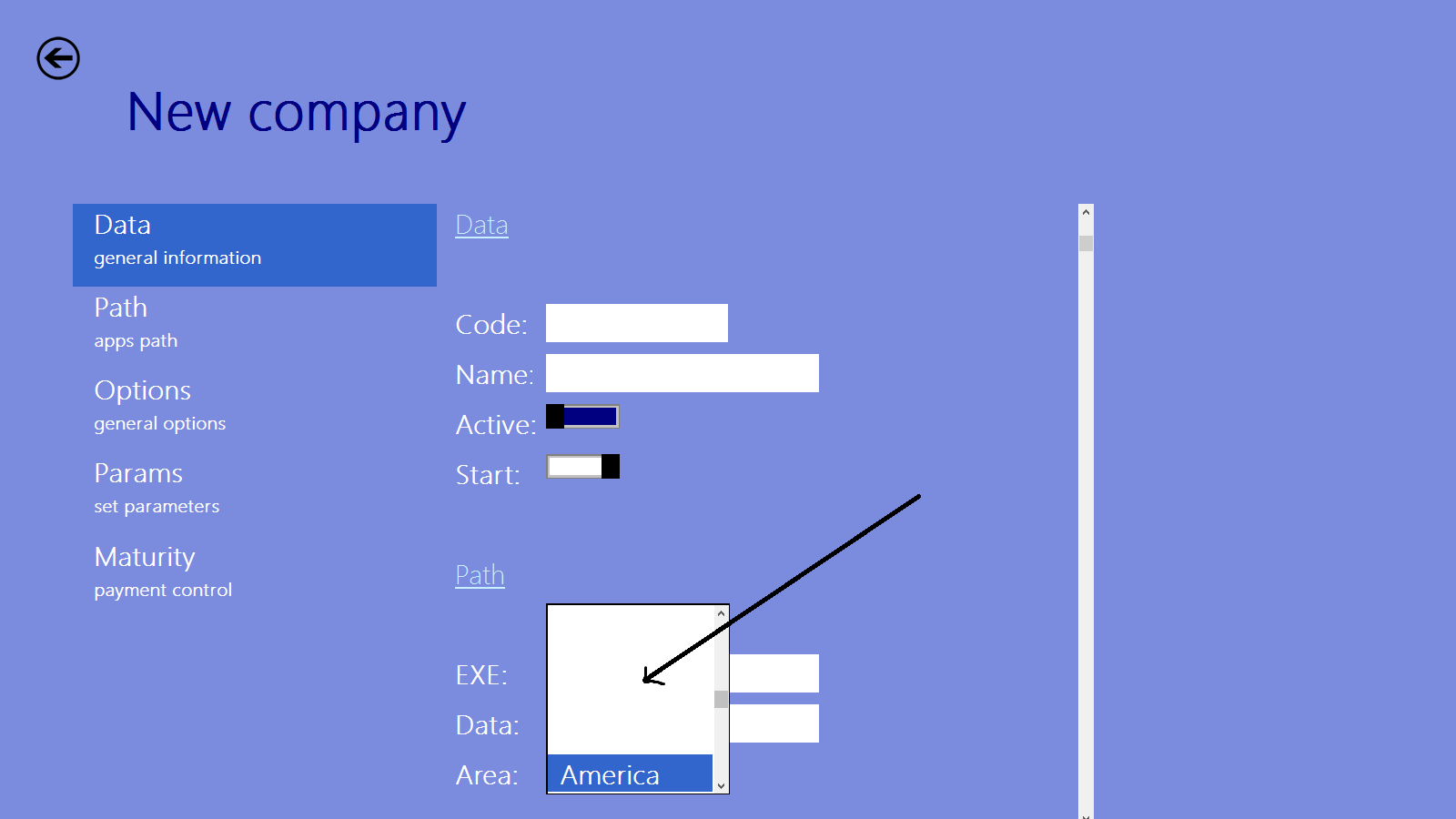

There is a bug in calculating the coordinates of the combometro. A big space before the elements is shown and it is not always the same spacing depending on what element you selected.
Mr Rao
Personnally i have never seen a combobox starting in the middle of a rectangle or any other random place
If it is a design issue.....
I would suggest we have a standard behaviour (starting at the beginning)
Thank you
Richard
I agree the design needs to be modified somewhat.
But here the selected item appears just at the place of the control.
We shall soon have a relook into this to match windows 8 behavior exactly.
Thank you
Richard
VIDEO here
http://www.atzwanger-software.com/fw/cm.wmv
Shows the blank lines at the top or at the end of ComboMetroBox.
Hallo Antonio,
I put a small repetition.
COMBOMETRO is quite urgent for the whole Metro Style like programming capabilities of FIVEWIN.
Metro Style like programming capabilities of FIVEWIN is the main advantage Fivewin has over the other programming languages. There are afaik no other languages offering this possibility.
The next years (5-7) will not have much real Metro Style programs ready.
First missing hardware – these only run on W8 system
Second you cannot transform a whole program in short time.
So a step by step transformation would be best. Metro Style is a design concept which you have to get used to.
Please Antonio would you be so kind to fix these little problems.
Best regards,
Otto
Otto, Richard,
There is a quick fix thats seems to work ![]()
In combom.prg line 411:
nTopRows := 0 // instead of nTopRows -= n
Please try it on your apps and let me know your results, thanks
Antonio
The change is ok, the combo shows now from the beginning
Thank you
Richard
Hello Antonio,
this fix does not resolve the problem. With this fix the comboBox has no blank rows at top still on bottom but the item which is selected is somewhere.
Not over the “getfield”.
This version still has the problem with the color of the selected row. In the copy I work with I changed following line.
::bClrSelFocus := { || { CLR_WHITE, CLR_GREEN } } //otto
Best regards,
Otto
Otto,
Do you mean to have the same standard Windows (desktop) combobox behavior ?
Hello Antonio,
if you use this version on a white window you do not see anything.
Best regards,
Otto