

Saludos,
les dejo una nueva clase para crear layout en ventanas, esto nos permite autoajustar los controles contenidos, con esta clase podriamos olvidar el uso de @ x,y y el tamaño de los controles
para ver el efecto redimencionen la ventana
dejo un zip con 2 ejemplos ejecutable y todas las fuentes
http://sitasoft.net/fivewin/samples/layout_1.zip
para correr los ejemplos por favor copiarlos en la carpeta de samples de fivewin
aqui el codigo de uno de los ejemplos
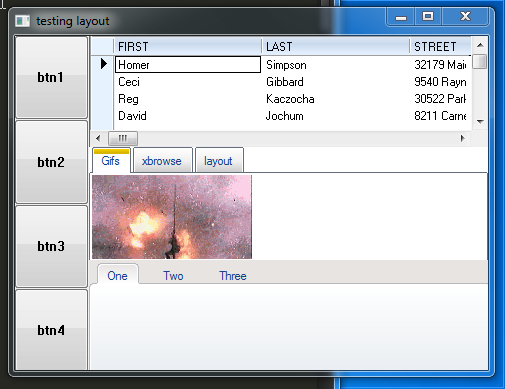
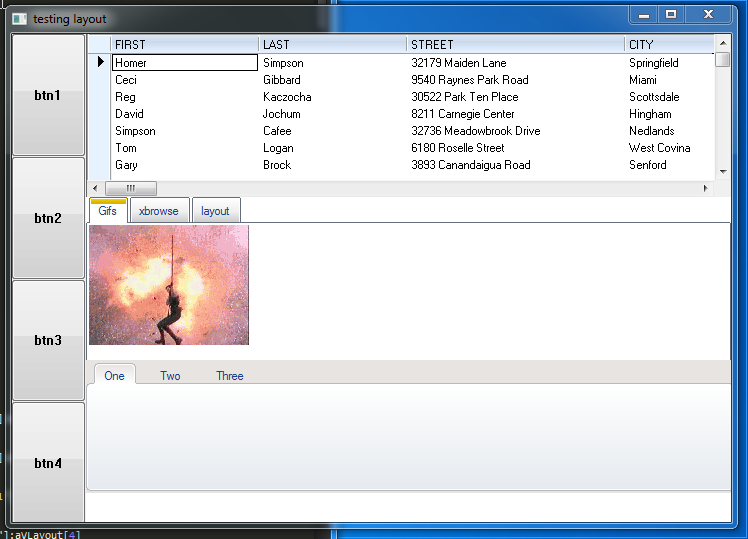
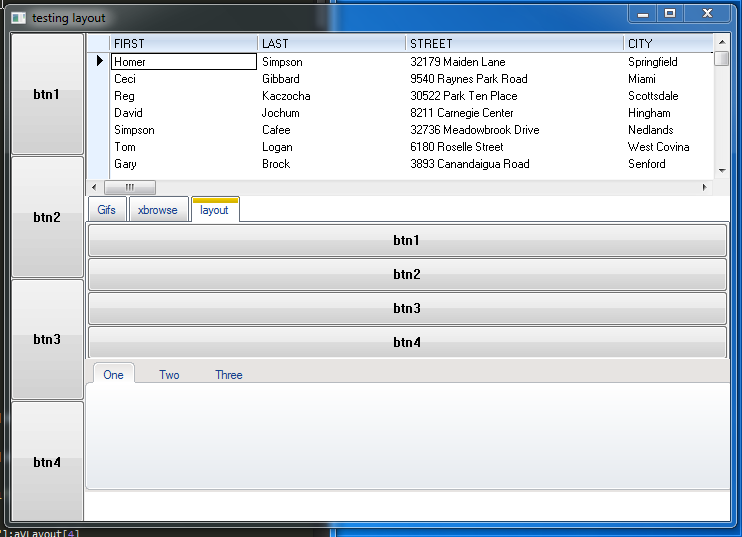
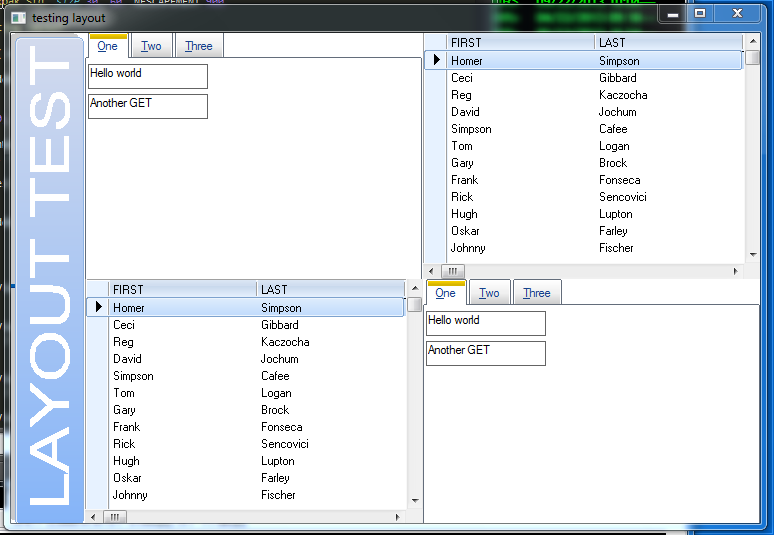
les dejo una nueva clase para crear layout en ventanas, esto nos permite autoajustar los controles contenidos, con esta clase podriamos olvidar el uso de @ x,y y el tamaño de los controles
para ver el efecto redimencionen la ventana
dejo un zip con 2 ejemplos ejecutable y todas las fuentes
http://sitasoft.net/fivewin/samples/layout_1.zip
para correr los ejemplos por favor copiarlos en la carpeta de samples de fivewin
aqui el codigo de uno de los ejemplos
#include "fivewin.ch"
#include "ribbon.ch"
#include "gif.ch"


function main()
    local oWnd
    local oMainLay
    local hLays := {=>}
    local hButtons := {=>}
    local hBrowses := {=>}
    local oRBar, oFld

    define window oWnd title "testing layout"


    USE CUSTOMER NEW SHARED ALIAS "CUST1"
    USE CUSTOMER NEW SHARED ALIAS "CUST2"

    hLays["MAIN"] = TLayout():new( oWnd )

    hLays["H1"] = hLays["MAIN"]:addHLayout(75)
    hLays["H2"] = hLays["MAIN"]:addHLayout()

    //add 4 layout in H1, will use for 4 buttons
    hLays["H1"]:addVLayout()
    hLays["H1"]:addVLayout()
    hLays["H1"]:addVLayout()
    hLays["H1"]:addVLayout()

    @ 0,0 button hButtons["ONE"] prompt "btn1" of hLays["H1"]:aVLayout[1]
    hLays["H1"]:aVLayout[1]:oClient = hButtons["ONE"]

    @ 0,0 button hButtons["TWO"] prompt "btn2" of hLays["H1"]:aVLayout[2]
    hLays["H1"]:aVLayout[2]:oClient = hButtons["TWO"]

    @ 0,0 button hButtons["THREE"] prompt "btn3" of hLays["H1"]:aVLayout[3]
    hLays["H1"]:aVLayout[3]:oClient = hButtons["THREE"]

    @ 0,0 button hButtons["FOUR"] prompt "btn4" of hLays["H1"]:aVLayout[4]
    hLays["H1"]:aVLayout[4]:oClient = hButtons["FOUR"]

/*
IN THIS POINT THE DISTRIBUTION IS
----------------------------------
|     |                          |
|btn1 |                          |
|-----|                          |
|     |                          |
|btn2 |                          |
|-----|                          |
|     |                          |
|btn3 |                          |
|-----|                          |
|     |                          |
|btn4 |                          |
----------------------------------
->75<-|->REST OF WIDTH         <-|
*/

    //add 3 layout in H2, will use for 3 xbrowse
    hLays["H2"]:addVLayout()
    hLays["H2"]:addVLayout()
    hLays["H2"]:addVLayout()


    @ 0,0 XBROWSE hBrowses["ONE"] OF hLays["H2"]:aVLayout[1] ALIAS "CUST1"
    hBrowses["ONE"]:CreateFromCode()
    hLays["H2"]:aVLayout[1]:oClient = hBrowses["ONE"]


    @ 0, 0 FOLDEREX oFld PIXEL PROMPT "Gifs", "xbrowse", "layout" of hLays["H2"]:aVLayout[2]
    hLays["H2"]:aVLayout[2]:oClient = oFld

    @ 1,   1 GIF FILE "..\gifs\matrix4.gif" OF oFld:aDialogs[ 1 ]

    @ 0,0 XBROWSE hBrowses["ONE"] OF oFld:aDialogs[2] ALIAS "CUST2"
    hBrowses["ONE"]:CreateFromCode()
    oFld:aDialogs[2]:oClient = hBrowses["ONE"]

    //WORKING INSIDE FOLDERS
    hLays["FOLDER"] = TLayout():new( oFld:aDialogs[3] )

    hLays["FOLDER_H1"] = hLays["FOLDER"]:addHLayout()

    //add 4 layout in FOLDER_H1, will use for 4 buttons
    hLays["FOLDER_H1"]:addVLayout()
    hLays["FOLDER_H1"]:addVLayout()
    hLays["FOLDER_H1"]:addVLayout()
    hLays["FOLDER_H1"]:addVLayout()

    @ 0,0 button hButtons["FOLDER_ONE"] prompt "btn1" of hLays["FOLDER_H1"]:aVLayout[1]
    hLays["FOLDER_H1"]:aVLayout[1]:oClient = hButtons["FOLDER_ONE"]

    @ 0,0 button hButtons["FOLDER_TWO"] prompt "btn2" of hLays["FOLDER_H1"]:aVLayout[2]
    hLays["FOLDER_H1"]:aVLayout[2]:oClient = hButtons["FOLDER_TWO"]

    @ 0,0 button hButtons["FOLDER_THREE"] prompt "btn3" of hLays["FOLDER_H1"]:aVLayout[3]
    hLays["FOLDER_H1"]:aVLayout[3]:oClient = hButtons["FOLDER_THREE"]

    @ 0,0 button hButtons["FOLDER_FOUR"] prompt "btn4" of hLays["FOLDER_H1"]:aVLayout[4]
    hLays["FOLDER_H1"]:aVLayout[4]:oClient = hButtons["FOLDER_FOUR"]


    DEFINE RIBBONBAR oRBar WINDOW  hLays["H2"]:aVLayout[3] PROMPT "One", "Two", "Three" HEIGHT 133 TOPMARGIN 25 2010

/*
IN THIS POINT THE DISTRIBUTION IS
----------------------------------
|     |                          |
|btn1 |                          |
|-----| xbrowse                  |
|     |--------------------------|
|btn2 |                          |
|-----|                          |
|     | folderex                 |
|btn3 |--------------------------|
|-----|                          |
|     |                          |
|btn4 | ribbonbar                |
----------------------------------
->75<-|->REST OF WIDTH         <-|
*/

    activate window oWnd

return nil#include "fivewin.ch"
#define LAYOUT_TYPE_MAIN 0
#define LAYOUT_TYPE_HORIZONTAL 1
#define LAYOUT_TYPE_VERTICAL 2
class TLayout from TPanel
data bOnResize
data aHLayout, aVLayout
data nType
data nTop, nLeft, nWidth, nHeight
data lFixed
data nSumHFix, nHFix, nSumVFix, nVFix HIDDEN
method new( oWnd )
method addHLayout()
method addVLayout()
method calculeHorizontal( nWidth, nHeight ) HIDDEN
method calculeVertical( nWidth, nHeight ) HIDDEN
method onResized( nWidth, nHeight )
endclass
//----------------------------------------------------//
method TLayout:new( oWnd )
local bOnResize
::aHLayout = {}
::aVLayout = {}
::nTop = 0
::nLeft = 0
::nWidth = 0
::nHeight = 0
::lFixed = .F.
::nSumHFix = 0
::nHFix = 0
::nSumVFix = 0
::nVFix = 0
::nId = ::GetNewId()
::bOnResize = oWnd:bResized
oWnd:bResized = {| nType, nWidth, nHeight | ::onResized( nType, nWidth, nHeight ) }
if ! oWnd:isKindOf("TLAYOUT")
::nType = LAYOUT_TYPE_MAIN
oWnd:oClient = self
endif
return ::Super:new(0,0, oWnd:nHeight, oWnd:nWidth, oWnd)
//----------------------------------------------------//
method TLayout:addVLayout( nHeight )
local oChild
DEFAULT nHeight := 0
oChild = TLayout():new( self )
oChild:nType = LAYOUT_TYPE_VERTICAL
oChild:lFixed = nHeight > 0
oChild:nHeight = nHeight
if oChild:lFixed
::nSumVFix++
::nVFix += nHeight
endif
aadd( ::aVLayout, oChild )
return oChild
//----------------------------------------------------//
method TLayout:addHLayout( nWidth )
local oChild
DEFAULT nWidth := 0
oChild = TLayout():new( self )
oChild:nType = LAYOUT_TYPE_HORIZONTAL
oChild:lFixed = nWidth > 0
oChild:nWidth = nWidth
if oChild:lFixed
::nSumHFix++
::nHFix += nWidth
endif
aadd( ::aHLayout, oChild )
return oChild
//----------------------------------------------------//
method TLayout:calculeVertical( nWidth, nHeight )
local nLen
local nNewHeight
local nAuxHeight, nCalcHeight
local nItem, nCountNotFixed := 0
local nTop, nLeft
local oItem
local nAcum := 0
nLen = Len( ::oWnd:aVLayout )
nCalcHeight := ( nHeight - ::oWnd:nVFix ) / Max( 1, ( nLen - ::oWnd:nSumVFix ) )
nNewHeight = nCalcHeight
nTop = 0
nLeft = 0
for nItem = 1 to nLen
oItem = ::oWnd:aVLayout[ nItem ]
if oItem:nId == ::nId
if oItem:lFixed
nAuxHeight = nNewHeight
nNewHeight = oItem:nHeight
else
nCountNotFixed++
nNewHeight = Round( nCalcHeight * nCountNotFixed, 0 ) - nAcum
nAuxHeight = nNewHeight
endif
::Move( nTop, nLeft, nWidth, nNewHeight )
nNewHeight = nAuxHeight
exit
else
if oItem:lFixed
nTop += oItem:nHeight
else
nCountNotFixed++
nNewHeight = Round( nCalcHeight * nCountNotFixed, 0 ) - nAcum
nAcum += nNewHeight
nTop += nNewHeight
endif
endif
next
return nil
//----------------------------------------------------//
method TLayout:calculeHorizontal( nWidth, nHeight )
local nLen
local nNewWidth
local nAuxWidth, nCalcWidth
local nItem, nCountNotFixed := 0
local nTop, nLeft
local oItem
local nAcum := 0
nLen = Len( ::oWnd:aHLayout )
nCalcWidth := ( nWidth - ::oWnd:nHFix ) / Max( 1, ( nLen - ::oWnd:nSumHFix ) )
nNewWidth = nCalcWidth
nTop = 0
nLeft = 0
for nItem = 1 to nLen
oItem = ::oWnd:aHLayout[ nItem ]
if oItem:nId == ::nId
if oItem:lFixed
nAuxWidth = nNewWidth
nNewWidth = oItem:nWidth
else
nCountNotFixed++
nNewWidth = Round( nCalcWidth * nCountNotFixed, 0 ) - nAcum
nAuxWidth = nNewWidth
endif
::Move( nTop, nLeft, nNewWidth, nHeight )
nNewWidth = nAuxWidth
exit
else
if oItem:lFixed
nLeft += oItem:nWidth
else
nCountNotFixed++
nNewWidth = Round( nCalcWidth * nCountNotFixed, 0 ) - nAcum
nAcum += nNewWidth
nLeft += nNewWidth
endif
endif
next
return nil
//----------------------------------------------------//
method TLayout:onResized( nType, nWidth, nHeight )
if ::nType != LAYOUT_TYPE_MAIN
if ::oWnd:isKindOf( "TLAYOUT" )
switch ::nType
case LAYOUT_TYPE_HORIZONTAL
::calculeHorizontal( nWidth, nHeight )
exit
case LAYOUT_TYPE_VERTICAL
::calculeVertical( nWidth, nHeight )
exit
endswitch
endif
end
if ! ( ::bOnResize == NIL )
Eval( ::bOnResize, nType, nWidth, nHeight )
endif
return 0
//----------------------------------------------------//our best documentation is the source code
Isla de Margarita Venezuela.
danielgarciagil@gmail.com
http://tdolphin.blogspot.com/
https://www.dropbox.com/referrals/NTI5Njk4MDc1OQ?src=global9
Isla de Margarita Venezuela.
danielgarciagil@gmail.com
http://tdolphin.blogspot.com/
https://www.dropbox.com/referrals/NTI5Njk4MDc1OQ?src=global9


