FiveTech Support Forums

FiveWin / Harbour / xBase community
Board index FiveWin for Harbour/xHarbour To Daniel : test of Tlayout
Posts: 7318
Joined: Thu Oct 18, 2012 07:17 PM
To Daniel : test of Tlayout
Posted: Wed Nov 13, 2013 11:23 AM
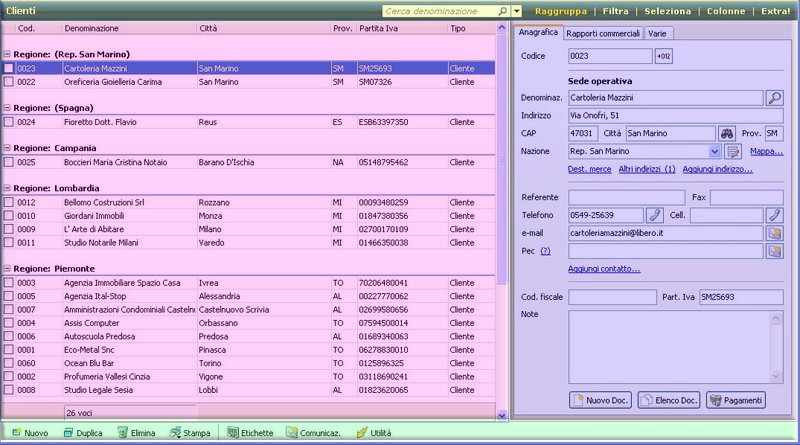
Daniel, this winwdow is possible to simulate with Tlayout ?


can you say how ?
Since from 1991/1992 ( fw for clipper Rel. 14.4 - Momos)

I use : FiveWin for Harbour March-April 2024 - Harbour 3.2.0dev (harbour_bcc770_32_20240309) - Bcc7.70 - xMate ver. 1.15.3 - PellesC - mail: silvio[dot]falconi[at]gmail[dot]com
Posts: 2365
Joined: Wed Nov 02, 2005 11:46 PM
Re: To Daniel : test of Tlayout
Posted: Wed Nov 13, 2013 01:50 PM
Silvio

the Layout is a way to order you controls by sections and adjust automatically when resizes it...

in yours image you can set a 4 "extern" sections and each section you can build a subsections

Posts: 7318
Joined: Thu Oct 18, 2012 07:17 PM
Re: To Daniel : test of Tlayout
Posted: Thu Nov 14, 2013 11:20 AM
Daniel,
I made a test run ok but I need the resize of child wnd


I wish when resize the xbrowse is resised to left as this pciture


My test

I used C5 Vttile instead of TTitle of fwh and on the footer C5 Statusbar

Code (fw): Select all Collapse
 
#include "FiveWin.ch"


static ownd, owndlayout


/***************************************/
function Main()
/*
*/

local oGrupo, oBtn1, oRibbon
local oBtn2, oBtn3, oBtn4

SetBalloon( .T. )

DEFINE WINDOW oWnd FROM 1, 1 To 22, 75 ;
TITLE "This is a MDI enviroment" MDI  ;
 MENU BuildMenu()

 DEFINE BUTTONBAR oBar OF oWnd SIZE 32, 32 2007
SET MESSAGE OF oWnd TO "A message bar"

ACTIVATE WINDOW oWnd maximized

return nil

 function BuildMenu()

   local oMenu

   MENU oMenu 2007
      MENUITEM "&DataBases"
      MENU
         MENUITEM "&Clients..." FILENAME "..\bitmaps\16x16\favorite.bmp"  ACTION teste()
         MENUITEM "&Report..."
         MENU
            MENUITEM "&One..." DISABLED
            MENUITEM "&Two..." CHECKED
            MENUITEM "&Three..." WHEN .F.
         ENDMENU
         SEPARATOR
         MENUITEM "&End" ACTION oWnd:End()
      ENDMENU

      MENUITEM "Edit" WHEN .F.

      oMenu:AddHelp()

      MENUITEM "Another item"
   ENDMENU

   return oMenu


/*********************************************************/
function teste()
/*
*/
local oBrowse, oGet[2], cTest:=SPACE(10),cTest2:=space(10)
local hLays := {=>}
local hButtons := {=>}
local hBrowses := {=>}
local oFld
Local oFont :=  TFont():New( "Lucida Console", 0, -10,, )
Local oFonttxt :=  TFont():New( "Lucida Console", 0, -16,, )
Local  oTitle

USE CUSTOMER NEW SHARED ALIAS "CUST1"
USE CUSTOMER NEW SHARED ALIAS "CUST2"

define window owndlayout mdichild of ownd title "testing layout"


hLays["MAIN"] := TLayout():new( owndlayout )

hLays["H1"] := hLays["MAIN"]:addVLayout(20)
hLays["H2"] := hLays["MAIN"]:addVLayout()
hLays["H4"] := hLays["MAIN"]:addVLayout(30)


hLays["H1"]:addHLayout(hLays["H2"]:nwidth)


    *  hLays["H1"]:aHLayout[1]:

     oTitle := TTitle():New( 0, 0, hLays["H2"]:nwidth, 32,  hLays["H1"]:aHLayout[1], "Clienti" )
     oTitle:nClrText := CLR_WHITE
     oTitle:nClrBar  := RGB(89,135,214)
     oTitle:nClrBar2 := RGB(3,56,147)
     oTitle:lBorder := .t.
     oTitle:nClrBorde := RGB(0,45,150)

     hLays["H1"]:aHLayout[1]:oClient = oTitle


//folder

hLays["H2"]:addHLayout(900)
hLays["H2"]:addHLayout(380)


@ -50, 0 XBROWSE oBrowse of hLays["H2"]:aHLayout[1] ALIAS "CUST2"
oBrowse:CreateFromCode()
hLays["H2"]:aHLayout[1]:oClient := oBrowse


@ 0, 300 FOLDEREX oFld PIXEL PROMPT "Anagrafica", "Rapporti Commerciali", "Varie" of hLays["H2"]:aHLayout[2]
hLays["H2"]:aHLayout[2]:oClient = oFld


//--------------------------------------------------------------------------------------------------//
  //botoes

 oBar := TC5StBar():New(0,;
                       0,;
                       500,;
                       40,;
                       hLays["H4"],;
                       GetSysColor(15), GetSysColor(15) ,;
                       .T., ;
                       oFont,;
                       CLR_BLACK )

  oBar:nClrBorder       := RGB(124,124,148)
        oBar:nClrOver         := RGB(117,183,225)  //RGB(255,255,220)
        oBar:nClrOver2        := RGB(117,183,225)   //RGB(238,152, 21)
        oBar:nClrSel          := CLR_WHITE         //RGB(238,152, 21)
        oBar:nClrSel2         := CLR_WHITE      //RGB(250,227,144)
        oBar:nClrPane         := CLR_WHITE  // RGB(255,255,255)
        oBar:nClrPane2        := CLR_WHITE  //RGB(143,172,230)
        oBar:nClrTSel         := RGB( 49,106,197)

  oBar:AddItem( "Nuovo",".\bitmaps\manuale.bmp" , {||msginfo()}, {||.t.}, .f., "Nuova riga" )
  oBar:AddItem( "Modifica",".\bitmaps\manuale.bmp" , {||msginfo()}, {||.t.}, .f., "Nuova riga" )
  oBar:AddItem( "Elimina",".\bitmaps\manuale.bmp" , {||msginfo()}, {||.t.}, .f., "Nuova riga" )
  oBar:AddItem( "Stampa",".\bitmaps\manuale.bmp" , {||msginfo()}, {||.t.}, .f., "Nuova riga" )
  oBar:AddItem( "Etichette",".\bitmaps\manuale.bmp" , {||msginfo()}, {||.t.}, .f., "Nuova riga" )
    for n := 1 to len( oBar:aItems )
            oBar:aItems[n]:nFixHeight :=  24
        next
        oBar:ResizeItems()


     hLays["H4"]:oClient = oBar
//--------------------------------------------------------------------------------------------------//


     activate window owndlayout maximized ;
        ON RESIZE (oBrowse:nwidth:= owndlayout:nwidth/2+200,;
                 oFld:nLeft:=  oBrowse:nLeft-300)

return ni
Since from 1991/1992 ( fw for clipper Rel. 14.4 - Momos)

I use : FiveWin for Harbour March-April 2024 - Harbour 3.2.0dev (harbour_bcc770_32_20240309) - Bcc7.70 - xMate ver. 1.15.3 - PellesC - mail: silvio[dot]falconi[at]gmail[dot]com
Posts: 7318
Joined: Thu Oct 18, 2012 07:17 PM
Re: To Daniel : test of Tlayout
Posted: Thu Nov 14, 2013 11:54 AM
Daniel anothe test
Code (fw): Select all Collapse
 
    #include "FiveWin.ch"


    static ownd, owndlayout


    /***************************************/
    function Main()
    /*
    */

    local oGrupo, oBtn1, oRibbon
    local oBtn2, oBtn3, oBtn4

    SetBalloon( .T. )

    DEFINE WINDOW oWnd FROM 1, 1 To 22, 75 ;
    TITLE "This is a MDI enviroment" MDI  ;
     MENU BuildMenu()

     DEFINE BUTTONBAR oBar OF oWnd SIZE 32, 32 2007
    SET MESSAGE OF oWnd TO "A message bar"

    ACTIVATE WINDOW oWnd maximized

    return nil

     function BuildMenu()

       local oMenu

       MENU oMenu 2007
          MENUITEM "&DataBases"
          MENU
             MENUITEM "&Clients..." FILENAME "..\bitmaps\16x16\favorite.bmp"  ACTION teste()
             MENUITEM "&Report..."
             MENU
                MENUITEM "&One..." DISABLED
                MENUITEM "&Two..." CHECKED
                MENUITEM "&Three..." WHEN .F.
             ENDMENU
             SEPARATOR
             MENUITEM "&End" ACTION oWnd:End()
          ENDMENU

          MENUITEM "Edit" WHEN .F.

          oMenu:AddHelp()

          MENUITEM "Another item"
       ENDMENU

       return oMenu


    /*********************************************************/
    function teste()
    /*
    */
    local oBrowse, oGet[2], cTest:=SPACE(10),cTest2:=space(10)
    local hLays := {=>}
    local hButtons := {=>}
    local hBrowses := {=>}
    local oFld
    Local oFont :=  TFont():New( "Lucida Console", 0, -10,, )
    Local oFonttxt :=  TFont():New( "Lucida Console", 0, -16,, )
    Local  oTitle

    USE CUSTOMER NEW SHARED ALIAS "CUST1"
    USE CUSTOMER NEW SHARED ALIAS "CUST2"

    define window owndlayout mdichild of ownd title "testing layout"


    hLays["MAIN"] := TLayout():new( owndlayout )

    hLays["H1"] := hLays["MAIN"]:addVLayout(20)
    hLays["H2"] := hLays["MAIN"]:addVLayout()
    hLays["H4"] := hLays["MAIN"]:addVLayout(30)


          hLays["H1"]:addHLayout(hLays["H2"]:nwidth)

         oTitle := TTitle():New( 0, 0, hLays["H2"]:nwidth, 32,  hLays["H1"]:aHLayout[1], "Clienti" )
         oTitle:nClrText := CLR_WHITE
         oTitle:nClrBar  := RGB(89,135,214)
         oTitle:nClrBar2 := RGB(3,56,147)
         oTitle:lBorder := .t.
         oTitle:nClrBorde := RGB(0,45,150)

         hLays["H1"]:aHLayout[1]:oClient = oTitle


    //folder

    hLays["H2"]:addHLayout()
    hLays["H2"]:addHLayout()


    @ -50, 0 XBROWSE oBrowse of hLays["H2"]:aHLayout[1] ALIAS "CUST2"
    oBrowse:CreateFromCode()
    hLays["H2"]:aHLayout[1]:oClient := oBrowse


   @ 0, 300 FOLDEREX oFld PIXEL PROMPT "Anagrafica", "Rapporti Commerciali", "Varie" of hLays["H2"]:aHLayout[2]
    hLays["H2"]:aHLayout[2]:oClient = oFld


    //--------------------------------------------------------------------------------------------------//
      //botoes

     oBar := TC5StBar():New(0,;
                           0,;
                           500,;
                           40,;
                           hLays["H4"],;
                           GetSysColor(15), GetSysColor(15) ,;
                           .T., ;
                           oFont,;
                           CLR_BLACK )

      oBar:nClrBorder       := RGB(124,124,148)
            oBar:nClrOver         := RGB(117,183,225)  //RGB(255,255,220)
            oBar:nClrOver2        := RGB(117,183,225)   //RGB(238,152, 21)
            oBar:nClrSel          := CLR_WHITE         //RGB(238,152, 21)
            oBar:nClrSel2         := CLR_WHITE      //RGB(250,227,144)
            oBar:nClrPane         := CLR_WHITE  // RGB(255,255,255)
            oBar:nClrPane2        := CLR_WHITE  //RGB(143,172,230)
            oBar:nClrTSel         := RGB( 49,106,197)

      oBar:AddItem( "Nuovo",".\bitmaps\manuale.bmp" , {||msginfo()}, {||.t.}, .f., "Nuova riga" )
      oBar:AddItem( "Modifica",".\bitmaps\manuale.bmp" , {||msginfo()}, {||.t.}, .f., "Nuova riga" )
      oBar:AddItem( "Elimina",".\bitmaps\manuale.bmp" , {||msginfo()}, {||.t.}, .f., "Nuova riga" )
      oBar:AddItem( "Stampa",".\bitmaps\manuale.bmp" , {||msginfo()}, {||.t.}, .f., "Nuova riga" )
      oBar:AddItem( "Etichette",".\bitmaps\manuale.bmp" , {||msginfo()}, {||.t.}, .f., "Nuova riga" )
        for n := 1 to len( oBar:aItems )
                oBar:aItems[n]:nFixHeight :=  24
            next
            oBar:ResizeItems()


         hLays["H4"]:oClient = oBar
    //--------------------------------------------------------------------------------------------------//


         activate window owndlayout maximized;
           ON RESIZE (hLays["H2"]:aHLayout[1]:= owndlayout:nwidth-80,;
                      hLays["H2"]:aHLayout[2]:= owndlayout:nwidth-400)

    return ni


When I resize make an error
Application
===========
Path and name: C:\work\errori\tlayout\test.Exe (32 bits)
Size: 2,569,216 bytes
Compiler version: xHarbour 1.2.3 Intl. (SimpLex) (Build 20130422)
FiveWin Version: FWHX 13.07
Windows version: 5.1, Build 2600 Service Pack 2

Time from start: 0 hours 0 mins 2 secs
Error occurred at: 11/14/13, 12:59:36
Error description: Error BASE/1004 Class: 'NUMERIC' has no exported method: NID
Args:
[ 1] = N 1210

Stack Calls
===========
Called from: => NID( 0 )
Called from: Lib\TLayout.prg => TLAYOUT:CALCULEHORIZONTAL( 175 )
Called from: Lib\TLayout.prg => TLAYOUT:ONRESIZED( 207 )
Called from: Lib\TLayout.prg => (b)TLAYOUT:NEW( 59 )
Called from: .\source\classes\WINDOW.PRG => TLAYOUT:RESIZE( 2168 )
Called from: => TWINDOW:HANDLEEVENT( 0 )
Called from: .\source\classes\CONTROL.PRG => TLAYOUT:HANDLEEVENT( 1729 )
Called from: .\source\classes\WINDOW.PRG => _FWH( 3183 )
Called from: => MOVEWINDOW( 0 )
Called from: .\source\classes\WINDOW.PRG => TWINDOW:MOVE( 2511 )
Called from: .\source\classes\CONTROL.PRG => TLAYOUT:MOVE( 775 )
Called from: Lib\TLayout.prg => TLAYOUT:CALCULEVERTICAL( 141 )
Called from: Lib\TLayout.prg => TLAYOUT:ONRESIZED( 210 )
Called from: Lib\TLayout.prg => (b)TLAYOUT:NEW( 59 )
Called from: Lib\TLayout.prg => TLAYOUT:ONRESIZED( 217 )
Called from: Lib\TLayout.prg => (b)TLAYOUT:NEW( 59 )
Called from: .\source\classes\WINDOW.PRG => TLAYOUT:RESIZE( 2168 )
Called from: => TWINDOW:HANDLEEVENT( 0 )
Called from: .\source\classes\CONTROL.PRG => TLAYOUT:HANDLEEVENT( 1729 )
Called from: .\source\classes\WINDOW.PRG => _FWH( 3183 )
Called from: => WNDADJCLIENT( 0 )
Called from: .\source\classes\CONTROL.PRG => TLAYOUT:ADJCLIENT( 275 )
Called from: .\source\classes\WINDOW.PRG => TMDICHILD:RESIZE( 2160 )
Called from: => TWINDOW:HANDLEEVENT( 0 )
Called from: .\source\classes\MDICHILD.PRG => TMDICHILD:HANDLEEVENT( 333 )
Called from: .\source\classes\WINDOW.PRG => _FWH( 3183 )
Called from: => WNDADJCLIENT( 0 )
Called from: .\source\classes\MDIFRAME.PRG => TMDIFRAME:RESIZE( 223 )
Called from: => TMDIFRAME:HANDLEEVENT( 0 )
Called from: .\source\classes\WINDOW.PRG => _FWH( 3183 )
Called from: => WINRUN( 0 )
Called from: .\source\classes\WINDOW.PRG => TMDIFRAME:ACTIVATE( 996 )
Called from: Source\test4.prg => MAIN( 26 )
Since from 1991/1992 ( fw for clipper Rel. 14.4 - Momos)

I use : FiveWin for Harbour March-April 2024 - Harbour 3.2.0dev (harbour_bcc770_32_20240309) - Bcc7.70 - xMate ver. 1.15.3 - PellesC - mail: silvio[dot]falconi[at]gmail[dot]com
Posts: 2365
Joined: Wed Nov 02, 2005 11:46 PM
Re: To Daniel : test of Tlayout
Posted: Thu Nov 14, 2013 02:01 PM
Silvio

with TLayout you dont need calculate any coords

hLays["H2"]:aHLayout[1]:= owndlayout:nwidth-80
hLays["H2"]:aHLayout[2]:= owndlayout:nwidth-400

it´s wrong, the elements in aHLayout and aVLayout are TLayout objects not number

a simple test

Code (fw): Select all Collapse
#include "fivewin.ch"
#include "ttitle.ch"

function main()
    local oWnd
    local oMainLay
    local hLays := {=>}
    local hButtons := {=>}
    local hBrowses := {=>}
    local oFld, oTitle2, oTitle1, oFont3

    define window oWnd title "testing layout"

    USE CUSTOMER NEW SHARED ALIAS "CUST1"

    hLays["MAIN"] = TLayout():new( oWnd )

    hLays["V1"] = hLays["MAIN"]:addVLayout(48) //Top with fixed size 48
    hLays["V2"] = hLays["MAIN"]:addVLayout() //body
    hLays["V3"] = hLays["MAIN"]:addVLayout(48) //bottom with fixed size 48

    //BODY
    hLays["V2"]:addHLayout() //left
    hLays["V2"]:addHLayout(300) //right

    @ 0,0 XBROWSE hBrowses["ONE"] OF hLays["V2"]:aHLayout[1] ALIAS "CUST1"
    hBrowses["ONE"]:CreateFromCode()
    hLays["V2"]:aHLayout[1]:oClient = hBrowses["ONE"]

    @ 0, 0 FOLDEREX oFld PIXEL PROMPT "Gifs", "xbrowse", "layout" of hLays["V2"]:aHLayout[2]
    hLays["V2"]:aHLayout[2]:oClient = oFld

    @  0, 0  TITLE oTitle1 size 10, 10 of hLays["V1"] SHADOW NOSHADOW 
    hLays["V1"]:oClient = oTitle1

    @  0, 0  TITLE oTitle2 size 10, 10 of hLays["V3"] SHADOW NOSHADOW 
    hLays["V3"]:oClient = oTitle2

    activate window oWnd MAXIMIZED

return nil
Posts: 7318
Joined: Thu Oct 18, 2012 07:17 PM
Re: To Daniel : test of Tlayout
Posted: Thu Nov 14, 2013 05:08 PM
yes fantastic
Since from 1991/1992 ( fw for clipper Rel. 14.4 - Momos)

I use : FiveWin for Harbour March-April 2024 - Harbour 3.2.0dev (harbour_bcc770_32_20240309) - Bcc7.70 - xMate ver. 1.15.3 - PellesC - mail: silvio[dot]falconi[at]gmail[dot]com
Posts: 7318
Joined: Thu Oct 18, 2012 07:17 PM
Re: To Daniel : test of Tlayout
Posted: Thu Nov 14, 2013 06:14 PM
thanks Daniel now I saw it is can make with fwh ...

only I have problems..the window is too slowly when i resize it ( I work with 8 GB Ram on Windows seven)
and on Folderex the Gets are not showed right ..I not Know Why ..

Since from 1991/1992 ( fw for clipper Rel. 14.4 - Momos)

I use : FiveWin for Harbour March-April 2024 - Harbour 3.2.0dev (harbour_bcc770_32_20240309) - Bcc7.70 - xMate ver. 1.15.3 - PellesC - mail: silvio[dot]falconi[at]gmail[dot]com
Posts: 7318
Joined: Thu Oct 18, 2012 07:17 PM
Re: To Daniel : test of Tlayout
Posted: Fri Nov 15, 2013 08:49 AM
Daniel ,
I have some problem with Tlayout

The folder normal not have the resource effetc if I use the normal folder class ( + Windows xp Manifest)

the get are visible with black border


the folder tyope folderex have the get with black border and the size must be 20 (nheight) to show something

Since from 1991/1992 ( fw for clipper Rel. 14.4 - Momos)

I use : FiveWin for Harbour March-April 2024 - Harbour 3.2.0dev (harbour_bcc770_32_20240309) - Bcc7.70 - xMate ver. 1.15.3 - PellesC - mail: silvio[dot]falconi[at]gmail[dot]com

Continue the discussion