FiveTech Support Forums

FiveWin / Harbour / xBase community
Board index Bugs report & fixes / Informe de errores y arreglos Bug in TBtnBmp [Solved]
Posts: 44158
Joined: Thu Oct 06, 2005 05:47 PM
Re: Bug in TBtnBmp
Posted: Sun Jun 29, 2014 09:50 PM
Enrico,

Quite curious, now I tested here again and its fine :-)

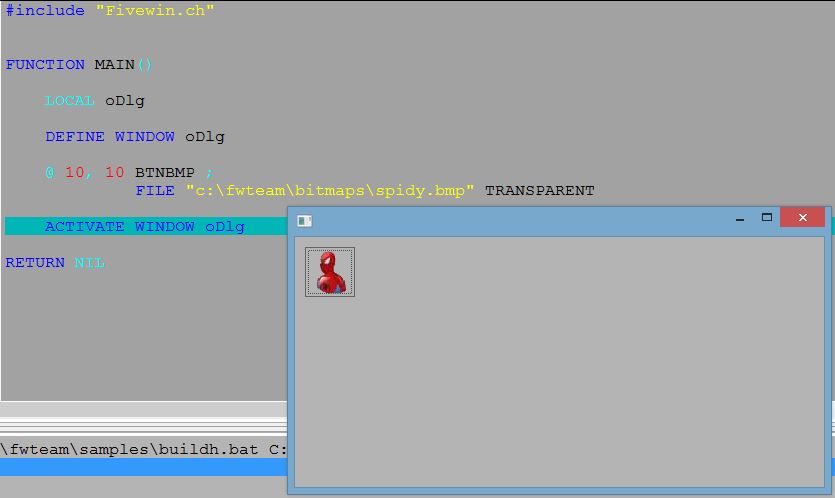
Please test this Class TBtnBmp Method Paint() (warning to other users: this is for testing only, don't use this code yet)

Code (fw): Select all Collapse
METHOD Paint() CLASS TBtnBmp

   local aInfo := ::DispBegin()

   local hBmp := If( ::lPressed, If( Empty( ::hBitmap2 ), If( ::lMOver .and. ;
                     ! Empty( ::hBitmap4 ), ::hBitmap4, ::hBitmap1 ),;
                     ::hBitmap2 ), If( ! IsWindowEnabled( ::hWnd ) .and. ;
                     ! Empty( ::hBitmap3 ), ::hBitmap3, If( ::lMOver .and. ;
                     ! Empty( ::hBitmap4 ), ::hBitmap4, ::hBitmap1 ) ) )

   local nBtn := If( ::lPressed, If( Empty( ::hBitmap2 ), If( ::lMOver .and. ;
                     ! Empty( ::hBitmap4 ), 4, 1 ), 2 ),;
                     If( ! IsWindowEnabled( ::hWnd ) .and. ! Empty( ::hBitmap3 ),;
                     3, If( ::lMOver .and. ! Empty( ::hBitmap4 ), 4, 1 ) ) )

   if ::lTransparent
      SetBrushOrgEx( ::hDC, nBmpWidth( ::oWnd:oBrush:hBitmap ) - ::nLeft,;
                     nBmpHeight( ::oWnd:oBrush:hBitmap ) - ::nTop )
      FillRect( ::hDC, GetClientRect( ::hWnd ), ::oWnd:oBrush:hBrush )
   else
      if Empty( ::bClrGrad )
         FillRect( ::hDC, GetClientRect( ::hWnd ), ::oBrush:hBrush )
      else
         if ::aGrad != nil
            GradientFill( ::hDC, 0, 0, ::nHeight, ::nWidth, ::aGrad() )
         endif
      endif   
   endif

   if ! Empty( hBmp )
      if ::lBmpTransparent
         if SetAlpha() .and. ::aAlpha[ nBtn ]
            ABPaint( ::hDC, If( ::lPressed, 1, 0 ), If( ::lPressed, 1, 0 ),;
                     hBmp, ::nAlphaLevel() )
         else
            DrawTransBmp( ::hDC, hBmp, If( ::lPressed, 1, 0 ),;
                          If( ::lPressed, 1, 0 ), ::nWidth, ::nHeight )
         endif
      else
         DrawTransBmp( ::hDC, hBmp, If( ::lPressed, 1, 0 ),;
                       If( ::lPressed, 1, 0 ), ::nWidth, ::nHeight )
      endif
   endif

   ::DispEnd( aInfo )

return nil
regards, saludos

Antonio Linares
www.fivetechsoft.com
Posts: 44158
Joined: Thu Oct 06, 2005 05:47 PM
Re: Bug in TBtnBmp
Posted: Sun Jun 29, 2014 09:54 PM
Enrico,

The same one modified as there is no need to call DrawTransBmp() when the bitmap is not going to be used in transparent mode:

Code (fw): Select all Collapse
METHOD Paint() CLASS TBtnBmp

   local aInfo := ::DispBegin()

   local hBmp := If( ::lPressed, If( Empty( ::hBitmap2 ), If( ::lMOver .and. ;
                     ! Empty( ::hBitmap4 ), ::hBitmap4, ::hBitmap1 ),;
                     ::hBitmap2 ), If( ! IsWindowEnabled( ::hWnd ) .and. ;
                     ! Empty( ::hBitmap3 ), ::hBitmap3, If( ::lMOver .and. ;
                     ! Empty( ::hBitmap4 ), ::hBitmap4, ::hBitmap1 ) ) )

   local nBtn := If( ::lPressed, If( Empty( ::hBitmap2 ), If( ::lMOver .and. ;
                     ! Empty( ::hBitmap4 ), 4, 1 ), 2 ),;
                     If( ! IsWindowEnabled( ::hWnd ) .and. ! Empty( ::hBitmap3 ),;
                     3, If( ::lMOver .and. ! Empty( ::hBitmap4 ), 4, 1 ) ) )

   if ::lTransparent
      SetBrushOrgEx( ::hDC, nBmpWidth( ::oWnd:oBrush:hBitmap ) - ::nLeft,;
                     nBmpHeight( ::oWnd:oBrush:hBitmap ) - ::nTop )
      FillRect( ::hDC, GetClientRect( ::hWnd ), ::oWnd:oBrush:hBrush )
   else
      if Empty( ::bClrGrad )
         FillRect( ::hDC, GetClientRect( ::hWnd ), ::oBrush:hBrush )
      else
         if ::aGrad != nil
            GradientFill( ::hDC, 0, 0, ::nHeight, ::nWidth, ::aGrad() )
         endif
      endif   
   endif

   if ! Empty( hBmp )
      if ::lBmpTransparent
         if SetAlpha() .and. ::aAlpha[ nBtn ]
            ABPaint( ::hDC, If( ::lPressed, 1, 0 ), If( ::lPressed, 1, 0 ),;
                     hBmp, ::nAlphaLevel() )
         else
            DrawTransBmp( ::hDC, hBmp, If( ::lPressed, 1, 0 ),;
                          If( ::lPressed, 1, 0 ), ::nWidth, ::nHeight )
         endif
      else
         DrawBitmap( ::hDC, hBmp, If( ::lPressed, 1, 0 ),;
                     If( ::lPressed, 1, 0 ), ::nWidth, ::nHeight )
      endif
   endif

   ::DispEnd( aInfo )

return nil
regards, saludos

Antonio Linares
www.fivetechsoft.com
Posts: 9020
Joined: Thu Oct 06, 2005 08:17 PM
Re: Bug in TBtnBmp
Posted: Sun Jun 29, 2014 09:58 PM

Antonio,

no, it doesn't work fine, sorry:

  • the bitmap is expanded to fill all the button
  • there is no 3d effect
  • the bitmap is not centered

EMG

Posts: 44158
Joined: Thu Oct 06, 2005 05:47 PM
Re: Bug in TBtnBmp
Posted: Sun Jun 29, 2014 09:59 PM
Enrico,

The above method Paint() works fine here on a window:

regards, saludos

Antonio Linares
www.fivetechsoft.com
Posts: 44158
Joined: Thu Oct 06, 2005 05:47 PM
Re: Bug in TBtnBmp
Posted: Sun Jun 29, 2014 10:01 PM

Enrico,

Yes I know it, its only a test. Its not completed yet. Now I am going to use it from a dialog and there the differences start (and that is what I don't want).

thanks for your testings :-)

regards, saludos

Antonio Linares
www.fivetechsoft.com
Posts: 44158
Joined: Thu Oct 06, 2005 05:47 PM
Re: Bug in TBtnBmp
Posted: Sun Jun 29, 2014 10:12 PM
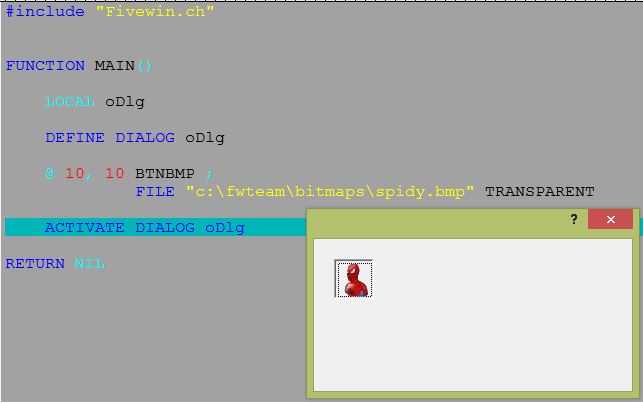
Now, on a dialog the differences begin:

Now searching why that inset border appears

regards, saludos

Antonio Linares
www.fivetechsoft.com
Posts: 44158
Joined: Thu Oct 06, 2005 05:47 PM
Re: Bug in TBtnBmp
Posted: Wed Jul 02, 2014 05:18 AM
Enrico,

Could you please test this Class TBtnBmp Method Paint() (warning: it is not finished yet) and let me know if the results are getting better for you ? :-)

thanks

Code (fw): Select all Collapse
METHOD Paint() CLASS TBtnBmp

   local aInfo := ::DispBegin()
   local nTop, nLeft

   local hBmp := If( ::lPressed, If( Empty( ::hBitmap2 ), If( ::lMOver .and. ;
                     ! Empty( ::hBitmap4 ), ::hBitmap4, ::hBitmap1 ),;
                     ::hBitmap2 ), If( ! IsWindowEnabled( ::hWnd ) .and. ;
                     ! Empty( ::hBitmap3 ), ::hBitmap3, If( ::lMOver .and. ;
                     ! Empty( ::hBitmap4 ), ::hBitmap4, ::hBitmap1 ) ) )

   local nBtn := If( ::lPressed, If( Empty( ::hBitmap2 ), If( ::lMOver .and. ;
                     ! Empty( ::hBitmap4 ), 4, 1 ), 2 ),;
                     If( ! IsWindowEnabled( ::hWnd ) .and. ! Empty( ::hBitmap3 ),;
                     3, If( ::lMOver .and. ! Empty( ::hBitmap4 ), 4, 1 ) ) )

   if ::lTransparent
      SetBrushOrgEx( ::hDC, nBmpWidth( ::oWnd:oBrush:hBitmap ) - ::nLeft,;
                     nBmpHeight( ::oWnd:oBrush:hBitmap ) - ::nTop )
      FillRect( ::hDC, GetClientRect( ::hWnd ), ::oWnd:oBrush:hBrush )
   else
      if Empty( ::bClrGrad )
         FillRect( ::hDC, GetClientRect( ::hWnd ), ::oBrush:hBrush )
      else
         if ::aGrad != nil
            GradientFill( ::hDC, 0, 0, ::nHeight, ::nWidth, ::aGrad() )
         endif
      endif   
   endif

   nTop  = ( ::nHeight / 2 ) - ( nBmpHeight( hBmp ) / 2 )
   nLeft = ( ::nWidth / 2 ) - ( nBmpWidth( hBmp ) / 2 )

   if ! Empty( hBmp )
      if ::lBmpTransparent
         if SetAlpha() .and. ::aAlpha[ nBtn ]
            ABPaint( ::hDC, nTop + If( ::lPressed, 1, 0 ),;
                     nLeft + If( ::lPressed, 1, 0 ), hBmp, ::nAlphaLevel() )
         else
            DrawTransBmp( ::hDC, hBmp, nTop + If( ::lPressed, 1, 0 ),;
                          nLeft + If( ::lPressed, 1, 0 ), nBmpWidth( hBmp ),;
                          nBmpHeight( hBmp ) )
         endif
      else
         DrawBitmap( ::hDC, hBmp, nTop + If( ::lPressed, 1, 0 ),;
                     nLeft + If( ::lPressed, 1, 0 ), nBmpWidth( hBmp ),;
                     nBmpHeight( hBmp ) )
      endif
   endif

   ::DispEnd( aInfo )

return nil
regards, saludos

Antonio Linares
www.fivetechsoft.com
Posts: 9020
Joined: Thu Oct 06, 2005 08:17 PM
Re: Bug in TBtnBmp
Posted: Wed Jul 02, 2014 07:48 AM

Antonio,

yes it getting better but:

  • bitmaps are not painted transparently
  • 3D effect is missing
  • bitmaps (on dialogs) are not centered

EMG

Posts: 44158
Joined: Thu Oct 06, 2005 05:47 PM
Re: Bug in TBtnBmp
Posted: Thu Jul 10, 2014 04:22 AM
Enrico,

I have finally reorganized Class TBtnBmp Method Paint() and now see how it looks :-)

Code (fw): Select all Collapse
METHOD Paint() CLASS TBtnBmp

   local aInfo := ::DispBegin()

   ::GetBmp()  

   if ::l2007 .or. ::l2010
      ::PaintBackGroundAs20072010()
   else   
      ::PaintBackGroundStandard()
   endif   

   ::PaintBitmap()

   ::PaintCaption()
   
   ::PaintBorder()
   
   if ::oPopup != nil
      ::PaintPopupSection()
   endif   

   ::DispEnd( aInfo )

return nil


I am sending it to you by email, in case you want to try it. Still it may miss some changes, thus I appreciate your feedback, thanks!
regards, saludos

Antonio Linares
www.fivetechsoft.com
Posts: 9020
Joined: Thu Oct 06, 2005 08:17 PM
Re: Bug in TBtnBmp
Posted: Thu Jul 10, 2014 07:55 AM

Antonio,

it looks better but:

  • 3D effect is missing
  • bitmaps (on dialogs) are not centered

EMG

Posts: 44158
Joined: Thu Oct 06, 2005 05:47 PM
Re: Bug in TBtnBmp
Posted: Thu Jul 10, 2014 01:45 PM

Enrico,

Do you mean 3D effect for buttons on dialogs ?

regards, saludos

Antonio Linares
www.fivetechsoft.com
Posts: 9020
Joined: Thu Oct 06, 2005 08:17 PM
Re: Bug in TBtnBmp
Posted: Thu Jul 10, 2014 02:19 PM

Antonio,

yes, Sir, exactly! :-)

EMG

Posts: 44158
Joined: Thu Oct 06, 2005 05:47 PM
Re: Bug in TBtnBmp
Posted: Thu Jul 10, 2014 11:11 PM

Enrico,

They look like "inset", right ?

Like this one, right ?

viewtopic.php?p=161582#p161582

regards, saludos

Antonio Linares
www.fivetechsoft.com
Posts: 9020
Joined: Thu Oct 06, 2005 08:17 PM
Re: Bug in TBtnBmp
Posted: Fri Jul 11, 2014 08:09 AM

Antonio,

no, the other way around. :-)

I can send you an image, if you need it.

EMG

Posts: 44158
Joined: Thu Oct 06, 2005 05:47 PM
Re: Bug in TBtnBmp
Posted: Sat Jul 12, 2014 09:44 AM

Enrico,

Yes, please post a screenshot, thanks

regards, saludos

Antonio Linares
www.fivetechsoft.com