
I really want to get this to work on the phone. I need to create a proof of concept for the owners.
If you think it will make a difference we can go ahead with developer option and maybe I can send changes via apk.
Board index FiveTouch FiveTouch FAQ
Funny, I decided to reload prg after changing Scintilla settings and the code highlighting went away. Typing letters work ok now but the delete/backspace does not work at all.
I thought maybe I could mark some text and press space bar to delete it but you cannot mark text in this mode either. Dang if do and dang if you don't.

Gale,
Please add this function to your PRG:
Gale FORd wrote:Ok, I was able to add some code to prg on phone.
With the code below, when I press run button it returns error "Unknown or unregistered symbol DOWNLOADLOCATION"
#include "FiveTouch.ch"

function Main()
  local cFileLocation, cFile
  cFileLocation := DownloadLocation()+"/"
  cFile := "test.dbf"
  if file( cFileLocation+cFile )
    MemoWrit( cFile, MemoRead( cFileLocation+cFile ) )
  endif
   MsgInfo( "Hello world from FiveTouch" )

return nil
Please add this function to your PRG:
function DownloadLocation()

return QStandardPaths():StandardLocations( 14 ):Value( 0 )Gale,
When you uncheck "use Scintilla" then you have to press on "New" and you will get a standard multiline editor
Gale FORd wrote:On setting "use Scintilla" it is really hard to tell because it is so small. But it looks like it is unchecked. I tried changing it so it looks checked but it did not help. When I went back to settings it looked like it was unchecked again. Not matter what I change it to and press "ok" the code in the window still looks like it is using Scintilla and the editing is still problematic.
When you uncheck "use Scintilla" then you have to press on "New" and you will get a standard multiline editor
Gale,
The best way to go is to develop from FiveTouch Windows version and then send the PRG to your android device once it is tested
Gale FORd wrote:Funny, I decided to reload prg after changing Scintilla settings and the code highlighting went away. Typing letters work ok now but the delete/backspace does not work at all.
I thought maybe I could mark some text and press space bar to delete it but you cannot mark text in this mode either. Dang if do and dang if you don't.
The best way to go is to develop from FiveTouch Windows version and then send the PRG to your android device once it is tested
Gale,
FiveTouch is great for quickly developing and testing a prototype.
Once it is finished, then you can build your own APK. I will send you an email with all the tools that you need to install.
For now, its better if you focus on starting as you are doing, so you get used to it.
I will prepare you an email with all the tools that you have to install and how to use them.
Gale FORd wrote:I really want to get this to work on the phone. I need to create a proof of concept for the owners.
If you think it will make a difference we can go ahead with developer option and maybe I can send changes via apk.
FiveTouch is great for quickly developing and testing a prototype.
Once it is finished, then you can build your own APK. I will send you an email with all the tools that you need to install.
For now, its better if you focus on starting as you are doing, so you get used to it.
I will prepare you an email with all the tools that you have to install and how to use them.
I understand about developing on something other than phone.
The problem is you have to update the phone sometime to test.
So far I have not been able to get test.dbf where I can even see the controls.prg sample working you sent in the apk.
I know we will get this working it is just a little frustrating when it is right there in front of you.
Thanks,
Gale,
I am going to try it here step by step...
Gale,
Here it worked fine on first try. I sent myself an email with user.dbf and downloaded it.
Then I went to FiveTouch and run this code and worked as expected
I coded it from the tablet itself. The Scintilla source code editor works fine on this Android tablet.
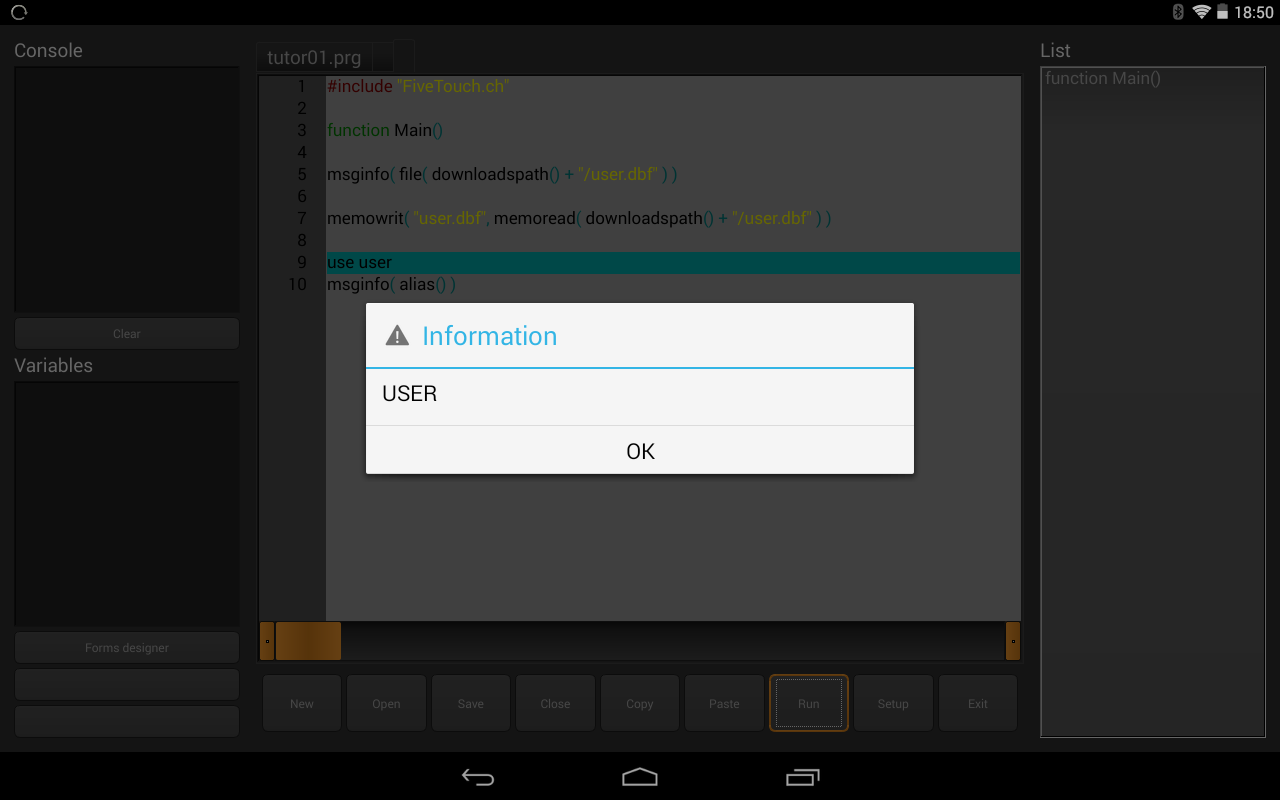
Here it worked fine on first try. I sent myself an email with user.dbf and downloaded it.
Then I went to FiveTouch and run this code and worked as expected
I coded it from the tablet itself. The Scintilla source code editor works fine on this Android tablet.
I understand. i have tried it on tablets also, but my target destination for this project is phones. I will also have limited control over the model. That is why I am spending so much time this early in the process to see how it might work on a phone.
I still plan to develop and run on computers and tablets. I am testing on Laptop, Microsoft Surface Pro 3, and Android tablet and phone. some day maybe Ipad and Iphone.
To develop you need at least a tablet as a phone is too small to code on it
Maybe you could install TeamViewer support on it and easily manage it from your PC 
I have done it a few times and works great
sure, I have no desire to develop on phone. Just need it to run and test on phone. Still trying to get some testing and evaluation of phone capabilities.
Gale,
When you are ready to start building your APKs please let me know it and I will provide you
all that you need to install on your PC.
OK, thanks.
Antonio,
Is it working to IOS?