FiveTech Support Forums

FiveWin / Harbour / xBase community
Board index FiveWin for Harbour/xHarbour Print multiple images with defined sizes
Posts: 389
Joined: Mon Oct 13, 2008 11:26 AM
Print multiple images with defined sizes
Posted: Fri Mar 27, 2015 07:34 PM
Hi, I want to develop ( or use a solution that can be integrated ) to print multiples images in laserjet/inkjet printer:

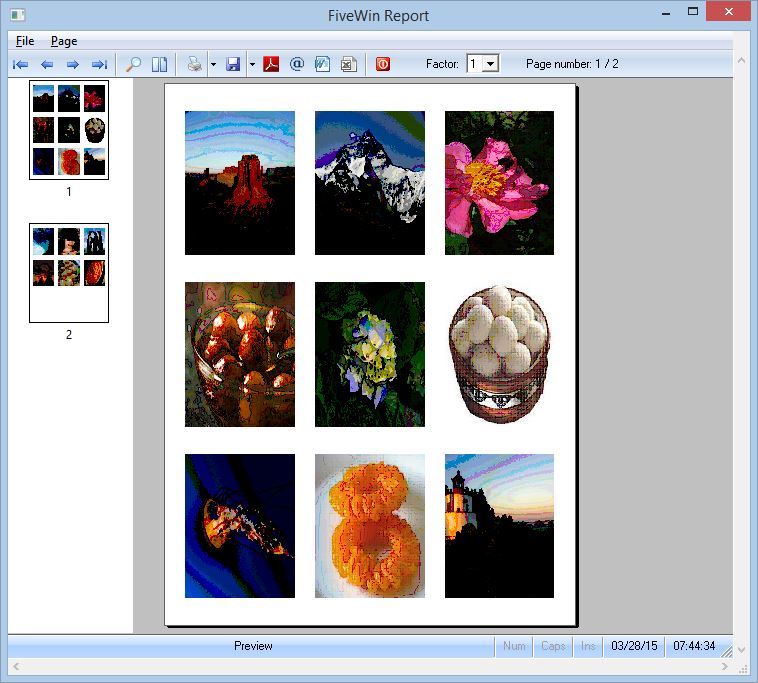
The result that I expect is:

Code (fw): Select all Collapse
     A4 papper
+-------------------+
|                   | 
| +---+ +---+ +---+ |
| | 1 | | 2 | | 3 | |
| |   | |   | |   | |
| +---+ +---+ +---+ |
|                   |
| +---+ +---+ +---+ |
| | 4 | | 5 | | 6 | |
| |   | |   | |   | |
| +---+ +---+ +---+ |
|                   |
| +---+ +---+ +---+ |
| | 7 | | 8 | | 9 | |
| |   | |   | |   | |
| +---+ +---+ +---+ |
|                   |
+-------------------+


I need to take up to 9 image files, resize to fit the size defined image to be printed and send to the printer with no interation with the user, just print with all configurations already set.

How can I do that?

Fast Report maybe?
Email: SamirSSabreu@gmail.com
xHarbour 1.2.3 + Fwhh 20.2
Posts: 10733
Joined: Sun Nov 19, 2006 05:22 AM
Re: Print multiple images with defined sizes
Posted: Sat Mar 28, 2015 02:17 AM
Code (fw): Select all Collapse
#include "fivewin.ch"

function main()

   local oPrn
   local cImagePath  := cFilePath( ExeName() ) + "jpg\\"
   local aDir        := Directory( cImagePath + "*.jpg" )
   local aImage      := {}
   local n,i,nRow, nCol
   local nGutterV, nGutterH, nWidth, nHeight
   local lStretch    := .t.   // to stretch image or not

   RPrevUserBtns( nil, 2007 )

   for n := 1 to Len( aDir ) step 3
      if n < len( aDir ) - 2
         AAdd( aImage, { cImagePath + aDir[ n ][ 1 ], cImagePath + aDir[ n + 1, 1 ], cImagePath + aDir[ n + 2, 1 ] } )
      endif
   next

   PRINT oPrn PREVIEW

   nHeight     := oPrn:nVertRes
   nGutterV    := nHeight / 20
   nHeight     := ( nHeight - 4 * nGutterV ) / 3

   nWidth      := oPrn:nHorzRes
   nGutterH    := nWidth / 20
   nWidth      := ( nWidth - 4 * nGutterH ) / 3

   for n := 1 to Len( aImage ) step 3

      PAGE
      nRow  := nGutterV
      nCol  := nGutterH
      for i := n to Min( n + 2, Len( aImage ) )
         oPrn:SayImage( nRow,nCol, aImage[ i, 1 ], nWidth, nHeight, nil, lStretch )
         nCol  += nGutterH + nWidth
         oPrn:SayImage( nRow,nCol, aImage[ i, 2 ], nWidth, nHeight, nil, lStretch )
         nCol  += nGutterH + nWidth
         oPrn:SayImage( nRow,nCol, aImage[ i, 3 ], nWidth, nHeight, nil, lStretch )
         nRow  += nGutterV + nHeight
         nCol  := nGutterH
      next
      ENDPAGE

   next n

   ENDPRINT

return nil


Regards


G. N. Rao.

Hyderabad, India
Posts: 2170
Joined: Fri Jul 18, 2008 01:24 AM
Re: Print multiple images with defined sizes
Posted: Sun Mar 29, 2015 08:54 PM

Mr. Nages , thanks for your sample.
I tried your code and it works ... but with a catch:
If the amount of images are complete ( multiple of 3) , so good ... otherwise the line containing incomplete number of images do not see.
That is , if 9,12,15,18 all good, but if they are 16 or 17, do not see this 2 images. (I use FWH12.04)

Am I missing something?

Thank You.

Francisco J. Alegría P.

Chinandega, Nicaragua.


Fwxh-MySql-TMySql
Posts: 2170
Joined: Fri Jul 18, 2008 01:24 AM
Re: Print multiple images with defined sizes
Posted: Mon Mar 30, 2015 12:49 AM

I solved . I applied slight modifications to fit my needs.
Thanks Mr. Rao for your code.

Regards.

Francisco J. Alegría P.

Chinandega, Nicaragua.


Fwxh-MySql-TMySql
Posts: 389
Joined: Mon Oct 13, 2008 11:26 AM
Re: Print multiple images with defined sizes
Posted: Mon Mar 30, 2015 11:07 AM
FranciscoA wrote:I solved . I applied slight modifications to fit my needs.
Thanks Mr. Rao for your code.

Regards.


Please, post the final solution for all users
Email: SamirSSabreu@gmail.com
xHarbour 1.2.3 + Fwhh 20.2
Posts: 2170
Joined: Fri Jul 18, 2008 01:24 AM
Re: Print multiple images with defined sizes
Posted: Mon Mar 30, 2015 02:58 PM
Hi, here you got.

Code (fw): Select all Collapse
*for n := 1 to Len( aDir ) step 3
*      if n < len( aDir ) - 2
*         AAdd( aImage, { cImagePath + aDir[ n ][ 1 ], cImagePath + aDir[ n + 1, 1 ], cImagePath + aDir[ n + 2, 1 ] } )
*      endif
*   next

   for n := 1 to Len( aDir ) step 3
      For nn := 1 to 3
         nImages ++
         if nImages <= Len(aDir)
            aadd(a3Images, cImagePath + aDir[ nImages ][ 1 ])
         else
            aadd(a3Images, " ")
         endif
      Next
      AAdd( aImage, a3Images )
      a3Images:={}
   next


*for i := n to Min( n + 2, Len( aImage ) )
*         oPrn:SayImage( nRow,nCol, aImage[ i, 1 ], nWidth, nHeight, nil, lStretch )
*         nCol  += nGutterH + nWidth
*         oPrn:SayImage( nRow,nCol, aImage[ i, 2 ], nWidth, nHeight, nil, lStretch )
*         nCol  += nGutterH + nWidth
*         oPrn:SayImage( nRow,nCol, aImage[ i, 3 ], nWidth, nHeight, nil, lStretch )
*         nRow  += nGutterV + nHeight
*         nCol  := nGutterH
*      next

     for i := n to Min( n + 2, Len( aImage ) )
        if !Empty(aImage[ i, 1 ])
          oPrn:SayImage( nRow,nCol, aImage[ i, 1 ], nWidth, nHeight, nil, lStretch )
       endif

       if !Empty(aImage[ i, 2 ])
          nCol  += nGutterH + nWidth
          oPrn:SayImage( nRow,nCol, aImage[ i, 2 ], nWidth, nHeight, nil, lStretch )
       endif

       if !Empty(aImage[ i, 3 ])
          nCol  += nGutterH + nWidth
          oPrn:SayImage( nRow,nCol, aImage[ i, 3 ], nWidth, nHeight, nil, lStretch )
       endif

         nRow  += nGutterV + nHeight
         nCol  := nGutterH

     next


Maybe exists better ways to do it, but this way it is working for me.

Regards.
Francisco J. Alegría P.

Chinandega, Nicaragua.


Fwxh-MySql-TMySql
Posts: 2170
Joined: Fri Jul 18, 2008 01:24 AM
Re: Print multiple images with defined sizes
Posted: Mon Mar 30, 2015 03:11 PM
Francisco J. Alegría P.

Chinandega, Nicaragua.


Fwxh-MySql-TMySql
Posts: 389
Joined: Mon Oct 13, 2008 11:26 AM
Re: Print multiple images with defined sizes
Posted: Wed Apr 01, 2015 05:29 PM

Thanks!
I'll test soon!

Email: SamirSSabreu@gmail.com
xHarbour 1.2.3 + Fwhh 20.2
Posts: 389
Joined: Mon Oct 13, 2008 11:26 AM
Re: Print multiple images with defined sizes
Posted: Tue Apr 07, 2015 05:53 PM

Can I set the size of the image in Centimeters?

Email: SamirSSabreu@gmail.com
xHarbour 1.2.3 + Fwhh 20.2

Continue the discussion