FWH 15.03 offers support to generate pivot tables with a single function call. Viewing of pivot table is again a simple one xbrowse statement..
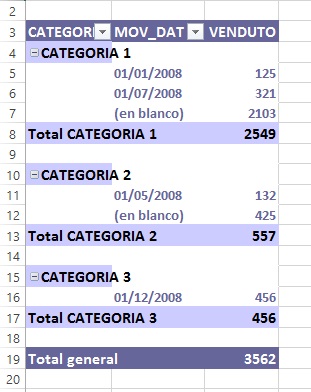
Excel Example:
Transactions data:

Excel Pivot Table from this data.

With FWH, we can have the transaction data in either DBF or any SQL table. Assuming we have the same data in c:\\fwh\\samples\\pvtdata.dbf, this is the code to generate pivot table:

oBrw:InvertPivot() inverts the pivot table view:
Syntax of Pivot function:
Creating XBrowse also easy.
We need not, rather should not, specify any clauses like COLUMNS, HEADERS, group headers, footer totals or group totals. XBrowse recognizes Pivot Array and takes care of columns, grouping, totalling, etc.. What we may specify are picture formats, colors, lines, etc. only.
The code can be as brief as this:
We can see the sample code in fwh\samples\pivotdbf.prg and pivotado.prg.
Screen-shot from pivotdbf.prg.

Clicking the button toggles the pivot view.

More complex usage, using sql query as the source and expressions for columns and rows:

Excel Example:
Transactions data:
Excel Pivot Table from this data.
With FWH, we can have the transaction data in either DBF or any SQL table. Assuming we have the same data in c:\\fwh\\samples\\pvtdata.dbf, this is the code to generate pivot table:
oCn      := FW_OpenAdoConnection( "c:\\fwh\\samples\\" )
aPivot   := FW_AdoPivotArray( oCn, "PVTDATA.DBF", "REGION", "PRODUCT", "SALES", "SUM" ) // Extract Pivot data in array
XBROWSER aPivot SETUP oBrw:bRClicked := { |r,c,f,o| o:InvertPivot() } // View Pivot Array
oBrw:InvertPivot() inverts the pivot table view:
Syntax of Pivot function:
FW_AdoPivotArray( oCn,          // Ado Connection Object
                  cTable,       // Table Name or Sql Query
                  cRowFld,      // Row Field Name or Expression
                  cColFld,      // Column Field Name of Expression
                  cValFld,      // Value Field Name
                  [AggrFunc]    // Aggregate function "SUM","AVG","COUNT", etc. Default is "SUM"
                  ) --> PivotArray
Creating XBrowse also easy.
@ r, c XBROWSE oBrw [SIZE w,h] PIXEL OF oWnd DATASOURCE aPivotWe need not, rather should not, specify any clauses like COLUMNS, HEADERS, group headers, footer totals or group totals. XBrowse recognizes Pivot Array and takes care of columns, grouping, totalling, etc.. What we may specify are picture formats, colors, lines, etc. only.
The code can be as brief as this:
   DEFINE DIALOG oDlg SIZE 980,300 PIXEL FONT oFont TITLE "PIVOT TABLE"

   @ 30,10 XBROWSE oBrw SIZE -10,-10 PIXEL OF oDlg DATASOURCE aPivot ;
      CELL LINES FOOTERS NOBORDER

   oBrw:CreateFromCode()

   @ 08,10 BUTTON "Invert Pivot" SIZE 60,12 PIXEL OF oDlg ACTION oBrw:InvertPivot()

   ACTIVATE DIALOG oDlg CENTERED
We can see the sample code in fwh\samples\pivotdbf.prg and pivotado.prg.
Screen-shot from pivotdbf.prg.
Clicking the button toggles the pivot view.
More complex usage, using sql query as the source and expressions for columns and rows:
   oCn      := FW_OpenAdoConnection( "c:\\fwh\\samples\\" )
   cSql     := "( SELECT S.NAME,C.AGE,C.SALARY FROM CUSTOMER C LEFT JOIN STATES S ON C.STATE = S.CODE WHERE C.STATE LIKE 'A%' )"
   apivot   := FW_AdoPivotArray( oCn, cSql, "NAME AS ST", "INT(AGE/10)*10 AS AGEGROUP", "SALARY", "SUM" )
   XBROWSER aPivot SETUP oBrw:bRClicked := { |r,c,f,o| o:InvertPivot() }
Regards
G. N. Rao.
Hyderabad, India
G. N. Rao.
Hyderabad, India


 saludos...