FiveTech Support Forums

FiveWin / Harbour / xBase community
Board index FiveWin for Harbour/xHarbour New function OfficeExtractImage
Posts: 1467
Joined: Mon Oct 10, 2005 11:26 AM
New function OfficeExtractImage
Posted: Sun Apr 26, 2015 04:40 PM

Hello,

Can someone explain me this new function? Or provide us with an example?

Thanks.

Regards,

Michel D.
Genk (Belgium)


_____________________________________________________________________________________________

I use : FiveWin for (x)Harbour v. 25.12 - Harbour 3.2.0 (May 2025) - xHarbour Builder (January 2020) - Bcc773

Posts: 10733
Joined: Sun Nov 19, 2006 05:22 AM
Re: New function OfficeExtractImage
Posted: Mon Apr 27, 2015 03:19 PM
Purpose of this function is to extract thumbnails from MS Office documents (docx,xlsx,pptx) if saved with thumbnails.

I suggest you first go through the disucssion about saving and extraction of thumbnails of office ducuments
viewtopic.php?f=3&t=13602.

If an office document docx, xlsx or pptx is saved with a thumbnail, this function extracts the thumbnail and saves in the same folder.

OfficeExtractImage( "c:\fwh\samples\cust.docx" ) --> "c:\fwh\samples\cust.emf" // empty value in case of failure
OfficeExtractImage( "c:\fwh\samples\cust.xlsx" ) --> "c:\fwh\samples\cust.wmf"
OfficeExtractImage( "c:\fwh\samples\mppt.pptxx" ) --> "c:\fwh\samples\mppt.jpeg"

Second parameter is lReExtract ( default .f. ). When .f., if the function finds an already extracted thumbnail, returns the name of the thumbnail file. When .t., the function re-extracts the thumbnail.

Notes:
1) The document must have been saved with "save thumbnail" option checked while saving.
2) OfficeExtractImage is named similar to IExtractImage interface.

The new class TXImage can display emf/wmf in addition to any image file that the TImage class handles. This is the most suitable viewer to view the thumbnails.

Testing:
You may Select any docx, which is saved with thumbnail.

For this illustration, I opened and saved c:\fwh\manual\manual FWH english.doc as c:\fwh\manual\FWHmanual.docx with thumbnail.

In addition, I used xbrowser with customer.dbf and saved as word document from the print preview as c:\fwh\samples\cust.docx and c:\fwh\samoles\cust.xlsx, with "save thumbnail" option checked.

When the docx and xlx are ready, here is a sample program to view:
Code (fw): Select all Collapse
#include "fivewin.ch"

//----------------------------------------------------------------------------//

function Main()

   local aDocs := { "c:\fwh\manual\fwhmanual.docx", "c:\fwh\samples\cust.docx", "c:\fwh\samples\cust.xlsx" }
   local oDlg, oFont, oBrw, oImage, oBrush

   DEFINE FONT oFont NAME "ARIAL" SIZE 0,-18
   DEFINE BRUSH oBrush FILE "c:\fwh\bitmaps\backgrnd\stone.bmp"

   DEFINE DIALOG oDlg SIZE ScreenWidth() * 0.6, ScreenHeight() * 0.95 PIXEL ;
      FONT oFont TRUEPIXEL TITLE "FWH 15.04: OFFICE THUMBNAIL VIEWER"

   @ 20,20 XBROWSE oBrw SIZE 300,-20 PIXEL OF oDlg ;
      DATASOURCE aDocs COLUMNS 1 HEADERS "Document" ;
      CELL LINES NOBORDER

   WITH OBJECT oBrw
      :bChange       := { || oImage:Refresh() }
      :CreateFromCode()
   END

   @ 20,320 XIMAGE oImage SOURCE OfficeExtractImage( oBrw:Document:Value ) SIZE -20,-20 OF oDlg
   oImage:SetBrush( oBrush )

   ACTIVATE DIALOG oDlg CENTERED
   RELEASE FONT oFont
   RELEASE BRUSH oBrush

return nil

//----------------------------------------------------------------------------//
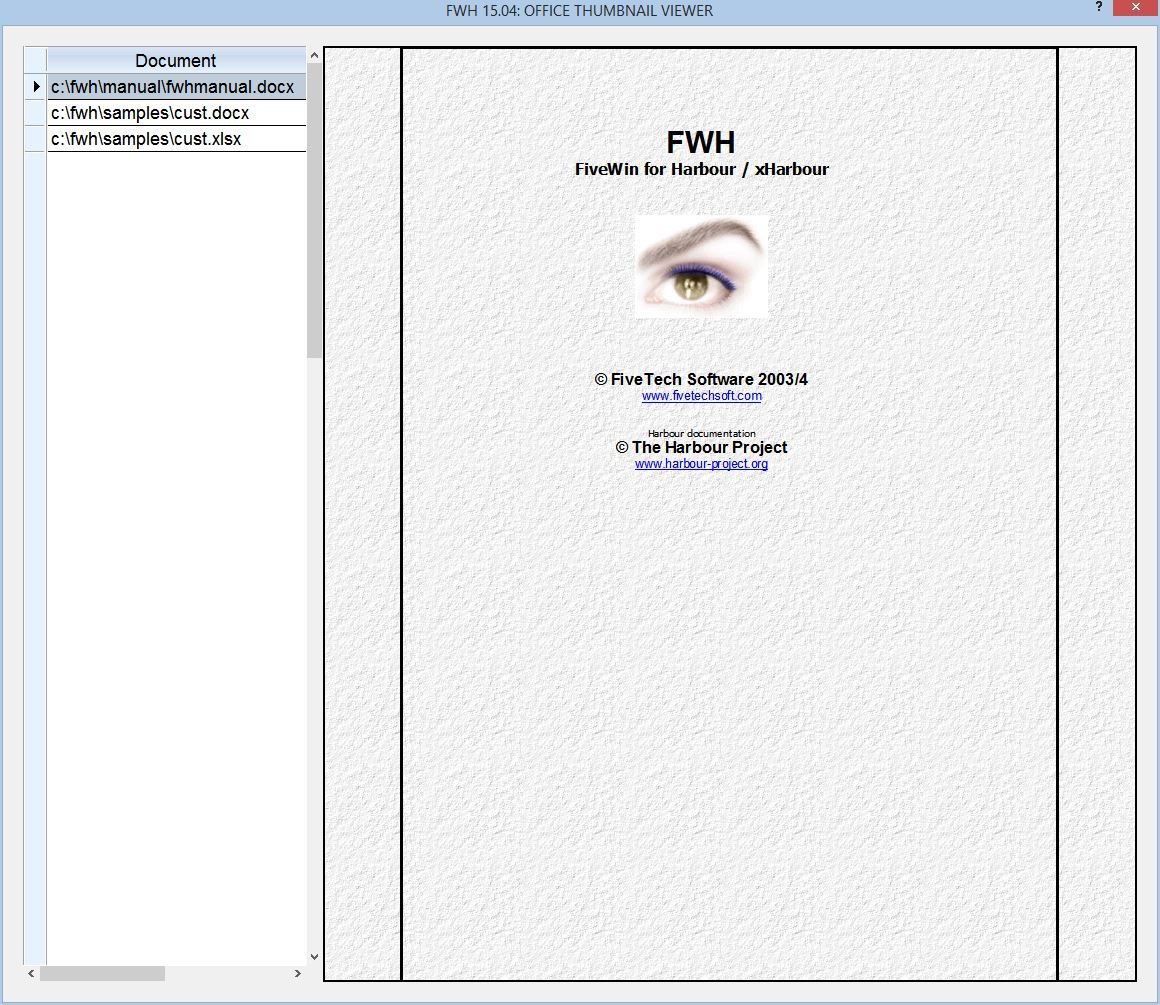
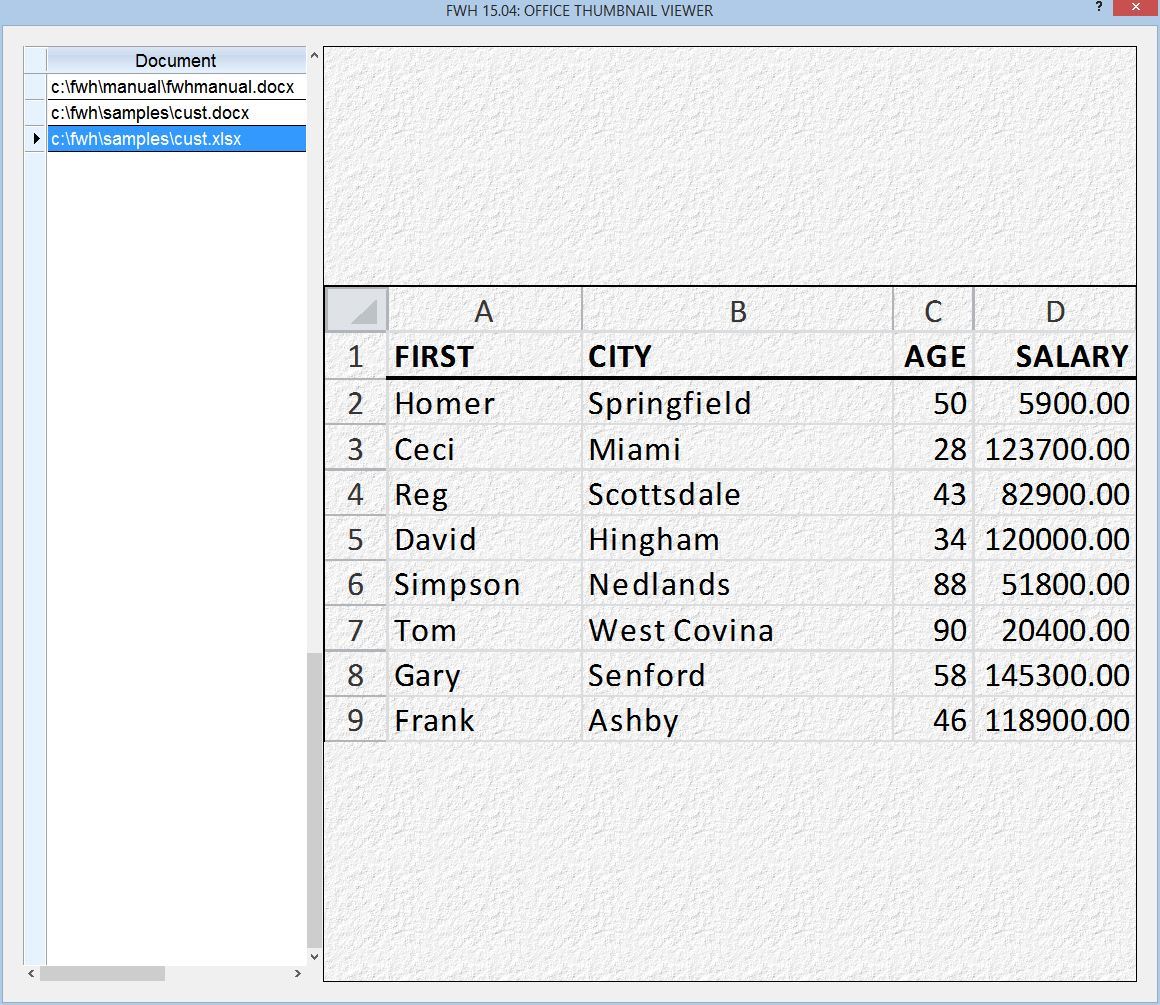


Note:
The function in the released version works with xHarbour but not with Harbour, due to some bugs in Harbour's HB_UnzipFile() function. The fix/woraround for Harbour is ready and will be released soon.
Regards


G. N. Rao.

Hyderabad, India
Posts: 1467
Joined: Mon Oct 10, 2005 11:26 AM
Re: New function OfficeExtractImage
Posted: Wed Apr 29, 2015 12:13 PM

Mr. Rao,

Thanks a lot for your explanation.

Regards,

Michel D.
Genk (Belgium)


_____________________________________________________________________________________________

I use : FiveWin for (x)Harbour v. 25.12 - Harbour 3.2.0 (May 2025) - xHarbour Builder (January 2020) - Bcc773

Posts: 6755
Joined: Wed Feb 15, 2012 08:25 PM
Re: New function OfficeExtractImage
Posted: Wed Apr 29, 2015 01:51 PM
Mr Rao

This error,

Stack Calls
===========
Time from start: 0 hours 0 mins 3 secs
Error occurred at: 29/04/2015, 15:46:53
Error description: Error BASE/1004 Message not found: TXBROWSE:DOCUMENT

Stack Calls
===========
Called from: .\source\function\HARBOUR.PRG => _CLSSETERROR( 244 )
Called from: .\source\classes\XBROWSE.PRG => TXBROWSE:DOCUMENT( 8415 )
Called from: scicode.prg => (b)MAIN10( 433 )
Called from: .\source\classes\XIMAGE.PRG => TXIMAGE:REFRESH( 154 )
Called from: .\source\classes\WINDOW.PRG => (b)TWINDOW( 585 )
Called from: .\source\classes\WINDOW.PRG => TXIMAGE:SETBRUSH( 0 )

Cristobal Navarro

Hay dos tipos de personas: las que te hacen perder el tiempo y las que te hacen perder la noción del tiempo

El secreto de la felicidad no está en hacer lo que te gusta, sino en que te guste lo que haces
Posts: 10733
Joined: Sun Nov 19, 2006 05:22 AM
Re: New function OfficeExtractImage
Posted: Wed Apr 29, 2015 01:55 PM

I guess you might have made some changes in the source code provided above, very likely in the HEADERS clause.
Please compile and build exactly without changing the code. You may change the array of documents ofcourse.

Note:
oBrw:Document refers to column with header "Document"

Regards


G. N. Rao.

Hyderabad, India
Posts: 6755
Joined: Wed Feb 15, 2012 08:25 PM
Re: New function OfficeExtractImage
Posted: Wed Apr 29, 2015 01:56 PM
nageswaragunupudi wrote:I guess you might have made some changes in the source code provided above, very likely in the HEADERS clause.
Please compile and build exactly without changing the code. You may change the array of documents ofcourse.

Note:
oBrw:Document refers to column with header "Document"


You are right, apologies

But I fail to see the images ( Office 2010 )
Cristobal Navarro

Hay dos tipos de personas: las que te hacen perder el tiempo y las que te hacen perder la noción del tiempo

El secreto de la felicidad no está en hacer lo que te gusta, sino en que te guste lo que haces
Posts: 10733
Joined: Sun Nov 19, 2006 05:22 AM
Re: New function OfficeExtractImage
Posted: Wed Apr 29, 2015 04:15 PM

1) We can extract the images only if we first saved with thumbnail option checked.
2) As I said earlier this extraction is not working with Harbour due to some bugs in HB_UnzipFile() function of Harbour. This is fixed and revised build is ready for release.
This works well with xHarbour

Meanwhile sent you the revised olefuncs.prg by email to you.

Regards


G. N. Rao.

Hyderabad, India
Posts: 7318
Joined: Thu Oct 18, 2012 07:17 PM
Re: New function OfficeExtractImage
Posted: Fri Mar 24, 2017 11:38 AM

TWO QUESTION

Do I must have Office installed ?
Wich is the difference of Xmage vs Image class ?

Since from 1991/1992 ( fw for clipper Rel. 14.4 - Momos)

I use : FiveWin for Harbour March-April 2024 - Harbour 3.2.0dev (harbour_bcc770_32_20240309) - Bcc7.70 - xMate ver. 1.15.3 - PellesC - mail: silvio[dot]falconi[at]gmail[dot]com

Continue the discussion