
Cristobal,
gracias por responder, lo puse as'i
Bcc32.Exe -s -c -O2 -e -I%HB_INC_INSTALL%;%C_INC_INSTALL% -M -v -n%HOME%\obj %C%
y sigue igual
saludos
Marcelo V'ia
Cristobal,
gracias por responder, lo puse as'i
Bcc32.Exe -s -c -O2 -e -I%HB_INC_INSTALL%;%C_INC_INSTALL% -M -v -n%HOME%\obj %C%
y sigue igual
saludos
Marcelo V'ia
Utilizas ficheros .res?
Lo has borrado?
Cristobal,
si, utilizo ficheros .RES, entonces no los puedo borrar
Dentro estas reiniciadas, volvi a probar y ahora compilo, pero este comportamiento se repite, como podre tener esto estable, con versiones previas de FW + BCC582 todo OK.....alguna pista ser'a la instalaci'on de mi S.O. win10??? mi m'aquina en espec'ifico?
Ojala tengan alguna pista, es muy desmotivante
saludos y gracias por su ayuda
Marcelo V'ia
Marcelo Via Giglio wrote:Cristobal,
si, utilizo ficheros .RES, entonces no los puedo borrar
Dentro estas reiniciadas, volvi a probar y ahora compilo, pero este comportamiento se repite, como podre tener esto estable, con versiones previas de FW + BCC582 todo OK.....alguna pista ser'a la instalaci'on de mi S.O. win10??? mi m'aquina en espec'ifico?
Ojala tengan alguna pista, es muy desmotivante
saludos y gracias por su ayuda
Marcelo V'ia
Cristobal,
yo trabajo directamente con ficheros RES, puede que sea oportunidad de cambiar a ficheros RC, pero será esa una de las causas de mi problema?
Gracias de todas formas, seguire probando, que mas puedo decir
saludos
Marcelo Via
Mi consejo es que pruebes a generar el .RES con el mismo compilador
Haz una pequeña prueba
Marcelo Via Giglio wrote:Cristobal,
yo trabajo directamente con ficheros RES, puede que sea oportunidad de cambiar a ficheros RC, pero será esa una de las causas de mi problema?
Gracias de todas formas, seguire probando, que mas puedo decir
saludos
Marcelo Via
Hola Gente
Estoy teniendo este problema
Hice unas cuantas compilaciones sin contratiempos. Hasta que sin mas comenzó el problema
borre los \Temp
ejecute bcdedit /set IncreaseUserVa 3072
borre el .res
Uso UEStudio (genera el .res)
Luego regenero el sample y el error se manifiesta
Ocurre usando BCC7 + Harbour 3.2.0dev (r1506171039) + FWH 1204
gracias
# --------- Harbour y FWH configuration --------
# --- general --------------------------------------
# $P  - project name
# $Pp - path to project directory
# $Pn - project name
# --- compile --------------------------------------
# $I  - input full name
# $Ip - input path
# $In - input name
# $Ie - input extension
# $O  - output file
# $Op - path to output file
# $On - output filename (without path)
# $Oe - output extension
# $R  - release/debug setting for compiler
# --- build ----------------------------------------
# $T  - target full name
# $Tp - target path
# $Tn - target name
# $O  - output file
# $Op - path to output file
# $On - output filename (without path)
# $Oe - output extension
# $R  - release/debug setting for linker

[Settings]
Target =
Category&01 = DEFAULT RUN CONFIGURATION
Working Directory =.
Command Line Arguments =

Category&02 = Harbour Options
Automatic Memvar Declaration = no|yes
Variables Are Assumed = no|yes
Generate Preprocessed Output = no|yes
Warning Level = 1|2|3|4|0
User Include Path =
User Defines =

Compiler Options =
Linker Options =

Excluded Files = Excludes

[SettingsInfo]
Target = Provides a space for you to specify an output file and location of the program that the linker creates.
Working Directory = Provides a space for you to specify the directory in which executing occurs. If you do not specify a directory, executing occurs in the directory where the executable is located.
Command Line Arguments = Provides a space for you to specify command-line arguments you want to pass to the program at startup.
Compiler Options = Provides a space for you to specify an additional compiler options.
User Defines = Shows the switches the tool will use to build. Use ';' as delimiter.
Linker Options = Provides a space for you to specify an additional linker options.
Excluded Files = This will exclude the file(s) included in this UE project group from the build.

[SettingsReps]
User Defines = @[;|-D%s]
Automatic Memvar Declaration = no=|yes=/a
Variables Are Assumed = no=|yes=/v
Generate Preprocessed Output = no=|yes=/p
User Include Path = ^^@[;|;%s]
User Include Path&1 = ^^@[;| /i%s]
Use Multi Thread Library = no|yes
Warning Level = @/w%s

[Variables]
FWH = D:\SISTEMAS\COMPILER\FWH
HPATH =D:\SISTEMAS\COMPILER\Harbour
CPATH = D:\SISTEMAS\COMPILER\BCC7

HPATHL = $(HPATH)\LIB
CPATHL = $(CPATH)\LIB

HOPT = /n /gc1 /q $(Compiler Options) /i$(HPATH)\INCLUDE $(User Include Path&1) $(User Defines) $(Automatic Memvar Declaration) $(Variables Are Assumed) $(Generate Preprocessed Output) $(Warning Level)
COPT = -O2 -M -c -v -I$(HPATH)\INCLUDE

LOPT = -Gn -aa -Tpe -s -v
LIBS1 = $(FWH)\LIB\FiveH.lib $(FWH)\LIB\FiveHC.lib $(FWH)\LIB\hbzebra.lib
LIBS2 = $(HPATHL)\hbrtl.lib $(HPATHL)\hbvm.lib $(HPATHL)\gtgui.lib $(HPATHL)\hblang.lib $(HPATHL)\hbmacro.lib $(HPATHL)\hbrdd.lib $(HPATHL)\rddntx.lib $(HPATHL)\rddcdx.lib $(HPATHL)\rddfpt.lib $(HPATHL)\hbsix.lib $(HPATHL)\hbdebug.lib $(HPATHL)\hbcommon.lib $(HPATHL)\hbpp.lib $(HPATHL)\hbcpage.lib $(HPATHL)\hbwin.lib $(HPATHL)\hbct.lib $(HPATHL)\xHB.lib $(HPATHL)\hbcplr.lib $(HPATHL)\hbpcre.lib $(HPATHL)\png.lib $(HPATHL)\hbzlib.lib
LIBS3 = $(CPATHL)\cw32.lib $(CPATHL)\import32.lib $(CPATHL)\odbc32.lib $(CPATHL)\msimg32.lib $(CPATHL)\nddeapi.lib $(CPATHL)\iphlpapi.lib $(CPATHL)\psapi.lib $(CPATHL)\ws2_32.lib $(CPATHL)\shell32.lib
LIBS = $(LIBS1) $(LIBS2) $(LIBS3)
XPATH=C:\xHarbour
FPATH=C:\FiveWin
BPATH=C:\Borland\BCC55

[Environment]
PATH = $(HPATH)\BIN;$(CPATH)\BIN;%PATH%
INCLUDE = $(HPATH)\INCLUDE;$(CPATH)\INCLUDE;$(FWH)\INCLUDE
LIB = $(HPATH)\LIB;$(CPATH)\LIB
BuildMode = %UESMode%

[General]
TargetExt = .EXE
ReleaseOut = Release
DebugOut = Debug
UseFullPaths = 1
UseDosNames = 0
Excludes = $(Excluded Files)
GenerateEDGroup=$(External Dependencies)
.CPP = .C

[MakeCommands]
run = Execute Application
makef = Show Makefile

[Execute Application]
Title = Execute $T
Cmd0 = $(Command Line Arguments)
Depends = $T
ShowWindow = 1
DisplayConsole = $(DCon)

[Show Makefile]
Title=Show makefile
Cmd0=uestudio makefile
ShowWindow=1
DisplayConsole=0

[InsertFiles]

[FileGroups]
FGO = .obj;
FGR = .res;
FGL = .lib;
FGD = .def;

[GroupFormats]
FGO = %s
FGR = %s
FGL = %s

[Build]
Out = $T
Depends = $FGO $FGR
DebugFlag =
ReleaseFlag =
Cmd0 = ilink32 $(LOPT) c0w32.obj $FGO, $Pp\$T,, $(LIBS),, $FGR
Cmd1 = $Pp\$T

[.PRG]
Out = $In.c
DebugFlag = /b
ReleaseFlag = /l
Cmd0 = harbour $I $(HOPT) $R /o$O

IncFiles = 1
CaseSensitive = 0
IncDirs = .;$(INCLUDE);
IncKeyWords = #include;
Comments = /*.*/.//.eol.

[.C]
Out = $In.obj
Cmd0 = bcc32 $(COPT) -o$O $I

[.RC]
Out = $In.res
Cmd0 = brc32 -r -fo$O $I

IncFiles = 1
CaseSensitive = 0
IncDirs = .;$(INCLUDE);
IncKeyWords = #include;
Comments = /*.*/.//.eol.Saludos,
Adhemar Cuéllar
Gracias Adhemar
Así lo tengo, desde antes que comience el problema 
[Variables]
HPATH = d:\Harbour7
FWH = d:\Harbour7\FWH
CPATH = d:\bcc7
Agrego;
Acabo de instalar BCC7 + Harbour 3.2.0dev (r1506171039) en otra PC con Windows 10
Con la configuracion que tengo en mi equipo de trabajo para UEStudio realicé compilaciones de la carpeta samples de Dolphin y de mi proyecto que usa mariaDB; sin complicaciones.
En mi equipo de trabajo, de acuerdo a lo sugerido respecto a los temporales, he corrido una herramienta de Bitdefender para liberar tales archivos; sin que se solucione el problema.
Asi es que estoy como Tarzan en la selva 
you need to enable the 3GB memory space at bootup

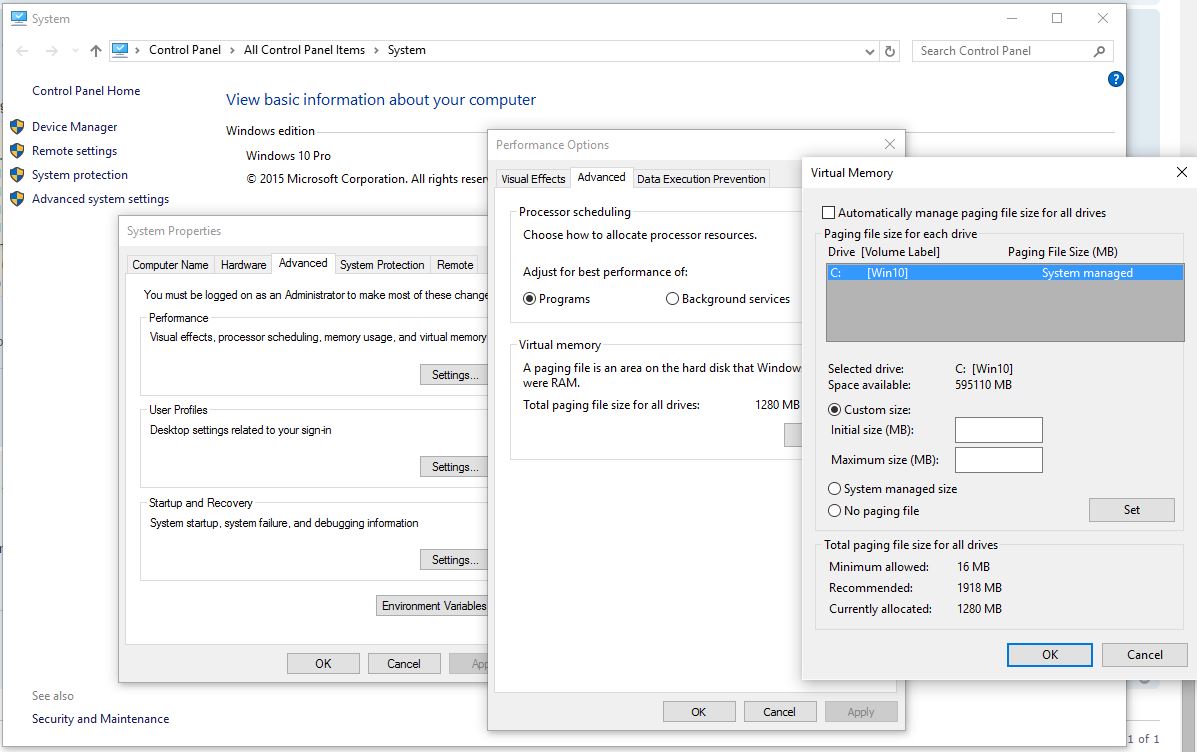
Antonio
Ya aprendí algo mas
Automáticamente Windows está asignando 2432MB


