
Hello !
Is it possible in the cell of xBrowse to display the text vertically ?
Hello !
Is it possible in the cell of xBrowse to display the text vertically ?
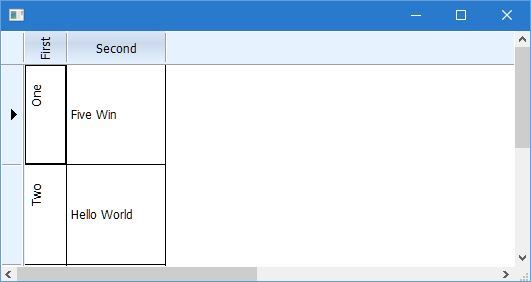
#include "fivewin.ch"

function Main()

   local oWnd, oFont, oVert, oBrw
   local aData := { { "One", "Five Win" }, { "Two", "Hello World" }}

   DEFINE FONT oFont NAME "TAHOMA" SIZE 0,-12
   DEFINE FONT oVert NAME "TAHOMA" SIZE 0,-12 NESCAPEMENT 900

   DEFINE WINDOW oWnd
   oWnd:SetFont( oFont )

   @ 0,0 XBROWSE oBrw OF oWnd DATASOURCE aData AUTOCOLS ;
      HEADERS "First", "Second" ;
      LINES NOBORDER

   WITH OBJECT oBrw:aCols[ 1 ]
      :oHeaderFont   := oVert
      :oDataFont     := oVert
   END
   oBrw:nRowHeight   := 100

   oBrw:CreateFromCode()
   oWnd:oClient := oBrw

   ACTIVATE WINDOW oWnd CENTERED
   RELEASE FONT oFont, oVert

return nil
I think it does not take vertical text alignment. In the header and data . It is possible to do so ?
horacio wrote:I think it does not take vertical text alignment. In the header and data . It is possible to do so ?
Sorry , I had not fully read the post .
Saludos
Thank, Mr. Rao
FWH1507/BCC7/xHarbour
#include "fivewin.ch"

function Main()

   local oWnd, oFont, oVert, oBrw
   local aData := { { "One", "Five Win" }, { "Two", "Hello World" }}

   DEFINE FONT oFont NAME "TAHOMA" SIZE 0,-12
   DEFINE FONT oVert NAME "TAHOMA" SIZE 0,-12 NESCAPEMENT 900

   DEFINE WINDOW oWnd
   oWnd:SetFont( oFont )

   @ 0,0 XBROWSE oBrw OF oWnd DATASOURCE aData AUTOCOLS ;
      HEADERS "First", "Second" ;
      LINES NOBORDER

   WITH OBJECT oBrw:aCols[ 1 ]
      :oHeaderFont   := oVert
      :oDataFont     := oVert
      :bPaintText    := { | oCol, hDC, cData, aRect, aColors, lHighLite, lSelected | ;
                          PaintText( oCol, hDC, cData, aRect, aColors, lHighLite, lSelected ) }
   END
   oBrw:nRowHeight   := 80

   oBrw:CreateFromCode()
   oWnd:oClient := oBrw

   ACTIVATE WINDOW oWnd CENTERED
   RELEASE FONT oFont, oVert

return nil

#define DT_CENTER                   0x00000001

func PaintText( Self, hDC, cData, aRect, aColors, lHighLite, lSelected )

   local nTextWidth     := ::oBrw:GetWidth( cData, ::oDataFont )
   local nBottom

   nBottom  := aRect[ 3 ] - ( aRect[ 3 ] - aRect[ 1 ] - nTextWidth ) / 2
   DrawTextEx( hDC, cData, { nBottom, aRect[ 2 ], aRect[ 1 ], aRect[ 4 ] }, DT_CENTER )

return nil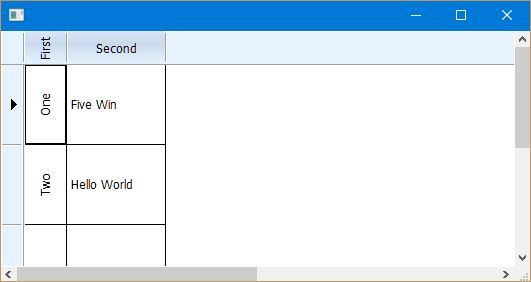
FWH15.10 now paints vertical text in cells honoring the nDataStrAlign.
This is what we need. Thank, Mr. Rao !
Is it possible in XBrowse horizontal merging of cells (a la Excel) ?
Natter wrote:
Is it possible in XBrowse horizontal merging of cells (a la Excel) ?
Application
===========
   Path and name: C:\xDevStudio\Projects\Tubelite\Tubelite.EXE (32 bits)
   Size: 9,551,360 bytes
   Compiler version: Harbour 3.2.0dev (r1603082110)
   FiveWin  version: FWH 19.12
   C compiler version: Borland/Embarcadero C++ 7.0 (32-bit)
   Windows version: 6.2, Build 9200

   Time from start: 0 hours 0 mins 5 secs
   Error occurred at: 10/09/2020, 09:06:37
   Error description: Error BASE/1003  No existe la variable: OVERT

Stack Calls
===========
   Called from: C:\xDevStudio\Projects\Tubelite\Source\Tubelite.prg => DIRECTORIO( 6915 )
   Called from: C:\xDevStudio\Projects\Tubelite\Source\Tubelite.prg => (b)DEFINE_RIBBON( 1558 )
   Called from: .\source\classes\TRBTN.PRG => TRBTN:CLICK( 717 )
   Called from: .\source\classes\TRBTN.PRG => TRBTN:LBUTTONUP( 917 )
   Called from: .\source\classes\CONTROL.PRG => TCONTROL:HANDLEEVENT( 1791 )
   Called from: .\source\classes\TRBTN.PRG => TRBTN:HANDLEEVENT( 1575 )
   Called from: .\source\classes\WINDOW.PRG => _FWH( 3559 )
   Called from:  => WINRUN( 0 )
   Called from: .\source\classes\WINDOW.PRG => TWINDOW:ACTIVATE( 1097 )
Called from: C:\xDevStudio\Projects\Tubelite\Source\Tubelite.prg => MAIN( 494 ) WITH OBJECT oBrw:aCols[ 1 ]
:oDataFont := oVert
:bPaintText := { | oCol, hDC, cData, aRect, aColors, lHighLite, lSelected | ;
PaintText( oCol, hDC, cData, aRect, aColors, lHighLite, lSelected ) }
ENDThe above program compiles and executes perfectly here.
Please check if you copied the program correctly.
#include "fivewin.ch"

function Main()

   local oWnd, oFont, oVert, oBrw
   local aData := { { "One", "Five Win" }, { "Two", "Hello World" }}

   DEFINE FONT oFont NAME "TAHOMA" SIZE 0,-12
   DEFINE FONT oVert NAME "TAHOMA" SIZE 0,-12 NESCAPEMENT 900

   DEFINE WINDOW oWnd
   oWnd:SetFont( oFont )

   @ 0,0 XBROWSE oBrw OF oWnd DATASOURCE aData AUTOCOLS ;
      HEADERS "First", "Second" ;
      LINES NOBORDER

   WITH OBJECT oBrw:aCols[ 1 ]
      :oHeaderFont   := oVert
      :oDataFont     := oVert
   END
   oBrw:nRowHeight   := 80

   oBrw:CreateFromCode()
   oWnd:oClient := oBrw

   ACTIVATE WINDOW oWnd CENTERED
   RELEASE FONT oFont, oVert

return nil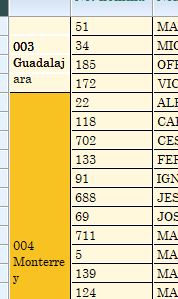
mariordz wrote:You are totally right Mr. Rao, I failed to expalin correctly what I wanted.
The first column of my xbrowse has the branch the employees are assigned to, and i have it merged, what I really wanted to achieve was to show the text in vertical orientation in to the merged cells, and the example you provide shows the vertical text in one row only.
I hope this can be achieved, only for aesthetic reasons


