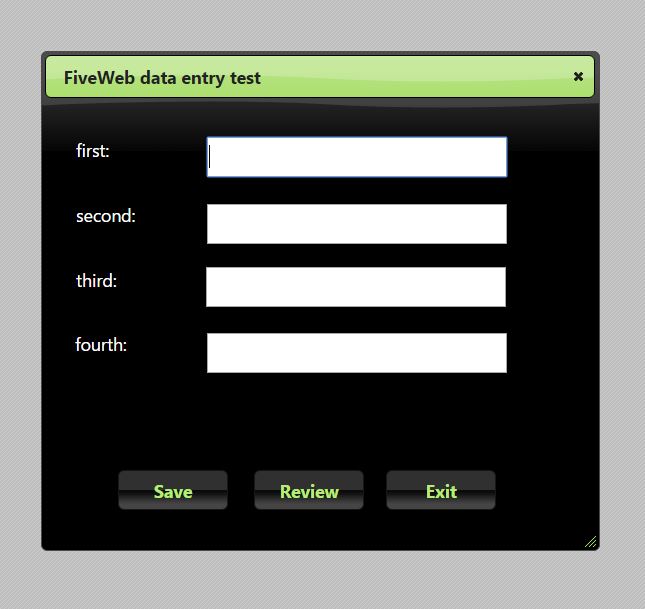
I have created a simple dialog the has 4 gets with FiveWeb.
How can I save the contents of the gets to a file on the server?
I just need a simple text file.
Jeff Barnes
(FWH 16.11, xHarbour 1.2.3, Bcc730)
I have created a simple dialog the has 4 gets with FiveWeb.
How can I save the contents of the gets to a file on the server?
I just need a simple text file.
Jeff,
Please post here or email me your FiveWeb PRG and I will implement it, thanks
#include "FiveWeb.ch"
function Main()
local oDlg
local oGetFirst, cFirst := Space( 30 )
local oGetSecond, cSecond := Space( 30 )
local oGetThird, cThird := Space( 30 )
local oGetFourth, cFourth := Space( 30 )
DEFINE DIALOG oDlg TITLE "FiveWeb data entry test" ;
SIZE 550, 500
@ 40, 31 SAY "first:" SIZE 110, 40 OF oDlg
@ 105, 31 SAY "second:" SIZE 110, 40 OF oDlg
@ 170, 31 SAY "third:" SIZE 110, 40 OF oDlg
@ 234, 30 SAY "fourth:" SIZE 110, 40 OF oDlg
@ 39, 162 GET oGetFirst VAR cFirst SIZE 300, 40 OF oDlg
@ 106, 162 GET oGetSecond VAR cSecond SIZE 300, 40 OF oDlg
@ 169, 161 GET oGetThird VAR cThird SIZE 300, 40 OF oDlg
@ 235, 162 GET oGetFourth VAR cFourth SIZE 300, 40 OF oDlg
@ 372, 73 BUTTON "Save" SIZE 110, 40 OF oDlg ;
ACTION MsgInfo( "Save" )
@ 372, 209 BUTTON "Review" SIZE 110, 40 OF oDlg ;
ACTION MsgInfo( "Review" )
@ 372, 341 BUTTON "Exit" SIZE 110, 40 OF oDlg ;
ACTION ( oDlg:End() ) // ( ... ) means processed in advance in the server
ACTIVATE DIALOG oDlg
return nil┌────────────────────────────────────────────────────────────────────────────┐
│ FiveWeb builder Harbour development power │▄
│ (c) FiveTech, 1993-2015 for Microsoft Windows 9X/NT/200X/ME/XP/Vista/7/8 │█
└────────────────────────────────────────────────────────────────────────────┘█
▀▀▀▀▀▀▀▀▀▀▀▀▀▀▀▀▀▀▀▀▀▀▀▀▀▀▀▀▀▀▀▀▀▀▀▀▀▀▀▀▀▀▀▀▀▀▀▀▀▀▀▀▀▀▀▀▀▀▀▀▀▀▀▀▀▀▀▀▀▀▀▀▀▀▀▀▀
Compiling...
Harbour 3.2.0dev (r1506171039)
Copyright (c) 1999-2015, http://harbour-project.org/
Compiling 'jeff.prg' and generating preprocessed output to 'jeff.ppo'...
Lines 940, Functions/Procedures 1
Generating C source output to 'jeff.c'... Done.
Embarcadero C++ 7.00 for Win32 Copyright (c) 1993-2015 Embarcadero Technologies, Inc.
jeff.c:
Turbo Incremental Link 6.70 Copyright (c) 1997-2014 Embarcadero Technologies, Inc.
* Application successfully built *
Attention: This is a FiveWeb application that has to be executed
from the server as a cgi-bin, i.e.:
http://server_address/cgi-bin/jeff.exe
FiveWeb (c) FiveTech Software 2015
http://www.fivetechsoft.com
c:\fiveweb\samples>
#include "FiveWeb.ch"
//----------------------------------------------------------------------------//
function Main( cParams )
if pcount() > 0
Process( cParams )
return nil
endif
ShowDialog()
return nil
//----------------------------------------------------------------------------//
function ShowDialog()
local oDlg
local oGetFirst, cFirst := Space( 30 )
local oGetSecond, cSecond := Space( 30 )
local oGetThird, cThird := Space( 30 )
local oGetFourth, cFourth := Space( 30 )
DEFINE DIALOG oDlg TITLE "FiveWeb data entry test" ;
SIZE 550, 500
@ 40, 31 SAY "first:" SIZE 110, 40 OF oDlg
@ 105, 31 SAY "second:" SIZE 110, 40 OF oDlg
@ 170, 31 SAY "third:" SIZE 110, 40 OF oDlg
@ 234, 30 SAY "fourth:" SIZE 110, 40 OF oDlg
@ 39, 162 GET oGetFirst VAR cFirst SIZE 300, 40 OF oDlg
@ 106, 162 GET oGetSecond VAR cSecond SIZE 300, 40 OF oDlg
@ 169, 161 GET oGetThird VAR cThird SIZE 300, 40 OF oDlg
@ 235, 162 GET oGetFourth VAR cFourth SIZE 300, 40 OF oDlg
@ 372, 73 BUTTON "Save" SIZE 110, 40 OF oDlg ;
ACTION ( 'document.location = "' + '?save:" + ' + ;
'document.getElementById( "oGetFirst" ).value.trim() + ":" + '+ ;
'document.getElementById( "oGetSecond" ).value.trim() + ":" + '+ ;
'document.getElementById( "oGetThird" ).value.trim() + ":" + '+ ;
'document.getElementById( "oGetFourth" ).value.trim() ' ) // processed in the browser
@ 372, 209 BUTTON "Review" SIZE 110, 40 OF oDlg ;
ACTION 'document.location = "' + '?review:data.txt"'
@ 372, 341 BUTTON "Exit" SIZE 110, 40 OF oDlg ;
ACTION ( oDlg:End() ) // ( ... ) means processed in advance in the server
ACTIVATE DIALOG oDlg
return nil
//----------------------------------------------------------------------------//
function Process( cParams )
local aParams := hb_aTokens( cParams, ":" )
do case
case aParams[ 1 ] == "save"
Save( aParams )
ShowDialog()
case aParams[ 1 ] == "review"
? MemoRead( "data.txt" )
end case
return nil
//----------------------------------------------------------------------------//
function Save( aParams )
local cData := "", n
for n = 2 to Len( aParams )
cData += aParams[ n ] + CRLF
next
if ! Empty( aParams )
MemoWrit( "data.txt", cData )
endif
return nil
//----------------------------------------------------------------------------//Thanks Antonio,
Can I not use IIS ?
I am able to build and run the program on my server but I do not see where the data (text file) is stored.
I have two general questions on this topic:
1) Is there enough security to actually protect data stored on a website that your are trying to create with this product ?
2) Text files are not very good for storing an data that must be accessed / referenced. I once saw a comment that .dbf files could be used with FiveWeb. Is that correct, and can they be placed on a hosted server ?
Tim
Jeff,
Here you have a detailed guide to use FiveWeb and Microsoft IIS
Tim,
> 1) Is there enough security to actually protect data stored on a website that your are trying to create with this product ?
It depends on where you store the data file. If you save it in the same CGI-BIN folder there are no risks (AFAIK) as the CGI-BIN
does not allow to directly retrieve it. CGI-BIN protocol only allows to execute apps and users are not allowed to retrieve any files.
>
2) Text files are not very good for storing an data that must be accessed / referenced. I once saw a comment that .dbf files could be used with FiveWeb. Is that correct, and can they be placed on a hosted server ?
>
Yes, you can use DBFs, or any other database (using ADO, TDolphin, etc). You are creating a Harbour EXE so you have all that power.
Antonio,
I have my IIS setup as mentioned in the link.
Where should I be looking for the saved text file?
I figured it should be been in the c:\inetpub\wwwroot\cgi folder but see nothing (other than my exe) there.
Jeff,
When you click on "Review" do you see the file contents ?
I have tested it here with xampp not with IIS.
have you searched your computer for the data filename ?
Clicking Review does not show the file contents.
The file data.txt is not found on the server.
Jeff,
Surely IIS does not allow to write in the CGI-BIN folder, please try to change this line in jeff.prg and
use a folder with write permissions:
Instead of:
MemoWrit( "data.txt", cData )
try with:
MemoWrit( cPathToWriteableFolder + "\data.txt", cData )
With IIS it will not save at all.
With xampp (accessing it from the server), it always saves to the cgi-bin folder regardless of what path I give it. But it does save so it's a start ![]()
I'm not able (yet) to access with xampp via the web but I'm sure I'm just missing a setting somewhere.