We advise 4 simple ways of inserting images into Ado table. Following program works for any database.
#include "fivewin.ch"
#include "adodef.ch"  // important
//----------------------------------------------------------------------------//

function Main()

   local oCn, cTableName, aJpg

   oCn := <......... Ado connection object. Connect in your own way ..>
   cTableName := "MyImages"  // any other name you like
   aJpg            := { array of jpg files wih path }

   AdoImportImages( oCn, "MyImages", aJpg )

   oCn:Close()

return nil

//----------------------------------------------------------------------------//

function AdoImportImages( oCn, cTable, aJpg )

   CreateTable( oCn, cTable )
   UsingSQL(               oCn, cTable, cFileNoPath( aJpg[ 1 ] ), MemoRead( aJpg[ 1 ] ) )
   UsingAdoRecordSet( oCn, cTable, cFileNoPath( aJpg[ 2 ] ), MemoRead( aJpg[ 2 ] ) )
   UsingTDataRow(      oCn, cTable, cFileNoPath( aJpg[ 3 ] ), MemoRead( aJpg[ 3 ] ) )

   BrowseImagesTable( oCn, cTable )

return nil

//----------------------------------------------------------------------------//

function CreateTable( oCn, cTable )

   TRY
      oCn:Execute( "DROP TABLE " + cTable )
   CATCH
   END

   FWAdoCreateTable( cTable, { ;
      { "IMAGENAME",    'C',  20,   0 }, ;
      { "IMAGEDATA",    'm',  10,   0 } }, oCn )

/*
Notes: Use this function to create tables. Thie same syntax and notiation are compatible with different databases.
Data Type small 'm' indicates binary data in contast to "M" meaning text memo.
*/

return nil

//----------------------------------------------------------------------------//

function UsingSQL( oCn, cTable, cImageName, cImageData )

   local cSql

   PRIVATE table_name := cTable

   cSql  := SQL INSERT INTO &table_name ( IMAGENAME,IMAGEDATA ) VALUES ( cImageName, cImageData )
   oCn:Execute( cSql )
   // This works for ADO and non ado connections
return nil

//----------------------------------------------------------------------------//

function UsingAdoRecordSet( oCn, cTable, cImageName, cImageData )

   local oRs

   oRs   := FW_OpenRecordSet( oCn, cTable )
   oRs:AddNew( { "ImageName", "ImageData" }, { cImageName, STRTOHEX( cImagedata ) } )
   oRs:Close()

return nil

//----------------------------------------------------------------------------//

function UsingTDataRow( oCn, cTable, cImageName, cImageData )

   local oRs, oRec

   oRs   := FW_OpenRecordSet( oCn, cTable )
   oRec  := TDataRow():New( oRs, .t. )
   oRec:ImageName    := cImageName
   oRec:ImageData    := cImageData
   oRec:Save()
   oRs:Close()

return nil

//----------------------------------------------------------------------------//

function BrowseImagesTable( oCn, cTable )

   local oRs   := FW_OpenRecordSet( oCn, cTable )

   XBROWSER oRs FASTEDIT SETUP ( oBrw:ImageData:nDataBmpAlign := AL_CENTER, oBrw:lCanPaste := .t. )

   oRs:Close()

return nil
3 methods are shown in the 3 Useby functions in the above program. Now the 4th method.
Copy any image from Web or any other imaging program or document into clipboard. Move to any Image cell in the xbrowse. Press Ctrl-V. The image is pasted into the cell and also is written in the database table.
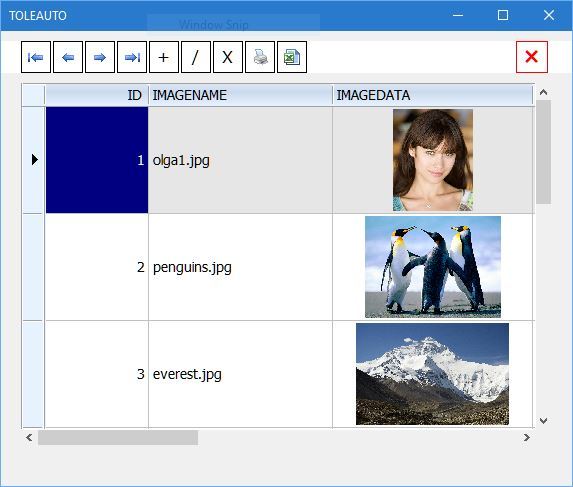
This program is tested with MSSQL (SQLEXPRESS) and with MYSQL before posting.
Specific note for MySql: By default the maximum size of packet size for communication between client and server is only 1 MB and this is not adequate for images. You need to increase this size sutabluy once. Please see
//
https://dev.mysql.com/doc/refman/5.5/en ... large.html


