- Can you use .rc files with FiveWeb?
- How would you open a PDF file to be viewed via FiveWeb?
Thanks,
Jeff Barnes
(FWH 16.11, xHarbour 1.2.3, Bcc730)
Jeff Barnes
(FWH 16.11, xHarbour 1.2.3, Bcc730)
Jeff,
FiveWeb currently does not support RC files. Look for FWeb from Carles Aubia on these forums, his product does support RC files.
The browser should open a PDF by default (at least Chrome does it).
Look for "document.location" in FiveWeb examples and set it to the PDF file url directly.
<div class="php" id="{CB}" style="font-family: monospace;"><?php
<a href="http://www.php.net/include">include</a> ('./fweb/fweb.php' );

$oWeb   = new TWeb( 'Test PDF' );
$oWeb->Activate();

    $oWnd   = new TDialog( 'my_dialog', 700, 900 , 'Manual FWeb - Framework Web' );
    $oWnd->SetIcon( 'images.app/doc.png' );

        $oPdf = new TFrame( $oWnd, 'my_frame', 0, 0, '100%', '100%', 'help/FWeb_EN.pdf' );

    $oWnd->Activate();

$oWeb->End();
?></div> )
)Ok so I am obviously missing something in my formatting ... 
I've tried several different ways of trying to open the PDF using document.location but it never seems to work (using Chrome)
Can you please give me a code sample on how to open the pdf using document.location ?
Thanks.
Jeff,
@ 260, 160 BUTTON "Ok" OF oDlg ;
ACTION document.location = "url_to_the_pdf"
Looks like its a problem with xampp not allowing me to open the pdf.
If I manually enter the url in Chrome with xampp running it give an error.
If I switch to IIS it will open the PDF
The problem is, in IIS the exe does not really work 
When I click a button (a browse) it does nothing.
I took a quick look at FWeb but it looks like it doesn't let us use harbour code.
Jeff,
If you manually enter the url in Chrome with xampp running, this should work. I've tried it and it works.
Fiveweb it's based in Harbour
FWeb it's based on php but using the FiveWin philosophy with RIA concept -> https://en.wikipedia.org/wiki/Rich_Internet_application
There are two solutions to make the jump to the Web ! 
Got it working ...
How can I force the page to refresh after it opens?
I know I can use document.location.reload(true) but I can't get it to work when added to the button:
Example:
If I add each to it's own button, they work so I know the commands are correct but this isn't what I need.
I'm using window.open so I can have the PDF opened in a new tab. The second button will obviously reload the original tab.
@ 484, 456 BUTTON "PDF" SIZE 110, 40 OF oDlg ACTION window.open("/PDF/Monitor.pdf","_blank")
@ 524, 456 BUTTON "Refresh" SIZE 110, 40 OF oDlg ACTION document.location.reload(true)
But, if I try to do the following the code will not compile:
@ 484, 456 BUTTON "PDF" SIZE 110, 40 OF oDlg ACTION (window.open("/PDF/Monitor.pdf","_blank"), document.location.reload(true) )
The compile error is:
Compiling...
Certus.prg(232) Error E0030 Syntax error "syntax error at '.'"
Harbour 3.0.0 (Rev. 16951)
Copyright (c) 1999-2011, http://harbour-project.org/
Compiling 'Certus.prg' and generating preprocessed output to 'Certus.ppo'...
1 error
No code generated.
* Compile errors *
Jeff,
Try it this way:
@ 484, 456 BUTTON "PDF" SIZE 110, 40 OF oDlg ;
ACTION "window.open('/PDF/Monitor.pdf','_blank'), document.location.reload(true)"
Thanks Antonio ... That worked.
Is there any way I can do something like the code below without it being tied to a button?
window.open("/PDF/Monitor.pdf","_blank")
Example:
IF cVar = "Something"
window.open("/PDF/Monitor.pdf","_blank")
ENDIF
Jeff,
Try this:
? "<script>window.open('/PDF/Monitor.pdf','_blank');<\script>"
Thanks Antonio ... got that part working now.
FiveWeb is working quite well so far 
Now on to FOLDERS....
I am able to create the folders following the sample (TestFold.prg).
@ 0, 0 FOLDER oFld PROMPTS "Test 1","Test 2" SIZE 1000, 650 OF oDlg
How do I setup my gets/browse etc... in separate tabs in the folder?
#include "FiveWeb.ch"

function Main()

   local oDlg, oFld
   local cVar1 := Space( 10 ), cVar2 := Space( 20 ), cVar3 := Space( 30 )

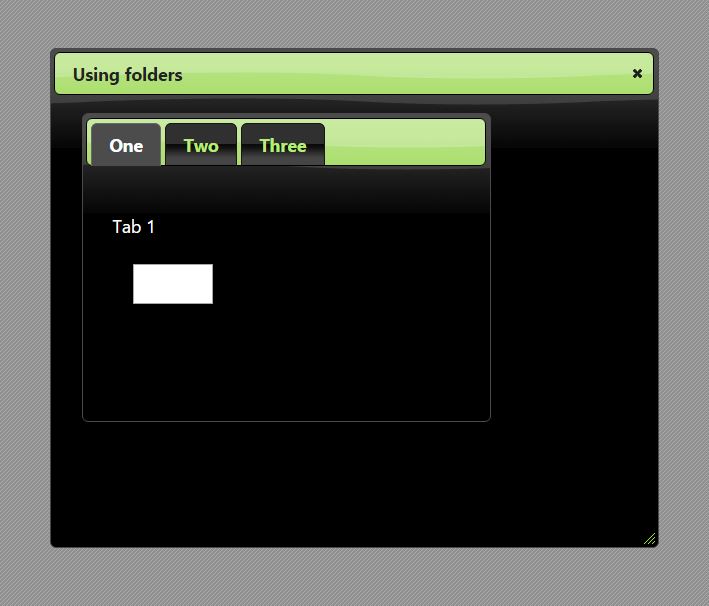
   DEFINE DIALOG oDlg TITLE "Using folders"

   @ 10, 10 FOLDER oFld PROMPTS "One", "Two", "Three" OF oDlg SIZE 400, 300

   @ 100, 30 SAY "Tab 1" OF oFld:aDialogs[ 1 ]

   @ 150, 50 GET cVar1 OF oFld:aDialogs[ 1 ]

   @ 100, 30 SAY "Tab 2" OF oFld:aDialogs[ 2 ]

   @ 150, 50 GET cVar2 OF oFld:aDialogs[ 2 ]

   @ 100, 30 SAY "Tab 3" OF oFld:aDialogs[ 3 ]

   @ 150, 50 GET cVar3 OF oFld:aDialogs[ 3 ]

   ACTIVATE DIALOG oDlg

return nil