FiveTech Support Forums

FiveWin / Harbour / xBase community
Board index FiveWin for Harbour/xHarbour Icons and buttons
Posts: 102
Joined: Sat Jun 06, 2015 06:57 PM
Icons and buttons
Posted: Wed Feb 17, 2016 07:08 PM

I recently upgraded from a version of FWH from 2008 to 1507 and notice the following:

  1. What used to be buttons with nicely rounded corners now have square corners. Any way to get to old style back?
  2. The program icon no longer appears on the program shortcut or in explorer. When the program is open it does display on the windows task bar but looks really funky, with a white background . The icon displays with windows in the program but again looks funky with the while background. Before the background was always the same color as the windows background.
  3. I use a panel on the left side of the screen with some buttons on it with bmp files and before they displayed nicely and the background was the same background as the panel. Now the background is a different color so it looks really funky. Buttons on a toolbar at the top look fine, however.
Posts: 44158
Joined: Thu Oct 06, 2005 05:47 PM
Re: Icons and buttons
Posted: Wed Feb 17, 2016 09:38 PM

Could you post some screenshots ?

many thanks for your feedback,

regards, saludos

Antonio Linares
www.fivetechsoft.com
Posts: 102
Joined: Sat Jun 06, 2015 06:57 PM
Re: Icons and buttons
Posted: Wed Feb 17, 2016 11:25 PM
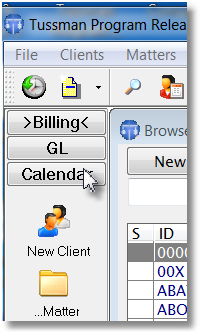
Here is with the old FWH (example 1)


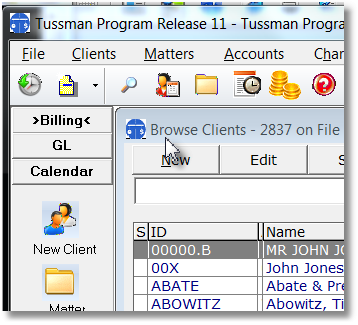
Here is with new FWH 1507 (example 2)


Note:

1. white background on icons in example 2 - in example 1 background is same color as window
2. Square corners on buttons in example 2 - in example 1 they are rounded
3. Colored background on buttons in panel at left (New Client, etc)--in example 1 background is same color as panel

No difference in coding between the two versions. Icon is declared as : DEFINE icon oicon file "tp.ico"

Also as I described the icon doesn't display at all on the desktop shortcut or listing the file in explorer.
Posts: 44158
Joined: Thu Oct 06, 2005 05:47 PM
Re: Icons and buttons
Posted: Thu Feb 18, 2016 07:14 AM

Do you include a WindowsXP.Manifest in your RC file ?

It seems as it is missing in your current version

regards, saludos

Antonio Linares
www.fivetechsoft.com
Posts: 102
Joined: Sat Jun 06, 2015 06:57 PM
Re: Icons and buttons
Posted: Sat Feb 20, 2016 04:16 AM

Thanks for that Antonio. With the manifest file the buttons are now rounded. But I still can't get the icon to work. I have in my .MAK file the line

IF EXIST tp.RES echo tp.RES >> b32.bc

The icon is in the tp.RES file and with the old FWH it worked fine, but it won't compile with the new FWH1507. Instead, I get a message

TP.RES contains invalid OMF record, type 0x00.

Any ideas?

Posts: 44158
Joined: Thu Oct 06, 2005 05:47 PM
Re: Icons and buttons
Posted: Sat Feb 20, 2016 08:36 AM

Please post here your b32.bc file

regards, saludos

Antonio Linares
www.fivetechsoft.com
Posts: 102
Joined: Sat Jun 06, 2015 06:57 PM
Re: Icons and buttons
Posted: Sat Feb 20, 2016 05:20 PM

c:\bcc7\lib\c0w32.obj +
obj\tp.obj obj\tp1.obj obj\tp2.obj obj\tp3.obj obj\tp4.obj obj\tp5.obj +
obj\tp6.obj obj\tp7.obj obj\tp8.obj obj\tp9.obj obj\tp10.obj obj\tp11.obj +
obj\tp12.obj obj\tp13.obj obj\tp14.obj +
obj\rbill.obj, +
tp.exe, +
tp.map, +
c:\fwh1507\lib\FiveHx.lib c:\fwh1507\lib\FiveHC.lib +
c:\xhB2\lib\rtl.lib +
c:\xhB2\lib\vm.lib +
c:\xhB2\lib\gtgui.lib +
c:\xhB2\lib\lang.lib +
c:\xhB2\lib\macro.lib +
c:\xhB2\lib\rdd.lib +
c:\xhB2\lib\dbfntx.lib +
c:\xhB2\lib\dbfcdx.lib +
c:\xhB2\lib\dbffpt.lib +
c:\xhB2\lib\hbsix.lib +
c:\xhB2\lib\debug.lib +
c:\xhB2\lib\common.lib +
c:\xhB2\lib\pp.lib +
c:\xhB2\lib\pcrepos.lib +
c:\xhB2\lib\ct.lib +
c:\xhB2\lib\zlib.lib +
c:\xhB2\lib\hbzip.lib +
c:\xhB2\lib\libmisc.lib +
c:\xhB2\lib\tip.lib +
c:\xhB2\lib\png.lib +
c:\fwh1507\lib\tdata32.lib +
c:\bcc7\lib\cw32.lib +
c:\bcc7\lib\import32.lib +
c:\bcc7\lib\uuid.lib +
c:\bcc7\lib\ws2_32.lib +
c:\bcc7\lib\psdk\odbc32.lib +
c:\bcc7\lib\psdk\rasapi32.lib +
c:\bcc7\lib\psdk\nddeapi.lib +
c:\bcc7\lib\psdk\msimg32.lib +
c:\bcc7\lib\psdk\psapi.lib +
c:\bcc7\lib\psdk\gdiplus.lib +
c:\bcc7\lib\psdk\iphlpapi.lib +
c:\bcc7\lib\psdk\shell32.lib +
tp.RES

Posts: 44158
Joined: Thu Oct 06, 2005 05:47 PM
Re: Icons and buttons
Posted: Sat Feb 20, 2016 07:05 PM

The last two lines should be like this:

c:\bcc7\lib\psdk\shell32.lib,
tp.RES

Please modify your makefile

regards, saludos

Antonio Linares
www.fivetechsoft.com
Posts: 102
Joined: Sat Jun 06, 2015 06:57 PM
Re: Icons and buttons
Posted: Sat Feb 20, 2016 07:45 PM

How should the mak file look? Those two lines currently read:

echo $(BCDIR)\lib\psdk\shell32.lib + >> b32.bc
echo tp.res >> b32.bc

Posts: 102
Joined: Sat Jun 06, 2015 06:57 PM
Re: Icons and buttons
Posted: Sat Feb 20, 2016 07:59 PM

Antonio,

Once again thank you very much!!! I figured it out and now it all works. Whew! I appreciate all your help

Regards,

David

Posts: 44158
Joined: Thu Oct 06, 2005 05:47 PM
Re: Icons and buttons
Posted: Sat Feb 20, 2016 08:56 PM

very good

regards, saludos

Antonio Linares
www.fivetechsoft.com

Continue the discussion