I am suggesting two methods.
1. Using built-in Array filtering capabilities of XBrowse.
2. Splitting the child array and attaching to the Parent array.
Both work well. My preference is the 2nd method. There can be many other approaches too. You may use what you like.
For testing, I created parent and child arrays from states.dbf and customer.dbf in \fwh\samples folder. You may copy this program to \fwh\samples folder and build it.
#include "fivewin.ch"

//----------------------------------------------------------------------------//

function Main()

   UseXBrowseFilter()
   UseSplitArrays()

return nil

//----------------------------------------------------------------------------//

static function UseXBrowseFilter()

   local aParent, aChild
   local oDlg, oFont, oParent, oChild

   USE STATES
   aParent  := FW_DbfToArray( "CODE,NAME" )
   CLOSE STATES

   USE CUSTOMER
   aChild   := FW_DbfToArray( "STATE,FIRST,CITY,SALARY" )
   CLOSE CUSTOMER

   DEFINE FONT oFont NAME "TAHOMA" SIZE 0,-15
   DEFINE DIALOG oDlg SIZE 700,400 PIXEL TRUEPIXEL FONT oFont ;
      TITLE "XBROWSE ARRAY FILTERING CAPABILITIES"

   @ 20,20 XBROWSE oParent SIZE 200,-20 PIXEL OF oDlg ;
      DATASOURCE aParent AUTOCOLS HEADERS "Code", "State" ;
      CELL LINES NOBORDER

   WITH OBJECT oParent
      :SetGroupHeader( "STATES" )
      :bChange    := { || oChild:Seek( "" ), oChild:Seek( oParent:Code:Value ) } // Not necessary but desirable to use
      //
      :CreateFromCode()
   END

   @ 20,220 XBROWSE oChild SIZE -20,-20 PIXEL OF oDlg ;
      DATASOURCE aChild AUTOCOLS ;
      HEADERS "St", "FirstName", "City", "Salary" ;
      AUTOSORT ;
      COLSIZES 60,120,130 ;
      CELL LINES NOBORDER

   WITH OBJECT oChild
      :SetGroupHeader( "CUSTOMERS" )
      :lIncrFilter   := .t.
      :bFilterExp    := { |cSeek,aRow| aRow[ 1 ] = cSeek }
      :bKeyChar      := { |k| If( k == VK_BACK .or. k > 31, 0, nil ) }
      //
      :CreateFromCode()
   END

   ACTIVATE DIALOG oDlg CENTERED ON INIT oChild:Seek( aParent[ 1, 1 ] )
   RELEASE FONT oFont

return nil

//----------------------------------------------------------------------------//

static function UseSplitArrays()

   local aParent, aChild, n, nAt
   local oDlg, oFont, oParent, oChild

   USE STATES
   aParent  := FW_DbfToArray( "CODE,NAME,ARRAY(0)" )
   CLOSE STATES

   USE CUSTOMER
   aChild   := FW_DbfToArray( "STATE,FIRST,CITY,SALARY" )
   CLOSE CUSTOMER

   for n := 1 to Len( aChild )
      nAt   := AScan( aParent, { |a| a[ 1 ] == aChild[ n, 1 ] } )
      if nAt > 0
         AAdd( aParent[ nAt, 3 ], aChild[ n ] )
      endif
   next

   DEFINE FONT oFont NAME "TAHOMA" SIZE 0,-15
   DEFINE DIALOG oDlg SIZE 700,400 PIXEL TRUEPIXEL FONT oFont ;
      TITLE "USING SPLIT ARRAYS"

   @ 20,20 XBROWSE oParent SIZE 200,-20 PIXEL OF oDlg ;
      DATASOURCE aParent AUTOCOLS HEADERS "Code", "State" ;
      CELL LINES NOBORDER

   WITH OBJECT oParent
      :SetGroupHeader( "STATES" )
      :bChange    := { || oChild:aArrayData := oParent:aRow[ 3 ], ;
                          oChild:Refresh( .t. ) }
      //
      :CreateFromCode()
   END

   @ 20,220 XBROWSE oChild SIZE -20,-20 PIXEL OF oDlg ;
      DATASOURCE aParent[ 1, 3 ] AUTOCOLS ;
      HEADERS "St", "FirstName", "City", "Salary" ;
      AUTOSORT ;
      COLSIZES 60,120,130 ;
      CELL LINES NOBORDER

   WITH OBJECT oChild
      :SetGroupHeader( "CUSTOMERS" )
      //
      :CreateFromCode()
   END

   ACTIVATE DIALOG oDlg CENTERED
   RELEASE FONT oFont

return nil

//----------------------------------------------------------------------------//
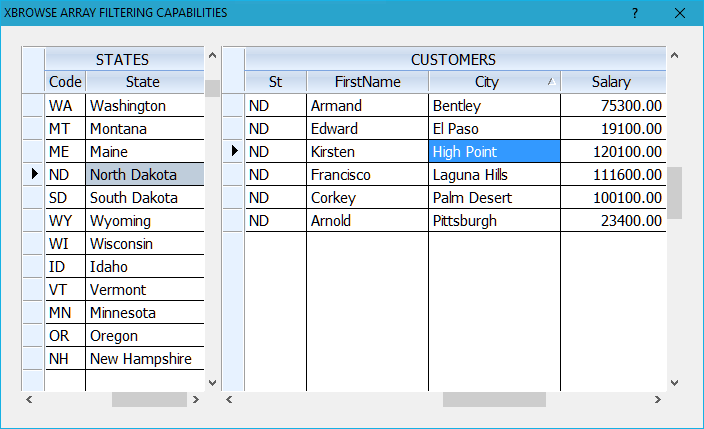
XBrowse is more than a normal browse. It makes many complex things easy, which otherwise require complex coding. All it requires is to add one line of code to the child browse
and another line of code in parent browse
:bChange := { || oChild:Seek( "" ), oChild:Seek( oParent:Code:Value ) }
A word about ArrayRDD. I had to test this recently. I do not advise this approach for performance reasons. First we need to create a table using ArrayRDD. This is unacceptably slow. Next we have to append each row of our array to the table one by one and then use filters. All said and done I am not sure how far this RDD is compatible with XBrowse.


