FiveTech Support Forums

FiveWin / Harbour / xBase community
Board index FiveWin for Harbour/xHarbour Windows Toast notifications - second try
Posts: 4840
Joined: Fri Nov 18, 2005 04:52 PM
Re: Windows Toast notifications - second try
Posted: Wed Apr 20, 2016 02:01 PM
Antonio,

Code (fw): Select all Collapse
function Main()

   Local oWnd
   
   define window oWnd
   
   activate window oWnd ;
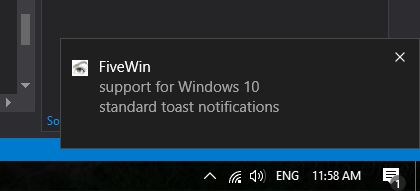
      on init Toast( "FiveWin", "support for Windows 10", "standard toast notifications" )

return nil

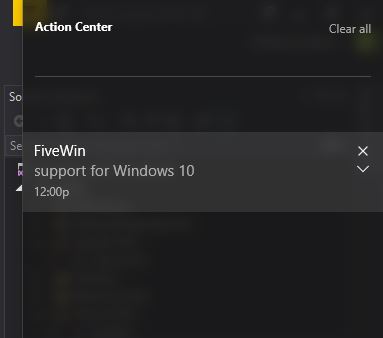
That is exactly the code I am using and it doesn't show in the Action Center on my PC.

My Hardware and software specs:

Edition Windows 10
Version 1511
OS Build 10586.218

Processor AMD A8-4555M APU with Radeon(tm) HD
Installed RAM 4.00 GB(3.19 GB usable)
System type 64-bit operating system, x64-based processor

FWH 16.02/BCC7/xHarbour 1.2.3 Intl. (SimpLex) (Build 20150603)

James
FWH 18.05/xHarbour 1.2.3/BCC7/Windows 10
Posts: 4840
Joined: Fri Nov 18, 2005 04:52 PM
Re: Windows Toast notifications - second try
Posted: Wed Apr 20, 2016 02:12 PM
Antonio,

You said,

Regarding the detection of the click on the toast, it can be done in VSC2015 C++, not sure if we will be able to have it with Borland:


Well, Microsoft says:

Be aware that for a desktop app to be able to display toast notifications, that app must have a shortcut on the Start screen as this sample does. That shortcut must have an AppUserModelID.


But you have already proven them wrong on Microsoft's above statement, so I have faith you can solve the click action too.

James
FWH 18.05/xHarbour 1.2.3/BCC7/Windows 10
Posts: 44158
Joined: Thu Oct 06, 2005 05:47 PM
Re: Windows Toast notifications - second try
Posted: Wed Apr 20, 2016 04:46 PM

Richard,

I am emailing you the FWH 64 libs that work fine with toasts

regards, saludos

Antonio Linares
www.fivetechsoft.com
Posts: 44158
Joined: Thu Oct 06, 2005 05:47 PM
Re: Windows Toast notifications - second try
Posted: Wed Apr 20, 2016 05:03 PM

Norberto,

> several options, such as actions, scheduling, auto answer, it would be possible to implement this ?

I am working on it. Not sure how far we can go

> there would be the possibility to detect Windows 10 and just run the notification only in this version?

You should use FWH function IsWindows10() from your app

regards, saludos

Antonio Linares
www.fivetechsoft.com
Posts: 866
Joined: Tue Oct 16, 2007 08:57 AM
Re: Windows Toast notifications - second try
Posted: Fri Apr 22, 2016 12:57 AM
Antonio Linares wrote:Richard,

I am emailing you the FWH 64 libs that work fine with toasts

Antonio,

it's working fine for 64bit within Visual Studio 2015.

Code (fw): Select all Collapse
#include "FiveWin.ch"

#define Show                       7
#define CreateToastNotification    7
#define CreateToastNotifierWithId  8
#define Item                       8
#define GetTemplateContent         9
#define CreateTextNode            12
#define GetElementsByTagName      17
#define AppendChild               23

function Main()

   local oWnd

   DEFINE WINDOW oWnd

   ACTIVATE WINDOW oWnd ;
      ON INIT Toast( "FiveWin", "support for Windows 10", "standard toast notifications" )

return nil

function Toast( cFirstLine, cSecondLine, cThirdLine )

   local pString, cIID, pToastFactory
   local pXml, pNodeList, pXmlNode, pXmlText, pXmlNodeChild
   local pNotification, pNotificationFactory, pNotifier

   RoInitialize( 1 )

   pString = WinRTString( "Windows.UI.Notifications.ToastNotificationManager" )

   // "50AC103F-D235-4598-BBEF-98FE4D1A3AD4"
   cIID = Chr( 0x3F ) + Chr( 0x10 ) + Chr( 0xAC ) + Chr( 0x50 ) + ;
          Chr( 0x35 ) + Chr( 0xD2 ) + Chr( 0x98 ) + Chr( 0x45 ) + ;
          Chr( 0xBB ) + Chr( 0xEF ) + Chr( 0x98 ) + Chr( 0xFE ) + ;
          Chr( 0x4D ) + Chr( 0x1A ) + Chr( 0x3A ) + Chr( 0xD4 )

   RoGetActivationFactory( pString, cIID, @pToastFactory )
   WindowsDeleteString( pString );

   WinRTMethod( pToastFactory, GetTemplateContent, 7, @pXml )

   pString = WinRTString( "image" )
   WinRTMethod( pXml, GetElementsByTagName, pString, @pNodeList )
   WindowsDeleteString( pString )

   pString = WinRTString( "text" )
   WinRTMethod( pXml, GetElementsByTagName, pString, @pNodeList )
   WindowsDeleteString( pString )

   WinRTMethod( pNodeList, Item, 0, @pXmlNode )
   pString = WinRTString( cFirstLine )
   WinRTMethod( pXml, CreateTextNode, pString, @pXmlText )
   WindowsDeleteString( pString )
   WinRTMethod( pXmlNode, AppendChild, pXmlText, @pXmlNodeChild )

   WinRTMethod( pNodeList, Item, 1, @pXmlNode )
   pString = WinRTString( cSecondLine )
   WinRTMethod( pXml, CreateTextNode, pString, @pXmlText )
   WindowsDeleteString( pString )
   WinRTMethod( pXmlNode, AppendChild, pXmlText, @pXmlNodeChild )

   WinRTMethod( pNodeList, Item, 2, @pXmlNode )
   pString = WinRTString( cThirdLine )
   WinRTMethod( pXml, CreateTextNode, pString, @pXmlText )
   WindowsDeleteString( pString )
   WinRTMethod( pXmlNode, AppendChild, pXmlText, @pXmlNodeChild )

   // 04124B20-82C6-4229-B109-FD9ED4662B53
   cIID = Chr( 0x20 ) + Chr( 0x4B ) + Chr( 0x12 ) + Chr( 0x04 ) + ;
          Chr( 0xC6 ) + Chr( 0x82 ) + Chr( 0x29 ) + Chr( 0x42 ) + ;
          Chr( 0xB1 ) + Chr( 0x09 ) + Chr( 0xFD ) + Chr( 0x9E ) + ;
          Chr( 0xD4 ) + Chr( 0x66 ) + Chr( 0x2B ) + Chr( 0x53 )

   pString = WinRTString( "Windows.UI.Notifications.ToastNotification" )
   RoGetActivationFactory( pString, cIID, @pNotificationFactory )
   WindowsDeleteString( pString )

   WinRTMethod( pNotificationFactory, CreateToastNotification, pXML, @pNotification )

   pString = WinRTString( cFirstLine )
   WinRTMethod( pToastFactory, CreateToastNotifierWithId, pString, @pNotifier )
   WindowsDeleteString( pString )

   WinRTMethod( pNotifier, Show, pNotification )

   RoUninitialize()

return nil

function WinRTString( cText )

   local pString
   
   WindowsCreateString( AnsiToWide( cText ), Len( cText ), @pString )

return pString

DLL FUNCTION RoInitialize( nType AS LONG ) AS LONG PASCAL LIB "combase.dll"

DLL FUNCTION RoUninitialize() AS VOID PASCAL LIB "combase.dll"

DLL FUNCTION WindowsCreateString( cWideText AS LPSTR, nLength AS LONG, @pString AS PTR ) ;
   AS LONG PASCAL LIB "combase.dll"
   
DLL FUNCTION WindowsDeleteString( pString AS PTR ) AS LONG PASCAL LIB "combase.dll"

DLL FUNCTION RoGetActivationFactory( pString AS PTR, REFIID AS LPSTR, @pFactory AS PTR ) ;
   AS LONG PASCAL LIB "combase.dll"

#pragma BEGINDUMP

#include <Windows.h>
#include <hbapi.h>

#ifndef _WIN64
   #ifndef HB_LONGLONG
      #define HB_LONGLONG long
      #define hb_storvnll hb_stornl
   #endif
#endif

typedef void * ( __stdcall * PMETHOD0 )( void * );
typedef void * ( __stdcall * PMETHOD1 )( void *, void * );
typedef void * ( __stdcall * PMETHOD2 )( void *, void *, void * );

HB_FUNC( WINRTMETHOD ) // pInspectable, nMethod, params...
{
   IUnknown * unknown = ( IUnknown * ) hb_parnll( 1 );
   void * pMethod = ( ( void ** ) unknown->lpVtbl )[ hb_parnl( 2 ) - 1 ];
   IUnknown * pReturn;

   switch( hb_pcount() )
   {
      case 3:
         if( HB_ISBYREF( 3 ) )
            hb_retnll( ( HB_LONGLONG ) ( ( PMETHOD1 ) pMethod )( unknown, &pReturn ) );
         else
            hb_retnll( ( HB_LONGLONG ) ( ( PMETHOD1 ) pMethod )( unknown, ( IUnknown * ) hb_parnll( 3 ) ) );
         break;

      case 4:
         if( HB_ISBYREF( 4 ) )
            hb_retnll( ( HB_LONGLONG ) ( ( PMETHOD2 ) pMethod )( unknown, ( void * ) hb_parnll( 3 ), &pReturn ) );
         else
            hb_retnll( ( HB_LONGLONG ) ( ( PMETHOD2 ) pMethod )( unknown, ( void * ) hb_parnll( 3 ), ( IUnknown * ) hb_parnll( 4 ) ) );
         break;
   } 

   if( HB_ISBYREF( 3 ) )
      hb_storvnll( ( HB_LONGLONG ) pReturn, 3 );

   if( HB_ISBYREF( 4 ) )
      hb_storvnll( ( HB_LONGLONG ) pReturn, 4 );
}   

#pragma ENDDUMP
Best Regards,


Richard


Harbour 3.2.0dev (r2503251254) => Borland C++ v7.7 32bit

MySQL v8.0

Harbour 3.2.0dev (r2503251254) => Borland C++ v7.7 64bit
Posts: 44158
Joined: Thu Oct 06, 2005 05:47 PM
Re: Windows Toast notifications - second try
Posted: Fri Apr 22, 2016 05:49 AM

Richard,

The libs I sent you are for VSC2015

regards, saludos

Antonio Linares
www.fivetechsoft.com
Posts: 866
Joined: Tue Oct 16, 2007 08:57 AM
Re: Windows Toast notifications - second try
Posted: Sat Apr 23, 2016 03:40 PM
Antonio Linares wrote:Richard,

The libs I sent you are for VSC2015

Yes, it's work.
Best Regards,


Richard


Harbour 3.2.0dev (r2503251254) => Borland C++ v7.7 32bit

MySQL v8.0

Harbour 3.2.0dev (r2503251254) => Borland C++ v7.7 64bit
Posts: 44158
Joined: Thu Oct 06, 2005 05:47 PM
Re: Windows Toast notifications - second try
Posted: Mon Apr 25, 2016 10:04 AM
Toasts with images support for Borland (and all C compilers) is working:

Code (fw): Select all Collapse
   Toast( "FiveWin", "support for Windows 10", "standard toast notifications",;
          "c:\fwteam\bitmaps\pngs\fivetech.png" )


Please note that I am using Windows 10 build 14328 (Pro Insider preview) and the toasts now look
higher and the image looks smaller

function Toast() is included in next FWH 16.04


regards, saludos

Antonio Linares
www.fivetechsoft.com
Posts: 4840
Joined: Fri Nov 18, 2005 04:52 PM
Re: Windows Toast notifications - second try
Posted: Mon Apr 25, 2016 03:51 PM

Antonio,

Thanks for all the hard work on this.

I might suggest two action items might be:

1) Getting toasts to appear in the Action Center
2) Providing on-click actions

Also, I found some good links for more info on toast programming:

Toast Notification and Action Center Overview for Windows 10

https://blogs.msdn.microsoft.com/tiles_ ... indows-10/

Adaptive and interactive toast notifications for Windows 10

https://blogs.msdn.microsoft.com/tiles_ ... indows-10/

Toast Notifications does not appear in Action Center after time out

http://stackoverflow.com/questions/3616 ... r-time-out

Note that toasts do appear in the Action Center using the second code version you posted, but not in the later ones, so we know it is possible and that something in the later versions is interfering.

Regards,
James

FWH 18.05/xHarbour 1.2.3/BCC7/Windows 10
Posts: 44158
Joined: Thu Oct 06, 2005 05:47 PM
Re: Windows Toast notifications - second try
Posted: Mon Apr 25, 2016 04:44 PM

James,

You can see it my screenshots that it appears in the action center, anyhow they dissapear after closing the action center.

I guess it may be related to not having a shortcut created.

I have reviewed your provided stackoverflow url but did not found any difference

Also please keep in mind that in order to have Borland support, we are not using the "official" C++ way to do it,
as Borland simply does not compile the C++ code. And we use a different approach that help us but also limit us.

regards, saludos

Antonio Linares
www.fivetechsoft.com
Posts: 9020
Joined: Thu Oct 06, 2005 08:17 PM
Re: Windows Toast notifications - second try
Posted: Mon Apr 25, 2016 05:48 PM
Antonio Linares wrote:Also please keep in mind that in order to have Borland support, we are not using the "official" C++ way to do it,
as Borland simply does not compile the C++ code.


Please can you explain what do you mean exactly? Borland is a C/C++ compiler.

EMG
Posts: 44158
Joined: Thu Oct 06, 2005 05:47 PM
Re: Windows Toast notifications - second try
Posted: Mon Apr 25, 2016 08:44 PM

Enrico,

Microsoft published the C++ code to build and show a Toast, but it does not compile with Borland C++.

There are missing headers, errors, etc.

So we took a totally different approach and implemented it in FWH using C mode (not C++), so
we can use Borland, VC and MinGW.

regards, saludos

Antonio Linares
www.fivetechsoft.com
Posts: 9020
Joined: Thu Oct 06, 2005 08:17 PM
Re: Windows Toast notifications - second try
Posted: Mon Apr 25, 2016 09:45 PM
Antonio Linares wrote:Enrico,

Microsoft published the C++ code to build and show a Toast, but it does not compile with Borland C++.

There are missing headers, errors, etc.

So we took a totally different approach and implemented it in FWH using C mode (not C++), so
we can use Borland, VC and MinGW.


Can I see a C++ code that can't be compiled with Borland, please? I wish to check it.

EMG
Posts: 44158
Joined: Thu Oct 06, 2005 05:47 PM
Re: Windows Toast notifications - second try
Posted: Mon Apr 25, 2016 09:55 PM
regards, saludos

Antonio Linares
www.fivetechsoft.com
Posts: 9020
Joined: Thu Oct 06, 2005 08:17 PM
Re: Windows Toast notifications - second try
Posted: Mon Apr 25, 2016 10:15 PM
Antonio Linares wrote:Enrico,

Here it is:
https://github.com/Microsoft/Windows-classic-samples/tree/master/Samples/DesktopToasts/cpp


Is it possible to download the source code? I can't find how to do it.

EMG