FiveTech Support Forums

FiveWin / Harbour / xBase community
Board index FiveWin for Harbour/xHarbour Print-preview with different results ?
Posts: 4043
Joined: Wed Dec 19, 2007 06:40 PM
Print-preview with different results ?
Posted: Mon May 30, 2016 01:28 PM
Hello,

I'm working on some forms to display images.
Everything works fine without any problems on my computer.
Testing it on the customer computer there are funny results.
any idea if something is missing ?
All other reports are working fine ( same results )

the difference :

All other reports
oPRINT:cmSay( .....

New report
oPRINT:SayText( ....


regards
Uwe :-)
Since 1995 ( the first release of FW 1.9 )

i work with FW.

If you have any questions about special functions, maybe i can help.
Posts: 8515
Joined: Tue Dec 20, 2005 07:36 PM
Re: Print-preview with different results ?
Posted: Mon May 30, 2016 01:43 PM

Post your code, please.

João Santos - São Paulo - Brasil - Phone: +55(11)95150-7341
Posts: 4043
Joined: Wed Dec 19, 2007 06:40 PM
Re: Print-preview with different results ?
Posted: Mon May 30, 2016 02:28 PM
Sample code ( nothing special )

I used the logic of Mr. Rao's sample :
viewtopic.php?f=3&t=32369&p=189963&hilit=%3APrintImage#p189963

Code (fw): Select all Collapse
oPRINT:SetPage(9)       //  A4
oPRINT:SetPortrait()        //  Vertical

nMargin     := Int( 0.12 * oPRINT:nHorzRes() )
nWidth      := 8.2 * nMargin
nColWidth := Int( ( nWidth - ( nMargin / 2 ) ) )  

nSeite := 0
DO WHILE !EOF()
   aDatP[31] := ("PATIENT")->DMERKER // record selected
   IF aDatP[31] = "X"   
      aDatP[1] := TRIM(("PATIENT")->ANREDE) + " " + TRIM(("PATIENT")->NAME) + " " + TRIM(("PATIENT")->NAME1)
      ....
      ....
      aDatP[47] := TRIM( ("PATIENT")->ORTSPLAN ) // Grafic
      PAGE
         nRow := 95
         oPRINT:SayText( nRow, nWidth - 320, "Datum : " + DTOC(DATE()), NIL, NIL, oFont2 )
         nRow += 70
         oPRINT:SayText( nRow, nMargin, aDatP[1], NIL, NIL, oFont3 )
         nRow += 50
         oPRINT:Line ( nRow, nMargin, nRow, nWidth, oPen1 )  //  HORIZONTAL
         nRow += 30
         ....
         nRow := 1150 // Grafic
         IF FILE ( c_Pfad5 + aDatP[47] )
              oPRINT:PrintImage( nRow, nMargin, c_Pfad5 + aDatP[47], nWidth - 220, 1000 )
         ENDIF
         nSeite++
         nRow += 200
         oPRINT:SayText( nRow, nMargin + 420, "Seite : " + LTRIM(STR(nSeite)), NIL, NIL, oFont2 )
      ENDPAGE
    ENDDIF
    ("PATIENT")->(DBSKIP(+1))
ENDDO

ENDPRINT


regards
Uwe :-)
Since 1995 ( the first release of FW 1.9 )

i work with FW.

If you have any questions about special functions, maybe i can help.
Posts: 2706
Joined: Fri Oct 07, 2005 01:50 PM
Re: Print-preview with different results ?
Posted: Mon May 30, 2016 03:01 PM
Uwe

Every printer driver has a different vertical and horizontal resolution. In order to be consistent on your text resolution, you have to calculate your line and page placement. You are on the right track .. Please consider this code :

Code (fw): Select all Collapse
oFont8b   := TFont():New( "Times New Roman", 0,-8, .F.,.T. , , , ,.F.,,,,,,, oPRINT, )
oFont10   := TFont():New( "Times New Roman", 0,-10,.F.,.F. , , , ,.F.,,,,,,, oPRINT, )
oFont10b  := TFont():New( "Times New Roman", 0,-10,.F.,.T. , , , ,.F.,,,,,,, oPRINT, )
oFont12ib := TFont():New( "Times New Roman", 0,-12,.F.,.T. , , , ,.T.,,,,,,, oPRINT, )
oFont12b  := TFont():New( "Times New Roman", 0,-12,.F.,.T. , , , ,.F.,,,,,,, oPRINT, )
oFont14b  := TFont():New( "Times New Roman", 0,-14,.F.,.T. , , , ,.F.,,,,,,, oPRINT, )
oFont24b  := TFont():New( "Times New Roman", 0,-24,.F.,.T. , , , ,.F.,,,,,,, oPRINT, )

nLines    := 0
nPages    := 1

nRowStep := oPrint:nVertRes() / 55      // pixel per line = 57.65 @ 55
nColStep := oPrint:nHorzRes() /130      // columns

oPRINT:StartPage()

nMargin   := Int(oPrint:nLogPixelX()*0.5)      // *0.2
LINE      := nMargin

...
...

// company
oPRINT:SAY ( LINE, (oPrint:nHorzRes()*.07), cOwner, oFONT12b )
oPRINT:SayBitMap( LINE,(oPrint:nHorzRes()*.81), "CUMMING.BMP", 600,300 )    //600,300

Line += oFont10b:nHeight

oPRINT:SAY ( LINE, (oPrint:nHorzRes()*.07), cAdd1 , oFONT12b )
Line += oFont10b:nHeight

oPRINT:SAY ( LINE, (oPrint:nHorzRes()*.07), cAdd2 , oFONT12b )
Line += oFont10b:nHeight

oPRINT:SAY ( LINE, (oPrint:nHorzRes()*.07), alltrim(cCity1)+", "+cState1+" "+cZip1, oFONT12b )
Line += oFont24b:nHeight

oPRINT:SAY ( LINE, (oPrint:nHorzRes()*.69),"PO Number", oFONT10b )
oPRINT:SAY ( LINE, (oPrint:nHorzRes()*.805),":", oFONT10b )
oPRINT:SAY ( LINE, (oPrint:nHorzRes()*.82),cPo, oFONT10b )
Line += oFont12b:nHeight

oPRINT:SAY ( LINE, (oPrint:nHorzRes()*.69),"Vendor Id", oFONT10b )
oPRINT:SAY ( LINE, (oPrint:nHorzRes()*.805),":", oFONT10b )
oPRINT:SAY ( LINE, (oPrint:nHorzRes()*.82),cVendorId, oFONT10 )
Line += oFont12b:nHeight

oPRINT:SAY ( LINE, (oPrint:nHorzRes()*.69),"PO Date", oFONT10b ) // 775
oPRINT:SAY ( LINE, (oPrint:nHorzRes()*.805),":", oFONT10b )
oPRINT:SAY ( LINE, (oPrint:nHorzRes()*.82),dtoc( dOrdered ), oFONT10 )
Line += oFont12b:nHeight

oPRINT:SAY ( LINE, (oPrint:nHorzRes()*.69),"Date Expected", oFONT10b )
oPRINT:SAY ( LINE, (oPrint:nHorzRes()*.805),":", oFONT10b )
oPRINT:SAY ( LINE, (oPrint:nHorzRes()*.82),dtoc( dExpected ), oFONT10 )
Line += oFont12b:nHeight

oPRINT:SAY ( LINE, (oPrint:nHorzRes()*.69),"Invoice Numb", oFONT10b )
oPRINT:SAY ( LINE, (oPrint:nHorzRes()*.805),":", oFONT10b )
oPRINT:SAY ( LINE, (oPrint:nHorzRes()*.82),cInvoice, oFONT10 )
Line += oFont12b:nHeight

oPRINT:SAY ( LINE, (oPrint:nHorzRes()*.69),"Terms", oFONT10b )
oPRINT:SAY ( LINE, (oPrint:nHorzRes()*.805),":", oFONT10b )
oPRINT:SAY ( LINE, (oPrint:nHorzRes()*.82),cTerms, oFONT10 )
Line += oFont12b:nHeight

oPRINT:SAY ( LINE, (oPrint:nHorzRes()*.69),"Contact", oFONT10b )
oPRINT:SAY ( LINE, (oPrint:nHorzRes()*.805),":", oFONT10b )
oPRINT:SAY ( LINE, (oPrint:nHorzRes()*.82),cContact, oFONT10 )
Line += oFont12b:nHeight

oPRINT:SAY ( LINE, (oPrint:nHorzRes()*.69),"Contact Phone", oFONT10b )
oPRINT:SAY ( LINE, (oPrint:nHorzRes()*.805),":", oFONT10b )
oPRINT:SAY ( LINE, (oPrint:nHorzRes()*.82),cPhone, oFONT10 )
Line += oFont12b:nHeight

Line -= oFont12b:nHeight

// 1216.67 reset line

oPRINT:SAY ( LINE, (oPrint:nHorzRes()*.07), cVendor, oFONT12b  )
Line += oFont12b:nHeight

oPRINT:SAY ( LINE, (oPrint:nHorzRes()*.07), cAddress1, oFONT12b  )
Line += oFont12b:nHeight

If cAddress2 = "  "
   oPRINT:SAY ( LINE, (oPrint:nHorzRes()*.07), substr(cCcity+", "+cSstate+" "+cZip+space(50),1,50), oFONT12b )
   Line += oFont12b:nHeight
Else
    oPRINT:SAY ( LINE, (oPrint:nHorzRes()*.07), cAddress2, oFONT12b  )
    Line += oFont12b:nHeight
Endif

If cVaddress2 = "  "
Else
   oPRINT:SAY ( LINE, (oPrint:nHorzRes()*.07), substr(cCity+", "+cState+" "+cZip+space(50),1,50), oFONT12b )
Endif

Line += oFont24b:nHeight

oPrint:Line( line, (oPrint:nHorzRes()*.02), line, (oPrint:nHorzRes()*.9792), oPen1 )
Line += oFont12b:nHeight
Line -= oFont10b:nHeight

oPRINT:SAY ( LINE, (oPrint:nHorzRes()*.04),  "Qty", oFONT10b )
oPRINT:SAY ( LINE, (oPrint:nHorzRes()*.1),   "Description", oFONT10b )
oPRINT:SAY ( LINE, (oPrint:nHorzRes()*.531), "Location", oFONT10b )
oPRINT:SAY ( LINE, (oPrint:nHorzRes()*.78),  "Cost", oFONT10b )
oPRINT:SAY ( LINE, (oPrint:nHorzRes()*.9),   "Extended", oFONT10b )

Line += oFont14b:nHeight
oPrint:Line( line, (oPrint:nHorzRes()*.02), line, (oPrint:nHorzRes()*.9792), oPen1 )
Line += oFont12b:nHeight
Line -= oFont10b:nHeight

Notice placement is a calculation of the printer nHorzRez() and nVertRez() ( which it appears you are doing ) .. also Line spacing is incremented or de-incremented by the font:nHeight .. not very pretty, but it works with just about any printer and places your text and pictures in the same position each time regardless of the printer.

Hope that helps ..

Rick Lipkin
Posts: 4043
Joined: Wed Dec 19, 2007 06:40 PM
Re: Print-preview with different results ?
Posted: Mon May 30, 2016 03:29 PM
Rick,

thank You for the infos.
Tomorrow I will send the compiled sample ( from Mr. Rao ) to my customer.
Let's see what happens.

I still added a forced linefeed
cText1 := "AAAAAAAAAAAAAAAAAAAAA" + CRLF ;
+ "BBBBBBBBBBBBBBBBBBBBBBBB" + CRLF ;
+ "CCCCCCCCCCCCCCCCCCCCCCCCCC"

TEXT INTO aText[ 1 ]
&cText1
ENDTEXT

TEXT INTO aText[ 2 ]
????????????????? ???????? ???? ????? ????????????? ? ?????? ?????????? ????? ?????? ?????????. ?????????? ?????? ?????? ????????? ???????????. ?????? ??????? ?????????? ???????? ??????? ?????? ?????? ??????? (23)?? ???????????. ?????? ??????? ?????????? ????? ????????????? ??????? ?????? ??????
ENDTEXT


regards
Uwe :-)
Since 1995 ( the first release of FW 1.9 )

i work with FW.

If you have any questions about special functions, maybe i can help.
Posts: 1048
Joined: Mon Oct 24, 2005 09:54 AM
Re: Print-preview with different results ?
Posted: Mon May 30, 2016 06:38 PM

Uwe, In no case you can use absolute numbers (nRow += 70, etc.), in position of printrow or printcol!
This restriction is only, if you use pixels as unit!

Regards,
Günther
---------------------------------
office@byte-one.com
Posts: 10733
Joined: Sun Nov 19, 2006 05:22 AM
Re: Print-preview with different results ?
Posted: Tue May 31, 2016 01:04 AM
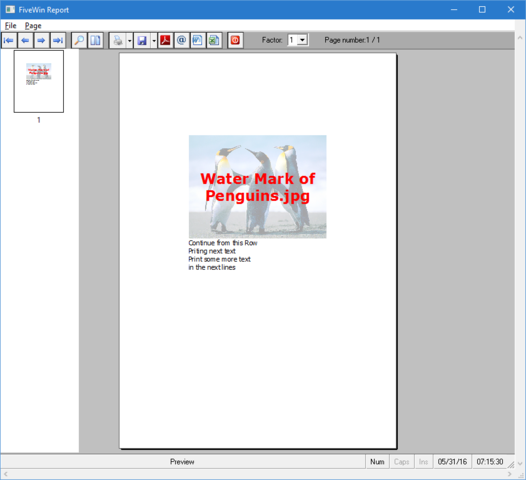
SayText() and PrintImage() are new methods. Among other things they are also meant to reduce the need for calculations by the programmer.

Method SayText() can print multi-line text. After printing, the method returns the last row printed. The programmer can continue printing from the returned row without having to calculate the row to start printing the next item. The coordinates can be specified in any unit and the return value will be in the same units.

Example usage:
nRow := oPrn:SayText( nRow, nCol, cText, <other params> )
nRow := oPrn:PrintImage( nRow, nCol, cImageFile, <other params> )

Command syntax is available from 16.04 onwards and we advise using the command syntax
Code (fw): Select all Collapse
#xcommand @ <nRow>, <nCol> PRINT TO <prn> TEXT <cText> ;
      [SIZE <nWidth> [,<nHeight>] ] ;
      [<unit: PIXEL,MM,CM,INCHES>] ;
      [FONT <fnt>] ;
      [ALIGN <aln>] ;
      [COLOR <nTxt> [,<nBck> ] ] ;
      [LASTROW <lrow>] ;
   => ;
      [<lrow> := ] <prn>:SayText( <nRow>, <nCol>, <cText>, [<nWidth>], [<nHeight>], ;
            [<fnt>], [<aln>], [<nTxt>], [<nBck>], [<(unit)>] )


#xcommand @ <nRow>, <nCol> PRINT TO <prn> IMAGE <img> ;
      [SIZE <nWidth> [,<nHeight>] ] ;
      [<unit: PIXEL,MM,CM,INCHES>] ;
      [<lStr: STRETCH>] ;
      [ ALPHALEVEL <nAlpha>] ;
      [<lNoTrn: NOTRANSPARENT>] ;
      [<lGray: GRAY> ] ;
      [LASTROW <lrow>] ;
   => ;
      [<lrow> := ] <prn>:PrintImage( <nRow>, <nCol>, <img>, [<nWidth>], [<nHeight>], ;
            [<.lStr.>], [<nAlpha>], [!<.lNoTrn.>], [<.lGray.>], [<(unit)>] )

We can also specify units as pixel (default) or MM, CM, INCHES. Return value will be in the same units.

These methods are not compatible with older printers like dot-matrix, etc. On printers that support Alpha, it is possible to print Images like water mark and print other text/images over them,

We introduced these functions recently and welcome feed back on compatibility with different printer drivers and suggestions for improvement. After testing during last month we found the need to make a few corrections we shall provide the corrections.

This example shows how lot of computational work is simplified.
Code (fw): Select all Collapse
#include "fivewin.ch"

function Main()

   local oPrn, nRow, nTop, nBottom, oFont, oBold

   PRINT oPrn PREVIEW FROM USER

   DEFINE FONT oFont NAME "TAHOMA"  SIZE 0,-14 OF oPrn
   DEFINE FONT oBold NAME "VERDANA" SIZE 0,-30 BOLD OF oPrn

   PAGE
   nTop     := 1.0

   @ nTop, 2.13 PRINT TO oPrn IMAGE "penguins.jpg" SIZE 4,6 INCHES LASTROW nBottom ALPHALEVEL 90
   @ nTop, 2.13 PRINT TO oPrn TEXT "Water Mark of" + CRLF + "Penguins.jpg" SIZE 4, 6 INCHES ;
      FONT oBold COLOR CLR_HRED ALIGN "C"

   nRow  := nBottom
   @ nRow, 2.13 PRINT TO oPrn TEXT "Continue from this Row" + CRLF + "Priting next text" ;
      SIZE 4 INCHES FONT oFont LASTROW nRow
   @ nRow, 2.13 PRINT TO oPrn TEXT "Print some more text" + CRLF + "in the next lines" ;
      SIZE 4 INCHES FONT oFont LASTROW nRow

   ENDPAGE
   ENDPRINT

   RELEASE FONT oFont, oBold

return nil

Regards


G. N. Rao.

Hyderabad, India
Posts: 10733
Joined: Sun Nov 19, 2006 05:22 AM
Re: Print-preview with different results ?
Posted: Tue May 31, 2016 04:28 AM
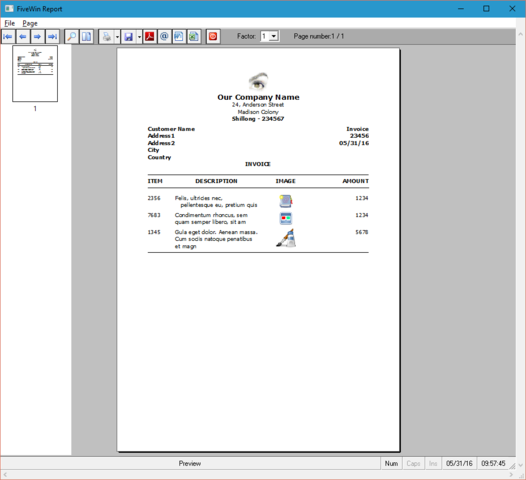
This sample demonstrates how much the calculations are simplified.
Code (fw): Select all Collapse
#include "fivewin.ch"

function Main()

   local cCompany := "Our Company Name"
   local aAddress := { "24, Anderson Street", "Madison Colony" }
   local cCity    := "Shillong - 234567"
   local aItems   := { ;
      { 2356, RandomText( 40, 80 ), "..\bitmaps\pngs\image3.png", 1234 }, ;
      { 7683, RandomText( 40, 80 ), "..\bitmaps\pngs\image4.png", 1234 }, ;
      { 1345, RandomText( 40, 80 ), "..\bitmaps\pngs\image8.png", 5678 } }
   local nItem

   local oPrn, nRow, nTop, nBottom, oFont, oBold, oLarge, aRow, oPen

   PRINT oPrn PREVIEW FROM USER

   DEFINE FONT oFont  NAME "TAHOMA"  SIZE 0,-12 OF oPrn
   DEFINE FONT oBold  NAME "TAHOMA"  SIZE 0,-12 BOLD OF oPrn
   DEFINE FONT oLarge NAME "VERDANA" SIZE 0,-15 BOLD OF oPrn

   PAGE
   nRow     := 2.0

   @ nRow, 2.5 PRINT TO oPrn IMAGE "\fwh\bitmaps\pngs\fivetech.png" SIZE 16,1.5 CM LASTROW nRow
   @ nRow, 2.5 PRINT TO oPrn TEXT cCompany SIZE 16 CM FONT oLarge ALIGN "T" LASTROW nRow
   @ nRow, 2.5 PRINT TO oPrn TEXT aAddress SIZE 16 CM FONT oFont  ALIGN "T" LASTROW nRow
   @ nRow, 2.5 PRINT TO oPrn TEXT cCity    SIZE 16 CM FONT oBold  ALIGN "T" LASTROW nRow

   nRow   += 0.2

   aRow  := Array( 2 )
   @ nRow, 2.5 PRINT TO oPrn TEXT { "Invoice", 23456, Date() } ;
      SIZE 16 CM FONT oBold ALIGN 'TR' LASTROW aRow[ 1 ]

   @ nRow, 2.5 PRINT TO oPrn TEXT { "Customer Name", "Address1", "Address2", "City", "Country" } ;
      SIZE 16 CM FONT oBold ALIGN "TL" LASTROW aRow[ 2 ]

   nRow  := Max( aRow[ 1 ], aRow[ 2 ] )

   @ nRow, 2.5 PRINT TO oPrn TEXT "INVOICE" SIZE 16 CM FONT oBold ALIGN "T" LASTROW nRow

   nRow  += 0.5
   oPrn:cmLine( nRow, 2.5, nRow, 18.5 )
   nRow  += 0.2

   aRow  := Array( Len( aItems[ 1 ] ) )

   @ nRow, 2.5 PRINT TO oPrn TEXT "ITEM"        SIZE 2 CM FONT oBold ALIGN "TL" LASTROW aRow[ 1 ]
   @ nRow, 4.5 PRINT TO oPrn TEXT "DESCRIPTION" SIZE 6 CM FONT oBold ALIGN "T" LASTROW aRow[ 2 ]
   @ nRow,10.5 PRINT TO oPrn TEXT "IMAGE"       SIZE 4 CM FONT oBold ALIGN "T" LASTROW aRow[ 3 ]
   @ nRow,14.5 PRINT TO oPrn TEXT "AMOUNT"      SIZE 4 CM FONT oBold ALIGN "TR" LASTROW aRow[ 4 ]

   nRow  := FW_Greatest( aRow ) + 0.2
   oPrn:cmLine( nRow, 2.5, nRow, 18.5 )
   nRow  += 0.5

   for nItem := 1 to Len( aItems )

      @ nRow, 2.5 PRINT TO oPrn TEXT aItems[ nItem, 1 ]  SIZE 2 CM FONT oFont ALIGN "TL" LASTROW aRow[ 1 ]
      @ nRow, 4.5 PRINT TO oPrn TEXT aItems[ nItem, 2 ]  SIZE 6 CM FONT oFont ALIGN "TL" LASTROW aRow[ 2 ]
      @ nRow,10.5 PRINT TO oPrn IMAGE aItems[ nItem, 3 ] SIZE 4,Max( aRow[ 1 ], aRow[ 2 ] ) - nRow CM LASTROW aRow[ 3 ]
      @ nRow,14.5 PRINT TO oPrn TEXT aItems[ nItem, 4 ]  SIZE 4 CM FONT oFont ALIGN "TR" LASTROW aRow[ 4 ]

      nRow  := FW_Greatest( aRow ) + 0.2

   next

   oPrn:cmLine( nRow, 2.5, nRow, 18.5 )

   ENDPAGE
   ENDPRINT

   RELEASE FONT oFont, oBold

return nil


Regards


G. N. Rao.

Hyderabad, India
Posts: 4043
Joined: Wed Dec 19, 2007 06:40 PM
Re: Print-preview with different results ?
Posted: Tue May 31, 2016 10:56 AM
I don*t understand the different results.
The response of my customer executing the test


Code (fw): Select all Collapse
#include "FiveWin.ch"
#include "Image.ch"

function Main()
local aText[ 4 ], oPrn, oFont
local nMargin, nGutter, nWidth, nColWidth
local nRow, nCol

cText1 := "AAAAAAAAAAAAAAAAAAAAA" + CRLF + "BBBBBBBBBBBBBBBBBBBBBBBB" + CRLF + "CCCCCCCCCCCCCCCCCCCCCCCCCC"

TEXT INTO aText[ 1 ]
&cText1
ENDTEXT

TEXT INTO aText[ 2 ]
????????????????? ???????? ???? ????? ????????????? ? ?????? ?????????? ????? ?????? ?????????. ?????????? ?????? ?????? ????????? ???????????. ?????? ??????? ?????????? ???????? ??????? ?????? ?????? ??????? (23)?? ???????????. ?????? ??????? ?????????? ????? ????????????? ??????? ?????? ??????

ENDTEXT

TEXT INTO aText[ 3 ]
I'm hoping that every good film is a commercial film. Every good film should be a commercial film. And my definition of commercial is that if the film goes out and people engage in it and it earns money, then it is a commercial film," said Anurag Kashyap.

ENDTEXT

TEXT INTO aText[ 4 ]
?????? ?????? ??????? ?????? ?????? ?????? ?? ???? ??? ?? ?????? ???? ?? ? ??? ?? ????? ?? ????? ???? ??????? ???? ?? ???? ?? ???? ??????? ?? ????? ???? ??????? ?????? ?????? ???? ???? ?? ??? ??? ?? ??? ????? ?? ??? ?? ????? ???? ?? ????? ?? ?? ?? ?????? ??? ???? ?? ??? ?? ?????? ?????? ????? ???? ??????? ??????? ????? ????? ?? ?? ???? ??? ???? ?? ???????? ?? ?? ????????? ??? ??? ?? ??? ??? ????? ?? ???? ?? ??????? ?? ????? ???? ??? ????? ???? ?? ??? ?? ???????? ???? ?????? ?????? ?? ?????? ???? ?? ?? ?? ??????? ??? ??? ?? ????? ?? ??????? ???? ???? ?? ???

ENDTEXT

PRINT oPrn PREVIEW
DEFINE FONT oFont NAME "Segoe UI" SIZE 0,-12 OF oPrn

nMargin     := Int( 0.1 * oPrn:nHorzRes() )
nWidth      := 8 * nMargin
nColWidth   := Int( ( nWidth - nMargin ) / 2 )

PAGE
nRow        := 100
nRow        := oPrn:SayText( nRow, nMargin, aText[ 1 ], nColWidth, nil, oFont )
nRow        += 20
nRow        := oPrn:PrintImage( nRow, nMargin, "olga.jpg", nColWidth, 2000 )
nRow        += 40
nRow        := oPrn:SayText( nRow, nMargin, aText[ 2 ], nColWidth, nil, oFont )
nRow        += 20
nRow        := oPrn:PrintImage( nRow, nMargin, "olga.jpg", nColWidth, 1500 )


nRow        := 100
nCol        := nMargin + nColWidth + nMargin
nRow        := oPrn:SayText( nRow, nCol, aText[ 3 ], nColWidth, nil, oFont )
nRow        += 20
nRow        := oPrn:PrintImage( nRow, nCol, "olga.jpg", nColWidth, nil )
nRow        += 40
nRow        := oPrn:SayText( nRow, nCol, aText[ 1 ], nColWidth, nil, oFont )
nRow        += 20
nRow        := oPrn:PrintImage( nRow, nCol, "olga.jpg", nColWidth, 600 )
nRow        += 40
nRow        := oPrn:SayText( nRow, nCol, aText[ 4 ], nColWidth, nil, oFont )

ENDPAGE
ENDPRINT

return nil


any idea *

regards
Uwe :-)
Since 1995 ( the first release of FW 1.9 )

i work with FW.

If you have any questions about special functions, maybe i can help.
Posts: 8515
Joined: Tue Dec 20, 2005 07:36 PM
Re: Print-preview with different results ?
Posted: Tue May 31, 2016 01:03 PM
João Santos - São Paulo - Brasil - Phone: +55(11)95150-7341
Posts: 1516
Joined: Thu May 27, 2010 02:06 PM
Re: Print-preview with different results ?
Posted: Wed Jun 01, 2016 07:05 AM

If you use msginfo( oprn:nLogPixelX() ) at the beginning of the print job ,you will see that the printer have different value for ppp .
I have seen values for different printers ( 300, 600, 1200 px ) in my tests . if your image have 300px width and your printer use 600ppp your print image have 0.5
inch. , if your printer use 300ppp , your image is 1inch width.
I think that to solve the problem you should use cm or mm values in your printer jobs.

Regards.

Continue the discussion