FiveTech Support Forums

FiveWin / Harbour / xBase community
Board index FiveWin for Harbour/xHarbour Change Color of xBrowse Column Headers and Footers
Posts: 2706
Joined: Fri Oct 07, 2005 01:50 PM

Change Color of xBrowse Column Headers and Footers

Posted: Thu Jun 16, 2016 12:07 PM

To All

I am re-working a legacy FWH app and I am going with an all 'grey' color scheme. I would like to be able to change the color of the standard light blue for the column headers and footers of xBrowse to a light grey if that is possible.

Many Thanks
Rick Lipkin

Posts: 2170
Joined: Fri Jul 18, 2008 01:24 AM

Re: Change Color of xBrowse Column Headers and Footers

Posted: Thu Jun 16, 2016 02:02 PM
Hi, Rick.
Try this partial code.
Code (fw): Select all Collapse
STATIC bClrGradBtn

//--------------
Function Main()

SetDlgGradient( { { 1, RGB( 255, 255, 255 ), RGB( 229, 233, 238 ) } } )

bClrGradBtn := { | lPressed | If( ! lPressed,;   //Plomo
                 { { 1, RGB( 255, 255, 255 ), RGB( 229, 233, 238 ) } },;
                 { { 1, RGB( 194, 197, 201 ), RGB( 240, 240, 240 ) } } ) }


//-----------------------
Function xxx()

   @ .5, .5 XBROWSE oBrw SIZE 544,254 OF oDlg ; 
            ALIAS cAlias AUTOCOLS CELL LINES

   oBrwStyle(oBrw)

   oBrw:CreateFromCode()

   @ nHt-15, 10 BTNBMP oBt1 PROMPT "Nuevo"    SIZE 35,12 PIXEL OF oDlg RESOURCE "NEW16X16"    LEFT NOBORDER ;
                ACTION xAction()
   @ nHt-15, 48 BTNBMP oBt2 PROMPT "&Modific "  SIZE 35,12 PIXEL OF oDlg RESOURCE "EDIT16X16"   LEFT NOBORDER ;
                ACTION yAction()
   @ nHt-15,162 BTNBMP oBt5 PROMPT "&Salir  "   SIZE 35,12 PIXEL OF oDlg RESOURCE "SALIR16X16"  LEFT NOBORDER ;
                ACTION (oDlg:End())

   BtnDegrad(oDlg)  //Botones degradados (BTNBMP)

  ACTIVATE DIALOG oDlg CENTERED 
return nil


//-----------------------------
Function oBrwStyle(oBrw)
Local aRowGrad     := { { .5, nRGB( 255, 255, 255 ), nRGB( 240, 240, 240 ) }, ; 
                           { .5, nRGB( 240, 240, 240 ), nRGB( 232, 232, 232 ) } }
Local aSelGrad      := { { .5, RGB( 255, 255, 180 ), RGB( 255, 237, 178 ) }, ;
                           { .5, RGB( 255, 218, 103 ), RGB( 255, 233, 162 ) } }

WITH OBJECT  oBrw               
  :nColDividerStyle := 5
  :nMarqueeStyle    := 5 //MARQSTYLE_HIGHLCELL
  :nColorPen        := Rgb( 225, 225, 225 )
  :nRecSelColor     := nRGB( 240, 240, 240 )
  :bClrSel          := { || { CLR_BLACK, RGB( 255, 255, 255 ) } }
  :bClrSelFocus     := { || { CLR_BLACK, aSelGrad } }
  :bClrRowFocus     := { || { CLR_BLACK, aRowGrad } }
  :bClrGrad         := { | lInvert | If( !lInvert,  { { 0.5, nRGB( 255, 255, 255 ), nRGB( 240, 240, 240 ) }, ;
                         { 0.5, nRGB( 240, 240, 240 ), nRGB( 232, 232, 232 ) } },; 
                         { { 0.50, 12961221, 16777215 }, { 0.50, 16777215, 12961221 } } ) }
  :bClrHeader       := {|| { CLR_BLUE, nRGB( 245, 245, 245 ) } } 
  :bClrFooter       := {|| { CLR_BLUE, 16777215 } } 
  :lAllowRowSizing  := .f.
  :lAllowColSwapping := .f.
  :lAllowColHiding   := .f.          
  :lKinetic          := .f. 
  :lColDividerComplete := .t.
  :lFooter   := .t.
  :nHeaderHeight     := 24
  :nFooterHeight     := :nHeaderHeight
END
Return nil

//------------------------
Function BtnDegrad(oWn)
local n
if bClrGradBtn != NIL
   For n:=1 to len(oWn:aControls)
       if oWn:aControls[n]:ClassName()=="TBTNBMP"
          oWn:aControls[n]:bClrGrad = bClrGradBtn
       endif
   Next
endif
Return nil

Regards.
Francisco J. Alegría P.

Chinandega, Nicaragua.


Fwxh-MySql-TMySql
Posts: 4043
Joined: Wed Dec 19, 2007 06:40 PM

Re: Change Color of xBrowse Column Headers and Footers

Posted: Thu Jun 16, 2016 02:43 PM
Rick,

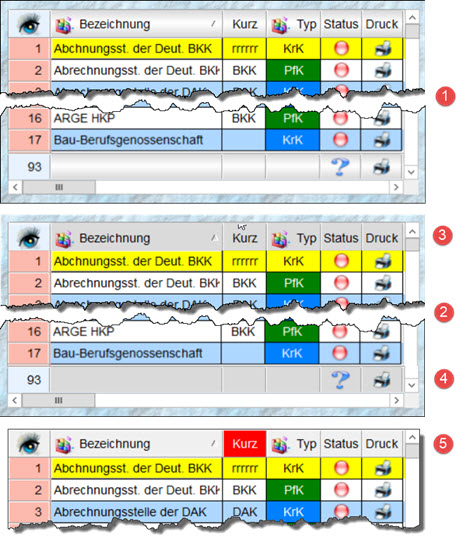
xBrowse Header and Footer with gradient light grey

oBrw1:bClrGrad := { | lInvert | If( ! lInvert, ;
{ { 0.50, 14342874, 16777215 }, ;
{ 0.50, 16777215, 14342874 } }, ;
{ { 0.50, 14342874, 16777215 }, ;
{ 0.50, 16777215, 14342874 } } ) }
// default colour gradient spec


some grey-values to replace 14342874 ( very light grey ) :
16777215 = white

11250603
12632256
13684944
15066597


Since 1995 ( the first release of FW 1.9 )

i work with FW.

If you have any questions about special functions, maybe i can help.
Posts: 2706
Joined: Fri Oct 07, 2005 01:50 PM

Re: Change Color of xBrowse Column Headers and Footers

Posted: Thu Jun 16, 2016 04:27 PM

Uwe

Thank you .. I am playing with the colors .. without making all the values the same .. is there a way to just make the color a solid light grey without any gradient ?

Rick Lipkin

Posts: 2706
Joined: Fri Oct 07, 2005 01:50 PM

Re: Change Color of xBrowse Column Headers and Footers

Posted: Thu Jun 16, 2016 04:31 PM
Francisco

Thank you for your suggestion .. going to try your solution :
Code (fw): Select all Collapse
:bClrHeader       := {|| { CLR_BLUE, nRGB( 245, 245, 245 ) } } 
:bClrFooter       := {|| { CLR_BLUE, 16777215 } }


Rick Lipkin
Posts: 2706
Joined: Fri Oct 07, 2005 01:50 PM

Re: Change Color of xBrowse Column Headers and Footers

Posted: Thu Jun 16, 2016 04:40 PM

Francisco

Unfortunately the above interpretation of your solution did not work .. still have the light blue headers and footers :(

Rick Lipkin

Posts: 6755
Joined: Wed Feb 15, 2012 08:25 PM

Re: Change Color of xBrowse Column Headers and Footers

Posted: Thu Jun 16, 2016 04:47 PM

Rick, try with oBrw:l2007 := .F.

Cristobal Navarro

Hay dos tipos de personas: las que te hacen perder el tiempo y las que te hacen perder la noción del tiempo

El secreto de la felicidad no está en hacer lo que te gusta, sino en que te guste lo que haces
Posts: 2706
Joined: Fri Oct 07, 2005 01:50 PM

Re: Change Color of xBrowse Column Headers and Footers

Posted: Thu Jun 16, 2016 04:55 PM
Cristobol and Uwe

Both of these solutions worked ..

Code (fw): Select all Collapse
 oLbx:l2007 := .F.   // light grey


Uwe .. Your solution allows control over the color
Code (fw): Select all Collapse
 
oLbx:bClrGrad := { | lInvert | If( ! lInvert, ;
                                         { { 0.50, 15790320, 15790320 }, ;
                                         { 0.50,   15790320, 15790320 } }, ;
                                         { { 0.50, 15790320, 15790320 }, ;
                                         { 0.50,   15790320, 15790320 } } ) }


Thank you ALL for your ideas, inspiration, and solutions !
Rick Lipkin
Posts: 6755
Joined: Wed Feb 15, 2012 08:25 PM

Re: Change Color of xBrowse Column Headers and Footers

Posted: Thu Jun 16, 2016 05:00 PM
Rick Lipkin wrote:Francisco

Thank you for your suggestion .. going to try your solution :
Code (fw): Select all Collapse
:bClrHeader       := {|| { CLR_BLUE, nRGB( 245, 245, 245 ) } } 
:bClrFooter       := {|| { CLR_BLUE, 16777215 } }


Rick Lipkin


Rick, code of Francisco with oBrw:l2007 := .F., have to work well
Cristobal Navarro

Hay dos tipos de personas: las que te hacen perder el tiempo y las que te hacen perder la noción del tiempo

El secreto de la felicidad no está en hacer lo que te gusta, sino en que te guste lo que haces
Posts: 2170
Joined: Fri Jul 18, 2008 01:24 AM

Re: Change Color of xBrowse Column Headers and Footers

Posted: Thu Jun 16, 2016 05:08 PM
Rick, please try this way. (As Cristobal said)

is there a way to just make the color a solid light grey without any gradient ?

Code (fw): Select all Collapse
//------------------------
Function FapBrwSetup(oBrw)
local nFONDO1 := RGB(215, 215, 215)
local nFONDO2 := RGB(235, 235, 235)
local nAZUL   := RGB( 0, 0, 128)

   WITH OBJECT oBrw
      :l2007            := .f.
      :nRecSelColor     :=  nFONDO1
      :nStyle           := nAnd( :nStyle, nNot( WS_BORDER ) )
      :nMarqueeStyle    := MARQSTYLE_HIGHLROW   //ilumina toda la linea
      :bClrHeader       := {|| { nAZUL, nFONDO1, } } 
      :bClrFooter       := :bClrHeader         // Colores texto de footers
      :bClrStd          := {|| IF( oBrw:nArrayAt() % 2 == 0, {nAZUL, nFONDO1}, {nAZUL, nFONDO2} ) }  
      :bClrSel          := {|| { nAZUL, CLR_WHITE } }  // para barra de linea selecc cuando el control no tiene el foco
      :bClrSelFocus     := { || { CLR_WHITE, nAZUL } }     // para barra de linea selecc cuando el control tiene el foco
      :nColDividerStyle := LINESTYLE_LIGHTGRAY
      :nRowDividerStyle := LINESTYLE_LIGHTGRAY
   END
Return nil
Francisco J. Alegría P.

Chinandega, Nicaragua.


Fwxh-MySql-TMySql
Posts: 4043
Joined: Wed Dec 19, 2007 06:40 PM

Re: Change Color of xBrowse Column Headers and Footers

Posted: Thu Jun 16, 2016 05:41 PM
Rick,


a setting for header AND footer
oBrw1:l2007 := .T.

1 // gradient
oBrw1:bClrGrad := { | lInvert | If( ! lInvert, ;
{ { 0.50, 14342874, 16777215 }, ;
{ 0.50, 16777215, 14342874 } }, ;
{ { 0.50, 14342874, 16777215 }, ;
{ 0.50, 16777215, 14342874 } } ) } // default colour gradient spec

2
// single color with ( 4 same color defines )
oBrw1:bClrGrad := { || { { 0.1, 14342874, 14342874 }, ;
{ 0.1, 14342874, 14342874 } } }

------------------------
------------------------

3 + 4
bClrHeader and bClrFooter You can use to color a single column
otherwise You can use AEval(... for ALL columns

oBrw1:l2007 := .F..
AEval( oBrw1:aCols, { |o| o:bClrHeader := { || { CLR_BLUE, 14342874 } } } )
AEval( oBrw1:aCols, { |o| o:bClrFooter := { || { CLR_BLUE, 14342874 } } } )

5
colering a single column-header ( column 2 )
oBrw1:aCols[2]:bClrHeader := { || { CLR_BLUE, 255 } }

regards
Uwe :-)
Since 1995 ( the first release of FW 1.9 )

i work with FW.

If you have any questions about special functions, maybe i can help.
Posts: 2706
Joined: Fri Oct 07, 2005 01:50 PM

Re: Change Color of xBrowse Column Headers and Footers

Posted: Thu Jun 16, 2016 06:09 PM

Thank you ALL !! appreciate your help

Rick Lipkin

Posts: 866
Joined: Tue Oct 16, 2007 08:57 AM

Re: Change Color of xBrowse Column Headers and Footers

Posted: Wed Jan 18, 2017 05:39 AM

Hi
How to change xBrowse Header character color? I saw it black color.

Best Regards,


Richard


Harbour 3.2.0dev (r2503251254) => Borland C++ v7.7 32bit

MySQL v8.0

Harbour 3.2.0dev (r2503251254) => Borland C++ v7.7 64bit
Posts: 1487
Joined: Tue Jun 14, 2016 07:51 AM

Re: Change Color of xBrowse Column Headers and Footers

Posted: Wed Jan 18, 2017 09:58 AM

oBrw4:aCols[2]:bClrHeader := { || { CLR_RED, 155 } }

oBrw4:kleuren:bClrHeader := { || { CLR_GREEN, 155 } } // Col Nr. changed to HeaderName

Marc Venken

Using: FWH 23.08 with Harbour
Posts: 4043
Joined: Wed Dec 19, 2007 06:40 PM

Re: Change Color of xBrowse Column Headers and Footers

Posted: Wed Jan 18, 2017 10:04 AM
or include

Code (fw): Select all Collapse
WITH OBJECT oBrw
     
     :bClrHeader := { || { 255, } } // red text and keeps the background 
     // same for footer 
     :bClrFooter := { || { 255, } } // red text and keeps the background  

END


regards
Uwe :-)
Since 1995 ( the first release of FW 1.9 )

i work with FW.

If you have any questions about special functions, maybe i can help.