FiveTech Support Forums

FiveWin / Harbour / xBase community
Board index FiveWin for Harbour/xHarbour FWH 16.08 : Built-in MySql/MariaDB functionality (Updated )
Posts: 36
Joined: Sat Sep 03, 2016 03:11 PM
Re: FWH : Built-in MySql/MariaDB functionality
Posted: Thu Sep 22, 2016 03:05 PM

oCn:CreateTable('grupo, {{'NOMGRU','C',30,0}, {'ALTERA','D', 8,0}},'CODGRU')

is created the "ID" field and not " CODGRU " as AUTO_INCREMENT

João Carlos

VinheSoft Informatica

BCC 7.7 - FHW 24.07 - Harbour 3.2.0dev (r2404101339) for BCC 7.7
Posts: 10733
Joined: Sun Nov 19, 2006 05:22 AM
Re: FWH : Built-in MySql/MariaDB functionality
Posted: Thu Sep 22, 2016 04:39 PM

Let me check and come back to you

Regards


G. N. Rao.

Hyderabad, India
Posts: 10733
Joined: Sun Nov 19, 2006 05:22 AM
Re: FWH : Built-in MySql/MariaDB functionality
Posted: Thu Sep 22, 2016 05:29 PM

Checked. This was not working in earlier versions.
May we know the FWH version you are using and whether you are using xHarbour and Harbour?

Regards


G. N. Rao.

Hyderabad, India
Posts: 36
Joined: Sat Sep 03, 2016 03:11 PM
Re: FWH : Built-in MySql/MariaDB functionality
Posted: Thu Sep 22, 2016 05:36 PM

FWH 16.06 e Harbour 3.20

João Carlos

VinheSoft Informatica

BCC 7.7 - FHW 24.07 - Harbour 3.2.0dev (r2404101339) for BCC 7.7
Posts: 10733
Joined: Sun Nov 19, 2006 05:22 AM
Re: FWH : Built-in MySql/MariaDB functionality
Posted: Thu Sep 22, 2016 05:53 PM

Can you please email me?

nageswaragunupudi@gmail.com

Regards


G. N. Rao.

Hyderabad, India
Posts: 10733
Joined: Sun Nov 19, 2006 05:22 AM
Re: FWH : Built-in MySql/MariaDB functionality
Posted: Thu Sep 22, 2016 08:52 PM

We just sent you revised libs by mail.
Please let us know if it is working now

Regards


G. N. Rao.

Hyderabad, India
Posts: 36
Joined: Sat Sep 03, 2016 03:11 PM
Re: FWH : Built-in MySql/MariaDB functionality
Posted: Thu Sep 22, 2016 10:41 PM

Mr Rao

It worked !!!

Thanks

João Carlos
São Paulo - Brasil

João Carlos

VinheSoft Informatica

BCC 7.7 - FHW 24.07 - Harbour 3.2.0dev (r2404101339) for BCC 7.7
Posts: 10733
Joined: Sun Nov 19, 2006 05:22 AM
Re: FWH : Built-in MySql/MariaDB functionality
Posted: Fri Sep 23, 2016 01:02 AM
Much simpler way to specify auto-inc primary key is to specify "+" as field type.
Before or without actually creating table, you can check the table creation sql by
? oCn:CreateTableSQL( cTableName, aStruct )

Example:
Code (fw): Select all Collapse
   aStru :=  { ;
               { "codgru",    "+",  3, 0 }, ; // '+' : AutoInc Primary Key
               { "nomgru",    "C", 30, 0 }, ;
               { "altera",    "D",  8, 0 }, ;
               { "check",     "L",  1, 0 }, ;
               { "Amount",    "N", 10, 2 }, ;
               { "details",   "M", 10, 0 }, ; // Unlimited Text Memo Field
               { "photo",     "m", 10, 0 }, ; // 'm' for Binary Memo field like Images, etc
               { "dtime",     "T",  8, 0 }, ; // DateTime field
               { "createdt",  "@",  8, 0 }, ; // TimeStamp when record is appended
               { "changedt",  "=",  8, 0 }  ; // TimeStamp when record is last modified
             }

   ? oCn:CreateTableSQL( "testtable", aStru )

Result:
Code (fw): Select all Collapse
CREATE TABLE `testtable` (
   `codgru` INT AUTO_INCREMENT PRIMARY KEY,
   `nomgru` VARCHAR( 30 ),
   `altera` DATE,
   `check` BIT DEFAULT 0,
   `Amount` DECIMAL( 11, 2 ),
   `details` TEXT,
   `photo` LONGBLOB,
   `dtime` DATETIME,
   `createdt` TIMESTAMP DEFAULT CURRENT_TIMESTAMP,
   `changedt` TIMESTAMP DEFAULT CURRENT_TIMESTAMP ON UPDATE CURRENT_TIMESTAMP
)


Example showing how to specify foreign key constraints, collations, calculated columns ( mysql 5.7 and above):
Code (fw): Select all Collapse
   aStru := {  ;
               { "code", "REFERENCES states( code )" }, ;
               { "details",   "C",  80,   0, "utf8" }, ;
               { "quantity",  "N",  8,    3 }, ;
               { "rate",      "N",  3,    0 }, ;
               { "value = quantity * rate", "N", 12, 2  }   }

   ? oCn:CreateTableSQL( "test", aStru, nil, "latin1" )

Result:
Code (fw): Select all Collapse
CREATE TABLE `test` (
   `ID` INT AUTO_INCREMENT PRIMARY KEY,
   `code` varchar(2)  CHARACTER SET latin1 COLLATE latin1_general_ci,
   `details` VARCHAR( 80 ) CHARACTER SET utf8 COLLATE utf8_unicode_ci,
   `quantity` DECIMAL( 9, 3 ),
   `rate` SMALLINT,
   `value` DECIMAL( 13, 2 ) AS ( quantity * rate ),
FOREIGN KEY ( `code` ) REFERENCES `states` ( `code` ) ON UPDATE CASCADE ON DELETE RESTRICT
) CHARACTER SET latin1 COLLATE latin1_general_ci
Regards


G. N. Rao.

Hyderabad, India
Posts: 2064
Joined: Fri Jan 06, 2006 09:28 PM
Re: FWH : Built-in MySql/MariaDB functionality
Posted: Fri Sep 23, 2016 06:37 PM

Very Good, a partir de que version se podra usar esto.? gracias, saludos... :shock:

Dios no está muerto...


Gracias a mi Dios ante todo!
Posts: 10733
Joined: Sun Nov 19, 2006 05:22 AM
Re: FWH 16.08 : Built-in MySql/MariaDB functionality (Updated )
Posted: Tue Oct 04, 2016 04:51 AM
Updated documentation of Connection Object FWH 16.08

New and Additional Method for connection from Ado/TMySql Connection
Code (fw): Select all Collapse
oCn := mysql_Connect( oAdoCon (or ) oTMySqlCon )

Main functions and commands for establishing connection are described in the first post of this thread.

SWITCHES and SETTINGS:
Code (fw): Select all Collapse
   METHOD SetMultiStatement( lOnOf )
   METHOD SetAutoCommit( lOnOff)
   function MYSQL_TinyIntAsLogical( lOnOff )
   function MYSQL_MaxPadLimit( nNew )


DEBUGGING HELP
Code (fw): Select all Collapse
DATA lLog            AS LOGICAL INIT .f. // logs every sql statement executed and result/error
DATA lLogErr         AS LOGICAL INIT .f. // logs only failed sqls, Useful during development stage
DATA lShowErrors     AS LOGICAL INIT .f. // displays all error message for failed sqls
DATA lShowMessages   AS LOGICAL INIT .f. // displays all message for every sql execution
DATA cLogFile     INIT cFileSetExt( ExeName(), "log" ) // default log file name can be changed by programmer
METHOD ShowError( [cTitle] ) // Shows last error/information

All text is in the language set by method SetMsgLang()

LANGUAGE: Explained in full detail in the first post
Code (fw): Select all Collapse
   METHOD SetMsgLang( cLang )
   METHOD GetLocale()
   METHOD SetLocale( cLang )


INFORMATION DATAS/METHODS:
Please treat the datas as readonly and never modify the values from the program
Code (fw): Select all Collapse
CLASSDATA cClientInfo   // --> Eg: 6.0.0
CLASSDATA cServerInfo   // --> Eg: 5.7.15-log

DATA cServer, cUser, nFlags
DATA lOpen

DATA nPort INIT 3306
DATA lUnicode INIT FW_SetUnicode()

// Datas updated automatically after execution of every SQL
DATA nError       INIT 0
DATA cError       INIT ""
DATA cSqlInfo     INIT ""
DATA cLastSQL     INIT ""
DATA nExecSecs    INIT 0  // Time taken to execute the SQL
// end


METHOD character_set_name  // connection character_set
METHOD CurrentDB()       
METHOD ListTables( [cMask] ) // --> aTableAndViewNames
METHOD ListIndexes( cTable ) // --> { { idxname, idxfields, idxtype }, ... }
METHOD ListDbs( [cMask] ) // --> aDataBases  
METHOD ListBaseTables( [cMask], [cDB], [ lExt (.f.)] ) // --> aTableNames ( excluding Veiws )
       // if lExt is true, --> { { tablename, tablecreateSql }, ... }
METHOD ListViews( [cMask], [cDB], [lExt (.f.)] )  // --> aViews
       // if lExt is true --> { { viewname, viewdescription }, ... }
METHOD ListTriggers( [cTableMask], [cDB], [lExt (.f.)] ) // --> aTriggerNames of given table
      // --> Array with full information and Trigger source
METHOD ListProcedures( [cMask], [cDB], [lExt(.f.)] ) // lExt = .t. includes procedure body
METHOD ListFunctions(  [cMask], [cDB], [lExt(.f.)] ) // lExt = .t. includes function body
METHOD ListEngines( [lAll], [lShow] )
METHOD TableExists( cTableName, [db] ) // --> lExists
METHOD IsProcedure( cProc )  // --> lTrue
METHOD IsFunction( cFunc )   // --> lTrue
METHOD FKeyColumns( cTable, cDB ) // --> {{thistablecolumn,foreigndb,foreigntable,foreigncolumn}}
METHOD FKReferencedBy( cTable, cDB ) //-> {{ db.table}} referencing to this table
METHOD FKReferencedTables( cTable )  // --> All tables referenced by this table
METHOD FindRelation( parent, child ) // --> How the foreignkeys are related
METHOD GetVariables( [cMask] )    // --> session variables values
METHOD GetPrimaryFields( cTable, [cDB] ) //--> List of primary keys
METHOD GetUniqueFields( cTable, [cDB]  ) // --> list of all unique keys including primary
METHOD GetAutoCommit()
METHOD InsertID() // --? Last inserted auto-inc ID


DDL Methods
Code (fw): Select all Collapse
   METHOD SelectDB( cDB )
   METHOD CreateDB( cDB, cCharSet )
   METHOD CreateTable( cTable, aStruct, lAddAutoInc, char_set )
   METHOD CreateTableSQL( cTable, aStruct, lAddAutoInc, cCharSet )
   METHOD DropTable( cTable )
   METHOD RenameTable( cOld, cNew ) INLINE If( ::lOpen, ;
   METHOD AddAutoInc( cTable, cCol )
   METHOD MakePrimaryKey( cTable, cCol )
   METHOD AddColumn( cTable, aColSpec )
   METHOD AlterColumn( cTable, aColSpec )
   METHOD RenameColumn( cTable, cOldName, cNewName )


Methods CreateTable() and CreateTableSQL() are explained already in this post. To get the best results, it is recommended to use these methods instead of writing own sqls or depending on other GUI tools.

New in FWH 16.08:
METHOD CreateTableSQL( cExistingTable ) --> SQL for recreating the table. This sql is produced by MySql

DML Methods
Code (fw): Select all Collapse
METHOD SetAutoCommit( lOnOff)
METHOD Insert( cTable, acFields, aValues )
METHOD InsertSQL( cTable, acFields, aValues, acDuplicate )
METHOD Replace( cTable, acFields, aValues )
METHOD ReplaceSQL( cTable, aFields, aValues )
METHOD Update( cTable, aFields, aValues, cWhere )


FWRowSets make saving updates and insertions to a table exremely easy and there is hardly any need for writing SQL statements. Even in the rare occassions when we need to write SQLs for INSERT,UPDATE,REPLACE we can use METHODS Insert(...), Update(...) or Replace(...) and if we are so interested in examine the SQL statements, we can use METHODS InsertSQL(), ReplaceSQL().

Insert() method is very efficient and can handle multiple row inserts as well as update on duplicates. Even experts should find these methods very useful.

TRANSACTION SUPPORT
Code (fw): Select all Collapse
// ADO Compatibility
METHOD BeginTrans          INLINE ::BeginTransaction()
METHOD CommitTrans         INLINE ::CommitTransaction()
METHOD RollBackTrans       INLINE ::RollBack()
//
METHOD BeginTransaction()
METHOD CommitTransaction()
METHOD RollBack()


EXECUTION:
Code (fw): Select all Collapse
// Aliases
MESSAGE Query METHOD RowSet
MESSAGE SqlQuery METHOD Execute
//

METHOD QueryResult( cSql )
METHOD RowSet( cSql, [lShowError] )
METHOE RowSet( cSql, nRows, [lShowError] )
METHOD RowSet( cSql, aParams, [lShowError] )

METHOD Execute( cSql, aParams ) --> Nil / aResult / cResult
METHOD Call( cStoredFunction, [ uParam1, ..., uParamN ] ) // --> ReturnValue of Function
METHOD Call( cStoredProcedure, [ [@]uParam1, ..., [@]uParamN ] ) --> Nil or RowSet
       // Using @uParamX can retrieve values of OUT params
       // This facility is availble only here and not even in ADO


RowSet(..) and Call(...) methods will be discussed separately in other exclusive posts.

UTILITY METHODS & FUNCTIONS most used by other methods
Code (fw): Select all Collapse
METHOD UCase( c ) INLINE ::QueryResult( "SELECT UCASE( '" + c + "' )" )
METHOD LCase( c ) INLINE ::QueryResult( "SELECT LCASE( '" + c + "' )" )

METHOD ValToSQL( uVal, [lEmptyAsDefault] )
METHOD ApplyParams( cSql, aParams, [lDbfSyntax] ) //--> cSqlWithParamsEmbedded
METHOD ParseTableName( cName, @cTable, @cDB ) //-> db.table
METHOD ExprnDBF( cFilterExp, aParams ) // cfiltercond, p1, p2, ... )
METHOD ExprnSQL ( cWhereExp,  aParams )
function MYSQL_QuotedCol( cCol )


IMPORT & EXPORT
Code (fw): Select all Collapse
METHOD SaveToDBF( cSql, cDbf, [lForUpdate] ) --> nRows Saved. -1 in case of error
METHOD SqlToText( cSql ) --> Tab delimited Text suitable for pasting in Excel, Word, etc.
METHOD ImportFromDBF( cDbf, cTable, cColPrefix, nMultiRowSize, aFields, cAutoIncFld, cCharSet, lAddTS, bProgress ) --> lSuccess
METHOD UploadFromAlias( cTable, cSrcFieldList, cDstFieldList, nMultiRowSize, lUpdate ) --> lSuccess


These methods were explained in previous posts of this thread.

BACKUP & RESTORE
Code (fw): Select all Collapse
   METHOD BackUp( [atables], [dest], [bProgress], [nMaxRecs], [nMaxBuf] )
   METHOD BackUpIndex( cBackUp, [lView] )
   METHOD Restore( cFile, [aTables], [bProgress], [cNewDB] )
   METHOD RestoreFromSqlDump( cFile, [bProgress] )


Detailed explanation can be found at
viewtopic.php?f=3&t=32791


UTILTIES
Code (fw): Select all Collapse
   METHOD PivotArray( cTable, cRowFld, cColFld, cValFld, cAggrFunc )
   METHOD PivotRS( cTable, cRowFld, cColFld, cValFld, cAggrFunc )
   METHOD UpdateSummary( cMaster, cMasKey, acMasCols,   ;
                         cTrnTable, cTrnKey, acTrnCols, ;
                         cTrnWhere, cOperator )
   function MYSQL_UpdateSummarySQL( cMaster, cMasKey, acMasCols,   ;
                                 cTrnTable, cTrnKey, acTrnCols, ;
                                 cTrnWhere, cOperator )


DATAS (Read/Write)
Code (fw): Select all Collapse
   DATA bMeter
   DATA Cargo


CLOSE CONNECTION
Code (fw): Select all Collapse
   METHOD Close()
   METHOD End()      INLINE ::Close()
   DESTRUCTION: When connection object is set to NIL and no references are left in memory, close method is automatically called and the object is destroyed.

When the variable or all the variables referering to the connection objects go out of scope, the connection object is automatically closed and the object destroyed. It may be kept in mind that as long as atleast one RowSet still in memory, a reference to the connection object is still alive.

It is a good practice to explicitly close connection object with End() or Close() after closing all RowSet objects.
Regards


G. N. Rao.

Hyderabad, India
Posts: 10733
Joined: Sun Nov 19, 2006 05:22 AM
Re: FWH 16.08 : Built-in MySql/MariaDB functionality (Updated )
Posted: Tue Oct 04, 2016 08:41 AM
UTILITIES:
UpdateSummary()

This method makes it easy to update aggregates from transactions table into master/summary table. For this purpose this method uses function MYSQL_UpdateSummarySQL() with the same parameters and executes the SQL.

Example-1:
Code (fw): Select all Collapse
? MYSQL_UpdateSummarySQL( ;
  "customers", "ID",     "number,qty,sales", ;
  "sales",     "custid", "count(*),quantity,amount" )

generates this SQL
Code (fw): Select all Collapse
UPDATE `customers` m
LEFT OUTER JOIN
(
   SELECT `custid`, count(*) AS t01, SUM( quantity ) AS t02, SUM( amount ) AS t03
   FROM `sales`
   GROUP BY `custid`
) t
ON m.ID = t.custid
SET 
    m.number = IFNULL( t.t01, 0 ),
    m.qty    = IFNULL( t.t02, 0 ),
    m.sales  = IFNULL( t.t03, 0 )


Example-2
Code (fw): Select all Collapse
? MYSQL_UpdateSummarySQL( ;
  "customers", "ID",     "number,qty,sales", ;  
  "sales",     "custid", "count(*),quantity,amount", ;
  "saledate >= '2016-01-01'", "+" )


-->

Code (fw): Select all Collapse
UPDATE `customers` m
LEFT OUTER JOIN
(
   SELECT `custid`, count(*) AS t01, SUM( quantity ) AS t02, SUM( amount ) AS t03
   FROM `sales`
   WHERE saledate >= '2016-01-01'
   GROUP BY `custid`
) t
ON m.ID = t.custid
SET 
    m.number = m.number  +  IFNULL( t.t01, 0 ),
    m.qty    = m.qty     +  IFNULL( t.t02, 0 ),
    m.sales  = m.sales   +  IFNULL( t.t03, 0 )


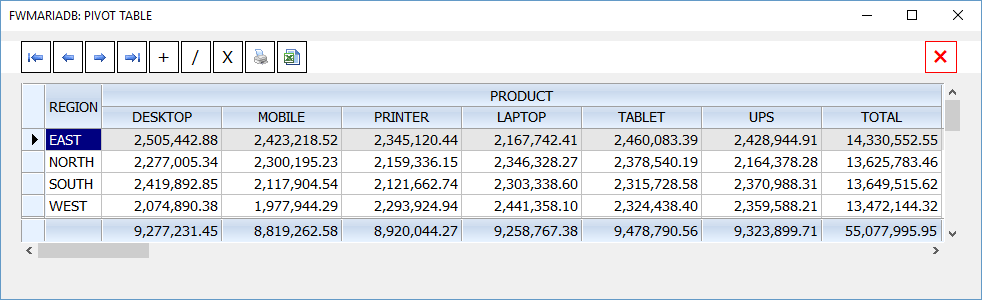
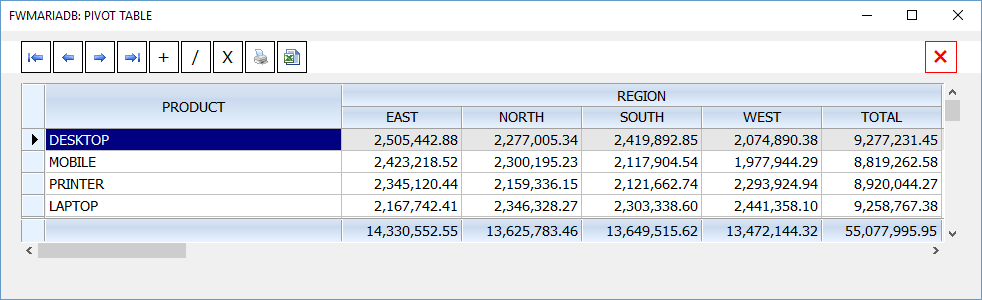
Pivot Table:

Syntax:
METHOD PivotArray( ;
cTable, ; // table name or cSql
cRowFld, ; // FieldName or SQL Expression for Rows
cColFld, ; // FieldName or SQL Expression for Columns
cValFld, ; // Value FieldName or SQL Expression
[cAggrFunc] // Default "SUM". Can be any Aggregate function
)

\fwh\samples\maria03.prg

Code (fw): Select all Collapse
XBROWSER oCn:PivotArray( "pivotdata", "REGION", "PRODUCT", "sales" ) ;
   TITLE "FWMARIADB: PIVOT TABLE"


Regards


G. N. Rao.

Hyderabad, India
Posts: 8515
Joined: Tue Dec 20, 2005 07:36 PM
Re: FWH 16.08 : Built-in MySql/MariaDB functionality (Updated )
Posted: Fri Oct 14, 2016 03:10 PM

Very good!!! Fantastic job!!!

Regards, saludos.

João Santos - São Paulo - Brasil - Phone: +55(11)95150-7341
Posts: 1598
Joined: Fri Oct 07, 2005 05:56 PM
Re: FWH 16.08 : Built-in MySql/MariaDB functionality (Updated )
Posted: Tue Nov 08, 2016 04:28 AM

METHOD Cancel() --> Cancels the pending updates/append

How do I know that data pending for updates (rowset has changed)?

Thanks for any help.

Regards,

Dutch


FWH 2304 / xHarbour Simplex 1.2.3 / BCC73 / Pelles C / UEStudio

FWPPC 10.02 / Harbour for PPC (FTDN)

ADS V.9 / MySql / MariaDB

R&R 12 Infinity / Crystal Report XI R2

(Thailand)
Posts: 36
Joined: Sat Sep 03, 2016 03:11 PM
Re: FWH 16.08 : Built-in MySql/MariaDB functionality (Updated )
Posted: Fri Dec 09, 2016 08:21 PM

Mr.Rao

What is the method for deleting a database?

OCn: DeleteDB (cDB)
OCn: DropDB (cDB)
OCn: Delete (cDB)
OCn: Drop (cDB)

I just managed this way:

OCn: QueryResult ('drop databases' + cDB)

Is there any method for this?

Att

João Carlos
VinheSoft

João Carlos

VinheSoft Informatica

BCC 7.7 - FHW 24.07 - Harbour 3.2.0dev (r2404101339) for BCC 7.7
Posts: 1067
Joined: Wed Nov 09, 2005 02:17 AM
Re: FWH 16.08 : Built-in MySql/MariaDB functionality (Updated )
Posted: Fri Dec 09, 2016 08:58 PM

I think there is no a function to do this yet.

Sds,
Vilian F. Arraes
vilian@vfatec.com.br
Belém-Pa-Brazil