oRs:bOnChangePage = { || vsay := alltrim(STR(oRs:nCurrentPage))+" / "+alltrim( STR(oRs:nMaxPages)),;
              oSay:refresh(),oBrw:Refresh() }  oRs:bOnChangePage = { || vsay := alltrim(STR(oRs:nCurrentPage))+" / "+alltrim( STR(oRs:nMaxPages)),;
              oSay:refresh(),oBrw:Refresh() }oRs:lAutoPage   := .t.oRs:lAutoExpand  := .t.In your dolphin example also pressing down arrow key does not go to next page. I sent you a sample which works exactly like your sample.
Note: Personally I do not like this kind of paging.
I prefer this
viewtopic.php?f=3t=33830p=199916hilit=million#p199916
&&&
oRs := oCn:RowSet( cSql )
// set up browse
// during runtime
//
oRs:oCn := oNewCn // Optional
oRs:ReQuery( cNewSql ) // same or different table
oRs:SetXbrColumns( oBrw )#include "fivewin.ch"
function Main()
local oCn, oRs, oDlg, oBrw
local aSql := { "select id,first,city, salary from customer", ;
"select * from states", ;
"select * from annual" }
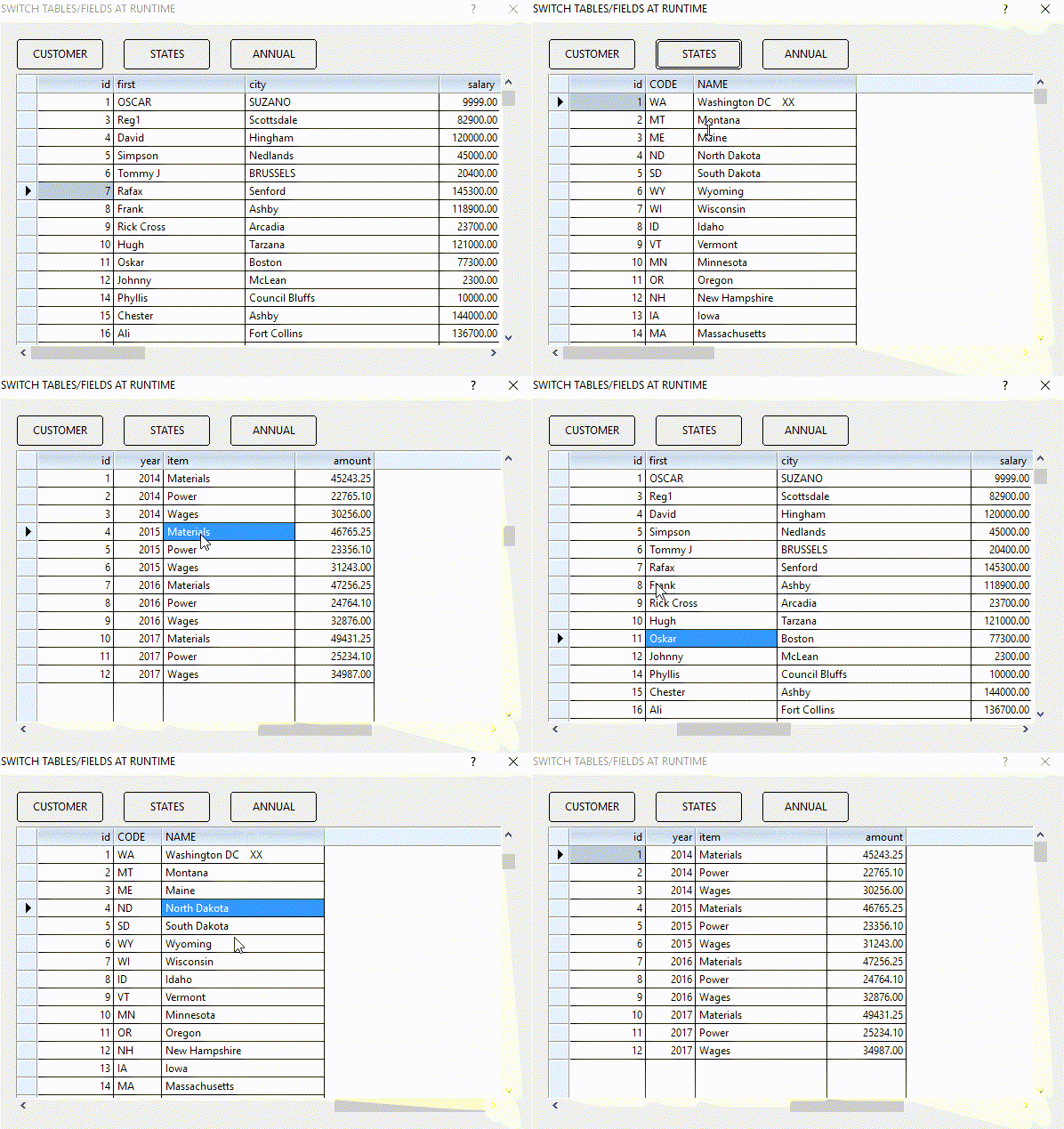
oCn := FW_DemoDB()
oRs := oCn:RowSet( aSql[ 1 ] )
DEFINE DIALOG oDlg SIZE 600,400 PIXEL TRUEPIXEL ;
TITLE "SWITCH TABLES/FIELDS AT RUNTIME"
@ 60, 20 XBROWSE oBrw SIZE -20,-20 PIXEL OF oDlg ;
DATASOURCE oRs AUTOCOLS CELL LINES NOBORDER
oBrw:CreateFromCode()
@ 20, 20 BTNBMP PROMPT "CUSTOMER" ;
SIZE 100,35 PIXEL OF oDlg FLAT ;
ACTION ( CursorWait(), oRs:Requery( aSql[ 1 ] ), oRs:SetXbrColumns( oBrw ) )
@ 20,140 BTNBMP PROMPT "STATES" ;
SIZE 100,35 PIXEL OF oDlg FLAT ;
ACTION ( CursorWait(), oRs:Requery( aSql[ 2 ] ), oRs:SetXbrColumns( oBrw ) )
@ 20,260 BTNBMP PROMPT "ANNUAL" ;
SIZE 100,35 PIXEL OF oDlg FLAT ;
ACTION ( CursorWait(), oRs:Requery( aSql[ 3 ] ), oRs:SetXbrColumns( oBrw ) )
ACTIVATE DIALOG oDlg CENTERED
oCn:Close()
return nil
#define QUINCENA ;
"select " + ;
"a.id      as c1, " + ;
"b.nombre    as c2, " +;
"a.fecha    as c3, " + ;
"c.id      as c4_0, " +;
"c.item     as c4, " +;
"a.pago     as c5, " + ;
"a.pobreza   as c6, " + ;
"a.gratis    as c7 " + ;
"from tbdiario a " + ;
"left join tbente as b on b.id = a.idente " +;
"left join tbitems as c on c.id = a.iditem "+;
"WHERE a.fecha >= ? AND a.fecha <= ? "+ ;
"ORDER BY a.iditem, a.fecha "::oQry := ::QUERY( QUINCENA, { ::dInicio, ::dFinal } )
::setfilter( "c4_0>0 and c4_0<11" )
 ::oQry:setorder( "c2", "c3" )
  ::oQry:Requery()Please try:
::oQry:setorder( "c2,c3" )
::oQry:Requery() Is not necessary here.
    ::oQry:setFilter( "c2_0<2" )
     ::oQry:setorder("c2_0, c3, c4_0")xbrowser ::oQryHello,
have somebody tryed to rewrite tdatabase() class to use RowSet object instead of dbf file?
For sample
METHOD FCount() INLINE ( ::oRc:FCount() ) //where ::oRc is rowset object created for this object
instead of
METHOD FCount() INLINE ( ::nArea )->( FCount() )
Could this approach work?
And am I correct it is not possible to inherit from Mariadb connection RowSet class?
Our database classes inherit from tdatabase() and would be easy first step to replace tdatabase() functionality without changing higher level code...
Taavi.
oRowSet:FCount()Hello,
so rewriting tdatabase() class to use to use rowset should work?
Maybe someone have done it already? Seems like logical path for me from dbf to Mariadb for those using tdatabase()...
Rowset object would be helpful, I need an class which has all methods of tdatabase() to replace database object in our classes. This way I could bypass creating my own class for that.
Taavi.
Hello,
can I have Rowset object, please?
Taavi