fwlog empty( ::clayout ), ! Empty( ::hBitmap )2. When i use clausula GDIPLUS and call the method ::loadbitmap() to change the bitmap, no bitmap to see. Without GDIPLUS is ok!
fwlog empty( ::clayout ), ! Empty( ::hBitmap )1) done.
2) Working for me with and without GDIP
btn:loadbmp( newfile ), btn:refresh()
Thanks, but i use a resource, not a file. Without GDIP is functioning perfect. I use a 16x16 bitmap.
@ 100, 90 BUTTONBMP PROMPT "Text" + CRLF + "Top" SIZE 140,140 PIXEL OF oWnd ;
BITMAP "CLIP" TEXTTOP GDIP ACTION { |b| b:loadbitmap( "STAR" ), b:refresh() }CLIP BITMAP "../bitmaps/clip.bmp"
STAR BITMAP "../bitmaps/16x16/favorite.bmp"Try with REDEFINE?? If i not change with :loadbitmap() the the bitmap is shown normal. I will tomorrow use a other bitmap.
Can you please provide a simple rc file with dialog and some fwh bitmaps?
Any news about this? The bug is in the functions of skinbuttons(), but i have not the complete Code. Antonio?
As of now, skinbuttons are compatible only with the legacy paint behavior.
Actually skinbuttons replaces the paint method of the button. While the paint method of buttons is greatly enhanced ( any kind of images, auto-resizing of images and also new styles of alignments) the skinbuttons paint method still handles the oldest painting logic.
Till we totally re-write skinbuttons code, this is compatible only with simple buttonbmps without gdiplus.
nageswaragunupudi wrote:As of now, skinbuttons are compatible only with the legacy paint behavior.Dear Mr.Rao
Actually skinbuttons replaces the paint method of the button. While the paint method of buttons is greatly enhanced ( any kind of images, auto-resizing of images and also new styles of alignments) the skinbuttons paint method still handles the oldest painting logic.
Till we totally *re-write* skinbuttons code, this is compatible only with simple buttonbmps without gdiplus.
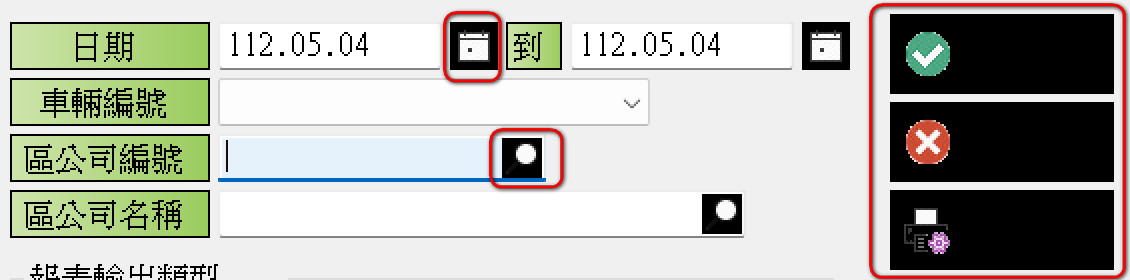
REDEFINE GET ::oGet4 VAR ::cNo4 ID 104 OF ::oDlg UPDATE CHRGROUP CHR_WIDE BITMAP "BTN_FIND16" ACTION( oThis:Select_DC_NO() )
REDEFINE BUTTONBMP oBtn[4] ID 701 OF ::oDlg ;
BITMAP "BTN_CALENDAR16" ;
TOOLTIP "輸入所選取的日期" ;
ACTION ChooseCal2( ::oGet1, ::cNo1 )
karinha wrote:Good evening Richard, PLS test this example. With XHARBOUR it works fine. With HARBOUR it doesn't work well(fail), it's something for the FiveTech Team(Rao) to check.These code look good, but I don't want it.
Buenas noches Richard, PLS prueba este ejemplo. Con XHARBOUR funciona bien. Con HARBOUR no funciona bien (falla), es algo que debe verificar el equipo de FiveTech (Rao).
Download complete:
https://mega.nz/file/EF9xUAYK#tk7-xn_ptC-isI6Mlkvizmzp14Va6KOvjNe533lxekU
Regards, Saludos.
oGet1:lBtnTransparent := .T. // transparent button get oGet1
oGet1:lAdjustBtn := .T.Mr. Richard
How can I reproduce your problem at my end so that I can understand what is happening?
nageswaragunupudi wrote:Mr. RichardMr.Rao
How can I reproduce your problem at my end so that I can understand what is happening?
Function Main()
Dialog1()
Dialog2()
oSQL_Erp32u := TWinCrane365():New()
RETURN
METHOD New() CLASS TWinCrane365
SkinButtons()Function Main()
SkinButtons()
Dialog1()
Dialog2()
oSQL_Erp32u := TWinCrane365():New()
RETURN
METHOD New() CLASS TWinCrane365