FiveTech Support Forums

FiveWin / Harbour / xBase community
Board index FiveWin para Harbour/xHarbour ExplorerBar en Outlook2003
Posts: 845
Joined: Sun Oct 09, 2005 05:36 PM
ExplorerBar en Outlook2003
Posted: Wed Sep 21, 2016 04:33 PM
Buen dia foro,

Tengo el siguiente codigo:
Code (fw): Select all Collapse
聽 聽MENU oMenu
聽 聽ENDMENU

聽 聽DEFINE WINDOW oWnd FROM 1, 1 TO 400, 600 PIXEL ;
聽 聽 聽 TITLE cTitle ;
聽 聽 聽 MENU oMenu MDI

聽 聽SET MESSAGE OF oWnd TO cTitle KEYBOARD CLOCK DATE NOINSET

聽 聽DEFINE OUTLOOK2003 oLbx OF oWnd ;
聽 聽 聽 聽 聽 PROMPTS "Uno", "Dos", "Tres", "" ;
聽 聽 聽 聽 聽 BITMAPS "bitmaps\1.bmp", "bitmaps\2.bmp", "bitmaps\3.bmp"

聽 聽 聽 聽 聽oWnd:oLeft = oLbx

聽 聽 聽 聽 聽oLbx:nWidth := 200

聽 聽@ 0, 0 EXPLORERBAR oExBar OF oLbx:aDialogs[ 1 ] ;
聽 聽 聽 聽 聽SIZE oLbx:aDialogs[ 1 ]:nWidth, oLbx:aDialogs[ 1 ]:nHeight

聽 聽@ 0,200 聽 SPLITTER oSplit1 ;
聽 聽 聽 聽 聽 聽 聽VERTICAL ;
聽 聽 聽 聽 聽 聽 聽PREVIOUS CONTROLS oLbx ;
聽 聽 聽 聽 聽 聽 聽HINDS CONTROLS oWnd:oWndClient ;
聽 聽 聽 聽 聽 聽 聽SIZE 4, 300 聽PIXEL ;
聽 聽 聽 聽 聽 聽 聽OF oWnd ;
聽 聽 聽 聽 聽 聽 聽_3DLOOK

聽 ACTIVATE WINDOW oWnd ;
聽 聽 聽 聽ON RESIZE ( oSplit1:nHeight := oWnd:nHeight )

return nil


Pinta bien la outlook y la explorerbar, el problema viene cuando redimensiono la ventana el pintado de la explorerbar no lo hace completo, adjunto imagen.
[img]http://s14.postimg.org/vlpqqbvgt/exbar.jpg" alt="" loading="lazy">
[/img]
Alguna solucion?
Gracias
____________________

Paco
Posts: 6755
Joined: Wed Feb 15, 2012 08:25 PM
Re: ExplorerBar en Outlook2003
Posted: Wed Sep 21, 2016 05:13 PM

Has probado en el RESIZE

oSplit1:AdjLeft()

Cristobal Navarro

Hay dos tipos de personas: las que te hacen perder el tiempo y las que te hacen perder la noci贸n del tiempo

El secreto de la felicidad no est谩 en hacer lo que te gusta, sino en que te guste lo que haces
Posts: 845
Joined: Sun Oct 09, 2005 05:36 PM
Re: ExplorerBar en Outlook2003
Posted: Wed Sep 21, 2016 06:14 PM
Cristobal, (perdon)

Ya habia intentado con AdjLeft(), pero lo omiti porque no se ve los controles outlook y explorerebar, ni intentando con la redimension de ventana aparecen los controles, te adjunto imagen:
[img]http://s14.postimg.org/jc5e0yj71/exbar2.jpg" alt="" loading="lazy">
[/img]
____________________

Paco
Posts: 44158
Joined: Thu Oct 06, 2005 05:47 PM
Re: ExplorerBar en Outlook2003
Posted: Wed Sep 21, 2016 08:17 PM

Prueba con:

DEFINE OUTLOOK2003 oLbx OF oWnd:oWndClient ...

regards, saludos

Antonio Linares
www.fivetechsoft.com
Posts: 6755
Joined: Wed Feb 15, 2012 08:25 PM
Re: ExplorerBar en Outlook2003
Posted: Wed Sep 21, 2016 09:37 PM
Francisco, es como te dice Antonio

Code (fw): Select all Collapse
#include "Fivewin.ch"
#include "Splitter.ch"
#include "OutLook.ch"


Function Main()

   local oWnd
   local oSplit1
   local oLbx
   local oExBar
   local oMenu
   local cTitle   := "Outlook 2003"

   MENU oMenu
   ENDMENU

   DEFINE WINDOW oWnd FROM 1, 1 TO 400, 600 PIXEL ;
      TITLE cTitle ;
      MENU oMenu MDI

   SET MESSAGE OF oWnd TO cTitle KEYBOARD CLOCK DATE NOINSET

   DEFINE OUTLOOK2003 oLbx OF oWnd:oWndClient ; //oWnd ;
          PROMPTS "Uno", "Dos", "Tres", "" ;
          BITMAPS "bitmaps\1.bmp", "bitmaps\2.bmp", "bitmaps\3.bmp"

         oLbx:nWidth := 200

   @ 0, 0 EXPLORERBAR oExBar OF oLbx:aDialogs[ 1 ] ;
         SIZE oLbx:aDialogs[ 1 ]:nWidth, oLbx:aDialogs[ 1 ]:nHeight

   @ 0,201   SPLITTER oSplit1 ;
             VERTICAL ;
             PREVIOUS CONTROLS oLbx ;  //             HINDS CONTROLS oWnd:oWndClient ;
             SIZE 4, 300  PIXEL ;
             LEFT MARGIN 0 ;
             RIGHT MARGIN 80 ;
             ON CHANGE oSplit1:nHeight := oWnd:oWndClient:nHeight ;
             OF oWnd:oWndClient //oWnd //;             _3DLOOK

  ACTIVATE WINDOW oWnd ;
       ON RESIZE ( oSplit1:nHeight := oWnd:oWndClient:nHeight ) //, oSplit1:AdjLeft() )

return nil
Cristobal Navarro

Hay dos tipos de personas: las que te hacen perder el tiempo y las que te hacen perder la noci贸n del tiempo

El secreto de la felicidad no est谩 en hacer lo que te gusta, sino en que te guste lo que haces
Posts: 845
Joined: Sun Oct 09, 2005 05:36 PM
Re: ExplorerBar en Outlook2003
Posted: Wed Sep 21, 2016 10:14 PM
Antonio,

Probando como indicas, desaparecen los controles :-)
Probando como indica Cristobal tambien desparecen los controles y el splitter tiene un comportamiento raro, nomas se mueve la mitad superior de la barra.
[img]http://s16.postimg.org/uwd8sg7mp/exbar3.jpg" alt="" loading="lazy">
[/img]
Gracias
____________________

Paco
Posts: 6755
Joined: Wed Feb 15, 2012 08:25 PM
Re: ExplorerBar en Outlook2003
Posted: Wed Sep 21, 2016 11:07 PM
En cuanto a que desaparecen los controles, no entiendo lo que quieres decir
En cuanto a lo de la mitad del splitter...
Copia el c贸digo anterior, modifica lo que te adjunto en este post y ejec煤talo, a mi no me desaparecen los controles

Code (fw): Select all Collapse
聽 聽@ 0,201 聽 SPLITTER oSplit1 ;
聽 聽 聽 聽 聽 聽 聽VERTICAL ;
聽 聽 聽 聽 聽 聽 聽PREVIOUS CONTROLS oLbx ;
聽 聽 聽 聽 聽 聽 聽SIZE 4, oWnd:oWndClient:nHeight 聽PIXEL ;
聽 聽 聽 聽 聽 聽 聽LEFT MARGIN 0 ;
聽 聽 聽 聽 聽 聽 聽RIGHT MARGIN 80 ;
聽 聽 聽 聽 聽 聽 聽ON CHANGE ( oSplit1:nHeight := oWnd:oWndClient:nHeight, oWnd:oWndClient:Refresh() ) ;
聽 聽 聽 聽 聽 聽 聽OF oWnd:oWndClient //oWnd //; 聽 聽 聽 聽 聽 聽 _3DLOOK

聽 ACTIVATE WINDOW oWnd ;
聽 聽 聽 聽ON RESIZE ( oSplit1:nHeight := oWnd:oWndClient:nHeight ) //, oSplit1:AdjLeft() )
Cristobal Navarro

Hay dos tipos de personas: las que te hacen perder el tiempo y las que te hacen perder la noci贸n del tiempo

El secreto de la felicidad no est谩 en hacer lo que te gusta, sino en que te guste lo que haces
Posts: 1364
Joined: Wed Jun 21, 2006 12:39 AM
Re: ExplorerBar en Outlook2003
Posted: Wed Sep 21, 2016 11:43 PM

Probando el ejemplo de Cristobal me sucede lo mismo. No aparece el control. Ser谩 la versi贸n ?. Mis herramientas son FWH 14.12, BCC582 Y Harbour 3.2

Saludos

Posts: 6755
Joined: Wed Feb 15, 2012 08:25 PM
Re: ExplorerBar en Outlook2003
Posted: Thu Sep 22, 2016 12:37 AM
"Una imagen vale m谩s que mil palabras"

Cristobal Navarro

Hay dos tipos de personas: las que te hacen perder el tiempo y las que te hacen perder la noci贸n del tiempo

El secreto de la felicidad no est谩 en hacer lo que te gusta, sino en que te guste lo que haces
Posts: 845
Joined: Sun Oct 09, 2005 05:36 PM
Re: ExplorerBar en Outlook2003
Posted: Thu Sep 22, 2016 03:38 PM
Cristobal,

Efectivamente se ve correcto como lo tienes, pero como comenta Horacio tal vez sean las versiones, tengo este codigo, y adjunto la imagen de como se ve, si aprecias el splitter se ve muy separado de donde termina la outllok2003 :
Code (fw): Select all Collapse
// Testing FiveWin splitter controls

#include "FiveWin.ch"
#include "Splitter.ch"
#include "Outlook.ch"


//----------------------------------------------------------------------------//

function Main()

聽 聽local oWnd
聽 聽local oSplit1
聽 聽local oLbx
聽 聽local oExBar
聽 聽local oMenu
聽 聽local cTitle 聽 := "Outlook 2003"
聽 聽local aRect := GetCoors(GetDeskTopWindow())


聽 聽MENU oMenu
聽 聽ENDMENU

聽 聽DEFINE WINDOW oWnd FROM 0, 0 TO 400, 600 PIXEL ;
聽 聽 聽 TITLE cTitle ;
聽 聽 聽 MENU oMenu MDI

聽 聽SET MESSAGE OF oWnd TO cTitle KEYBOARD CLOCK DATE NOINSET

聽 聽DEFINE OUTLOOK2003 oLbx OF oWnd ;
聽 聽 聽 聽 聽 PROMPTS "Uno", "Dos", "Tres", "" ;
聽 聽 聽 聽 聽 BITMAPS "bitmaps\catalogos.bmp", "bitmaps\printer.bmp", "bitmaps\utilerias.bmp"

聽 聽 聽 聽 聽oLbx:nWidth := 200

聽 聽@ 0, 0 EXPLORERBAR oExBar OF oLbx:aDialogs[ 1 ] ;
聽 聽 聽 聽 聽 SIZE oLbx:aDialogs[ 1 ]:nWidth, oLbx:aDialogs[ 1 ]:nHeight


聽 聽@ 0,201 聽 SPLITTER oSplit1 ;
聽 聽 聽 聽 聽 聽 聽VERTICAL ;
聽 聽 聽 聽 聽 聽 聽PREVIOUS CONTROLS oLbx ;
聽 聽 聽 聽 聽 聽 聽SIZE 4, oWnd:oWndClient:nHeight 聽PIXEL ;
聽 聽 聽 聽 聽 聽 聽LEFT MARGIN 0 ;
聽 聽 聽 聽 聽 聽 聽RIGHT MARGIN 80 ;
聽 聽 聽 聽 聽 聽 聽ON CHANGE ( oSplit1:nHeight := oWnd:oWndClient:nHeight, oWnd:oWndClient:Refresh() ) ;
聽 聽 聽 聽 聽 聽 聽OF oWnd:oWndClient


聽 ACTIVATE WINDOW oWnd ;
聽 聽 聽 聽ON RESIZE ( oSplit1:nHeight := oWnd:oWndClient:nHeight )

return nil


[img]http://s10.postimg.org/5jlw94r45/exbar4.jpg" alt="" loading="lazy">
[/img]

En cambio si a esta parte del codigo, le cambio su contenedor asi :
DEFINE OUTLOOK2003 oLbx OF oWnd:oWndClient

El control Outlook2003 no se ve, adjunto imagen y creo a esto tambien es a lo que se refiere Horacio:
[img]http://s21.postimg.org/5mcs2upf7/exbar5.jpg" alt="" loading="lazy">
[/img]

Utilizo fwh1502, xHarbour, Bcc7.0

Gracias
____________________

Paco
Posts: 1710
Joined: Tue Oct 28, 2008 06:26 PM
Re: ExplorerBar en Outlook2003
Posted: Thu Sep 22, 2016 04:48 PM

Francisco

Porque no intenta con OUTLOOK2010
Da mejor aspecto y est谩 mejorada.

Saludos,


Adhemar C.
Posts: 1380
Joined: Fri Oct 14, 2005 01:28 PM
Re: ExplorerBar en Outlook2003
Posted: Mon Sep 26, 2016 02:33 PM
Francisco;
Dada la version de FWH que us谩s,ten茅s disponible esta clase free: TTaskpanel
Este es el foro: http://codigo-base.el-foro.net
(Te lo puedo enviar, porque no recuerdo de donde lo baje)

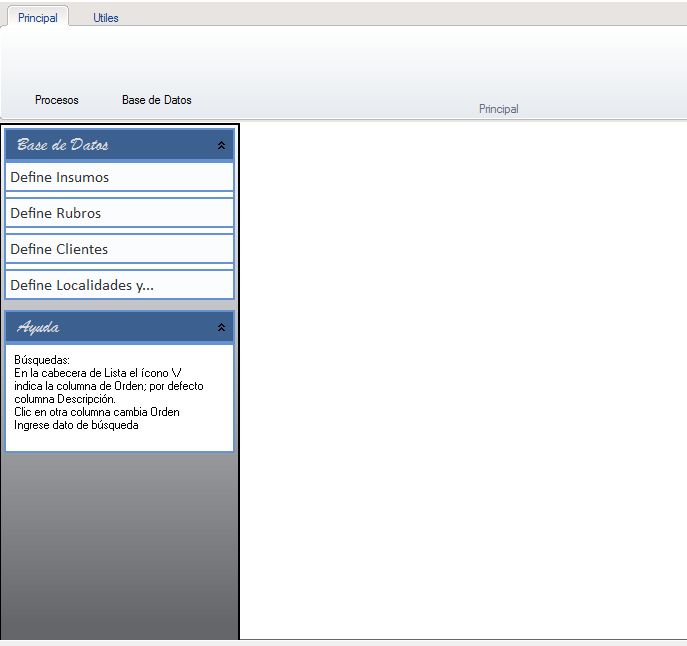
Se ve as铆:
Resistencia - "Ciudad de las Esculturas"

Chaco - Argentina
Posts: 1380
Joined: Fri Oct 14, 2005 01:28 PM
Re: ExplorerBar en Outlook2003
Posted: Mon Sep 26, 2016 02:44 PM
Resistencia - "Ciudad de las Esculturas"

Chaco - Argentina
Posts: 845
Joined: Sun Oct 09, 2005 05:36 PM
Re: ExplorerBar en Outlook2003
Posted: Tue Sep 27, 2016 02:39 PM

Mario,
Mi intencion es no usar librerias de Terceros, pero viendo la necesidad la reviso. ;)
Gracias
Saludos

____________________

Paco

Continue the discussion