FiveTech Support Forums

FiveWin / Harbour / xBase community
Board index FiveWin for Harbour/xHarbour Jpg resolution going down in Ximage ?
Posts: 1487
Joined: Tue Jun 14, 2016 07:51 AM
Jpg resolution going down in Ximage ?
Posted: Tue Nov 22, 2016 09:21 PM

Hello,

I use this to show a image.

@ 32,860 XIMAGE oImage2 SIZE 550,-300 OF oWnd SOURCE foto->foto

I see that the image's quality is going down when viewed with FWH compared with the view from let say Xnview.

  1. Is this normal behavior for a FWH program (15.12 32 bit system)

Marc

Marc Venken

Using: FWH 23.08 with Harbour
Posts: 44158
Joined: Thu Oct 06, 2005 05:47 PM
Re: Jpg resolution going down in Ximage ?
Posted: Tue Nov 22, 2016 10:00 PM

Marc,

Could you please provide one of the JPGs that you are testing ?

thanks

regards, saludos

Antonio Linares
www.fivetechsoft.com
Posts: 10733
Joined: Sun Nov 19, 2006 05:22 AM
Re: Jpg resolution going down in Ximage ?
Posted: Wed Nov 23, 2016 05:45 PM

How about IMAGE instead of XIMAGE?

TXImage class uses GDI+ for both reading and rendering all images.
TImage class uses FreeImage.dll for reading and classic GDI class for rendering images.

You may choose what do you consider better and also share your observation.

Regards


G. N. Rao.

Hyderabad, India
Posts: 1487
Joined: Tue Jun 14, 2016 07:51 AM
Re: Jpg resolution going down in Ximage ?
Posted: Wed Nov 23, 2016 09:31 PM

Rao,

I use the standards of FWH

when i change to

@ 40,860 IMAGE oImage2 SIZE 550,450 OF oWnd SOURCE foto->foto

i get the error

.\TEST1.PRG(212) Error E0030 Syntax error "syntax error at 'SOURCE'"

Because i think i don't have some libs linked in. I'm not used to link stuff into FWH or any part of it. Put a extra ch file on top I can do.

Marc

Marc Venken

Using: FWH 23.08 with Harbour
Posts: 1487
Joined: Tue Jun 14, 2016 07:51 AM
Re: Jpg resolution going down in Ximage ?
Posted: Wed Nov 23, 2016 09:42 PM
Here a screenshot for the difference look.

Marc Venken

Using: FWH 23.08 with Harbour
Posts: 10733
Joined: Sun Nov 19, 2006 05:22 AM
Re: Jpg resolution going down in Ximage ?
Posted: Thu Nov 24, 2016 12:13 AM

Syntax of Image is different
You do not need a separate ch. You play please check the full syntax in fivewin.ch.

@ r, c IMAGE SIZE w,h PIXEL OF oDlg FILE "c:.....jpg"

As suggested by Mr Antonio, please send him the jpg file

Regards


G. N. Rao.

Hyderabad, India
Posts: 10733
Joined: Sun Nov 19, 2006 05:22 AM
Re: Jpg resolution going down in Ximage ?
Posted: Thu Nov 24, 2016 04:18 PM
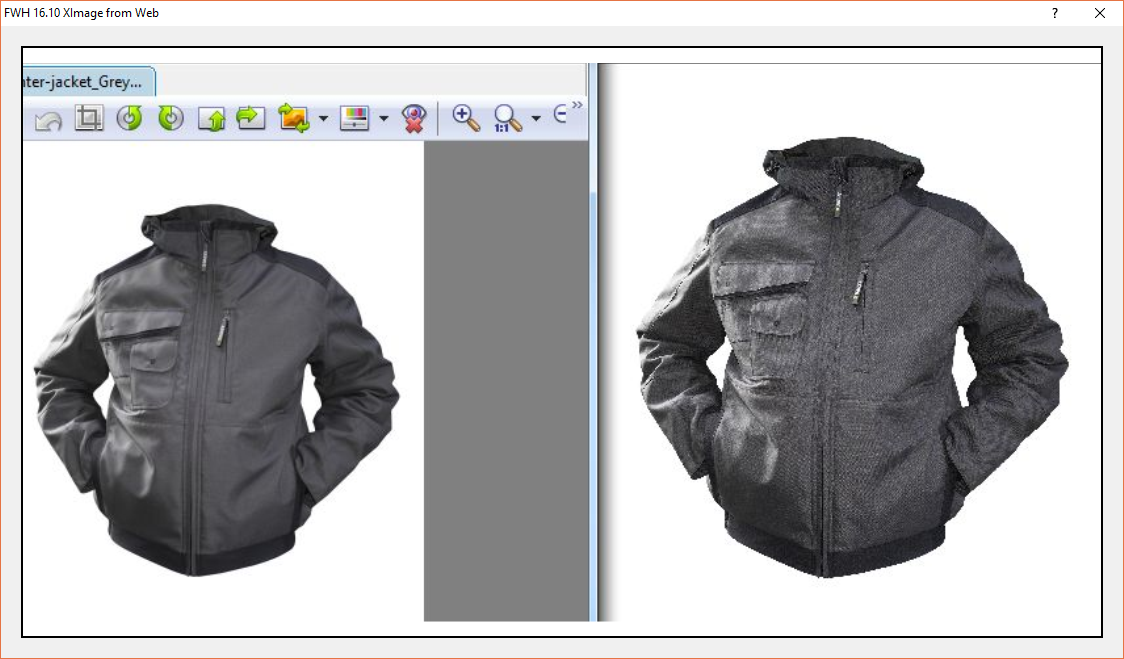
Here is a sample program to try:
Code (fw): Select all Collapse
function ImageTestNew

   local oDlg, oImage

   DEFINE DIALOG oDlg SIZE 1120,630 PIXEL TRUEPIXEL TITLE FWVERSION + " XImage from Web"

   @ 20,20 XIMAGE oImage SOURCE "http://www.kaboutersopglabbeek.be/img/fwh.jpg" ;
      SIZE -20,-20 OF oDlg

   oImage:FitWidth()
   oImage:lBmpTransparent := .f.

   ACTIVATE DIALOG oDlg CENTERED

return nil


Result:


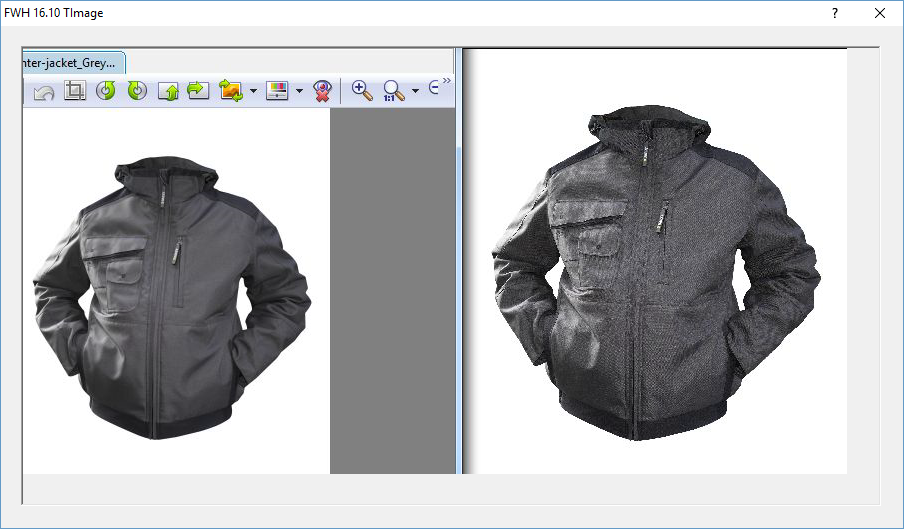
Using TImage class:


It can be seen that XImage display the jpg posted above with fair fidelity. We opine that both XImage and Image controls render images faithful the original. At the same time FWH does not provide any image enhancing features like some specialized imaging software, whose only job is to render images.
Regards


G. N. Rao.

Hyderabad, India
Posts: 1516
Joined: Thu May 27, 2010 02:06 PM
Re: Jpg resolution going down in Ximage ?
Posted: Fri Nov 25, 2016 07:58 AM

Can you put me a link to download the image?

Thank you.

Continue the discussion