FiveTech Support Forums

FiveWin / Harbour / xBase community
Board index FiveWin for Harbour/xHarbour Differences in BTNBMP
Posts: 392
Joined: Tue Jul 29, 2008 01:55 PM

Differences in BTNBMP

Posted: Sun Mar 26, 2017 09:26 PM
Hi Fivewinnes.

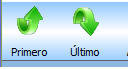
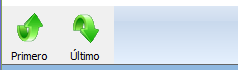
In the version of FWH14.08 I use the following code to create a button bar and its buttons, as shown in figure 1, the same code using the FWH17.02 version generates a different button.
What is the difference in BTNBMP for fwh17.02?
(Original code of ukoenig)

Codigo :

Code (fw): Select all Collapse
DEFINE FONT oFont1  NAME "Tahoma" SIZE 0,-11
SetBalloon( .T. )

DEFINE BUTTONBAR oBar OF oWnd _3D SIZE 40,58 CURSOR oHand _2007 TOP

@ 0, 0 BTNBMP oSBtn[1] OF oBar SIZE 56, 60 PIXEL 2007 ;
NOBORDER  PROMPT "Primero"  FILENAME "C:\BMPS\NWBTOP.BMP" ;
ACTION NIL ;
FONT oFont1 TOP

oSBtn[1]:bClrGrad = { | lMouseOver | If( ! lMouseOver,;
        { { 0.50, 16763283, 16777215 }, ;
        { 0.50, 16777215, 16763283 } }, ;
        { { 0.20, 11513775, 16777215 }, ;
        { 0.20, 16777215, 11513775 } } ) }
        
oSBtn[1]:lRound := .f.
oSBtn[1]:lTransparent := .t.   
oSBtn[1]:cToolTip =  {"Ir al", "Primero ", 1, CLR_BLACK, 14089979 }
oSBtn[1]:SetColor( 0, )


Barra generada con fwh14.08


Barra generada con fwh17.02

How do I define it with fwh17.02 to get the same result?

Thank you
Visite Chiapas, el paraiso de México.
Posts: 10733
Joined: Sun Nov 19, 2006 05:22 AM

Re: Differences in BTNBMP

Posted: Mon Mar 27, 2017 03:42 AM

In the version of FWH14.08 I use the following code to create a button bar and its buttons, as shown in figure 1, the same code using the FWH17.02 version generates a different button.
What is the difference in BTNBMP for fwh17.02?


The main difference is that in older versions Btn:lTransparent was not working on buttonbars, but now it is working. So you see the background color of the Bar.

If you remove :lTransparent := .t., you will see the gradient of the button as expected.

Though it works, it is not the recommended way to create buttons on buttonbars. We give below the recommended way to create buttons on buttonars.


Code (fw): Select all Collapse
#include "fivewin.ch"

#define GRAD_BTNS_ONLY

function main()

local oWnd, oBar, oFont1, aGrad, oBtn

aGrad = { | lMouseOver | If( ! lMouseOver,;
        { { 0.50, 16763283, 16777215 }, ;
        { 0.50, 16777215, 16763283 } }, ;
        { { 0.20, 11513775, 16777215 }, ;
        { 0.20, 16777215, 11513775 } } ) }

DEFINE FONT oFont1  NAME "Tahoma" SIZE 0,-11
SetBalloon( .T. )

DEFINE WINDOW oWnd
oWnd:SetFont( oFont1 )

DEFINE BUTTONBAR oBar OF oWnd _3D SIZE 64,64 2007

#ifndef GRAD_BTNS_ONLY
   oBar:bClrGrad := aGrad
#endif

DEFINE BUTTON oBtn OF oBar FILE "C:\fwh\bitmaps\attach.BMP" PROMPT "Primero" ;
   TOOLTIP  {"Ir al", "Primero ", 1, CLR_BLACK, 14089979 }

#ifdef GRAD_BTNS_ONLY
oBtn:bClrGrad := aGrad
#endif

ACTIVATE WINDOW oWnd CENTERED

return nil
Regards


G. N. Rao.

Hyderabad, India

Continue the discussion