FiveTech Support Forums

FiveWin / Harbour / xBase community
Board index FiveWin para Harbour/xHarbour ribbonbar windows 10
Posts: 7317
Joined: Thu Oct 18, 2012 07:17 PM
Re: ribbonbar windows 10
Posted: Sat Apr 29, 2017 10:19 AM
Antonio,
I tried to insert this features on my app
on a Window I open a dialog with nStyle := nOR( WS_CHILD, 4 )

if this dialog is actived and I click then it insert a space from tab and the dialog activated and I not Know How refresh the dialog to change the size
I tried with aClient := GetClientRect (oWnd:hWnd ) and the setsize but it not refresh

Since from 1991/1992 ( fw for clipper Rel. 14.4 - Momos)

I use : FiveWin for Harbour March-April 2024 - Harbour 3.2.0dev (harbour_bcc770_32_20240309) - Bcc7.70 - xMate ver. 1.15.3 - PellesC - mail: silvio[dot]falconi[at]gmail[dot]com
Posts: 44158
Joined: Thu Oct 06, 2005 05:47 PM
Re: ribbonbar windows 10
Posted: Sat Apr 29, 2017 10:22 AM

Try with oWnd:Resize()

regards, saludos

Antonio Linares
www.fivetechsoft.com
Posts: 7317
Joined: Thu Oct 18, 2012 07:17 PM
Re: ribbonbar windows 10
Posted: Sat Apr 29, 2017 11:06 AM

::oBar:bLDblClick = { || (If( ::oBar:nHeight > 27, ::oBar:nHeight := 27, ::oBar:nHeight := nHeightRib),;
ResizeWndMain())}

my resize function
oApp():oBar is a ribbonbar

Function ResizeWndMain()
local aClient
if oApp():oDlg != NIL
aClient := GetClientRect (oApp():oWndMain:hWnd )
oApp():oDlg:SetSize( aClient[4], aClient[3] - oApp():oBar:nHeight - oApp():oWndMain:oMsgBar:nHeight )
oApp():oDlg:Refresh()
endif
return NIL

Since from 1991/1992 ( fw for clipper Rel. 14.4 - Momos)

I use : FiveWin for Harbour March-April 2024 - Harbour 3.2.0dev (harbour_bcc770_32_20240309) - Bcc7.70 - xMate ver. 1.15.3 - PellesC - mail: silvio[dot]falconi[at]gmail[dot]com
Posts: 564
Joined: Thu Oct 13, 2005 09:23 AM
Re: ribbonbar windows 10
Posted: Mon May 01, 2017 06:38 PM

Gracias Antonio, el hack funciona perfectamente.

Saludos,

Posts: 189
Joined: Wed Apr 05, 2006 09:48 PM
Re: ribbonbar windows 10
Posted: Mon May 01, 2017 06:51 PM
Hola

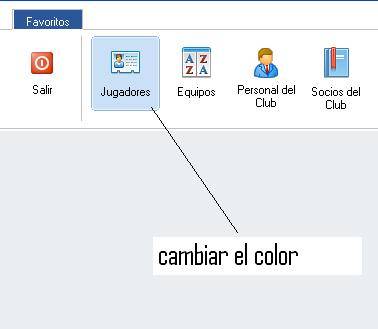
Perdonen por tanta molestia, pero no hay manera de cambiar el color, al pasar el ratón por encima del boton de la ribbonbar, como se puede hacer ?


Saludos
Posts: 44158
Joined: Thu Oct 06, 2005 05:47 PM
Re: ribbonbar windows 10
Posted: Tue May 02, 2017 07:21 AM
Aqui tienes un ejemplo:

Code (fw): Select all Collapse
oButton:bClrGradNormal := { | lPressed | If( lPressed,;
                                 { { 1, RGB( 214, 172, 255 ), RGB( 255, 255, 255 ) } },;
                                 { { 1, RGB( 230, 220, 255 ), RGB( 255, 255, 255 ) } } ) }
regards, saludos

Antonio Linares
www.fivetechsoft.com
Posts: 189
Joined: Wed Apr 05, 2006 09:48 PM
Re: ribbonbar windows 10
Posted: Tue May 02, 2017 07:52 AM

Gracias Antonio, ahora si me funciona perfectamente.

Saludos,

Continue the discussion