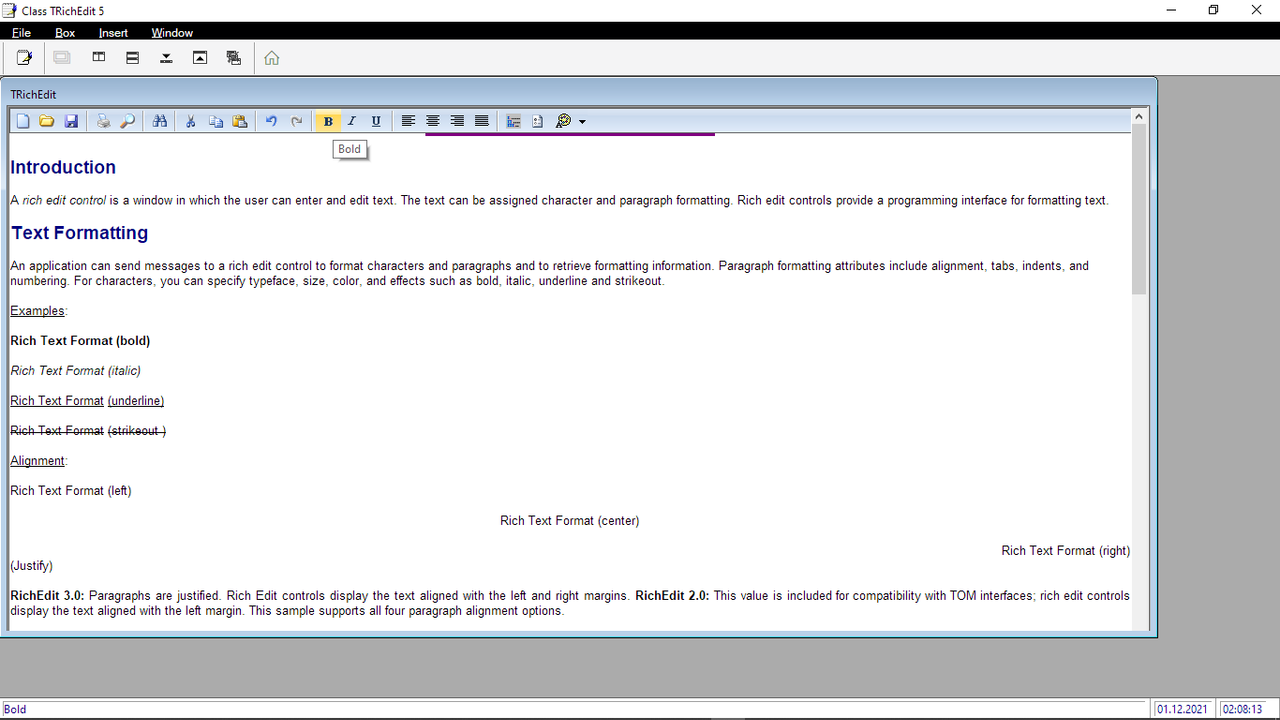
I saw that in FiveDBU, but that does not happen in this example.
Please look at the RC control I entered. Is that the correct current value for the control ?
I know the RTF capability is working because it does engage the spell checker. But, it does not show the button bar.
Here is the full code for the Dialog. Please note that this has a "forced load" temporarily for testing purposes.
FUNCTION setup3
    // Text Editor for disclosures
    //  Updated:    7/30/2015 5:55:48 PM

    LOCAL oEndText, oDlg, nRcrd, oRich
    PRIVATE cText := " ", cTitle := " ", cRtf := " "

    // Open the text database
    oEndText := tEndText():New( )
    oEndText:gobottom( )
    nRcrd := oEndText:recno( )
    DO WHILE nRcrd < 8
        oEndText:append( )
        oEndText:skip( )
        nRcrd := oEndText:recno( )
    ENDDO
    oEndText:gotop( )

  cText := oEndText:tagtext

    // Create the dialog
    DEFINE DIALOG oDlg RESOURCE "SETUP3" BRUSH oBrush transparent OF oWnd
    oDlg:nHelpID := 6

    REDEFINE BUTTONBAR oBarS3 ID 100 SIZE 60,60 OF oDlg 2015
            oBarS3:bClrGrad := aPubGrad

    MENU oWPopS1 POPUP

    MENUITEM "Estimate" ACTION ( oEndText:goto(1), cText := oEndText:tagtext, cTitle := oEndText:texttype, ;
        oDlg:update() ) MESSAGE "Text to print on estimates"

        MENUITEM "Invoices" ACTION ( oEndText:goto(2), cText := oEndText:tagtext, cTitle := oEndText:texttype, ;
            oDlg:update() ) MESSAGE "Text to print on invoices"

        MENUITEM "Tag lines" ACTION ( oEndText:goto(3), cText := oEndText:tagtext, cTitle := oEndText:texttype, ;
            oDlg:update() ) MESSAGE "Ad tag lines to printed on invoices"

        MENUITEM "Counter" ACTION ( oEndText:goto(4), cText := oEndText:tagtext, cTitle := oEndText:texttype, ;
            oDlg:update() ) MESSAGE "Text to print on counter sales"

        MENUITEM "Worksheets"   ACTION ( oEndText:goto(5), cText := oEndText:tagtext, cTitle := oEndText:texttype, ;
            oDlg:update() ) MESSAGE "Text to print on worksheets"

      MENUITEM "Statements" ACTION ( oEndText:goto(6), cText := oEndText:tagtext, cTitle := oEndText:texttype, ;
        oDlg:update() ) MESSAGE "Text to print on statements"

        MENUITEM "Recommendation"   ACTION ( oEndText:goto(7), cText := oEndText:tagtext, cTitle := oEndText:texttype, ;
            oDlg:update() ) MESSAGE "Disclosure for recommendation"

        MENUITEM "Text Message"     ACTION ( oEndText:goto(8), cText := oEndText:tagtext, cTitle := oEndText:texttype, ;
            oDlg:update() ) MESSAGE "Signature line for text messages"


    ENDMENU

    DEFINE BUTTON oWBtn1 OF oBarS3 RESOURCE "FIBILD" PROMPT "Sections" ;
        ACTION  oWBtn1:ShowPopup() MENU oWPopS1 TOOLTIP "Text sections"

    DEFINE BUTTON oWBtn3 OF oBarS3 RESOURCE "HRSAVE" ;
        ACTION ( oEndText:tagtext := cText, oEndText:save( ), oDlg:update( ) )

    DEFINE BUTTON oWBtn4 OF oBarS3 RESOURCE "SPELL" ;
        ACTION  ( cText := SpellOne( cText), oDlg:update() )

    DEFINE BUTTON oWBtn5 OF oBarS3 RESOURCE "HREXIT" ;
        ACTION oDlg:end()
/*
    // Create edit control
    REDEFINE GET cText MEMO ID 2155 OF oDlg ;
        MESSAGE "Edit the text, and press OK to save your changes" UPDATE
*/

    // Create edit control
    REDEFINE RICHEDIT5 oRich VAR cText ID 2155 OF oDlg ;
        MESSAGE "Edit the text, and press OK to save your changes"  //UPDATE

    oRich:SetText( cText )

    ACTIVATE DIALOG oDlg ON INIT (oReBar:hide( ),  oBarS3:lTransparent := .F.) CENTERED

  oReBar:show( )
    // Close the file
    oEndText:close()

RETURN NIL
And the .rc for this dialog:
SETUP3 DIALOG 0, 0, 660, 410
STYLE WS_POPUP | WS_CAPTION
CAPTION "Text Editor"
{
    CONTROL                 "", 100, "TBar", 0|WS_CHILD|WS_VISIBLE, 0,0, 640, 30
    CONTROL         "", 2155, "RichEdit50W", 4100 | WS_CHILD | WS_VISIBLE | WS_BORDER | WS_VSCROLL, 10, 40, 500, 350
}
Built with FWH 21.11, Harbour 32 bit, Microsoft Visual Studio Community 2022