

Is it possible the position of MsgRun() center on parent? Now is centered on Screen.
Board index FiveWin for Harbour/xHarbour MsgRun()-Question
Page: 1 2 (16 posts)

Günther,
We could add a new parameter to MsgRun()
function MsgRun( cCaption, cTitle, bAction, oWndParent )
and then in its code add this:
We could add a new parameter to MsgRun()
function MsgRun( cCaption, cTitle, bAction, oWndParent )
and then in its code add this:
     IF cTitle == NIL
          DEFINE DIALOG oDlg OF oWndParent ;
               FROM 0,0 TO 3, Len( cCaption ) + 4 ;
               STYLE nOr( DS_MODALFRAME, WS_POPUP )
     ELSE
          DEFINE DIALOG oDlg OF oWndParent ;
               FROM 0,0 TO 4, Max( Len( cCaption ), Len( cTitle ) ) + 4 ;
               TITLE cTitle ;
               STYLE DS_MODALFRAME
ENDIFAntonio, that would be very helpful and should be default!!.
Finally implemented this way. It will be included in FWH 17.05
Example:
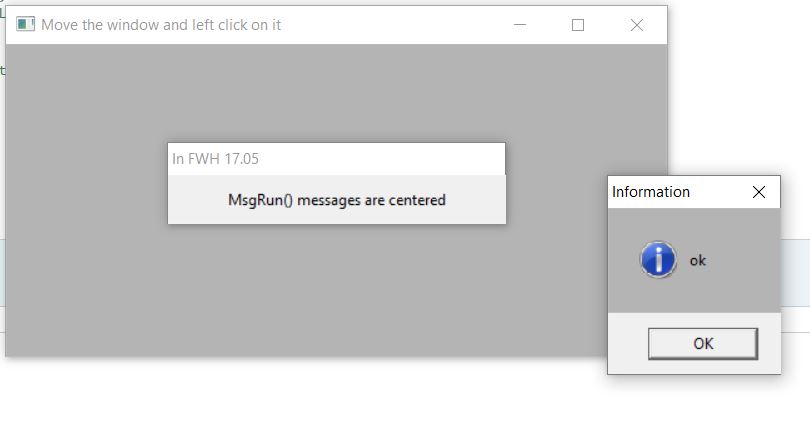
function MsgRun( cCaption, cTitle, bAction, oWndParent )

     LOCAL oDlg, nWidth, uReturn

     DEFAULT cCaption := "Please, wait...",;
             bAction  := { || WaitSeconds( 1 ) }

     IF cTitle == NIL
          DEFINE DIALOG oDlg ;
               FROM 0,0 TO 3, Len( cCaption ) + 4 ;
               STYLE nOr( DS_MODALFRAME, WS_POPUP )
     ELSE
          DEFINE DIALOG oDlg ;
               FROM 0,0 TO 4, Max( Len( cCaption ), Len( cTitle ) ) + 4 ;
               TITLE cTitle ;
               STYLE DS_MODALFRAME
     ENDIF

     oDlg:bStart := { || uReturn := Eval( bAction, oDlg ), oDlg:End(), SysRefresh() }
     oDlg:cMsg   := cCaption

     nWidth := oDlg:nRight - oDlg:nLeft

     ACTIVATE DIALOG oDlg ON PAINT oDlg:SayText( oDlg:cMsg ) ;
        ON INIT oDlg:Center( oWndParent )

return uReturn
Example:
#include "FiveWin.ch"

function Main()

   local oWnd

   DEFINE WINDOW oWnd TITLE "Move the window and left click on it"

   ACTIVATE WINDOW oWnd ;
      ON CLICK MsgRun( "MsgRun() messages are optionally centered", "In FWH 17.05", { || MsgInfo( "ok" ) }, oWnd )

return nilAntonio, thanks!
Should also MsgInfo() centered on parent, if desired?
Not sure if we can:
http://stackoverflow.com/questions/6299797/c-how-to-center-messagebox
http://stackoverflow.com/questions/6299797/c-how-to-center-messagebox
case WM_NOTIFY:{
  HWND X=FindWindow("#32770",NULL);
  if(GetParent(X)==H_frame){int Px,Py,Sx,Sy; RECT R1,R2;
    GetWindowRect(hwnd,&R1); GetWindowRect(X,&R2);
    Sx=R2.right-R2.left,Px=R1.left+(R1.right-R1.left)/2-Sx/2;
    Sy=R2.bottom-R2.top,Py=R1.top+(R1.bottom-R1.top)/2-Sy/2;
    MoveWindow(X,Px,Py,Sx,Sy,1);
  }
} break;Antonio, for MsgRun() i use this code:
So automatically center on the caller-window!
ACTIVATE DIALOG oDlg ON PAINT oDlg:SayText( oDlg:cMsg ) ;
    ON INIT WndCenter( oDlg:hWnd ,GetActiveWindow() )
So automatically center on the caller-window!
I think this is a better code:
 ACTIVATE DIALOG oDlg ON PAINT oDlg:SayText( oDlg:cMsg ) ;
    ON INIT oDlg:Center( oWndParent )
sometimes GetActiveWindow() may return a window that does not belong to our app
Antonio, ok!
On my tests with this function, i noticed a different look if the STYLE nOr( DS_MODALFRAME, WS_POPUP ) or STYLE DS_MODALFRAME and the clausula GRADIENT are using.
It seems that the caption (and maybe also the msgbar) not included in the calculation of the client area!?
On my tests with this function, i noticed a different look if the STYLE nOr( DS_MODALFRAME, WS_POPUP ) or STYLE DS_MODALFRAME and the clausula GRADIENT are using.
It seems that the caption (and maybe also the msgbar) not included in the calculation of the client area!?
aGrad := {{0.5,CLR_HRED,CLR_WHITE},{0.5,CLR_WHITE,CLR_HRED}}
IF cTitle == NIL
    DEFINE DIALOG oDlg GRADIENT aGrad FONT oFont ;
        FROM 0,0 TO 3, Len( cCaption ) + 4 ;
        STYLE nOr( DS_MODALFRAME, WS_POPUP )
ELSE
    DEFINE DIALOG oDlg GRADIENT aGrad FONT oFont;
        FROM 0,0 TO 4, Max( Len( cCaption ), Len( cTitle ) ) + 4 ;
        TITLE cTitle ;
        STYLE DS_MODALFRAME
ENDIFGünther,
Please provide a screenshot, thanks
Antonio, gradient should be half/half!
aGrad := {{0.5,METRO_ORANGE,CLR_WHITE},{0.5,CLR_WHITE,METRO_ORANGE}}
http://byte-one.com/snip_1.png
http://byte-one.com/snip_2.png
aGrad := {{0.5,METRO_ORANGE,CLR_WHITE},{0.5,CLR_WHITE,METRO_ORANGE}}
http://byte-one.com/snip_1.png

http://byte-one.com/snip_2.png

Try it this way:
We may be changing the dimensions of the dialog once the brush has been created. Trying to find out where we do that.
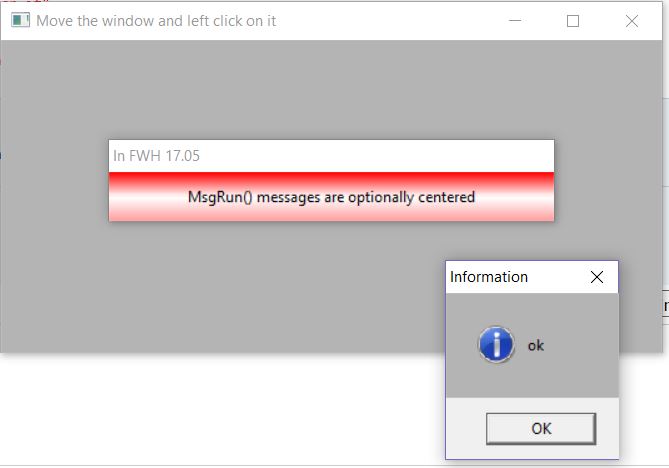
#include "FiveWin.ch"

function Main()

   local oWnd

   SetDlgGradient( { {0.30,CLR_HRED,CLR_WHITE}, {0.70,CLR_WHITE,CLR_HRED} } )

   DEFINE WINDOW oWnd TITLE "Move the window and left click on it"

   ACTIVATE WINDOW oWnd ;
      ON CLICK MsgRun( "MsgRun() messages are optionally centered", "In FWH 17.05", { || MsgInfo( "ok" ) }, oWnd )

return nil
We may be changing the dimensions of the dialog once the brush has been created. Trying to find out where we do that.
In METHOD Gradient( aGradColors ) CLASS TWindow should be respected the real client-area (without caption, etc..) not the height and width from full window/dialog
I have changed the code in CLASS TWindow. It seems, now is better.
METHOD Gradient( aGradColors ) CLASS TWindow
   #define SM_CYCAPTION 4
   #define SM_CYFRAME   32

   local hDC, hBmp, hBmpOld, lCaption := lAnd(::nStyle,WS_CAPTION) .or. !lAnd(::nStyle,WS_POPUP), nHeight_korr := if(lCaption,GetSysMetrics( SM_CYCAPTION ),0) + GetSysMetrics( SM_CYFRAME )/2

   DEFAULT aGradColors := ::aGradColors

   if aGradColors == nil
      return nil
   endif

   hDC = CreateCompatibleDC( ::GetDC() )
   hBmp = CreateCompatibleBitMap( ::hDC, ::nWidth, ::nHeight - nHeight_korr )
   hBmpOld = SelectObject( hDC, hBmp )

   GradientFill( hDC, 0, 0, ::nHeight - nHeight_korr, ::nWidth, aGradColors )

   if ::oBrush != nil
      ::oBrush:End()
   endif

   ::oBrush = TBrush():New()
   ::oBrush:hBitmap = hBmp
   ::oBrush:hBrush = CreatePatternBrush( hBmp )

   SelectObject( hDC, hBmpOld )

   ::ReleaseDC()

return nilNow is respecting the real ClientArea!
   local hDC, hBmp, hBmpOld, aClient := GetClientRect(::hWnd), nHeight := aClient[3]-aClient[1], nWidth := aClient[4]-aClient[2]

   DEFAULT aGradColors := ::aGradColors

   if aGradColors == nil
      return nil
   endif

   hDC = CreateCompatibleDC( ::GetDC() )
   hBmp = CreateCompatibleBitMap( ::hDC, nWidth, nHeight )
   hBmpOld = SelectObject( hDC, hBmp )

   GradientFill( hDC, 0, 0, nHeight, nWidth, aGradColors )

   if ::oBrush != nil
      ::oBrush:End()
   endif

   ::oBrush = TBrush():New()
   ::oBrush:hBitmap = hBmp
   ::oBrush:hBrush = CreatePatternBrush( hBmp )

   SelectObject( hDC, hBmpOld )

   ::ReleaseDC()

return nilPage: 1 2 (16 posts)