FiveTech Support Forums

FiveWin / Harbour / xBase community
Board index FiveWin for Harbour/xHarbour How to Convert RTF to PDF
Posts: 1067
Joined: Wed Nov 09, 2005 02:17 AM
How to Convert RTF to PDF
Posted: Tue May 09, 2017 07:47 PM
Guys,

Do you know some way to convert RTF files to PDF files without open them ?
Sds,
Vilian F. Arraes
vilian@vfatec.com.br
Bel茅m-Pa-Brazil
Posts: 2706
Joined: Fri Oct 07, 2005 01:50 PM
Re: How to Convert RTF to PDF
Posted: Tue May 09, 2017 08:04 PM

Vilian

Have a look at TRichEdit5 class ( triched5.prg in \samples\classes ) METHOD SaveToPDF( cName, cFile, lView ).

Rick Lipkin

Posts: 6755
Joined: Wed Feb 15, 2012 08:25 PM
Re: How to Convert RTF to PDF
Posted: Tue May 09, 2017 08:11 PM
Rick Lipkin wrote:Vilian

Have a look at TRichEdit5 class ( triched5.prg in \samples\classes ) METHOD SaveToPDF( cName, cFile, lView ).

Rick Lipkin


Yes, but function used for print need ::hWnd of control
Cristobal Navarro

Hay dos tipos de personas: las que te hacen perder el tiempo y las que te hacen perder la noci贸n del tiempo

El secreto de la felicidad no est谩 en hacer lo que te gusta, sino en que te guste lo que haces
Posts: 1067
Joined: Wed Nov 09, 2005 02:17 AM
Re: How to Convert RTF to PDF
Posted: Tue May 09, 2017 08:25 PM

Thank You guys, I will try.

Sds,
Vilian F. Arraes
vilian@vfatec.com.br
Bel茅m-Pa-Brazil
Posts: 6755
Joined: Wed Feb 15, 2012 08:25 PM
Re: How to Convert RTF to PDF
Posted: Tue May 09, 2017 08:27 PM

Create and hide control ?

Cristobal Navarro

Hay dos tipos de personas: las que te hacen perder el tiempo y las que te hacen perder la noci贸n del tiempo

El secreto de la felicidad no est谩 en hacer lo que te gusta, sino en que te guste lo que haces
Posts: 1067
Joined: Wed Nov 09, 2005 02:17 AM
Re: How to Convert RTF to PDF
Posted: Tue May 09, 2017 11:10 PM

Yes, I will try using something like this ;)

Sds,
Vilian F. Arraes
vilian@vfatec.com.br
Bel茅m-Pa-Brazil
Posts: 654
Joined: Fri Oct 21, 2005 05:54 AM
Re: How to Convert RTF to PDF
Posted: Fri Jul 26, 2019 01:31 PM
Dear Cristobal,

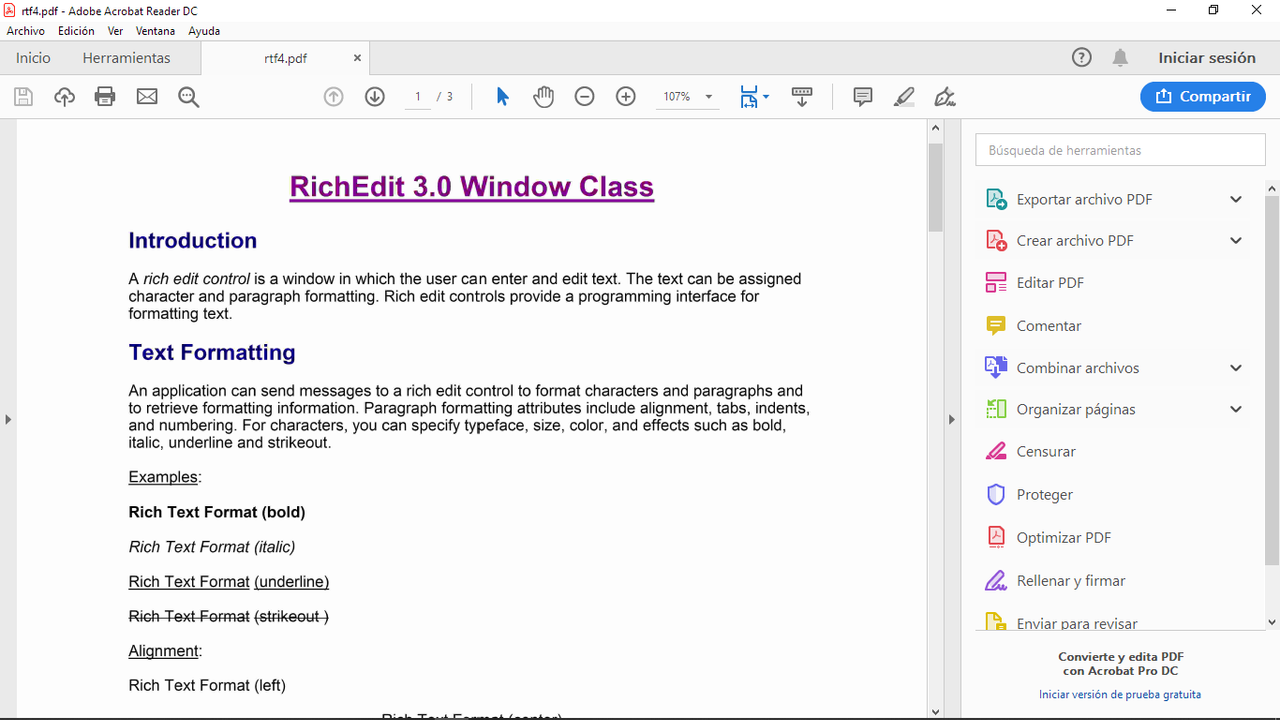
I have a problem with the oRTF:SaveToPdf(...) Method of TRichEdit5 Class.
It is creating the PDF, but the contents of the PDF File are blurry and not
readable as shown in the picture here.


Pleease help me.

Regards,

-Ramesh Babu P
Posts: 6755
Joined: Wed Feb 15, 2012 08:25 PM
Re: How to Convert RTF to PDF
Posted: Fri Jul 26, 2019 03:03 PM

Dear Ramesh
The image is not visible.
Please put your image or send me your file pdf

Cristobal Navarro

Hay dos tipos de personas: las que te hacen perder el tiempo y las que te hacen perder la noci贸n del tiempo

El secreto de la felicidad no est谩 en hacer lo que te gusta, sino en que te guste lo que haces
Posts: 654
Joined: Fri Oct 21, 2005 05:54 AM
Re: How to Convert RTF to PDF
Posted: Sat Jul 27, 2019 11:44 AM

Dear Cristobal,

The image I have posted above is the exact PDF generated
using the "TESTRTF5.PRG" under FWH\Samples.

The Menu Path used to generated the PDF is "File -> To RTF".
And the RTF file is "TESTRTF.RTF"

You can try it yourself.

Regards,

-Ramesh Babu P
Posts: 6755
Joined: Wed Feb 15, 2012 08:25 PM
Re: How to Convert RTF to PDF
Posted: Sat Jul 27, 2019 12:31 PM
Dear Ramesh
For me it's OK


Please put or send me your pdf
Cristobal Navarro

Hay dos tipos de personas: las que te hacen perder el tiempo y las que te hacen perder la noci贸n del tiempo

El secreto de la felicidad no est谩 en hacer lo que te gusta, sino en que te guste lo que haces
Posts: 10733
Joined: Sun Nov 19, 2006 05:22 AM
Re: How to Convert RTF to PDF
Posted: Sat Jul 27, 2019 09:01 PM
cnavarro wrote:Create and hide control ?


This is an attempt to use RichEdit5 control to silently convert RTF to PDF without displaying the control.
Code (fw): Select all Collapse
#include "fivewin.ch"

function Main()

聽 聽local oWnd, oBar

聽 聽DEFINE WINDOW oWnd TITLE "MY APPLICATION"
聽 聽DEFINE BUTTONBAR oBar OF oWnd SIZE 100,32 2010
聽 聽DEFINE BUTTON OF oBar PROMPT "RTFTOPDF" ;
聽 聽 聽 ACTION RTFTOPDF( "c:\fwh\samples\fiveodbc.rtf" )
聽 聽ACTIVATE WINDOW oWnd CENTERED

return nil

static function RTFTOPDF( cRTF, cPDF, lOpen )

聽 聽local oWnd, oRtf, cTxt := ""

聽 聽if Empty( cRtf ) .or. !File( cRTF ) .or. Lower( cFileExt( cRtf ) ) != "rtf"
聽 聽 聽 return .f.
聽 聽endif
聽 聽DEFAULT cPDF := cRTF, lOpen := .t.
聽 聽cPDF 聽:= cFileSetExt( cPDF, "pdf" )

聽 聽FErase( cPDF )

聽 聽DEFINE WINDOW oWnd
聽 聽@ 0,0 RICHEDIT5 oRtf VAR cTxt OF oWnd FILE cRTF
聽 聽oWnd:oClient := oRtf

聽 聽ACTIVATE WINDOW oWnd HIDDEN ON INIT ;
聽 聽 聽 ( oRtf:SaveToPDF( cFileNoExt( cPdf ), cPDF, lOpen ), oWnd:End() )

return File( cPDF )
Regards


G. N. Rao.

Hyderabad, India
Posts: 55
Joined: Tue Jun 30, 2015 02:26 AM
Re: How to Convert RTF to PDF
Posted: Wed Mar 11, 2020 09:00 PM
Hello everyone,
I'm trying to convert a RTF file into a PDF File. I already tried all your code suggestions and it now I'm able to preview it.
Everything works, except that I got some tables in the RTF File, and I don't know why the convertion to PDF is affecting the columns alignment.
Does anybody know what's happening?

Code (fw): Select all Collapse
RtfToPdf(cNovo)

FUNCTION RtfToPdf( cRTF, cPDF, lOpen )
LOCAL oWnd, oRtf, cTxt := ""

聽 聽IF Empty( cRtf ) .or. !File( cRTF ) .or. Lower( cFileExt( cRtf ) ) != "rtf"
聽 聽 聽 return .f.
聽 聽ENDIF
聽 聽DEFAULT cPDF := cRTF, lOpen := .t.
聽 聽cPDF 聽:= cFileSetExt( cPDF, "pdf" )

聽 聽FErase( cPDF )


聽 聽DEFINE WINDOW oWnd
聽 聽@ 0,0 RICHEDIT5 oRtf VAR cTxt OF oWnd FILE cRTF
聽 聽oWnd:oClient := oRtf

聽 聽ACTIVATE WINDOW oWnd HIDDEN ON INIT ;
聽 聽 聽 ( oRtf:SaveToPDF( cFileNoExt( cPdf ), cPDF, lOpen ), oWnd:End() )


RETURN File( cPDF )


METHOD SaveToPDF( cName, cFile, lView ) CLASS TRichEdit5

聽 聽local aMargins := PageGetMargins()
聽 聽local nLen 聽 聽 := ::Len()
聽 聽local nPrint 聽 := 0
聽 聽local oPrn
聽 聽//local aPrinters := aGetPrinters()

聽 聽?::cFileName,cFileNoExt( ::cFileName ) + ".pdf", cName, cFile

聽 聽DEFAULT cName := cFileNoExt( ::cFileName ) + " Report" //"FWH RichEdit Report"
聽 聽DEFAULT cFile := cFileNoExt( ::cFileName ) + ".pdf"
聽 聽DEFAULT lView := .F.

聽 聽if ::IsSelection()
聽 聽 聽 nPrint 聽 := ::GetPos()
聽 聽 聽 nLen 聽 聽 := ::GetSelection()[ 2 ] - nPrint
聽 聽 聽 //? nPrint, ::GetSelection()[ 2 ], nLen
聽 聽endif

聽 聽if !Empty( cFile )
聽 聽 聽 if lView
聽 聽 聽 聽 聽PRINT oPrn NAME cName PREVIEW FILE cFile
聽 聽 聽 else
聽 聽 聽 聽 聽PRINT oPrn NAME cName FILE cFile
聽 聽 聽 endif

聽 聽 聽 if Empty( oPrn:hDC )
聽 聽 聽 聽 聽MsgStop( "Printer not ready!" )
聽 聽 聽 聽 聽return nil
聽 聽 聽 endif

聽 聽 聽 CursorWait()

聽 聽 聽 AEval( aMargins, { | x, y | aMargins[ y ] := x * 1440 / 2540 } )

聽 聽 聽 do while nPrint < nLen
聽 聽 聽 聽 聽PAGE
聽 聽 聽 聽 聽 聽 nPrint := REPreview5( ::hWnd, oPrn:hDC, oPrn:hDCOut, aMargins, nPrint )
聽 聽 聽 聽 聽ENDPAGE
聽 聽 聽 enddo

聽 聽 聽 CursorArrow()

聽 聽 聽 ENDPRINT

聽 聽else
聽 聽 聽 MsgStop( "Not file name is implemented", "Error" )
聽 聽endif
return nil


Sds,
Ricardo Arraes
ricardo@vfatec.com.br

Continue the discussion