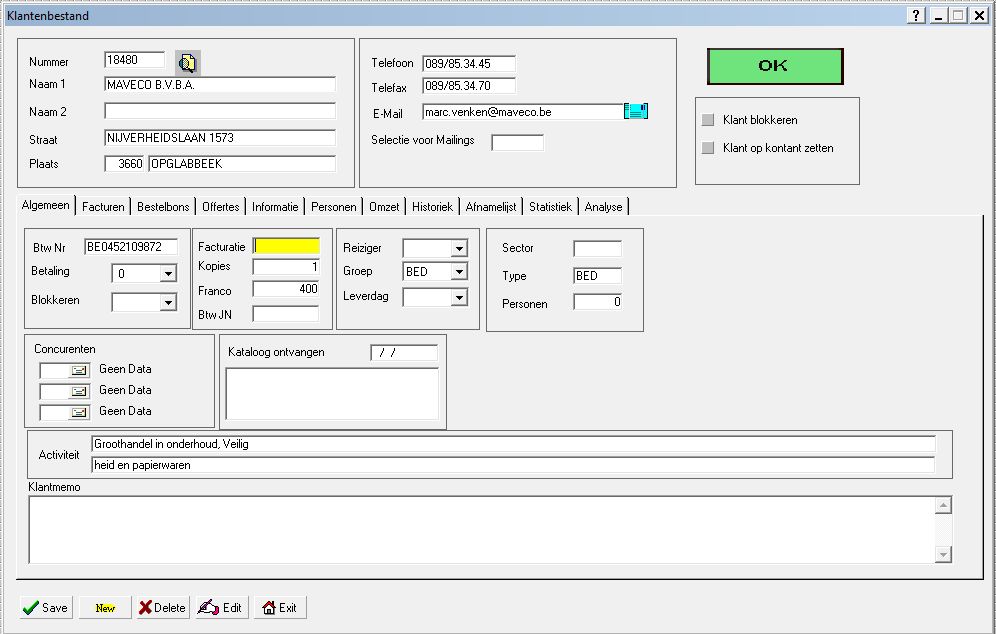
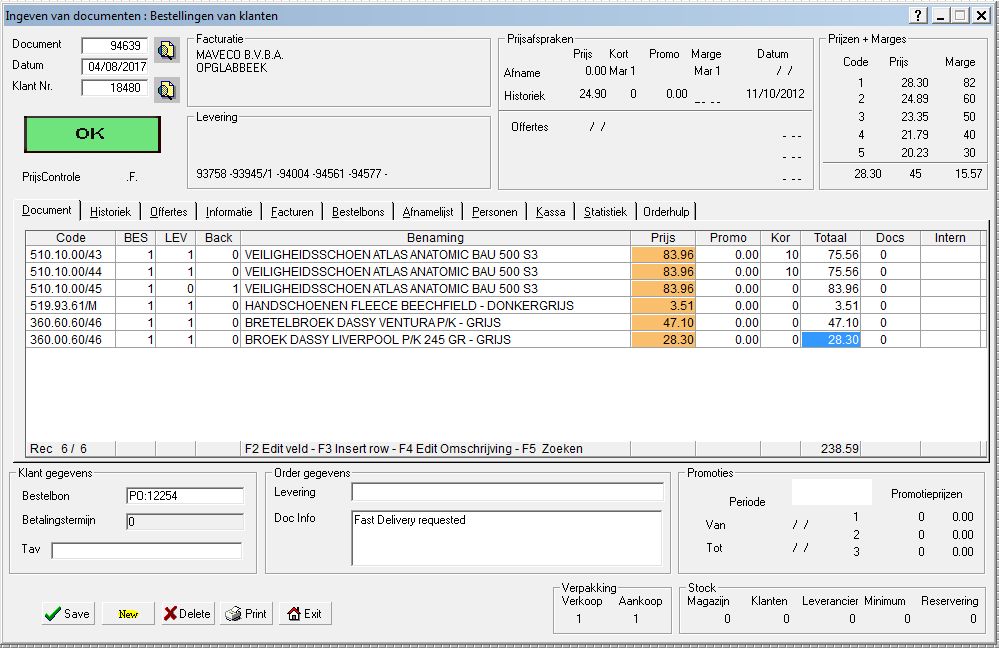
My technique about design form with code use extensivity preprocessor for hide design machine.
New Commands based in fwh commands.... is a new GUI
All is relative positions and sizes. So insert new says or get is very easy.
///////////////////////
// RelativePositions.Ch
//
//
///////////////////////////////////////////
*
#Define PIX_SEPARASAY 80

#Define PWG_ ( oGet:VarGet() )


#Define TMPW_(xNormal, xWord) ;
            xNormal:= If(xNulo_lWord , xNulo_oWord:xWord, xNormal)
#Define TMPW2_(xNormal, xWord) ;
            xNormal:= If(xNulo_lWord .AND. xNulo_oWord:xWord  != NIL, xNulo_oWord:xWord, xNormal)

#xcommand @ [<nRow>] [, <nCol>] ;
            RPSAY <cText> ;
            [<clauses,...>]                     ;
            [ <pict: PICT, PICTURE> <cPict> ] ;
            [ FONT <oFont> ]                    ;
            [ SIZE <nWidth>, <nHeight> ]        ;
            ;
            [ SEPARASAY <lSeparaSay> ];
            [ SUMCOLPIX <nSumColPix> ];
            [ PARRAFO <lParrafo>     ];
            [ ADJUSTLEFT <lAdjustLeft> ] ;
            [ DOBLELINEA <lDobleLinea> ] ;
            [ GETWORD <lGetWord>] ;
            [ MAXWORD    <lMaxWord>            ] ;
            [ CODIGOWIDTH <nCodigoWidth>       ] ;
            [ GETPARRAFO <lGetParrafo>] ;
            [ COLORFORE <nColorFore>] ;
            [ COLORBACK <nColorBack>] ;
            ;
            => ;
            ;
            xNulo_lWord:= .F.;;
            [xNulo_lWord:= <lGetWord>;];
            ;
            xNulo_nCodigoWidth:= NIL;;
            [xNulo_nCodigoWidth:= If(<lMaxWord>, 1, NIL) ;];
            [xNulo_nCodigoWidth:= <nCodigoWidth> ;] ;
            ;
            oCnt:nActualListaWord:= xNulo_nCodigoWidth ;;
            ;
            xNulo_oWord:= If(xNulo_lWord, oCnt:GetWord(), NIL) ;;
            ;
            xNulo_cTextParrafo:= NIL                                        ;;
            [xNulo_cTextParrafo:= If(<lGetParrafo>, oCnt:GetParrafo(), NIL) ;];
            ;
            ;
            ;
            oCnt:xNulo_cText:= <cText>;;
            TMPW_(oCnt:xNulo_cText, cText) ;;
            oCnt:xNulo_cText:= If(xNulo_cTextParrafo != NIL, xNulo_cTextParrafo, oCnt:xNulo_cText) ;;
            ;
            xNulo_cPicture:= NIL;;
            [xNulo_cPicture:= <cPict>;];
            TMPW_(xNulo_cPicture, cPicture);;
            ;
            ;
            xNulo_lDobleLinea:= NIL;;
            [xNulo_lDobleLinea:= <lDobleLinea>;];
            TMPW_(xNulo_lDobleLinea, lDobleLinea);;
            ;
            xNulo_lParrafo   := .f. [.OR. <lParrafo>] [.OR. <lGetParrafo>] ;;
            ;
            xNulo_lAdjustLeft:= .f. [ .OR. <lAdjustLeft>] ;;
            xNulo_lAdjustLeft:= xNulo_lAdjustLeft .OR. (xNulo_lParrafo .AND. !<.lAdjustLeft.>) ;;
            ;
            xNulo_oArea:= oCnt:oArea                                         ;;
            ;
            xNulo_oFont:= If(<.oFont.>, <oFont>, oCnt:CtlSayDefFont(xNulo_lParrafo))         ;;
            TMPW2_(xNulo_oFont, oFont);;
            ;
            xNulo_aSize:= oCnt:CtlSayDefSize(oCnt:xNulo_cText, <cPict>, <nWidth>, <nHeight>, xNulo_oFont, xNulo_lDobleLinea, xNulo_nCodigoWidth)     ;;                       ;;
            TMPW_(xNulo_lDobleLinea, lDobleLinea);;
            xNulo_nRow:=           oCnt:CtlSayRow(<nRow>)                                                              ;;
            xNulo_nRowDobleLinea:= oCnt:CtlSayRowAjuDobleLinea(xNulo_lDobleLinea, xNulo_oWord)                                                              ;;
            ;
            xNulo_nCol:= If(<.nCol.>,  <nCol>,  oCnt:UltRight()) ;;
           [xNulo_nCol+= If(<lSeparaSay>, oCnt:SeparaSay(), 0) ;];
           [xNulo_nCol+= <nSumColPix> ;];
            xNulo_nCol:= If(xNulo_lAdjustLeft, If(xNulo_lParrafo, oCnt:MarginLeftParrafo(), oCnt:MarginLeft()), xNulo_nCol)             ;;
            ;
            oCnt:ToPos(xNulo_nRow, xNulo_nCol+ xNulo_aSize\[1\])                              ;;
            ;
            xNulo_nRow+= xNulo_nRowDobleLinea;;
            ;
            ;
            ;
          @ xNulo_nRow, xNulo_nCol    SAY oCnt:xNulo_cText ;
            [<clauses>]                                     ;
            PICTURE xNulo_cPicture                          ;
            OF xNulo_oArea                                  ;
            FONT xNulo_oFont                                ;
            PIXEL                                           ;
            ;
            ;
            ;
            ;
            COLOR (If(.f. [.OR. <lGetParrafo>], oCnt:nClrParrafoFore, oCnt:nClrSayFore) [, <nColorFore>]), ( xNulo_oArea:nClrPane [, <nColorBack>] );
            SIZE xNulo_aSize\[1\], xNulo_aSize\[2\]         ;
            ;;
            If(xNulo_lParrafo, oCnt:SetPagePanel(), NIL)


#Trans VALFUN_(<oCnt>, [<ValidFunc>], [<PreValidFunc>], [<PostValidFunc>], [<SetSeModificoFunc>], [<lAsignaSeModifico>]) => ;
  {|oGet, lPaso|;
  lPaso:= ThFunValidGet(oGet, <oCnt>, <.ValidFunc.>, <.PreValidFunc.>, <.PostValidFunc.>,;
    {|oGet| nil[, <ValidFunc>]}, {|oGet| nil[, <PreValidFunc>]}, {|oGet, lSeModificoGet| nil[, <PostValidFunc>]}),;
  If(!<.lAsignaSeModifico.> [.OR. <lAsignaSeModifico>], <oCnt>:AsignaSeModifico(oGet), nil),;
                                 ;
                                 ;
  lPaso}

#command @  RPGET <uVar> ;
            [<clauses,...>                        ] ;
            [ <pict: PICT, PICTURE> <cPict>       ] ;
            ;
            ;
            ;
            [ ANCHO <nAncho>                      ] ;
            [ SOLONUMEROS <lSoloNumeros>          ] ;
            [ NAME <cName>                        ] ;
            ;
            ;
            [PREVALID <PreValidFunc>              ] ;
            [VALID <ValidFunc>                    ] ;
            [POSTVALID <PostValidFunc>            ] ;
            [OBLIGATORIO <lObligatorio>           ] ;
            [bOBLIGATORIO <lbObligatorio>         ] ;
            [SETSEMODIFICO <SetSeModificoFunc>    ] ;
            [ASIGNASEMODIFICO <lAsignaSeModifico> ] ;
            [NAMEGET_NOMBRE   <cNameGetNombre>    ] ;
            [ONPOSTSELECCION  <bPostSeleccion>    ] ;
            [OBJVAR           <oObjVar>           ] ;
            [TOAST            <bToast>            ] ;
            => ;
            ;
            xNulo_oGet := NIL;;
            ;
            xNulo_oArea:= oCnt:oArea                 ;;
            xNulo_oFont:= oCnt:CtlGetDefFont()          ;;
            xNulo_aSize:= oCnt:CtlGetDefSize(<uVar>, <cPict>, NIL, NIL, xNulo_oFont, <nAncho>, <lSoloNumeros>)     ;;
            xNulo_nRow:= oCnt:UltTop()              ;;
            ;
            xNulo_nCol:= oCnt:UltRight()                     ;;
            xNulo_nCol+= oCnt:SepSayGet();;
            ;
            ;
            oCnt:ToPos(NIL, xNulo_nCol+ xNulo_aSize\[1\])                              ;;
            ;
            ;
         @ xNulo_nRow, xNulo_nCol GET xNulo_oGet VAR <uVar> ;
            [<clauses>]                                ;
            [ PICTURE <cPict> ] ;
            VALID {|oGet, lRet| lRet:= Eval(VALFUN_(oCnt, <ValidFunc>, <PreValidFunc>, <PostValidFunc>, <SetSeModificoFunc>, <lAsignaSeModifico>), oGet), lRet  };
            OF xNulo_oArea    ;
            COLOR "N*/W" ;
            PIXEL        ;
            NOBORDER ;
            SIZE xNulo_aSize\[1\], xNulo_aSize\[2\] ;
            FONT xNulo_oFont                        ;;
            ;
            [<oObjVar>:= oClone(xNulo_oGet)         ;];
            ;
            xNulo_oGet:cVarName:= DepuraName(<(uVar)>) ;;
            [xNulo_oGet:cVarName:= <cName>          ;];
            If(<.cName.>, oCnt:DefineBtnGet(xNulo_oGet, <cNameGetNombre>, <bPostSeleccion>), NIL);;
            xNulo_oGet:oGet:Cargo:= CargoGetClip() ;;
            xNulo_oGet:oGet:Cargo:xOriginal1:= <uVar> ;;
            xNulo_oGet:oGet:Cargo:xOriginal2:= <uVar> ;;
            [xNulo_oGet:bToast:= <bToast> ]


// Como comando GET con algunos cambios
#command @ [<nRow>] [, <nCol>] RPASOCIADO [ <oGet> VAR ] <uVar> ;
            [ <dlg: OF, WINDOW, DIALOG> <oWnd> ] ;
            [ <pict: PICT, PICTURE> <cPict> ] ;
            [ VALID <ValidFunc> ] ;
            [ <color:COLOR,COLORS> <nClrFore> [,<nClrBack>] ] ;
            [ SIZE <nWidth>, <nHeight> ]  ;
            [ FONT <oFont> ] ;
            [ <design: DESIGN> ] ;
            [ CURSOR <oCursor> ] ;
            [ <pixel: PIXEL> ] ;
            [ MESSAGE <cMsg> ] ;
            [ <update: UPDATE> ] ;
            [ WHEN <uWhen> ] ;
            [ <lCenter: CENTER, CENTERED> ] ;
            [ <lRight: RIGHT> ] ;
            [ ON CHANGE <uChange> ] ;
            [ <readonly: READONLY, NO MODIFY> ] ;
            [ <pass: PASSWORD> ] ;
            [ <lNoBorder: NO BORDER, NOBORDER> ] ;
            [ <help:HELPID, HELP ID> <nHelpId> ] ;
            [ ACTION <uAction> ] ;
            [ BITMAP <cBmpName> ] ;
            [ CUEBANNER <cCueText> ] ;
            ;
            ;
            ;
            [ ANCHO <nAncho>                      ] ;
            [ SOLONUMEROS <lSoloNumeros>          ] ;
            [ ASOCIADOINTENSO  <lAsociadoIntenso>             ] ;
            [ ASOCIADOINTENSO2 <lAsociadoIntenso2>            ] ;
       => ;
            ;
            xNulo_oArea:= oCnt:oArea                 ;;
            xNulo_oFont:= oCnt:CtlGetDefFont()          ;;
            xNulo_aSize:= oCnt:CtlGetDefSize(<uVar>, <cPict>, NIL, NIL, xNulo_oFont, <nAncho>, <lSoloNumeros>)     ;;
            xNulo_nRow:= oCnt:UltTop()              ;;
            ;
            xNulo_nCol:= oCnt:UltRight()                     ;;
            xNulo_nCol+= oCnt:SepSayGet();;
            ;
            oCnt:ToPos(NIL, xNulo_nCol+ xNulo_aSize\[1\])                              ;;
            ;
            ;
            xNulo_lReadOnly:= .t.;;
            xNulo_lNoBorder:= (.T.             [,     !<lAsociadoIntenso> ] );;
            xNulo_lNoBorder:= (xNulo_lNoBorder [.AND. !<lAsociadoIntenso2>] );;
            ;
            ;
            ;
            xNulo_oGet:=  TGet():New( xNulo_nRow, xNulo_nCol, <{uVar}>,;
             xNulo_oArea, xNulo_aSize\[1\], xNulo_aSize\[2\], <cPict>, <{ValidFunc}>,;
             <nClrFore>, <nClrBack>, xNulo_oFont, <.design.>,;
             <oCursor>, .t., <cMsg>, <.update.>, \{|| .f. \},;
             <.lCenter.>, <.lRight.>,;
             [\{|nKey, nFlags, Self| <uChange>\}], xNulo_lReadOnly,;
             <.pass.>, xNulo_lNoBorder, <nHelpId>,,,,,, [\{|self| <uAction> \}],;
             <cBmpName>, [<(oGet)>], [<cCueText>],;
             nil, nil, nil,;
         .t., <lAsociadoIntenso>, <lAsociadoIntenso2> );;
             ;
             [<oGet>:= xNulo_oGet;];
             oCnt:AddCtlAsociado(xNulo_oGet)