FiveTech Support Forums

FiveWin / Harbour / xBase community
Board index FiveWin for Harbour/xHarbour A Colorpicker and RGB-tools
Posts: 4043
Joined: Wed Dec 19, 2007 06:40 PM
Re: To Marc -> A xBrowse-image colorpicker
Posted: Wed Nov 15, 2017 06:45 PM
Marc,
my extended version
It is possible now to display the colorpicker inside a second dialog connected to dialog one.
Because of the timer only this little area will be refreshed.
As well it is possible to change the background from red to green if enabled.
A switchfunction is added ( no resize needed )
I added the brightness-selector again because I need it for my gradient defines.
A new config-section is included
All color / brush selections are saved to a INI as well

http://www.pflegeplus.com/DOWNLOADS/Rgbtools4.zip


resized dialog on radio-selection


regards
Uwe :-)
Since 1995 ( the first release of FW 1.9 )

i work with FW.

If you have any questions about special functions, maybe i can help.
Posts: 1487
Joined: Tue Jun 14, 2016 07:51 AM
Re: To Marc -> A xBrowse-image colorpicker
Posted: Wed Nov 15, 2017 08:01 PM

Nice, Is the colorpicker always ONTOP on your end? Here it is gone to back.

In the small colorpicker, in the config (project) section you could consider to have the Xbrowse let select multiple rows to delete at once.
No you delete 1, and the buttun has focus, so you can't easily delete several records fast.

Marc

Marc Venken

Using: FWH 23.08 with Harbour
Posts: 4043
Joined: Wed Dec 19, 2007 06:40 PM
Re: To Marc -> A xBrowse-image colorpicker
Posted: Wed Nov 15, 2017 08:13 PM
Marc,

have a look at Your emails.

Is the colorpicker always ONTOP on your end? Here it is gone to back.


It works perfect now :
You can switch between < stay on top > or < go to the taskbar > on focus-change


STATIC nOntop := 1
LOCAL oOnTop


Add 2 radios

REDEFINE RADIO oOntop VAR nOntop ID 610, 611 OF oDlgMain UPDATE ;
ON CHANGE IIF( nOntop = 1, SetWindowPos( oDlgMain:hWnd, -1, 0, 0, 0, 0, 3 ), ; // On Top
SetWindowPos( oDlgMain:hWnd, -2, 0, 0, 0, 0, 3 ) )
AEval( oOntop:aItems, { | oRad | oRad:lTransparent := .T., ;
oRad:SetFont ( oFont1 ), ;
oRad:nClrText := nDTxtColor } )


Just add to ON INIT of oDlgMain the following line all other top-defines You can delete

ACTIVATE DIALOG oDlgMain CENTERED ;
ON INIT ( IIF( nOntop = 1, SetWindowPos( oDlgMain:hWnd, -1, 0, 0, 0, 0, 3 ), NIL ), ; // On Top defined in INI
...
...

add in Function GET_INI()

nOntop := Val(GetPvProfString( "RGB", "On top", "1" , cIniFile ) )

and in function SAVE_INI()

WritePProString( "RGB", "On top", ALLTRIM(STR(nOntop)), cIniFile )

don't forget to add the radios in RGB.RC !!!

regards
Uwe :-)
Since 1995 ( the first release of FW 1.9 )

i work with FW.

If you have any questions about special functions, maybe i can help.
Posts: 1487
Joined: Tue Jun 14, 2016 07:51 AM
Re: To Marc -&gt; A xBrowse-image colorpicker
Posted: Wed Nov 15, 2017 10:56 PM

Thanks. Will make the changes.

Marc Venken

Using: FWH 23.08 with Harbour
Posts: 4043
Joined: Wed Dec 19, 2007 06:40 PM
Re: To Marc -&gt; A xBrowse-image colorpicker
Posted: Mon Dec 04, 2017 12:38 PM
The Colorpicker / RGB-tool with a new optic and many new functions

1. changed from INI to DBF to save colors to a project
2. added color-selection ( 10 colors ) to add to a project
3. new factor for monitor-scale adjustment
4. a new tool-section to define a button-group ( color and gradient )
5. a new xBrowse-section to define row-colors


http://www.pflegeplus.com/DOWNLOADS/Rgbtools1.zip

regards
Uwe :-)
Since 1995 ( the first release of FW 1.9 )

i work with FW.

If you have any questions about special functions, maybe i can help.
Posts: 1487
Joined: Tue Jun 14, 2016 07:51 AM
Re: A Colorpicker and RGB-tools
Posted: Mon Dec 04, 2017 12:55 PM

Small Issue when I click image :

Application

Path and name: C:\fwh1705\samples\uwebrowse\RGB.exe (32 bits)
Size: 3,812,864 bytes
Compiler version: xHarbour 1.2.3 Intl. (SimpLex) (Build 20170902)
FiveWin version: FWHX 17.11
C compiler version: Borland/Embarcadero C++ 7.3 (32-bit)
Windows version: 6.1, Build 7600

Time from start: 0 hours 0 mins 1 secs
Error occurred at: 12/04/17, 13:55:05
Error description: Error BASE/1003 Variable does not exist: OSFONT

Stack Calls

Called from: .\RGB.PRG => FROM_BMP( 906 )
Called from: .\RGB.PRG => (b)MAIN( 244 )
Called from: .\source\classes\BTNBMP.PRG => TBTNBMP:CLICK( 684 )
Called from: .\source\classes\BTNBMP.PRG => TBTNBMP:LBUTTONUP( 924 )
Called from: .\source\classes\CONTROL.PRG => TCONTROL:HANDLEEVENT( 1721 )
Called from: .\source\classes\BTNBMP.PRG => TBTNBMP:HANDLEEVENT( 1873 )
Called from: .\source\classes\WINDOW.PRG => _FWH( 3348 )
Called from: => DIALOGBOX( 0 )
Called from: .\source\classes\DIALOG.PRG => TDIALOG:ACTIVATE( 296 )
Called from: .\RGB.PRG => MAIN( 351 )

Marc Venken

Using: FWH 23.08 with Harbour
Posts: 4043
Joined: Wed Dec 19, 2007 06:40 PM
Re: A Colorpicker and RGB-tools
Posted: Mon Dec 04, 2017 01:14 PM
Fixed ( wrong font )

more new ideas are welcome :-)

with the colorpicker You can select a color from a image.
Move the dialog to the side to view the covered values.
With a hotkey You can save the values to the clipboard.

To use the 10 color-buttons ( green 1 - 10 ) You must switch the colorpicker OFF
and select one of the predefined colors from the browsers.


with the tool-section You can work from inside Your editor.
That makes the button-design and xBrowse-row color defines easy.
Just copy / paste the color defines after You finished Your design.
A click of one of the 10 buttons opens a dialog with the full button-code.


regards
Uwe :-)
Since 1995 ( the first release of FW 1.9 )

i work with FW.

If you have any questions about special functions, maybe i can help.
Posts: 4043
Joined: Wed Dec 19, 2007 06:40 PM
Re: A Colorpicker and RGB-tools
Posted: Mon Dec 04, 2017 06:14 PM
Some improvements

It is possible to define and save the 10 projectcolors.
The fieldlength of RGB-text changed to 22


regards
Uwe :-)
Since 1995 ( the first release of FW 1.9 )

i work with FW.

If you have any questions about special functions, maybe i can help.
Posts: 7317
Joined: Thu Oct 18, 2012 07:17 PM
Re: To Marc -&gt; A xBrowse-image colorpicker
Posted: Mon Dec 04, 2017 08:56 PM
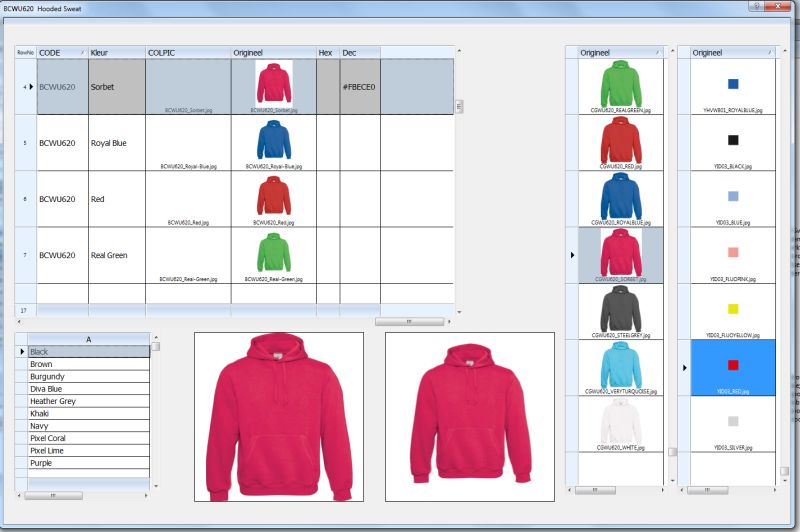
Marc Venken wrote:

Left top is the browse with 1 product selected and adding all the colors I want.
Left bottom = list off all colors available as tekst ( "Red,Green,Blue,...") // data from brands csv files for import in shopcarts.
2 imgs : only for visable reference.
Right browse (left side, the sweaters) are all colorpics of the products itself.
Right browse (colors) are color jpg files that are sometimes provided from the Brands (mostly not and therefore I need colorpicker.

So, The purpose : (filling a prestashop shopcard by import and direct database filling)

We have more that 100.000 products from 40/50 brands. Ofthen they have a csv file and a bunch of foto's. They have to be combined manualy,
since they don't provide allways the correct name (dbf and jpg). That is what I do above. Finaly i have to choose that I put a HEX code as color's
or a file. The HEX is still the problem.

If I however create a dbf with your Pickcolor program, then I call your dbf also, and pass the HEX code to my files.

Or as you suggest, Your Color Picker/Manager will make color swap tables for each Brand, and I keep it open for selecting in my App. So your database should be able to show only 1 brand, like it does now with the METRO colors
and your browse showse only the brand. I select from your program, it is stored inside memory and I copy/past to my app. Seemse to work ok then.

So you have a idea of what I'm doing.


marc you colorize each tshirt ? and How ?
Since from 1991/1992 ( fw for clipper Rel. 14.4 - Momos)

I use : FiveWin for Harbour March-April 2024 - Harbour 3.2.0dev (harbour_bcc770_32_20240309) - Bcc7.70 - xMate ver. 1.15.3 - PellesC - mail: silvio[dot]falconi[at]gmail[dot]com
Posts: 1487
Joined: Tue Jun 14, 2016 07:51 AM
Re: A Colorpicker and RGB-tools
Posted: Tue Dec 05, 2017 08:06 AM

Silvio,

I receive them from the manufacturer. I have nothing to do about it.

Marc

Marc Venken

Using: FWH 23.08 with Harbour
Posts: 4043
Joined: Wed Dec 19, 2007 06:40 PM
Re: A Colorpicker and RGB-tools
Posted: Sat Dec 09, 2017 09:02 PM
changes :
xbrowsetitles ( headers ) are deleted inside the maindialog to reduce the size.

new :
Now it is possible to create Your own colorcharts.
With the button < Colorset > from the main-dialog You can select up to 10 colors from a image inside a second dialog and save them to a project.
A colorchart can be any image : a photo, a chart from the internet, alphablended logo ....

usage :
1. activate the colorpicker from the main-dialog.
2. choose the button < colorset >
3. create a new set ( image select ) or select a existing one.
4. select the radio where You want to save the color
5. click inside the image to save the color to the defined position.
6. with a right mouseclick on the second browser column, this set will
--be selected at startup
changing the radio, the color-values are shown at the bottom of the dialog.
7. optional < save to project >

Download

http://www.pflegeplus.com/DOWNLOAD/Colorpick6.zip

sample a colorwheel from the internet


colors selected from a photo


regards
Uwe :-)
Since 1995 ( the first release of FW 1.9 )

i work with FW.

If you have any questions about special functions, maybe i can help.
Posts: 1487
Joined: Tue Jun 14, 2016 07:51 AM
Re: A Colorpicker and RGB-tools
Posted: Sun Dec 10, 2017 12:44 PM

Very Nice en usefull for my project, but I have a other challenge :wink:

I think many users could benifit from the folowing : (Maybe it can even be done, but then I already say sorry..

If you take the new colorset, and add more definable colors 1 to 10 become 1 to XX (In my case some times 45)

I have 45 colors T-shirts from the brand Gildan.
1. Or Drag and Drop eacht color (Image Tshirt) into your dialog for selecting the color
2. Or Let the Colorpicker be able to select the color from all screen positions (You have done that before)

Then build a colorsheme from all colors until done and save the file with the colors (Is done now also)

Then be able to have the colors (named ex. Gildan) into a XBrowse for selection with the code (Hex, Rgb, ....)
Here I think of being able to chose the colorsheme and show It in the master colordialog. As example that the browse
with the METRO colors will be replaced the the selected colors (GILDAN).

Almost all of this is done. You could have a Tool that is very usefull for all people that need colors in WebShop product management.

You asked for Ideas, This was mine ....

If you are not all clear of what I mean, I would be glad to give a flow of all actions.

Marc Venken

Using: FWH 23.08 with Harbour
Posts: 4043
Joined: Wed Dec 19, 2007 06:40 PM
Re: A Colorpicker and RGB-tools
Posted: Sun Dec 10, 2017 01:21 PM
Marc,

good suggestions.

If you take the new colorset, and add more definable colors 1 to 10 become 1 to XX (In my case some times 45)


instead of 10 fixed colors I will add another browser with unlimited colors on top of the chart-dialog
6 fields --> projectname - chart-image - color - dec - rgb - hex
----------------- project ------ image --- cellcolor ---- values

I think a print-function of a colorset ( report ) would be useful :-)

I like creating this kind of tools :-)

regards
Uwe :-)
Since 1995 ( the first release of FW 1.9 )

i work with FW.

If you have any questions about special functions, maybe i can help.
Posts: 1487
Joined: Tue Jun 14, 2016 07:51 AM
Re: A Colorpicker and RGB-tools
Posted: Sun Dec 10, 2017 01:41 PM

But the chart image, will be different than your approuch. There is no 1 image where all colors exist, because the colors will come from all kind of pictures,
but you can keep that field.

If you have that browse, Is it then easy to make that you can have that data in stead of the data from METRO ?

Marc

Marc Venken

Using: FWH 23.08 with Harbour
Posts: 1487
Joined: Tue Jun 14, 2016 07:51 AM
Re: A Colorpicker and RGB-tools
Posted: Sun Dec 10, 2017 01:51 PM
The goal :


A Brand give all images of products and a exel file with product data.
We select the data that we want in our shop
We than browse (fivewin) this data in order to see the pictures and product colors (this is a the product in 1 color)
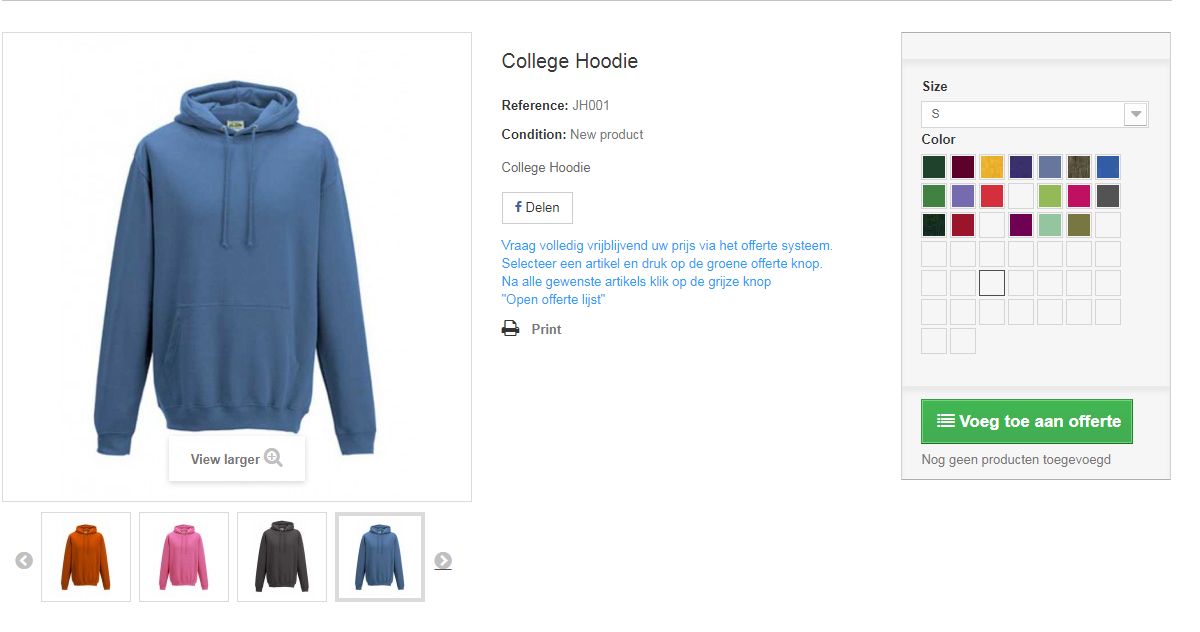
WE NEED to have the color (HEX) in order to have the small color icons on the right, and that is where your tool become handy !!!
We copy paste the code from Colorpic into our own browse (webshop) and de colors apear into the shop.

In the sample above, not all colors are defined with the HEX code, but the pictures are there if you click on them.
Marc Venken

Using: FWH 23.08 with Harbour