FiveTech Support Forums

FiveWin / Harbour / xBase community
Board index FiveWin for Harbour/xHarbour Program logic for years in a program
Posts: 1487
Joined: Tue Jun 14, 2016 07:51 AM
Program logic for years in a program
Posted: Wed Jan 17, 2018 04:31 PM

Hello,

I have the habbit of making for each year in my invoice program a field like Y2015, Y2014, Y2013 and show these in a statistic browse

Now afther some year, I need to make the fields Y2018,Y2017,Y2016 i order to keep up the real data.
This way I need to change structure and program (.exe) for the new fields)

How you you process these fields in a commercial program ? more like Year1, Year2, Year3,... and change headers of browse based on a system date periode ?

Any tips are welcome.

Marc Venken

Using: FWH 23.08 with Harbour
Posts: 9020
Joined: Thu Oct 06, 2005 08:17 PM
Re: Program logic for years in a program
Posted: Thu Jan 18, 2018 11:48 AM

Marc,

you should add records, not fields.

EMG

Posts: 1515
Joined: Thu Oct 30, 2008 02:37 PM
Re: Program logic for years in a program
Posted: Thu Jan 18, 2018 12:59 PM
Hi,

You database structure is a typical case:
code + Year 1 + Year 2+ Year 3 + Year N

Problem is that requires structure modification.


In my case I done :

1. Open new year user manual process: which consists in add new year field modifying database structure.
Other (worst) solution is create ~ 30 new years fields at once. It supress database modification.

2. In browse a FOR NEXT iterator, so:
Code (fw): Select all Collapse
FOR nI:= 1980 TO 3000   // H-V
   IF FieldPos("Y"+ Str(nI, 4))
       // Here add column to browse
   ENDIF
NEXT


Regards
Posts: 4840
Joined: Fri Nov 18, 2005 04:52 PM
Re: Program logic for years in a program
Posted: Sat Feb 03, 2018 04:14 PM

Marc,

As Enrico stated, you should be using a one-to-many database for this--not adding fields to the existing database. Adding fields is a violation of the relational database design principles for the very reason that you are experiencing. Your way uses up a lot of disk space and memory because you can have lots of empty fields.

The related database for your program should only have two fields, ID and YEAR. Then you add a new record for each year. This way there are no empty fields and you never have to modify your database structure to add a field.

One way to handle the browse is to just build an array from the two related databases, then browse the array.

James

FWH 18.05/xHarbour 1.2.3/BCC7/Windows 10
Posts: 1487
Joined: Tue Jun 14, 2016 07:51 AM
Re: Program logic for years in a program
Posted: Sat Feb 03, 2018 08:53 PM

James,

Yes, i'm going that way...

I'v tested my first changes with relation, and they work ok.

I'm reading topics about :

Scopes and relation in order to decide what to use. (Speed is important)
There was a interesting topic where this is discused... (You to)

Of course there is also the Tdatabase way, where the master is opened and the slave also with correct setting of filters...
(But this is for later)

Marc Venken

Using: FWH 23.08 with Harbour
Posts: 4840
Joined: Fri Nov 18, 2005 04:52 PM
Re: Program logic for years in a program
Posted: Sat Feb 03, 2018 11:13 PM

Marc,

Once you try database objects you will never go back.

FWH 18.05/xHarbour 1.2.3/BCC7/Windows 10
Posts: 10733
Joined: Sun Nov 19, 2006 05:22 AM
Re: Program logic for years in a program
Posted: Sun Feb 04, 2018 04:50 AM
Please try this test program:
Code (fw): Select all Collapse
#include "fivewin.ch"

REQUEST DBFCDX

function Main()

   local oCn, cDBF, cTable

   cDBF     := "MYDATA.DBF"
   cDBF     := TrueName( cDBF )

   CreateDBF( cDBF )

   oCn      := FW_OpenAdoConnection( cFilePath( cDBF ) )
   cTable   := "SELECT YEAR,ITEM,AMOUNT FROM " + cFileNoExt( cDBF ) + " WHERE YEAR >= 2015"

   XBROWSER FW_AdoPivotArray( oCn, cTable, "ITEM", "YEAR", "AMOUNT" )

return nil

function CreateDBF( cDBF )

   local aCols, aData

   aCols := { { "YEAR",   "N",  4, 0 }, ;
              { "ITEM",   "C", 10, 0 }, ;
              { "AMOUNT", "N", 12, 2 }  }

   aData := { ;
              { 2014, "Materials", 11300 }, ;
              { 2014, "Power",     13799 }, ;
              { 2014, "Wages",      9500 }, ;
              { 2015, "Materials", 12345 }, ;
              { 2015, "Power",     15000 }, ;
              { 2015, "Wages",     10200 }, ;
              { 2016, "Materials", 15000 }, ;
              { 2016, "Power",     16500 }, ;
              { 2016, "Wages",     12300 }, ;
              { 2017, "Materials", 16500 }, ;
              { 2017, "Power",     17750 }, ;
              { 2017, "Wages",     14500 }  }

   DBCREATE( cDBF, aCols, "DBFCDX", .T., "DTA" )
   FW_ArrayToDBF( aData )
   XBROWSER "DTA"
   CLOSE DTA

return nil

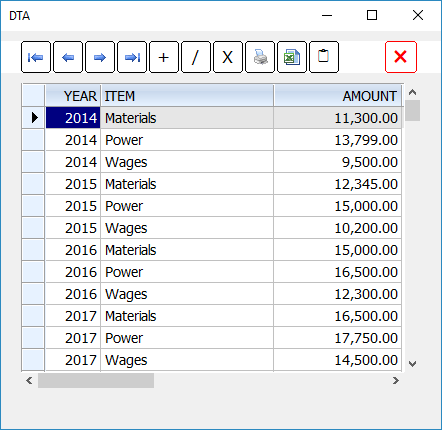
The program creates a raw data table. Years are recorded in a single field "YEAR". This is how the raw data looks.

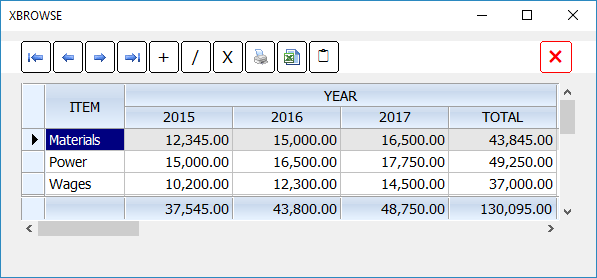
Now we need to display the data with different years in columns and other details as rows. We also want to select only years from 2016 onwards.

This is done by these lines of code:
Code (fw): Select all Collapse
   oCn      := FW_OpenAdoConnection( cFilePath( cDBF ) )
   cTable   := "SELECT YEAR,ITEM,AMOUNT FROM " + cFileNoExt( cDBF ) + " WHERE YEAR >= 2015"
   XBROWSER FW_AdoPivotArray( oCn, cTable, "ITEM", "YEAR", "AMOUNT" )


Result:
Regards


G. N. Rao.

Hyderabad, India
Posts: 1487
Joined: Tue Jun 14, 2016 07:51 AM
Re: Program logic for years in a program
Posted: Sun Feb 04, 2018 09:20 AM

Again a Super sollution in a few rows ...

It seems clear that you are using Sql syntax.

Comming from Fw16, converting and using FW32, it seems to be a good point to look also in Sql with DBF.

For me Sql was a online thing, but you proved me wrong. Sql is also for Dbf AND offline programs...

Some more stuff to read... Good that Uwe has enhanced Mr. Rao's sample collector....

Marc Venken

Using: FWH 23.08 with Harbour

Continue the discussion