

I was using Harbour 3.2.0dev (r1703231115) till recently and just now upgraded to the latest build Harbour 3.2.0dev (r1801051438). I noticed a major change in the manner array data is retrieved from Ole sources by TOleAuto, which may have impact on all libraries and software relying on this feature. In particular, this change affects
ADO RecordSet GetRows() --> aData
OLE Excel Range:Value() --> aData
xHarbour is consistent in its behavior from the time TOleAuto class was created till today. The behavior of Harbour's TOleAuto was also identical till recently. In other words, present Harbour version differs from xHarbour and all previous versions of Harbour.
GetRows()
Syntax: oRecordSet:GetRows( [rows], [start], [fields] ) --> aData
This is the fastest and simplest way to read data from a recordset into an array. Many existing software might be using this method and FWH library also uses this method.
Let us see the change using this sample program:
RecordSet:
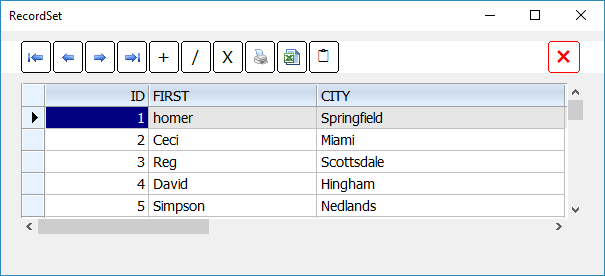
Array from GetRows() with all versions of xHarbour and all previous versions of Harbour:
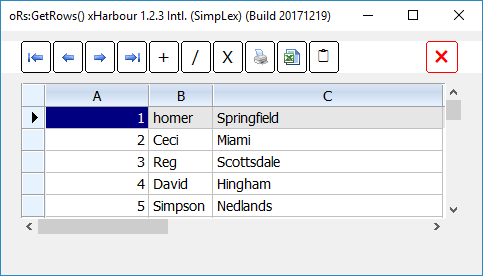
Array from GetRows() with the latest version of Harbour. (Different from xHarbour and all previous versions of Harbour)
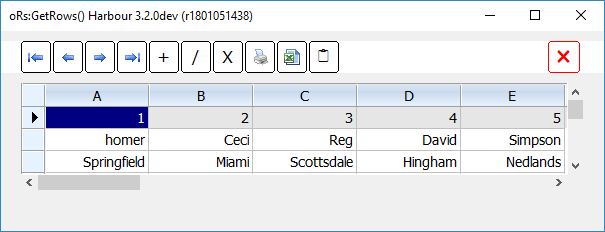
aData := oRange:Value // Excel
For testing this sample, first please open Excel. Please fill data in top 3 rows and 2 columns in this way:
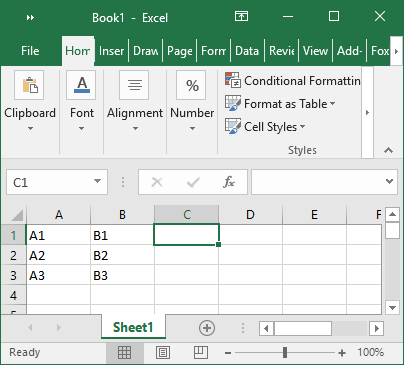
Range("A1:C3") is the used range.
In Visual Basic, if we assign Range.Value to an array the values of array are exactly like the values in the sheet, i.e.,
{ { "A1", "B1" },
{ "A2", "B2" },
{ "A3", "B3" } }
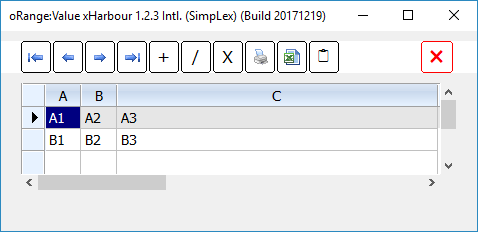
However (x)Harbour behaved differently from the beginning of TOleAuto class and was returning an array with transposed rows and columns like this:
{ { "A1", "A2", "A3" },
{ "B1", "B2", "B3 } }
For this reason, in all our (x)Harbour programs we transform the array after assining oRange:Value like this:
Now let us see the change. Do not close Excel and keep it open on the desktop. Now execute this program:
After "aData := oRange:Value"
All versions of xHarbour and all previous versions of Harbour:
Recent version of Harbour:
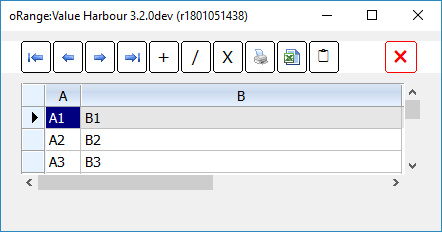
Obviously, Harbour fixed the transposed array issue in all previous versions, ignoring other side-effects and backward compatibility issues.
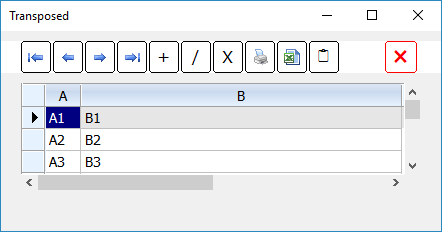
After "aData := ArrTranspose( aData )"
All versions of xHarbour and all previous versions of Harbour:
Recent version of Harbour:
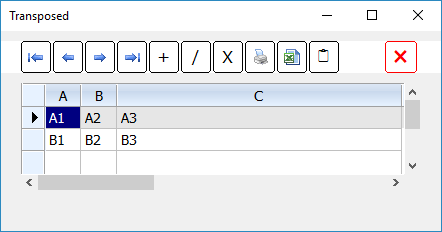
Implications:
Only those who use Harbour and use ADO/Excel Ole, directly or indirectly using these methods, need to be concerned about this issue. Upgrading Harbour will produce erroneous results unless the application code is carefully modified.
Obviously, FWH team is working on this issue of making the library compatible with xHarbour and Harbour both old and revised versions.
ADO RecordSet GetRows() --> aData
OLE Excel Range:Value() --> aData
xHarbour is consistent in its behavior from the time TOleAuto class was created till today. The behavior of Harbour's TOleAuto was also identical till recently. In other words, present Harbour version differs from xHarbour and all previous versions of Harbour.
GetRows()
Syntax: oRecordSet:GetRows( [rows], [start], [fields] ) --> aData
This is the fastest and simplest way to read data from a recordset into an array. Many existing software might be using this method and FWH library also uses this method.
Let us see the change using this sample program:
#include "fivewin.ch"

function Main()

   local oCn, oRs, aRows

   oCn   := FW_OpenAdoConnection( "c:\fwh\samples\xbrtest.mdb" )
   oRs   := FW_OpenRecordSet( oCn, "SELECT ID,FIRST,CITY FROM CUSTOMER WHERE ID < 6" )
   XBROWSER oRs TITLE "RecordSet"

   oRs:MoveFirst()
   aRows := oRs:GetRows()
   oRs:MoveFirst()

   XBROWSER aRows TITLE "oRs:GetRows() " + Version()

   oRs:Close()
   oCn:Close()

return nil
RecordSet:
Array from GetRows() with all versions of xHarbour and all previous versions of Harbour:
Array from GetRows() with the latest version of Harbour. (Different from xHarbour and all previous versions of Harbour)
aData := oRange:Value // Excel
For testing this sample, first please open Excel. Please fill data in top 3 rows and 2 columns in this way:
Range("A1:C3") is the used range.
In Visual Basic, if we assign Range.Value to an array the values of array are exactly like the values in the sheet, i.e.,
{ { "A1", "B1" },
{ "A2", "B2" },
{ "A3", "B3" } }
However (x)Harbour behaved differently from the beginning of TOleAuto class and was returning an array with transposed rows and columns like this:
{ { "A1", "A2", "A3" },
{ "B1", "B2", "B3 } }
For this reason, in all our (x)Harbour programs we transform the array after assining oRange:Value like this:
aData := oRange:Value
aData := ArrTranspose( aData )
Now let us see the change. Do not close Excel and keep it open on the desktop. Now execute this program:
#include "fivewin.ch"

function Main()

   local oRange, aData, n

   oRange   := GetExcelRange()
   if oRange == nil
      ? "Empty"
   else
      aData := oRange:Value
      xbrowser aData TITLE "oRange:Value " + Version()
      aData := ArrTranspose( aData )
      xbrowser aData TITLE "Transposed"
   endif

return nil
After "aData := oRange:Value"
All versions of xHarbour and all previous versions of Harbour:
Recent version of Harbour:
Obviously, Harbour fixed the transposed array issue in all previous versions, ignoring other side-effects and backward compatibility issues.
After "aData := ArrTranspose( aData )"
All versions of xHarbour and all previous versions of Harbour:
Recent version of Harbour:
Implications:
Only those who use Harbour and use ADO/Excel Ole, directly or indirectly using these methods, need to be concerned about this issue. Upgrading Harbour will produce erroneous results unless the application code is carefully modified.
Obviously, FWH team is working on this issue of making the library compatible with xHarbour and Harbour both old and revised versions.
Regards
G. N. Rao.
Hyderabad, India
G. N. Rao.
Hyderabad, India