

Hello,
I have a browse with lots of rowse (dbf 300.000) and I want to have a result from a colomnheader that I click on.
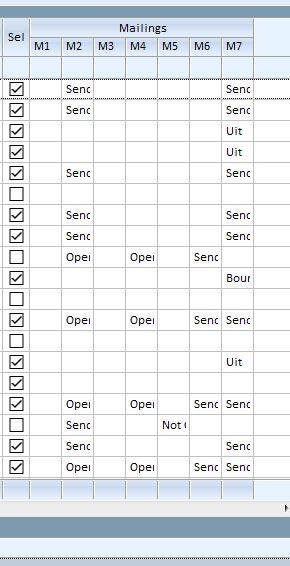
So if I click M7 then the calculation should begin and display the result as
Total Result
Send 2400
Uit 250
Bounce 110
...
So for every occurence of data, the same data should be added with 1
In my programming way, I would start a function,
select the master database
create a temp database
start the loop from masterdbf
every new item is added to temp, or cummulated with 1
afther the loop, display a browse with the result.
Works ok...
But Ive seens samples where there are functions being used like
AEval(), .... and others that seems to be able to do this stuff in only some small lines of code..
Any samples for this kind of statistic data retrieving ?
I have a browse with lots of rowse (dbf 300.000) and I want to have a result from a colomnheader that I click on.
So if I click M7 then the calculation should begin and display the result as
Total Result
Send 2400
Uit 250
Bounce 110
...
So for every occurence of data, the same data should be added with 1
In my programming way, I would start a function,
select the master database
create a temp database
start the loop from masterdbf
every new item is added to temp, or cummulated with 1
afther the loop, display a browse with the result.
Works ok...
But Ive seens samples where there are functions being used like
AEval(), .... and others that seems to be able to do this stuff in only some small lines of code..
Any samples for this kind of statistic data retrieving ?
Marc Venken
Using: FWH 23.08 with Harbour
Using: FWH 23.08 with Harbour
